TrustRadius: an HG Insights company

Salesforce Revenue Cloud

Score8.8 out of 10

242 Reviews and Ratings

What is Salesforce Revenue Cloud?

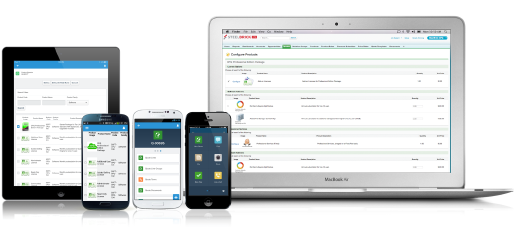
Salesforce Revenue Cloud (formerly Salesforce CPQ or SteelBrick) is built and delivered on the Salesforce Platform and Salesforce1 Mobile App which enables users to create accurate sales quotes quickly and submit error-free orders on the fly from any device.

Media

Configure. Price. Quote. Anytime, anywhere, on any device.

Top Performing Features

  • CPQ-CRM integration

    Integrates to the company’s CRM to update the customer record.

    Category average: 9.2

  • Purchase history and open contracts

    Provides information about a customer’s previous purchases and current purchase/service agreements, which may factor into new sales or need to be modified to account for new sales.

    Category average: 9

  • Attachments to quotes

    PDFs, contracts, videos, etc can be attached to quotes and/or proposals.

    Category average: 9

Areas for Improvement

  • Guided selling/Sales portal

    Provides salespeople with tips, recommendations, or question sequences to help with product configuration and quoting, and/or to assist with cross-sell and upsell.

    Category average: 8

  • Product configuration

    Allows users to configure products and services by selecting bundles, constraints, options, preferences, etc.

    Category average: 8.5

  • Configuration options

    Supports a robust, comprehensive level of detail around configuration options, including product features, services, quantity, etc. Options take into account availability and compatibility of selections.

    Category average: 8.5

Salesforce Revenue Cloud for success

Use Cases and Deployment Scope

Proposal doc generation and product attributes and other

Pros

  • Doc gen
  • Online collaboration
  • Advanced approvals

Cons

  • Documents merge for final proposal generation
  • Integrated e-signature

Return on Investment

  • Good and improved. UI for future RaoI
  • Migration from CPq to RCA is added investment

Usability

Alternatives Considered

Conga CPQ

Other Software Used

Salesforce Sales Cloud, Field Service Cloud

Great tool for marketing automation and leads nurturing

Use Cases and Deployment Scope

As sales managers, we have to ensure the leads are managed and nurtured in an effective manner, and Salesforce CPQ comes in handy for that. We get timely notifications via email when a new lead is generated and also when it passes through the different stages of a sales life-cycle. You easily can get a small snapshot of the customer's requirements in the notification you receive and can follow-up accordingly. We have an internal mechanism where we need to make sure we approve only the opportunities we deem fit either through CSMs or the SDRs and the process is smooth and seamless. It also helps you keep up to date with the accounts by giving you notifications of the user/contact that is just added to Salesforce CPQ to ensure they have a smooth onboarding process. It also helps us run some great marketing campaigns and pulling out reports is also intuitive.

Pros

  • Great for running marketing campaigns
  • Automation is fairly easy
  • Helps in nurturing of the leads
  • Reporting with audience segmentation is amazing

Cons

  • Implementation is a bit complex
  • A bit expensive

Return on Investment

  • Helps in nurturing the leads in a better way
  • Better Insights into the prospects sales journey until the end point when the lead finally bceomes a customer
  • can be easily integrated with the CRM, which helps with productivity
  • A bit expensive- negative

Alternatives Considered

Conga CPQ

Other Software Used

Front, Slack, SpotDraft, Planhat, Xoxoday Empuls, Salesforce Lightning Platform, Keka HR, Tableau Cloud

Incredibly powerful tool if you can devote the time to it.

Use Cases and Deployment Scope

CPQ helps us speed up the pricing and approval process. It also ensures our data is accurate and aligned from the quote to the opportunity, making for better data and more insights/visibility on discounting for leadership. We require CPQ to be used for new/upsell and renewals so our whole customer-facing team is using CPQ.

Pros

  • Pricing calculation.
  • Data hygiene.
  • Opportunity and pricing approval.

Cons

  • Lots of customization needed.
  • Heavy on the admin side.
  • Difficult to follow/customize at times.

Most Important Features

  • Pricing calculation.
  • Advanced approvals.
  • Customization opportunities.

Return on Investment

  • Speed up the quote generation process by hours.
  • Greater visibility into discounting and pricing.

Alternatives Considered

Ironclad

Other Software Used

Clari, Ironclad, Zoom, TripActions, Highspot

Central source of truth is key!

Use Cases and Deployment Scope

Having all the data and the ability to manipulate it in one robust platform like salesforce makes the whole process a breeze. We all know how frustrating it is to bounce around different - sometimes isolated tools. Salesforce Revenue Cloud couldn't make it easier. I know the whole team is very pleased with it.

Pros

  • Centralized data.
  • Standardized process.
  • Intuitive interface.

Cons

  • I don't have any direct recommendations for improvement.

Return on Investment

  • Saved time.
  • Saved the headache of going back and forth between tools and reports.
  • Allowed greater access to data from all the team.

Other Software Used

Salesloft, Gong.io, Slack

Salesforce CPQ gives us the right amount of flexibility and detailed reporting

Pros

  • Amend contracts
  • Track cross-sell, expansion, and product churn

Cons

  • Implementation can be cumbersome as it requires clearly defining your own processes
  • Licenses are expensive

Most Important Features

  • The functionality with the Contract object as this enables much of what we want to track
  • Approvals

Return on Investment

  • Positive ROI
  • Improved reporting

Alternatives Considered

HubSpot Sales Hub and Zoho CRM

Other Software Used

NetSuite SuiteBilling, Xactly SimplyComp, Pardot