TrustRadius: an HG Insights company

SolarWinds Engineer's Toolset

Score9.4 out of 10

57 Reviews and Ratings

What is SolarWinds Engineer's Toolset?

SolarWinds® Engineer’s Toolset (ETS) helps users monitor and troubleshoot a network with over 60 tools for network management. ETS allows users to monitor and receive alerts in real time on network availability and health, and perform network diagnostics for faster troubleshooting and resolution of complex network issues. With ETS users can deploy an array of network discovery tools including Port Scanner, Switch Port Mapper or advanced Subnet Calculator, manage Cisco® devices with specialized tools such as Real-time NetFlow Analyzer, Config Downloader, and Config Compare. SolarWinds Orion integration is offered to make troubleshooting a network easier and faster, allowing users to start tools contextually from any monitored element in Orion and significantly cut resolution time.

Media

Perform network stress tests with Engineer's Toolset WAN Killer. You don’t need to use real traffic for studying network activities, like testing traffic and load balancing. Instead, deploy Engineer's Toolset WAN Killer to help interactively test connections and adjust the IP traffic generated to achieve the desired network load based on your requirements.
Quickly troubleshoot your network with enhanced ping capabilities and packet route tracing, among other network bandwidth usage and monitoring tools included in ETS.
Using ETS, you can run scans to gain insight into how routers, hubs switches, and other devices are configured by analyzing SNMP queries and viewing MIB attributes. ETS is designed to help you more easily understand whether your network and ports are using appropriate settings.
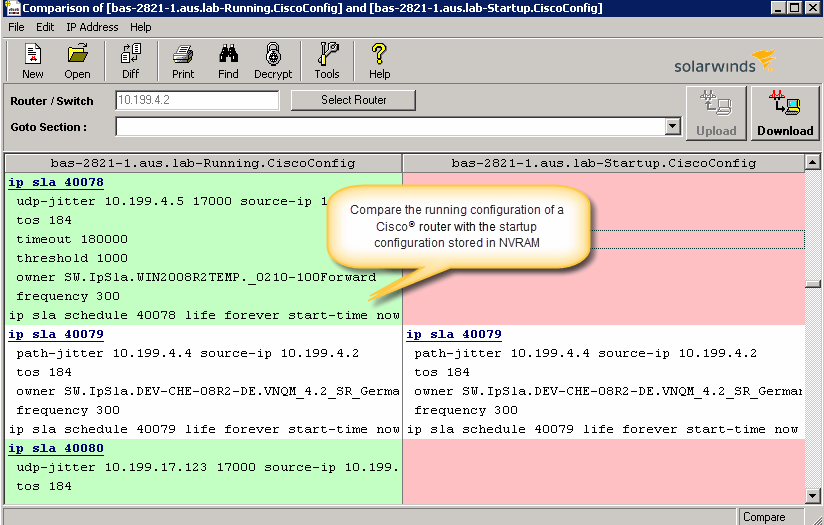
Config Compare, a part of ETS, is built to compare the running configuration of a Cisco router with the startup configuration. With the Cisco configuration compare tool, you can easily detect the changes made to the network, switch, and router configurations that are not committed to non-volatile memory (NVRAM).
Manage your IP network from discovery to address tracking. Discover subnets on a seed router and scan the subnet or a range of IP addresses, generate a list of subnets along with their mask, size, range, and broadcast address and actively monitor subnets to identify and track which IP addresses are in use on your network.

1 / 5

It's like having a Snap-On toolbox full of all the tools you need.

Pros

  • Compare cisco configs
  • IP address management
  • Ping sweep

Cons

  • [The] Bandwidth gauges could use some updating

Most Important Features

  • Config Viewer
  • Ping Sweep
  • Ip address manager

Return on Investment

  • Spend less time downloading free buggy tools
  • All the tools in one spot, so you don't have to look around for tools
  • Get to the solution sooner

Alternatives Considered

Wireshark

Other Software Used

Orion, SolarWinds Network Performance Monitor (NPM)

SolarWinds Engineer's Toolset is a must for Enterprise environments

Pros

  • Network Discovery
  • Monitoring
  • Device Configuration Management

Cons

  • UI could be smoother
  • Integration
  • More features

Most Important Features

  • Network Discovery
  • Configuration Management
  • Log Management

Return on Investment

  • Knowing the network is great
  • Stress testing our network helps show where we are week
  • Cost is reasonable

Many useful tools all contained in the same suite.

Pros

  • Multitude of tools in one set.
  • Wide variety of uses for the kit.
  • Addresses proactivity and reactivity well.

Cons

  • I wish it looked a little better on the eyes. It looks a bit dated in some of the tools.

Most Important Features

  • Config Downloader
  • Port Mapper
  • Network stress testing/monitoring

Return on Investment

  • Quicker monitoring for new devices.
  • Easier visibility into more of the network.
  • Quick troubleshooting tools.

Hidden Gem in SolarWinds Tools Suite

Pros

  • Debugging Tools
  • Saves Time for basic checks
  • Ping, Telnet, SSH right from the console and hence easy user management from console itself

Cons

  • Licensing structure
  • More debugging commands support
  • CLI based automation for script based checks

Most Important Features

  • Ping Check
  • Telnet Login
  • SSH Login
  • Realtime monitoring

Return on Investment

  • Diagnostics and Debugging is easy
  • Diagnosis access on servers are no longer required for end users
  • Licensing is little tricky
  • Product bought but not much used

Alternatives Considered

LogicMonitor, PRTG Network Monitor and Progress WhatsUp Gold (formerly Ipswitch WhatsUp Gold)

Other Software Used

LogicMonitor, PRTG Network Monitor, Progress WhatsUp Gold (formerly Ipswitch WhatsUp Gold)

Perfect tool set for quick returns.

Pros

  • MIB walks on SNMP objects
  • IP scan of network for discovery
  • Port scan

Cons

  • I think as a tool set, it is very solid. If you wanted more, you would be looking for NPM or other management suite tools.

Return on Investment

  • It shortened the time to diagnose basic issues by deploying the monitoring functions.

Alternatives Considered

SolarWinds Network Performance Monitor (NPM)

Other Software Used

Wireshark, Cisco Firepower 4100 Series, Juniper SRX