TrustRadius: an HG Insights company

UpKeep Maintenance Management

Score7 out of 10

38 Reviews and Ratings

What is UpKeep Maintenance Management?

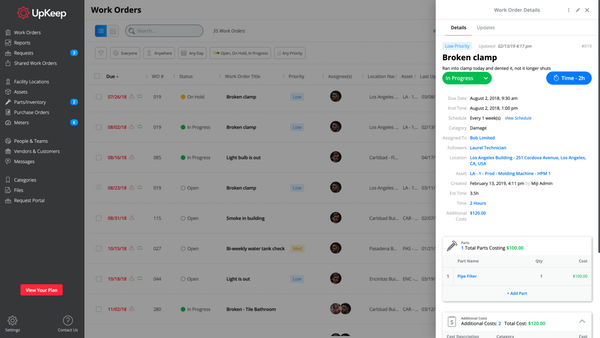
UpKeep allows users to snap a picture of a broken piece of equipment, create a work order, and schedule it for repair - all from a mobile device. UpKeep is designed for facility, property, restaurant, and manufacturing managers looking to improve communication by enabling real-time status updates for their teams. The vendor says it is a modern, intuitive, and customizable CMMS that is proven to expedite workflow processes.

Capabilities include:
-Add co-workers and easily assign work orders to different users
-­Create, update, and check status of work orders and tasks
-­Manage a history of your assets
-Receive notifications to your phone and email
-Organize reports
-Enable UPC Label scanning
-Develop assets and assign work orders to assets
-Sync across all devices you own
-Web application available for use on any device
-Create preventative and scheduled maintenance
-Customize work orders using form items

UpKeep is designed for maintenance crews who constantly work at different sites. The value prop is that technicians can spend more time in the field and less time retyping data or traveling between locations — thus resulting in higher quality data, more thorough analysis, and more robust asset evaluation.

Media

Product Suite

UpKeep Maintenance makes facilities management a breeze!

Pros

  • barcode tagging - label all assets for quick reporting and repairs
  • mobile app - works super well
  • scheduling of ongoing maintenance

Cons

  • sensors - they need to add more options here
  • pricing - they are a bit expensive - maybe more lower level plans

Most Important Features

  • Reporting on breakdowns - we have replaced so much outdated equipment due to constant breakdowns
  • Scheduling of maintenance - we have machinery to maintain; multiple buildings; varying crews for each type of job - way too many moving parts to mot have an app to track things!
  • barcodes - can't say enough here. Machine A breaks down. You boop the barcode on the machine - that creates a work ticket. You simply detail what's broken and that ticket goes right to the person who will come fix it.

Return on Investment

  • Replacing older equipment that has aged out has saved us thousands in unnecessary repair costs
  • The per user monthly is a bit of a negative. granted the app does a lot, but the price point is a bit high unless you are a very big company
  • History of work orders and maintenance is a life save - just running those reports saves us so much time!

Alternatives Considered

Hippo CMMS

Other Software Used

Microsoft 365 Business Premium, Wave Accounting, LogMeIn Central, Trello

UpKeep: The Life Saver

Pros

  • Keeps the work orders organized.
  • Keep the Maintenance team on top of where they are in the process.
  • Helps to gather information for other team's reporting needs.
  • Stores all information needed for the accounting department.

Cons

  • We want to be able to run reports that are not tedious.
  • We want to be able to do quick views of work that is in progress to be able to prioritize at a glance.

Return on Investment

  • So far, UpKeep is saving time, the PM team can use their phones for updates.
  • The phones let the field tech change, create and close tickets while in the field.

Alternatives Considered

Trello

Other Software Used

Trello

UpKeep Review

Pros

  • Tracking service issues - There's really no more excuses for not knowing when the machine was last serviced. Upkeep allows us to track that.
  • Scheduling - Knowing in advance which machines will need maintenance in the future allows us to actively prepare for shut-down periods.
  • General knowledge - Users can add their knowledge to the archives of each machine we have, helping to improve the trouble-shooting process.
  • Easy to update, easy to make - It's almost too easy to create and update files for locations, assets, parts, and issues.

Cons

  • Usability for updating items already in the database. For example, grouping new locations to a central one. I should be able to just select a group of locations and drag them to the central location. For example, the bathrooms and lunchroom of an office building should be all selectable and easily grouped.
  • Moving parts/inventory from location to location.
  • Accessing parts/assets - If a part or asset is located/listed in a sub-location, such as a production room, then it should still at least be visible if you look in another part of the central location and even update the service calls original location or vice-versa.

Return on Investment

  • It's a bit too soon to speak of ROI, but being able to track issues over multiple service calls has proven to be useful, especially when it comes to holding workers accountable for their use of the machines.
  • It's easy to use for those who use it.
  • It's no harder to submit issues than it is to send an email. If you can send an email, you can submit an issue.

Alternatives Considered

Astea

Great tool for buisness

Pros

  • Asset Management
  • User interface
  • Planning and pre-planning

Cons

  • Customization of user roles
  • Customization of forms

Return on Investment

  • Allowing our company to track maintenance dollars on assets
  • Allowing supervisors to track work order status

Upkeep delivers a great product for a great price!

Pros

  • Clean user interface. Faster training time for new employees.
  • Great asset tracking.
  • Easy and fast PM creation.

Cons

  • SSO setup could be improved.
  • Report creation in not very intuitive and takes time to learn.
  • File size upload limits are small when it comes to uploading manuals.

Return on Investment

  • Speed of response to work orders.
  • Customer satisfaction.
  • Less down time of assets.

Alternatives Considered

Maintenance Connection and eMaint

Other Software Used

Maintenance Connection