Adobe Campaign vs. Emma by Marigold

Overview
ProductRatingMost Used ByProduct SummaryStarting Price
Adobe Campaign
Score 6.9 out of 10
N/A
Adobe acquired Neolane in July 2013 and later re-named the product Adobe Campaign. Adobe Campaign provides both marketing automation and marketing resource management functionality such as spend & financial management, workflow, and asset management.N/A
Emma by Marigold
Score 9.4 out of 10
N/A
Emma by Marigold is an email marketing solution. Its key features include mobile-ready design templates, email automation, audience segmentation, and dynamic content. The software includes integration with third-party CRM solutions, ecommerce platforms, and social networks.
$500
per year per user
Pricing
Adobe CampaignEmma by Marigold
Editions & Modules
No answers on this topic
Basic
$500
per year per user
Offerings
Pricing Offerings
Adobe CampaignEmma by Marigold
Free Trial
NoYes
Free/Freemium Version
NoNo
Premium Consulting/Integration Services
NoNo
Entry-level Setup FeeNo setup feeNo setup fee
Additional Details
More Pricing Information
Community Pulse
Adobe CampaignEmma by Marigold
Considered Both Products
Adobe Campaign
Chose Adobe Campaign
more legacy, less intuitive but more customizable

Chose Adobe Campaign
We adore the fact that we can run numerous automated campaigns concurrently and that we can make changes to them without stopping and starting a new campaign. Adobe Campaign makes it possible for the process to go on.
Chose Adobe Campaign
Haven't used Salesforce Marketing Cloud much.
Chose Adobe Campaign
Sender also offers multi-channel marketing capabilities, allowing users to engage with their audience through different channels. However, the range and depth of multi-channel capabilities in Adobe Campaign are generally more extensive. So after using both the platforms I …
Chose Adobe Campaign
One of the major resons was already having AEM and creating a highly cohesive tech stack. Adobe Campaign fit the criteria.
Chose Adobe Campaign
In the end we didn’t go with Adobe Campaign.
Although it offers great a great tool set that is very flexible. You do need someone on staff that know Adobe products to get the full utilisation out of it. Ultimately what it came down to for us was that because we had a small team, …
Chose Adobe Campaign
Adobe Campaign Standard has a lot of segmentation options out of the box and a lot better analytics. Pardot is a lot more listbased, where with Adobe Campaign, you can do complete customized segmentation, such as all permissions in base A who are currently customers of this …
Chose Adobe Campaign
Easy drag and drop user friendly maenu and optimise software a good alternative to google as campaign.
Chose Adobe Campaign
Especially in its ease of use, especially considering its price and the great possibilities that this tool has given our company. Definitely a great competitor in this sector and the best option in terms of campaign creation, without any doubt, even having things that could be …
Chose Adobe Campaign
Adobe Campaign is more advanced when it is used with other tools from Adobe family.
Chose Adobe Campaign
Adobe Campaign has all the features and tools that develop the whole marketing and sales channels. It has been able to integrate with our systems in all departments in development of our planning structure. While Salesforce CMS works effectively in the management of our …
Chose Adobe Campaign
Compared to other websites, Adobe Campaign stacks up with its various uses. You can create with its other platforms and follow through. Other platforms, you have to use adobe to create then go somewhere else to schedule and post. Adobe Campaign allows you to use all within one …
Chose Adobe Campaign
Adobe Campaign is good in terms of features, offerings, it's customization options, and extensive possibilities to make a powerful email campaign or offer landing page. It's very reliable and stable too. But in terms of its dashboard UI, it is not as simple or quick to learn as …
Chose Adobe Campaign
All these applications are very similar, adobe has a differential for the company's expertise, for the way cloud services and their specialists are treated. I believe that it also has a differential in the metrics and management of flows where it is possible to have a broader …
Chose Adobe Campaign
The platform is much more complex and much more suited for complicated applications. While Mailchimp is an easier all rounded solution for starters it doesn’t allow the system integrator to do customization of the workflows and more complicated tasks. I would say that in my …
Chose Adobe Campaign
Adobe Campaign is different from these products in that is much more all-encompassing and is able to manage more aspects of a campaign than these more singular-tracked platforms.
Chose Adobe Campaign
As we tried to centralise the marketing automation platform within the enterprise, Adobe Campaign can plug into several instances of Salesforce.com for lead management queues. All other marketing automation platforms can only plug into one instance of Salesforce.com.

Adobe …
Chose Adobe Campaign
For B2C campaign, [I] still prefer to go with Marketo. However, for all other transactional/Nontransactional, promotional, Welcome email campaigns, while it is required to handle [the] global market with [a] number of brands, [I would] [prefer to] go with Adobe Campaign …
Chose Adobe Campaign
  • Easy to install
  • Free trails
  • Lesser cost as compared to others
Chose Adobe Campaign
Pardot: Adobe is a better value for the money. Active Campaign: Adobe Campaign has more automation features but comes inexpensive.
Chose Adobe Campaign
Adobe Campaign has a lot more features as compared to Mailchimp. While Mailchimp allows you to send a lot of communication to a lot of recipients, Adobe Campaign lets you set variables in the workflow, and send email at different times with a lot more customization. Adobe …
Chose Adobe Campaign
Adobe is far ahead of what I used previously. Adobe has all the details of the customer which is required to increase the sales of the company and the customer also gets relevant information.
Mailchimp is just an email tool where we can send mails to multiple users.
Emma by Marigold
Chose Emma by Marigold
Emma is a step up from Constant Contact and two steps up from Mailchimp. Emma is affordable and easy to use for all types of companies, but especially for smaller firms and startups. It’s in compliance with SPAM laws, but has an advanced platform to keep your emails from going …
Chose Emma by Marigold
I like Emma much better than MailChimp because of the flexibility and ease of the user interface. I used MailChimp for a previous position and I felt like the home page was definitely more cluttered and it had a clumsier navigation portal. I also think Emma's email design …
Chose Emma by Marigold
Emma had a more robust multi-level account structure which empowered individual locations to participate at the ground-level. Additionally corporate was able to maintain oversight, template creation, marketing automation, and data reporting. The goal is to provide the locations …
Chose Emma by Marigold
I use MailChimp a lot, and while I like it, at the end of the day Emma simply is the most cost-effective. There's not a HUGE learning curve, compared to MailChimp, which is nice, since our non-designers can take a proverbial 'whack' at an email and we can trust that it will get …
Chose Emma by Marigold
We prefer Emma, as it is a much more robust platform offering some of the best functionality and out of the box integrations.
Chose Emma by Marigold
Compared to Act-On, Emma is miles above regarding the ease of use and simplification of complex features. Drip campaigns really are a breeze with Emma's intuitive data. You will experience WYSIWYG glitches due to the nature of the program but Emma offers better templates to …
Chose Emma by Marigold
Emma is a good alternative, but I think mailchimp may be a better and more affordable alternative. Especially since mailchimp is continuously releasing new features and improving their product.
Chose Emma by Marigold
MailChimp seems to offer more customizable options than Emma, but Emma is far less buggy. I used Constant Contact while working with another nonprofit organization and did not anything about it.
Chose Emma by Marigold
We moved away from Constant Contact because of the reputation it was starting to get with not auditing its domain and not providing us with the best possible brand reputation and also because we just didn't get the analytics we wanted to improve our process. With Emma, we can …
Chose Emma by Marigold
Emma is the easiest to use platform I've tried so far. It was easy to setup and send the first enewsletter. The functionality is very user friendly and it "makes sense" as you go through to add content and users. It's made being a marketing team of one very efficient.
Chose Emma by Marigold
Mail Chimp: the price was better, but the platform was not predictable. You did not get the same support with mailchimp.
Constant Contact: This is an outdated system that does not make it easy to design modern, clean emails and I consider it a dinosaur.
Chose Emma by Marigold
Mailchimp is the global choice for our university and there is a pricing structure in place.
Chose Emma by Marigold
Emma was the perfect solution for what we were looking for due to its easy to use interface, relatively low cost and basic functionality. We were not looking for expensive, complex tools to send out multiple campaigns with various controls and tests. We also were impressed with …
Chose Emma by Marigold
At the time we made the decision to move to Emma, my organization was using both MailChimp and Constant Contact. Emma's drag-and-drop template editor surpassed both, and even editing the pre-made template HTML in Emma was easier. List management was much smoother than the …
Chose Emma by Marigold
We moved from Emma to SendGrid. The deliverability of Emma is lower than Sendgrid and the overall functionality of Sendgrid feels more fit for a digital marketing agency. The number and design of the Emma templates far surpasses that of Sendgrid though. Emma is much more suited …
Chose Emma by Marigold
I think that Emma is more user-friendly.
Chose Emma by Marigold
None of those platform were good for an agency and their clients. Managing multiple email clients in one system isn't something you find everywhere. It's also not easy to pay for the other platforms since they are built for the enterprise and not SMB.
Chose Emma by Marigold
Our internal competitors are the individual email platforms our stores have signed up for. In general, they need to take our HTML and upload it themselves, making Constant Contact and MailChimp very cumbersome. Emma, on the other hand, allows us to take charge of that. Users …
Chose Emma by Marigold
Very similar to MailChimp. More user-friendly than Constant Contact but fewer ways to customize formatting.
Chose Emma by Marigold
We chose Emma in addition to Sendgrid to protect the integrity of our transactional email deliverability. Emma's delivery rates were good. We later found Mailchimp a bit cheaper and easier to work with in our specific use case but I still think it's worth testing Emma if you're …
Chose Emma by Marigold
MUCH more straightforward and usable, PeopleVine requires someone with a lot more coding knowledge to do simple things like change a font color or hyperlink text and is better used by an agency with extensive access to those experts whereas Emma can be taught to just about …
Chose Emma by Marigold
Emma is night and day difference from Constant Contact in terms of customer support, feature set, and usability. It is so much better and more affordable. Emma is a step down in feature set and functionality from Pardot, Marketo, or Hubspot, but if you are a company that is not …
Chose Emma by Marigold
I was not with the company when Emma was selected. In my personal experience, I preferred HubSpot.
Features
Adobe CampaignEmma by Marigold
Email & Online Marketing
Comparison of Email & Online Marketing features of Product A and Product B
Adobe Campaign
-
Ratings
Emma by Marigold
9.1
Ratings
14% above category average
WYSIWYG email editor00 Ratings8.00 Ratings
Dynamic content00 Ratings9.00 Ratings
Ability to test dynamic content00 Ratings9.00 Ratings
A/B testing00 Ratings9.00 Ratings
Mobile optimization00 Ratings9.00 Ratings
Email deliverability reporting00 Ratings10.00 Ratings
List management00 Ratings10.00 Ratings
Triggered drip sequences00 Ratings9.00 Ratings
Reporting & Analytics
Comparison of Reporting & Analytics features of Product A and Product B
Adobe Campaign
-
Ratings
Emma by Marigold
10.0
Ratings
26% above category average
Dashboards00 Ratings10.00 Ratings
Standard reports00 Ratings9.90 Ratings
Custom reports00 Ratings10.00 Ratings
Best Alternatives
Adobe CampaignEmma by Marigold
Small Businesses
Mautic
Mautic
Score 9.0 out of 10
Mad Mimi
Mad Mimi
Score 10.0 out of 10
Medium-sized Companies
The Trade Desk
The Trade Desk
Score 9.0 out of 10
VerticalResponse
VerticalResponse
Score 10.0 out of 10
Enterprises
Iterable
Iterable
Score 8.7 out of 10
Iterable
Iterable
Score 8.7 out of 10
All AlternativesView all alternativesView all alternatives
User Ratings
Adobe CampaignEmma by Marigold
Likelihood to Recommend
5.0
(0 ratings)
8.0
(0 ratings)
Likelihood to Renew
8.4
(0 ratings)
9.5
(0 ratings)
Usability
5.0
(0 ratings)
10.0
(0 ratings)
Availability
7.0
(0 ratings)
-
(0 ratings)
Performance
7.0
(0 ratings)
-
(0 ratings)
Support Rating
5.0
(0 ratings)
2.0
(0 ratings)
In-Person Training
8.0
(0 ratings)
-
(0 ratings)
Online Training
8.0
(0 ratings)
-
(0 ratings)
Implementation Rating
8.0
(0 ratings)
7.0
(0 ratings)
User Testimonials
Adobe CampaignEmma by Marigold
Likelihood to Recommend
Multi-Channel Campaign Management: I have found Adobe Campaign to be excellent for managing campaigns across multiple channels, including email, mobile, social media, and web. Its centralized platform allows me to plan, execute, and track campaigns effectively, making it ideal for organizations with diverse marketing channels. For example, when I was running a campaign to promote a new product launch across email, SMS, and social media channels, Adobe Campaign provided me with the tools to orchestrate and track the campaign seamlessly. I could ensure consistent messaging and a cohesive customer experience across different channels.
Read full review
Using Emma for weekly templated email use with minimal changes is awesome. If you want you can create a master and make minor graphic edits quickly and easily from your smartphone. Any edit is possible as long as the artwork is on the online server. Only time I hit a bump in the road is when I was asked to change the style sheet and did not know that the pricing plan I was on did not include this feature. Client had to wait to send new format until Emma performed the requested changes.
Read full review
Pros
  • What we like most about this application is that it provides us with the creation of ads to generate presence and impact on different channels at minimum cost.
  • It has a section where [it] [helps] us determine our preferences in terms of marketing by private messaging and offer a report of actions.
  • It also provides analysis with percentages to determine how many customers actually received our e-mail advertising.
Read full review
  • Drag and Drop Interface - I love the drag-and-drop interface used to design campaigns. It makes it easy for creative types to get the look they want, and it helps less technically and aesthetically adept users to create campaigns that still look great. After using both Constant Contact and Mailchimp, I think Emma comes out on top in terms of ease of template design.
  • Master Admin Account - Having a master admin account controlled by one person allows us to deploy brand assets to each sub-account, and we're also able to push out templates for users who aren't ready or don't have the time to design their own.
  • Dynamic Content - Dynamic content has proven so useful to us, especially in our Admissions Office. Making it possible for regular users to easily create emails using dynamic content is a VERY strong feature that, in my experience, is unique to Emma.
  • Great Tutorials - Emma does a great job taking care of its users. The support folks are always kind and helpful, but Emma publishes an array of tutorials and resources to help with just about anything its users encounter, from how to use custom merge fields to advice on creating the best campaigns.
Read full review
Cons
  • It requires administrator rights in order to deploy into an environment.
  • We do not want changes directly in a production environment so deployments are a bottleneck since only a few have access.
  • Performing user audits are difficult or even impossible in certain cases to determine who started/executed/made changes to a workflow.
  • There's no easy way to roll back changes.
Read full review
  • Setup of users - We used to be able to setup a user and send them our own welcome email. Emma has since set up the ability to add users where they send the welcome email. It's a great new feature, but it doesn't always work. We've had some users who never receive these emails and then we need to reach out to support anyway.
  • The code to set up a configurable email is cumbersome. It's great that it is so customizable, but there is a learning curve.
Read full review
Likelihood to Renew
Despite the shortcomings of user interface and basic troubleshooting difficulty, Neolane is much more robust and delivers better capabilities to our sales and marketing staffs than any other product we have used here or any product our staff members have used at other locations.
Read full review
Easy to use and gets the job done without too many "extras" (ex. we didn't need a full marketing automation platform so Emma had what we needed to send email marketing communications without having to pay for the stuff we didn't need)
Read full review
Usability
Thanks to this tool we are taking more internal control of the creation and deployment of campaigns with less dependency on an ESP. We can pre-program marketing publications, being able to concentrate on the target audience. It helps me manage email campaigns with real-time tracking.
Read full review
While every WYSIWYG software will experience glitches, Emma handles them well. Keep in mind they rarely happen, but they do, it can be of annoyance. Regardless, Emma allows my organization to create seamless email campaigns using fresh data. Emma makes coming up with strategic decisions very easy. The list segmentation that Emma feature allows us to easily manage a large list without issues. Overall, Emma is extremely usable with nearly no learning curve!
Read full review
Reliability and Availability
Aside from frequent error prompts, the program is quite dependable
Read full review
No answers on this topic
Support Rating
Although there is a lot of material available on the internet to answer questions, I still feel a lack of commitment and delay in the responses of the support, but as a whole, it leaves nothing to be desired. I believe that, in the great majority, companies sin in the desired support, but we cannot generalize. But this one, in particular, has a wide range of specialists and well-qualified management, but I believe that it is not so bad.
Read full review
I hate that to get support I have to submit a question to a public forum and wait for a response. I just want the ability for a quick live chat to answer my simple help questions quickly or at the very least submit a ticket via email and get a status update.
Read full review
Alternatives Considered
Sender also offers multi-channel marketing capabilities, allowing users to engage with their audience through different channels. However, the range and depth of multi-channel capabilities in Adobe Campaign are generally more extensive. So after using both the platforms I selected Adobe Campaign for my email marketing purpose.
Read full review
Emma had a more robust multi-level account structure which empowered individual locations to participate at the ground-level. Additionally corporate was able to maintain oversight, template creation, marketing automation, and data reporting. The goal is to provide the locations with the ability to send their own marketing messages, saving corporate marketing time, and providing more genuine, locally-focused email campaigns. Emma was very effective at making that happen.
Read full review
Return on Investment
  • Adobe Campaign has boosted our ROI, with a 700% increase in the last month of using the service. These results are very favorable, and we will continue to use the service.
  • Adobe Campaign makes it easy to calculate the proposed ROI on a monthly basis, as it constantly lets us evaluate and compare the growth of our earnings in relation to previous ones.
Read full review
  • It's been pretty overwhelmingly positive. Our clients are happy about the savings that we're able to pass onto them.
  • We're able to better determine what headlines receive the most clicks from our client's emails based on the dashboard.
  • Super easy email designer that frees up some of our graphic designers to take on other jobs.
Read full review
ScreenShots

Emma by Marigold Screenshots

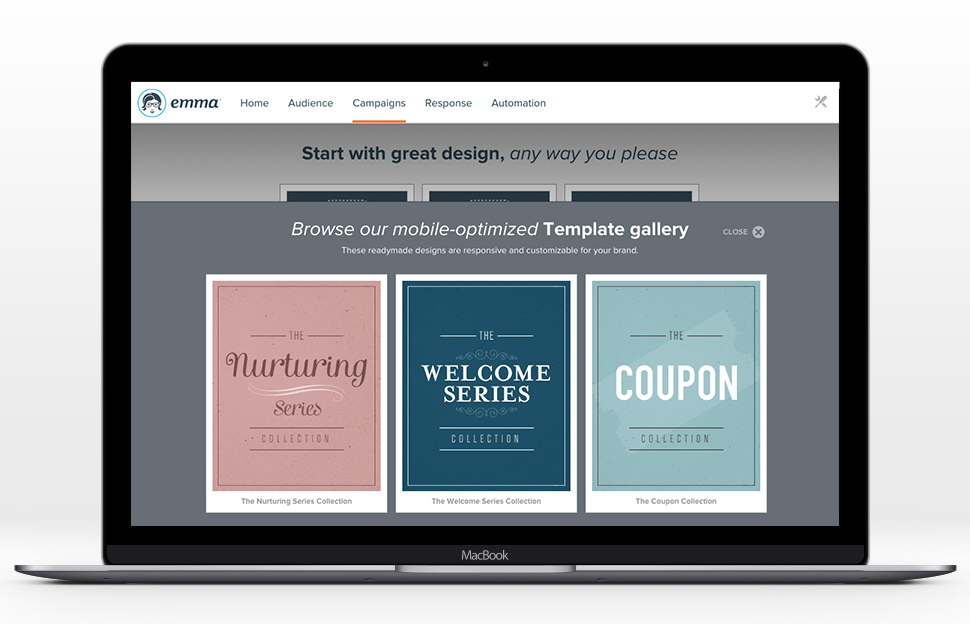
Screenshot of dynamic content used to send unique, personalized content to each subscriber based on the data stored about them from a single email.Screenshot of the editor's drag & drop layouts and inline text editing, that help to keep the creative process fast and flexible.Screenshot of a display of account activity, email performance and recent mailings in one place right after login.Screenshot of insights on the go using Metric, the included iPhone and Android app.Screenshot of response results that give insights into what's working and provide next steps.Screenshot of customizable, mobile-optimized templates to show off a brand and content in the template gallery.