Adobe Customer Journey Analytics B2B Edition vs. Crazy Egg

Overview
ProductRatingMost Used ByProduct SummaryStarting Price
Adobe Customer Journey Analytics B2B Edition
Score 0.0 out of 10
N/A
Launched in June of 2025, Adobe Customer Journey Analytics B2B Edition gives marketing sales teams actionable insights that let them optimize customer experiences, expand the sales pipeline, and drive strategic growth across the buyer’s journey.N/A
Crazy Egg
Score 8.2 out of 10
N/A
Crazy Egg is a heat map web analytics product.
$24
per month
Pricing
Adobe Customer Journey Analytics B2B EditionCrazy Egg
Editions & Modules
No answers on this topic
Crazy Egg
$24.00
per month
Offerings
Pricing Offerings
Adobe Customer Journey Analytics B2B EditionCrazy Egg
Free Trial
NoNo
Free/Freemium Version
NoNo
Premium Consulting/Integration Services
NoNo
Entry-level Setup FeeNo setup feeNo setup fee
Additional DetailsContact Adobe for pricing information.
More Pricing Information
Community Pulse
Adobe Customer Journey Analytics B2B EditionCrazy Egg
Considered Both Products
Adobe Customer Journey Analytics B2B Edition

No answer on this topic

Crazy Egg
Chose Crazy Egg
We felt that Crazy Egg is easy to set up and use when compared to other tools. Also, the pricing is affordable so we gave it a try and it works for us.
Chose Crazy Egg
I will say that I didn't evaluate or select Crazy Egg, it's been a legacy tool that has been at the company before me. Honestly, we're not even sure of all of the features/functionality that we can use. Me, as a UXR, I think there are some other tools that would help me more in …
Chose Crazy Egg
We selected Crazy Egg because it was cheaper and simpler to implement than other tools we evaluated. Other tools felt too complicated for the first step in heat mapping, but as a growing organization trying to learn more about our users, it felt like the optimal first step for …
Chose Crazy Egg
Hotjar is more expensive than Crazy Eggs, and we needed a tool to fit the budget for small comp. With more time, we could have tested it deeply also to have a better opinion, it seems to be great too
Chose Crazy Egg
I've only had experience with this one customer insight tool
Chose Crazy Egg
I have not used another software all that similar to Crazy Egg. I find Crazy Egg to be a unique tool to incorporate into your analytics, though I have seen similar software out there.
Chose Crazy Egg
If I were in charge of the purchase decision, I probably would've gone with HotJar, as they have additional qualitative data collection abilities other than heat and click maps. However, I inherited the purchase decision. Crazy Egg has been great for our click and heatmap needs.
Chose Crazy Egg
I did not evaluate other software. I knew of Crazy Egg through its fantastic reputation and fell in love right away!
Chose Crazy Egg
It is very simple to use, everything from setting up to seeing the results. You can easily export everything into a JPG or PDF and share it with clients. CrazyEgg is also more value oriented with a lower price point.
Chose Crazy Egg
There are a lot of tools with similar feature and closely equal pricing- This factor is the most confusing. As we need something for our website and not every tool has everything and it took time for us to understand this. We choose Crazy Egg for its ease of using and anyone …
Chose Crazy Egg
Crazy Egg a bit low on features and has a not so friendly interface. But depending on the complexity of your team/projects/experience in digital marketing, it is a great place to start. It's budget friendly. If you have an advanced analytics or A/B testing solution it's a nice …
Chose Crazy Egg
I've used Tealeaf which does click tracking, but the shortcoming is that it does it only on truly clickable elements. You miss out on the non-clickable elements that are being clicked, which is really valuable information. IBM sells an upgrade that adds that, but it costs a …
Chose Crazy Egg
ClickTale has more options than Crazy Egg - both in terms of heatmaps, and additional tools (like session replays and form analytics), but is also much more expensive.

Lucky Orange is priced similarly to Crazy Egg, and has many more features, but doesn't support different …
Chose Crazy Egg
We've never used ClickTale and it was obvious that they offered a lot for businesses. The reason why we chose Crazy Egg is because it fit our business needs and scale perfectly. We do not utilize the software as much as we should; however, when we do use it, we gain a lot of …
Chose Crazy Egg
ClickTale is the big competitor. It has more features such as mouse tracking which is super valuable. When we use Crazy Egg, it's for the following reasons: 1) a lot cheaper, 2) the quantitative Overview and List reports, 3) the fact that often what's offered by Crazy Egg is …
Chose Crazy Egg
Google Analytics offers features similar to Crazy Egg, but Crazy Egg's heatmap takes it over the edge. The heatmap goes beyond what a click-log offers by offering a big-picture view of user behavior.
Chose Crazy Egg
Crazy Egg is more affordable, but has less features.
Chose Crazy Egg
Crazy Egg is easier to use since you don't have to track individual clicks yourself
Chose Crazy Egg
Google Analytics has its place and is very useful but Crazy Egg provides that extra visual benefit that makes the analytics easy to understand for everyone involved.
Chose Crazy Egg
The only other tool that does something similar is Google Analytic's in-page analytics. I'm sure you *could* set up similar filters but for a marketer that doesn't write RegEx on a daily basis, it's so much easier to use the pre-existing tools built into Crazy Egg. The time …
Chose Crazy Egg
My agency selected Crazy Egg because of the ease of use and the pricing plans. I would like to be able to follow conversion funnels and some of the mobile modules are not as comprehensive. The best part of Crazy Egg is how easy it is to use and train others how to use properly.
Best Alternatives
Adobe Customer Journey Analytics B2B EditionCrazy Egg
Small Businesses
Ortto
Ortto
Score 9.0 out of 10
Smartlook
Smartlook
Score 8.2 out of 10
Medium-sized Companies
Quadient Inspire
Quadient Inspire
Score 8.6 out of 10
Siteimprove
Siteimprove
Score 10.0 out of 10
Enterprises
Quadient Inspire
Quadient Inspire
Score 8.6 out of 10
Contentsquare
Contentsquare
Score 7.3 out of 10
All AlternativesView all alternativesView all alternatives
User Ratings
Adobe Customer Journey Analytics B2B EditionCrazy Egg
Likelihood to Recommend
-
(0 ratings)
7.3
(0 ratings)
Likelihood to Renew
-
(0 ratings)
8.5
(0 ratings)
Usability
-
(0 ratings)
6.0
(0 ratings)
Availability
-
(0 ratings)
7.1
(0 ratings)
Performance
-
(0 ratings)
2.0
(0 ratings)
Support Rating
-
(0 ratings)
5.0
(0 ratings)
Online Training
-
(0 ratings)
10.0
(0 ratings)
Implementation Rating
-
(0 ratings)
9.2
(0 ratings)
Product Scalability
-
(0 ratings)
9.8
(0 ratings)
User Testimonials
Adobe Customer Journey Analytics B2B EditionCrazy Egg
Likelihood to Recommend
No answers on this topic
Crazy Egg is great if you have static content and want to be able to easily set up heatmaps and scrollmaps to see how people interact with your webpages across different devices types. Straightforward and reliable. In circumstances when you want fast turnarounds, Crazy Egg isn't the right tool as the visualisations often take the better part of a day to generate. It also doesn't perform well if your site has dynamic content - either AJAX-driven or dynamically expanding.
Read full review
Pros
No answers on this topic
  • Shows us exactly where users click on a page. Literally, the exact spot. This is useful in many different ways. You can see what links/buttons are clicked the most. You can see if a key CTA on the page IS NOT clicked - maybe you need a new design or the placement of that CTA is poor.
  • You can see if users are clicking a spot on the page that is not actually actionable. Maybe your treatment of some text or an image makes it appear that an item is linked, but it is not actually linked. You can see that people are clicking on that item, and either go ahead and link it, or else change the design to look less 'clickable'.
  • You can see what percentage of users actually view the different areas within your page. This is very useful when you run into a key stakeholder that demands certain content be above 'the fold'. Trying to explain to a non-technical person that 'the fold' is entirely dependent upon the user's screen size and resolution can be frustrating for both the stakeholder and yourself. Instead, using Crazy Egg's scrollmap feature, you can visually show that stakeholder that, for instance, 80% of users view the content that appears within the top 600 pixels of page height.
  • The design of both the heatmaps and scrollmaps is fantastic.
  • The 'page camera' software they offer works very well once you get the hang of it. This allows you to run tests on pages that include dynamic content (like a shopping cart product category page).
Read full review
Cons
No answers on this topic
  • Sometimes the snapshots record fewer visits as compared to another page variant even when traffic is evenly distributed between the two.
  • Crazy Egg has limited heatmap visualizations.
  • Need to delete snapshots after it reaches the max limit. It happens fast if you are taking both mobile and desktop views of pages.
Read full review
Likelihood to Renew
No answers on this topic
It's a great tool considering how inexpensive it is. If used correctly and you have a plan for tracking your websites, this tool can make a world of a difference. If you are not going to sit down and take the time to make a plan for how to use this tool, I would say it is not worth your time. Yes, you can look at items on your website that need to be changed, but without a consistent plan, other important items that need changing can be lost in the mix. Make sure you have enough time and energy to invest in this and it will be well worth it
Read full review
Usability
No answers on this topic
It's not clear what features there are. The navigation icon is not labeled. It's hard to know where to start when you're first logging in as a first-time user. It's hard to know how to set up anything and there aren't many helpful tutorials in-product. I don't want to be kicked out of a help center or read the documentation.
Read full review
Reliability and Availability
No answers on this topic
I never had any issues with CrazyEgg being down or not working when i need it, and I use it pretty much everyday
Read full review
Support Rating
No answers on this topic
I think support is an area where Crazy Egg is lacking. I would love to have a quarterly check-in with a Crazy Egg rep to understand what kinds of changes have been made to the platform and what is on the horizon. I also think a quick consulting sessions with a rep could be extremely beneficial, as I'm sure there are ways to use the tool that we haven't even thought about yet that would be extremely insightful for our team.
Read full review
Online Training
No answers on this topic
Crazy Egg is the best CRO and LPO tool for performance marketers who have a limited budget!
Read full review
Implementation Rating
No answers on this topic
It is simple. JavaScript code needs to be added to any pages where you want to run tests. That's it.
Read full review
Alternatives Considered
No answers on this topic
There are a lot of tools with similar feature and closely equal pricing- This factor is the most confusing. As we need something for our website and not every tool has everything and it took time for us to understand this. We choose Crazy Egg for its ease of using and anyone can be trained to use it. The main reason to chose Crazy Egg is the ease of creating snapshots and downloadable features. For me personally -the "confetti" feature helped a lot and its the main feature which is like a ALL IN 1.
Read full review
Scalability
No answers on this topic
Its reliability (not scaleability, as the question asks for, sorry) is pretty good but through our testing we know that some clicks do not get recorded. It doesn't bother us a lot because we look at the aggregate of thousands of visits, but we do know it misses things. As for scaleability, it's about right. You really don't want zillions of clicks per snapshot - the screen just turns to 100% dots and you lose the ability to differentiate different screen areas. We find that 25,000 clicks for a page gives us a really good view.
Read full review
Return on Investment
No answers on this topic
  • Positive Impact: Answering questions that analytics cannot. i.e. Are people seeing the PayPal button? We can measure how many people start the PayPal process on our site. However, its hard to know if low numbers are because of low interest or because our customers are missing the option.
  • Positive Impact: Measuring user engagement for page types to determine what elements on the page are most important to our customers.
  • Positive Impact: Lower cost than competitors to use helpful engagement tracking software. Currently, we're not consistently using Crazy Egg for user engagement so the $50 a month is perfect for our current needs.

Read full review
ScreenShots

Adobe Customer Journey Analytics B2B Edition Screenshots

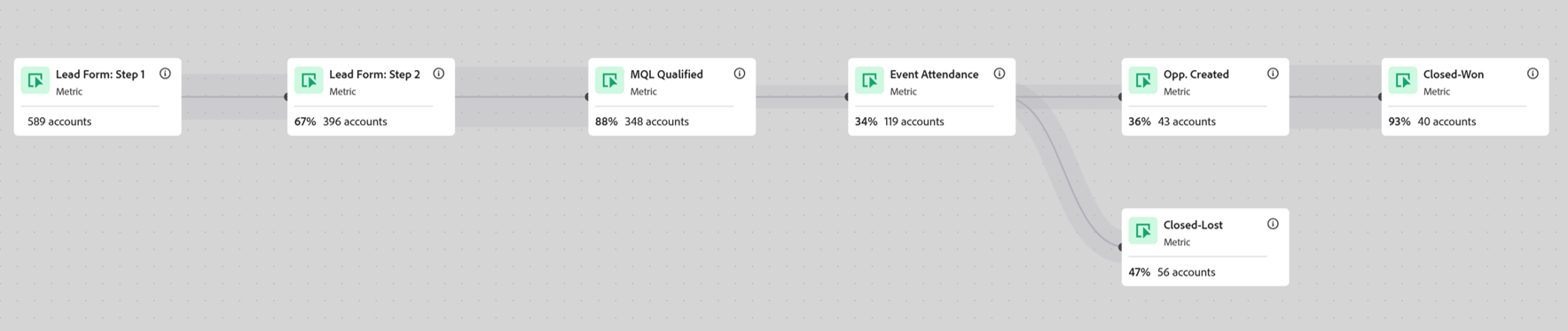
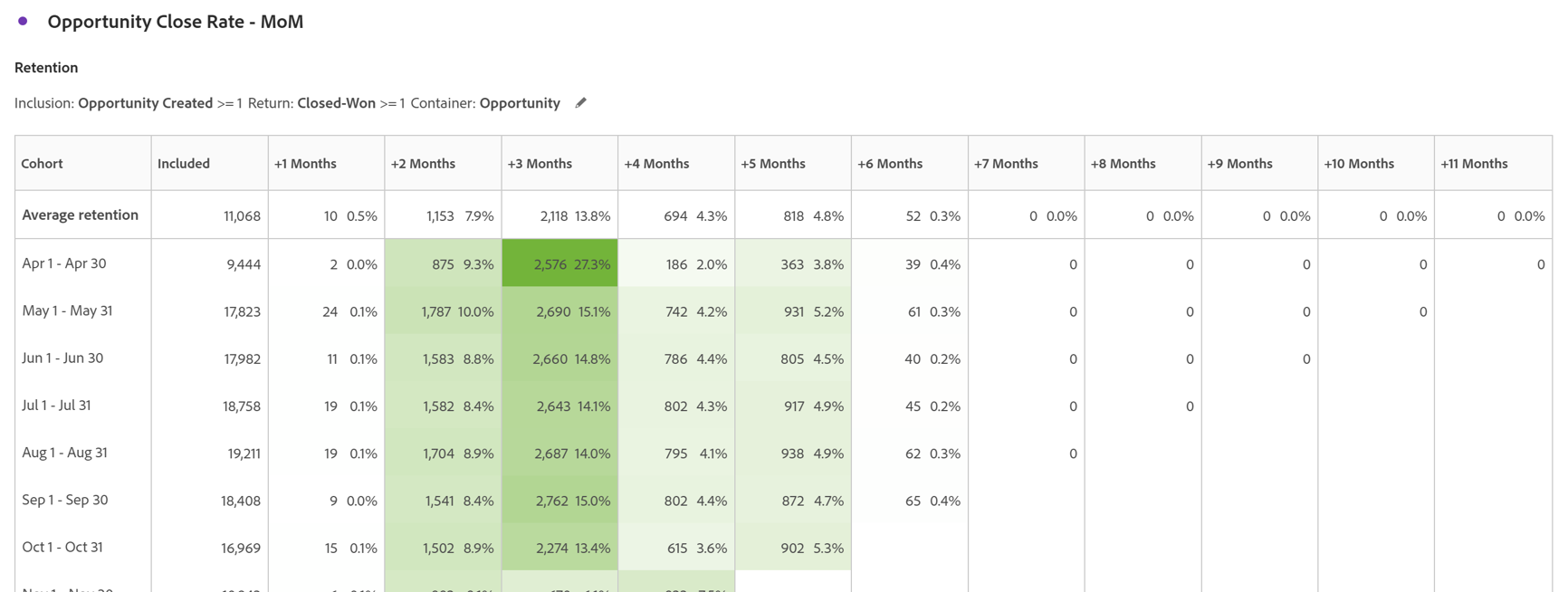
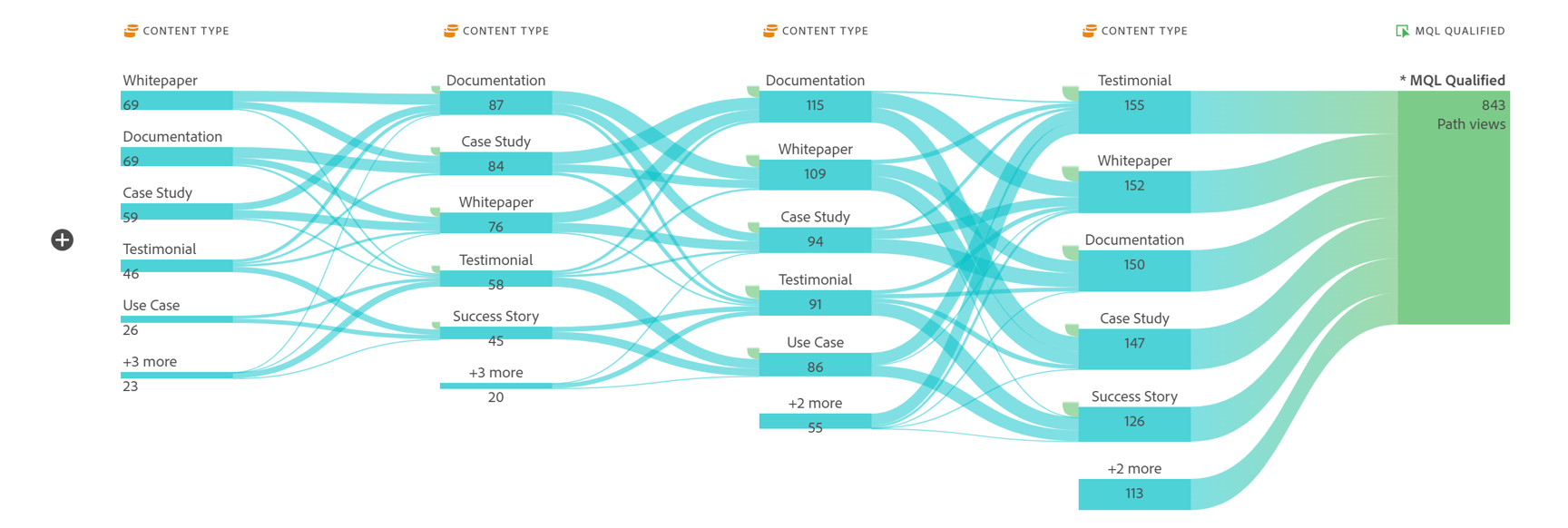
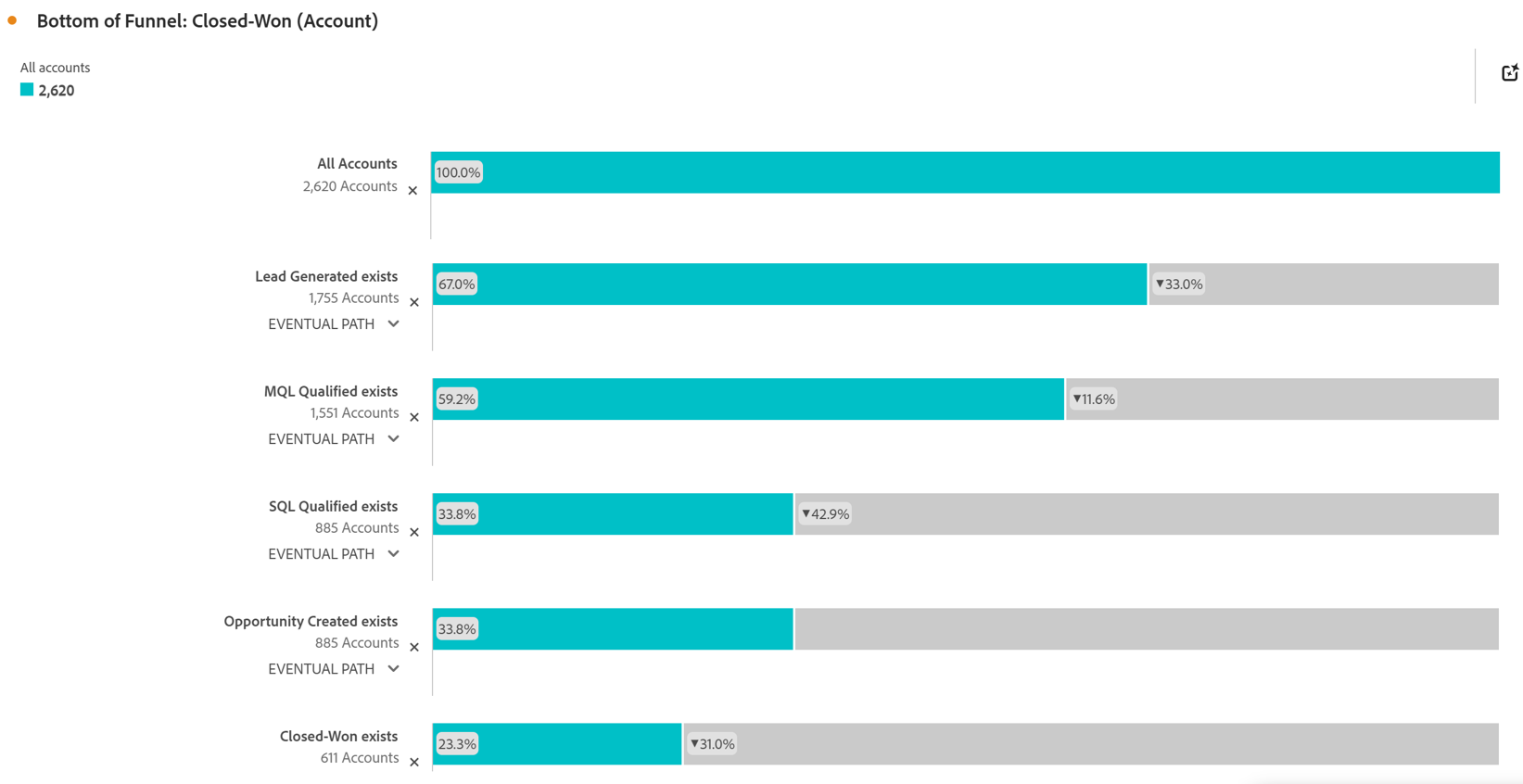
Screenshot of Account Based Marketing Engagement using the Journey Canvas feature. Effective Account Based Marketing requires a deep understanding of the buying journey at the account level to determine the most impactful marketing activities to drive deal closer. Identify which experiences - both online and offline - are most impactful in driving closed opportunities. Journey canvas maps every interaction across accounts, buying groups, opportunities, campaigns and channels for clarity on what's working and what isn't. The Journey Canvas feature in CJA B2B Edition lets users see a detailed path for a specific high value account or buying group, including all known online and offline interactions. And users can contextualize key events, such as an MQL trigger and an Opportunity creation. Plus, Sales Development Reps can see the interaction history for specific accounts before outreach, allowing for highly relevant conversations.Screenshot of Cohort Segmentation. This identifies key groups of buyers to publish to CDP for activation in paid media, personalization or email orchestration. Cohort tables lets users group B2B entities - Accounts, Opportunities, Buying Groups - based on a shared starting point and track their progress across pipeline stages over time. By analyzing behavior patterns of buying groups, marketing and sales teams can understand the time to reach key milestones in the buying journey and determine which marketing efforts lead to faster pipeline progression.Screenshot of In-Person Events. The impact of in-person event attendance can be optimized by reporting on engaged accounts and viewing activity across multiple in-person events. Flow lets you visualize the paths accounts and buying groups take between key interactions or stages over time. Understanding what behaviors led to a key milestone, such as registering for an in-person event or flagging a lead as an MQL, helps both marketing and sales teams understand the most influential experiences that lead to conversion. For in-person events, the steps leading up to registration may include previous in-person event attendance, as well as digital experiences such as downloading white papers and case studies.Screenshot of Sales Stage Progression. The fallout report in CJA B2B Edition gives you sales funnel insights by letting you visualize conversion and drop off rates between predefined steps in a sequential journey. The fallout report can answer key questions around which steps in the sales stages caused the most drop off towards deal close.