Agile CRM vs. Kustomer

Overview
ProductRatingMost Used ByProduct SummaryStarting Price
Agile CRM
Score 9.8 out of 10
N/A
Agile CRM is a customer relationship management (CRM) software built to make the entire marketing and sales lifecycles more efficient, built around features like sales enablement, marketing automation, social suite, and web engagement.
$14.99
per month per user
Kustomer
Score 8.7 out of 10
N/A
Kustomer is a customer service CRM platform built for managing high support volume by optimizing experiences throughout the customer service journey. Kustomer was acquired by Facebook in late 2020, but spun out in 2023 and re-launched as an independent entity, Kustomer, LLC.
$89
per month, per user
Pricing
Agile CRMKustomer
Editions & Modules
Starter
$14.99
per month per user
Regular
$49.99
per month per user
Enterprise
$79.99
per month per user
Enterprise
$89
per month, per user
Ultimate
$139
per month, per user
Offerings
Pricing Offerings
Agile CRMKustomer
Free Trial
NoNo
Free/Freemium Version
YesNo
Premium Consulting/Integration Services
NoNo
Entry-level Setup FeeNo setup feeNo setup fee
Additional DetailsDiscount available for annual billing (34%), and additional discounts available for 2-year plans (40%).All plans require an annual subscription and 8 users minimum.
More Pricing Information
Community Pulse
Agile CRMKustomer
Considered Both Products
Agile CRM
Chose Agile CRM
Agile is more user-friendly and better sits our needs due to tagging, workflows, and its campaign structures. However, we are considering moving away due to support and email issues.

Chose Agile CRM
It used to be great, but that was 5 years ago. [In my opinion], its more recent takeover by 500 Apps is a disaster and the systems are broken.
Chose Agile CRM
It was able to do most of the functions needed but was the most cost-effective to get us started. If you are a new company and looking to get started with a CRM start here for a year or two and when you have the money you can pay for one of the bigger players. This platform …
Chose Agile CRM
I have used Microsoft 365 and older DOS-based programs, both of which have clunky interfaces, are not very user friendly, and are very hard to customize for information. For example, to have a searchable function in 365, we had to add a window and put our search words in the …
Chose Agile CRM
Agile is much more cost effective than Salesforce for some of the projects we do.
Chose Agile CRM
It works better than other systems because of different factors such as the effective customer portal, the ability to email the case facility directly, the chat/live support experience, the social integration experiences such as Twitter, Facebook, the ability to make, receive, …
Chose Agile CRM
The price is far more affordable for a startup with Agile, however, HubSpot has far better features and support.
Chose Agile CRM
Agile CRM is an all-in-one CRM tool that is easy to use and cost-efficient depending on your business needs. Agile is a very effective CRM system and can quickly access your customer/prospect information. Agile's ability to integrate the marketing automation, CRM, telephony, …
Chose Agile CRM
Saleforce - Too expensive.
SugarCRM - Versatile. Free. But Slow.
Filemaker - Originally designed my own CRMWhich gave me full control of all functionality. But having an online system that is hosted in the cloud provides considerable advantages particularly when allowing access …
Chose Agile CRM
I trialed a number of other CRMs much to the disgust of my colleagues!

  • Pipedrive was great but more sales focussed and heavy on Javascript so felt slow at times
Chose Agile CRM
Agile CRM did most of what PipeDrive did, some of what Hubspot does, and a range of other stuff that I was starry eyed about at the outset. but I eventually concluded that a jack-of-all-trades was not what i was looking for. And while the support team tried, they didn't have …
Chose Agile CRM
Agile CRM is much less expensive than salesforce. It might not have all the potential of those thousands of add-ons, but for those who have basic needs – and the need to customize to some extent, it more than delivers.
Agile CRM has more advanced features, particularly around …
Chose Agile CRM
Much easier to set up against Zoho.
User-friendly against Zoho.
Team acceptance against Zoho.
Chose Agile CRM
With Agile CRM, I get the most bang for my buck, being a one-man operation. Their selling point that they offer everything you need is very sexy when the budget is limited. At the end of the day, Agile CRM offered a solution to my core business problem (which was centralizing …
Kustomer
Chose Kustomer
I think that Kustomer is the most user friendly BUT I think the other platforms are built to do a lot more and can be much more customized
Chose Kustomer
I find it baffling how little data can be stored or associated with a customer in many other systems, and how difficult that can be to set up. It is fine if you already have a robust CDP that you can hook up and use to power your CRM, but it is rare that an organization has the …
Chose Kustomer
It has improved a lot of the training time needed for our new hires to understand the Kustomer interface and how to handle communications fully. The time invested went significantly down, and the learning curve improved a lot as well.
Chose Kustomer
Apps like Intercom, Zendesk, and Gorgios all treat customer inquiries as tickets, just tracking that one issue or interaction with a customer. Kustomer treats each customer as an individual, which allows us to provide top-notch customer service. Customers love that we're able …
Chose Kustomer
Kustomer is more modern and capable of so much more any of my other systems have compared to in technical support customer interfaces.
Chose Kustomer
Kustomer is a great fit for our organization because we can cut down on multiple contacts from the same customer and see all their information in one place. It's also infinitely customizable, so if we need changes made we can make them while still using the same platform. This …
Chose Kustomer
Kustomer is different from slack since Slack is just for communicating with the whole team while Kustomer is more on communicating with our customers.
Chose Kustomer
I have never used anything besides Kustomer and I don't know if I ever will because Kustomer is just so helpful!!
Chose Kustomer
The UI of Kustomer is a lot cooler than what we are using before. There are a lot of features that Kustomer has that make things easier and more convenient than Desk.com.
Chose Kustomer
I use both in my role with the company. Our social media channels are managed through Khoros, but we use Kustomer to notate and contact customers outside of social media. I'd much rather bring our social media channels into Kustomer, to help with efficiency.
Chose Kustomer
I have not had any experience with other programs like Kustomer.
Chose Kustomer
Kustomer has a great team that is easy to work with. They are always there to support and are pleasant, as well.
Chose Kustomer
Zendesk: In my opinion, Kustomer is more powerful when used to its full potential due to its workflows/automations.
Chose Kustomer
Kustomer is far more intuitive, personal, and holistic than Zendesk. As a company who has a lot of interaction with a single customer, it is such an advantage to take the customer approach rather than a single ticket approach. Zendesk was very limited in a lot of the actions …
Chose Kustomer
All other systems I have used have been internally-made programs that were a lot more basic order-taking systems, no notes or call functions outside of when order was placed. Doesn't really compare here.
Chose Kustomer
Kustomer simply does more than any other platform I've been able to work with. Sure some others will give you a handful of neat tricks built in for managing a channel or two but those rarely offer any external integrative capacity or limit what you can do in connections. …
Chose Kustomer
Intercom, Kayako, Zendesk, Freshdesk have all been used by myself in the past, and were evaluated before we chose to go with Kustomer.
Chose Kustomer
I was not personally involved in the decision-making process when selecting a new CRM and ultimately settling on Kustomer. That said, I'm happy with the decision to partner with them. Compared to our previous CRMs, it is much easier to work with everything in one place and we …
Chose Kustomer
Kustomer was better suited to the personalized nature of the service that we're trying to provide.
Chose Kustomer
Glovo was using Zendesk before. Kustomer is much more flexible in terms of integration capabilities and customisation.
Chose Kustomer
Moving from Zendesk to Kustomer was driven by the clarity that the customer timeline brings for advocate engagement alongside the custom workflow abilities.
Chose Kustomer
Zendesk did not give a big picture of the customer. It was more of a ticketing platform, and only gave statistics of those conversations. We were unable to track customer sentiment, or other attributes of the customer.
Chose Kustomer
Kustomer is far more scalable and flexible than Zendesk, and it provides a real omni-channel experience far from the "Zendesk for mails, Zendesk chat for chats" we were used to. On the automation and customisation features, it gets even clearer how Kustomer can deal with a lot …
Chose Kustomer
I've used Desk and other platforms in the past and none of them are as interactive or user friendly as Kustomer.
Features
Agile CRMKustomer
Sales Force Automation
Comparison of Sales Force Automation features of Product A and Product B
Agile CRM
3.2
Ratings
83% below category average
Kustomer
-
Ratings
Customer data management / contact management3.60 Ratings00 Ratings
Workflow management5.50 Ratings00 Ratings
Territory management2.30 Ratings00 Ratings
Opportunity management3.40 Ratings00 Ratings
Integration with email client (e.g., Outlook or Gmail)1.10 Ratings00 Ratings
Contract management4.20 Ratings00 Ratings
Quote & order management3.50 Ratings00 Ratings
Interaction tracking3.70 Ratings00 Ratings
Channel / partner relationship management1.70 Ratings00 Ratings
Customer Service & Support
Comparison of Customer Service & Support features of Product A and Product B
Agile CRM
1.8
Ratings
123% below category average
Kustomer
-
Ratings
Case management1.80 Ratings00 Ratings
Call center management1.80 Ratings00 Ratings
Help desk management1.80 Ratings00 Ratings
Marketing Automation
Comparison of Marketing Automation features of Product A and Product B
Agile CRM
3.3
Ratings
79% below category average
Kustomer
-
Ratings
Lead management5.50 Ratings00 Ratings
Email marketing1.10 Ratings00 Ratings
CRM Project Management
Comparison of CRM Project Management features of Product A and Product B
Agile CRM
3.6
Ratings
71% below category average
Kustomer
-
Ratings
Task management4.90 Ratings00 Ratings
Billing and invoicing management1.40 Ratings00 Ratings
Reporting4.40 Ratings00 Ratings
CRM Reporting & Analytics
Comparison of CRM Reporting & Analytics features of Product A and Product B
Agile CRM
1.4
Ratings
138% below category average
Kustomer
-
Ratings
Forecasting1.30 Ratings00 Ratings
Pipeline visualization1.90 Ratings00 Ratings
Customizable reports1.10 Ratings00 Ratings
Customization
Comparison of Customization features of Product A and Product B
Agile CRM
4.1
Ratings
59% below category average
Kustomer
-
Ratings
Custom fields3.90 Ratings00 Ratings
Custom objects6.00 Ratings00 Ratings
Scripting environment1.40 Ratings00 Ratings
API for custom integration5.00 Ratings00 Ratings
Security
Comparison of Security features of Product A and Product B
Agile CRM
5.9
Ratings
34% below category average
Kustomer
-
Ratings
Single sign-on capability5.90 Ratings00 Ratings
Role-based user permissions5.90 Ratings00 Ratings
Social CRM
Comparison of Social CRM features of Product A and Product B
Agile CRM
3.0
Ratings
84% below category average
Kustomer
-
Ratings
Social data3.00 Ratings00 Ratings
Social engagement3.00 Ratings00 Ratings
Integrations with 3rd-party Software
Comparison of Integrations with 3rd-party Software features of Product A and Product B
Agile CRM
5.2
Ratings
34% below category average
Kustomer
-
Ratings
Marketing automation6.50 Ratings00 Ratings
Compensation management3.80 Ratings00 Ratings
Platform
Comparison of Platform features of Product A and Product B
Agile CRM
8.3
Ratings
12% above category average
Kustomer
-
Ratings
Mobile access8.30 Ratings00 Ratings
Incident and problem management
Comparison of Incident and problem management features of Product A and Product B
Agile CRM
-
Ratings
Kustomer
8.1
Ratings
1% above category average
Organize and prioritize service tickets00 Ratings8.00 Ratings
Expert directory00 Ratings8.30 Ratings
Subscription-based notifications00 Ratings8.50 Ratings
ITSM collaboration and documentation00 Ratings8.00 Ratings
Ticket creation and submission00 Ratings8.00 Ratings
Ticket response00 Ratings8.00 Ratings
Self Help Community
Comparison of Self Help Community features of Product A and Product B
Agile CRM
-
Ratings
Kustomer
8.5
Ratings
8% above category average
External knowledge base00 Ratings8.00 Ratings
Internal knowledge base00 Ratings9.00 Ratings
Multi-Channel Help
Comparison of Multi-Channel Help features of Product A and Product B
Agile CRM
-
Ratings
Kustomer
8.0
Ratings
3% above category average
Customer portal00 Ratings8.60 Ratings
IVR00 Ratings8.30 Ratings
Social integration00 Ratings7.30 Ratings
Email support00 Ratings10.00 Ratings
Help Desk CRM integration00 Ratings6.00 Ratings
Best Alternatives
Agile CRMKustomer
Small Businesses
Salesmate
Salesmate
Score 10.0 out of 10
Agiloft Service Desk (discontinued)
Score 9.0 out of 10
Medium-sized Companies
Creatio
Creatio
Score 9.7 out of 10
Agiloft Service Desk (discontinued)
Score 9.0 out of 10
Enterprises
Creatio
Creatio
Score 9.7 out of 10
SysAid
SysAid
Score 9.1 out of 10
All AlternativesView all alternativesView all alternatives
User Ratings
Agile CRMKustomer
Likelihood to Recommend
4.1
(0 ratings)
9.0
(0 ratings)
Likelihood to Renew
10.0
(0 ratings)
7.9
(0 ratings)
Usability
2.1
(0 ratings)
10.0
(0 ratings)
Availability
10.0
(0 ratings)
9.1
(0 ratings)
Performance
10.0
(0 ratings)
6.4
(0 ratings)
Support Rating
1.1
(0 ratings)
9.4
(0 ratings)
In-Person Training
-
(0 ratings)
7.6
(0 ratings)
Online Training
10.0
(0 ratings)
8.3
(0 ratings)
Implementation Rating
10.0
(0 ratings)
7.9
(0 ratings)
Configurability
10.0
(0 ratings)
7.9
(0 ratings)
Ease of integration
10.0
(0 ratings)
7.2
(0 ratings)
Product Scalability
10.0
(0 ratings)
9.1
(0 ratings)
Vendor post-sale
10.0
(0 ratings)
8.7
(0 ratings)
Vendor pre-sale
10.0
(0 ratings)
9.1
(0 ratings)
User Testimonials
Agile CRMKustomer
Likelihood to Recommend
Until the email issues are resolved I cannot recommend agile for any function. The email delivery rate has halved in the last six months and halved again in the last two with no resolution in sight. The customer service discussions start from zero information anytime suggesting agile are not writing notes or using a ticketing system to track customers' complaints. This results in our staff having to send emails manually and f=defeating the purpose of the system.
Read full review
It works really well for you to ask a teammate to review a case/email/message and provide some input since you can all review the same conversations and client accounts. They can also cover your inbox using your email handle in case you are out of the office suing some well deserved PTO.
Read full review
Pros
  • The set-up was simple. We ran into a snag with my domain verification, but Agile support worked with me to get it resolved.
  • I love being able to create several scripts based on persona. You can easily use a rule to display the appropriate script for each contact.
  • Even team members new to CRM were able to grasp it and be efficient within a few hours - it's simple to navigate.
Read full review
  • All customer data (past orders, communication with customer service, rewards account data) is in one place. This helps agents avoid confusion and reduces the number of tabs they need to open.
  • The Knowledge Base (or K Base) is very helpful. Any time we roll out a new policy or have a limited-time promotion, we can add all the relevant information and worksheets there for the convenience of the agents. That way they can stay in a chat while looking up the answer to a question.
  • We can seamlessly move from chat into email if the customer leaves or the queue times are too long. All the interactions will stay on the customer profile page, so they are kept up to date.
Read full review
Cons
  • The email template building tool is inflexible although it is simple to use and looks nice if you can work within its parameters.
  • Customer Support is not committed to finding answers and providing the best solutions. Many times each support person has a different answer or fixing a bug will take up to 2 weeks to address. They do not seem to understand that they are an online marketing platform that requires solutions within hours (or maybe days) and not weeks.
  • At some point in mid-2021, the process for sending out emails to 10s of thousands of contacts stopped functioning as simply and effectively as it had in the past. My staff (which I use as test cases) was no longer receiving emails, even though it showed in the system that they had received it (and no, it wasn't in spam). The bandaids that they provided me would work for one or two mailings and then stop working again. I was regularly trying to get customer support to find my answers but they were never able to solve my problem. The basic functionality that I appreciated - sending out nicely formatted email newsletters - is now completely gone and the platform is useless for our needs.
  • The reporting tools are awful and poorly configured. Querying on groups of people is inconsistent and inaccurate. There is no segmentation feature that I found that was actually effective.
Read full review
  • For our team, the feature that defaults all notes to begin in "done" status is difficult. Throughout each day we need to have notes open and assigned back and forth to different teams, and we have to remember to manually "open" each note. There is too much room for human error with this setting, and it is easy for important notes to be missed if a user forgets to open the note.
  • Similarly, it can be hard to remember to assign emails/notes to a particular team in addition to a user. We almost exclusively work out of team inboxes, and if someone on Care writes an email to a customer, the email will automatically be "done" when it is created, and it will be assigned to the user who wrote it, but not also to the user's team. There are instances where an email needs to be snoozed for several days/hours with further action needed, and unless the user remembers to assign the email to their team it may "awake" from the snooze and not be visible to anyone except the user who created it. Similarly to my first comment, this leaves a lot of room for human error and is not very intuitive.
  • Personally, I do not love that all tickets/emails/notes are jumbled together in the same inbox. While this gives visibility to everything on the "to do" list at the same time, it can be visually overwhelming. We have created unique folders for certain types of projects or categories of work, but have experienced tech glitches or just the awkwardness of another step to manually read the note, determine what type of category it is, and then manually assign it to another folder. Would love to have things auto-sort and take out this manual lift.
  • I love the idea of the autopilot setting, but we have not been able to use this for our work because it sorts items based on time, and not based on priority. In our line of work, we may have an urgent situation arise that needs attention before an email that was sent in 60 minutes ago. The autopilot feature would push the email to my associates sooner than it would the urgent situation from 5 minutes ago. Due to this, we manually monitor inboxes and assign work to ourselves and others.
Read full review
Likelihood to Renew
There was a little bit of a learning curve and some bumps along the way to managing this platform, but AgileCRM appears to be responsive to any challenges that arise, which I consider to be of vital importance.
Read full review
Because there's no other tool like Kustomer
Read full review
Usability
The tool has an affordable cost and is better than some market competitors. For delivering a great experience with a friendly user interface, low price, great technical support and several features that contribute to IT, sales and marketing teams, I recommend Agile CRM to friends and colleagues looking for such a solution.
Read full review
There is a learning curve, but it is more than worth it, especially to have a dedicated resource pointed at Kustomer and any other software it interacts with. The basic implementation is useful, and powerful - certainly a MASSIVE upgrade over taking care of your customers in an email inbox or shuffling between multiple windows and applications! It is also set up really well to grow and reconfigure with your business. I'm a big fan.
Read full review
Reliability and Availability
The training sessions are very helpful, because you have specialist that is available to answer any questions, guide you and coach you on how to dominate a certain feature of the platform. That being said,Whenever I have an issue that needs to be resolved, I can send email or call a support line. I usually use the support line.
Read full review
Because Kustomer is available when you need it
Read full review
Performance
The performance of AgileCRM has been acceptable to date. I'm pleased with the ability to modify leads in the system and search for them and add groups to campaigns.
Read full review
Because ages load quickly, reports complete in a reasonable time frame, given their complexity
Read full review
Support Rating
The support is good but most of them are in India so heavy accents but if you can work past that they are very helpful and get the job done. What's good about that is they offer all types of hours for support not just 9-5 which I liked because I was able to get to support when I was building in the late-night hours when I couldn't get something to work.
Read full review
It’s a great tool that has helped our company and overall customer service. I believe if we were able to edit certain setting for our specific company that would be hopeful. We have been told before that certain desires of ours would make a change throughout all of Kustomer. Which is not something we would want, we would just want that to change for our business.
Read full review
In-Person Training
No answers on this topic
Because they are very hands-on in training us and very approachable
Read full review
Online Training
Each section of the AgileCRM platform has an instructional video that describes in detail all of the features of that section. I found this to be very instructional way to learn about each section. Whenever I had more questions, I could always schedule a conference call with a tutor..
Read full review
It was very easy to understand.
Read full review
Implementation Rating
Once I get everything set up, everything started to flow and I can see the major benefit of this platform to my business
Read full review
Nothing really because it is easy to use. After an hour of using it, we're already getting the hang of it.
Read full review
Alternatives Considered
Agile CRM is an all-in-one CRM tool that is easy to use and cost-efficient depending on your business needs. Agile is a very effective CRM system and can quickly access your customer/prospect information. Agile's ability to integrate the marketing automation, CRM, telephony, and analytics with current company procedures and solutions makes it difficult to consider other similar tools.
Read full review
I find it baffling how little data can be stored or associated with a customer in many other systems, and how difficult that can be to set up. It is fine if you already have a robust CDP that you can hook up and use to power your CRM, but it is rare that an organization has the resources or the customer-focus to rally behind setting up their customer service/experience team up for success. With a platform like Kustomer, you can actually evolve the relationship over time, or use the past experiences (number of contacts, purchases, previous issues, etc.) to power your next steps with a customer, making for a much more nuanced relationship with a human, not just a ticket.
Read full review
Scalability
This products Starts with a free Limited version. You can upgradeTo an affordable paid version with minimal features. There's also an enterprise version which is what I have. It's much more expensive, however it allows me to access the full range of features available.
Read full review
Because customer is flexible and scalable
Read full review
Return on Investment
  • It may be me but I spent a disproportionate amount of time figuring out how to derive more ROI from Agile CRM. The functionality and facilities were there but I eventually gave up as it was taking too much time and attention.
Read full review
  • We’re getting so much positive feedback — which is not something you traditionally associate with a customer care team — because we’re making it effortless for customers to deliver both positive and negative feedback, and we can now resolve the bad feedback really really quickly.
  • Primarily from our increased efficiency with Kustomer, we’ve seen a significant reduction of $3 to $4 for every cost per contact.
Read full review
ScreenShots

Agile CRM Screenshots

Screenshot of a contact in Agile CRMScreenshot of the Agile CRM dashboardScreenshot of tasks, in Agile CRMScreenshot of Agile CRM reportingScreenshot of stages of a campaign, presented in Agile CRM

Kustomer Screenshots

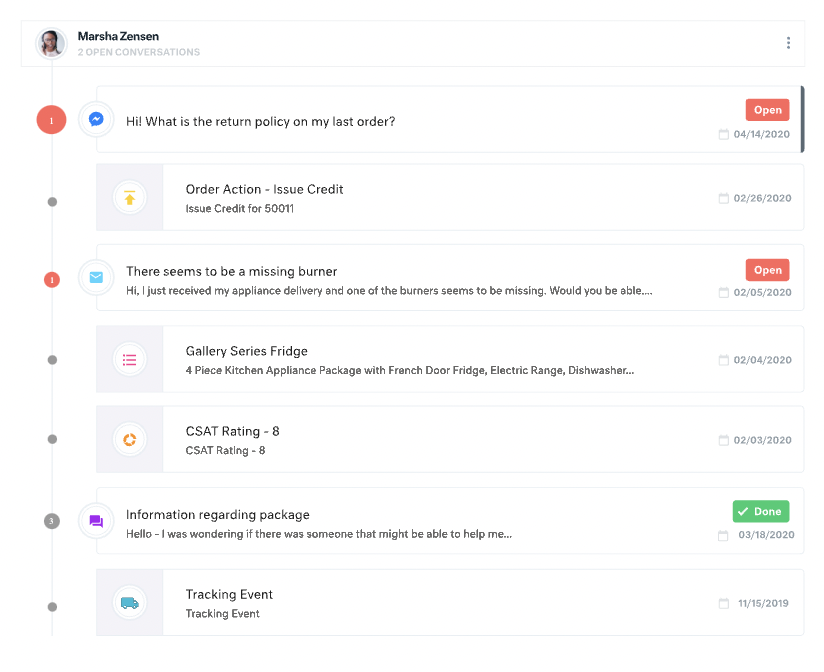
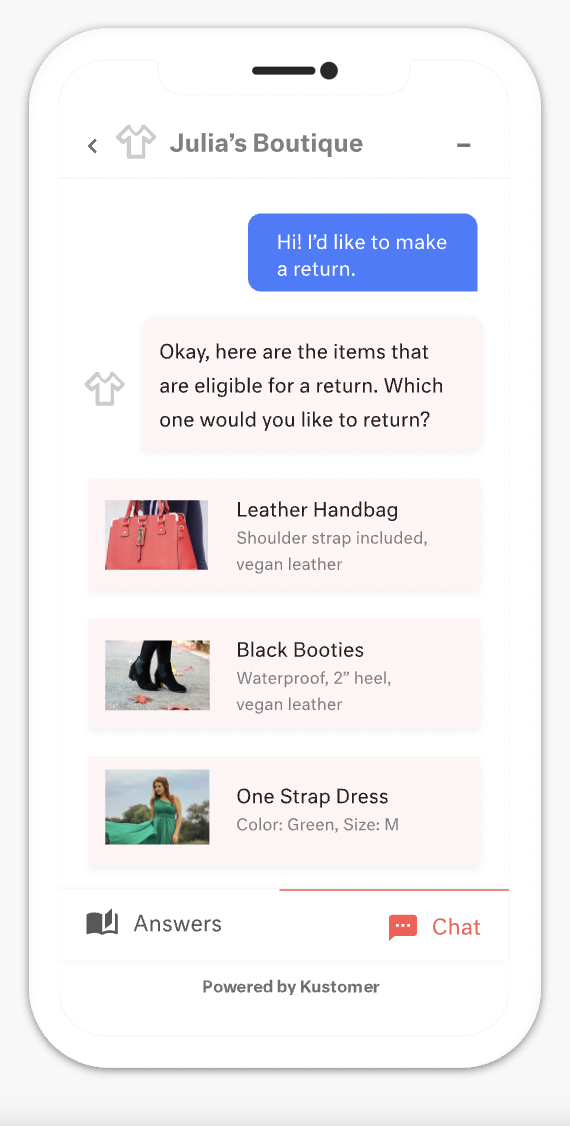
Screenshot of Example of a customer profile within Kustomer.Screenshot of Example of how Kustomer’s automated chats can save agents time by handling less complex requests automatically.