Avaza vs. Webex App

Overview
ProductRatingMost Used ByProduct SummaryStarting Price
Avaza
Score 8.1 out of 10
Mid-Size Companies (51-1,000 employees)
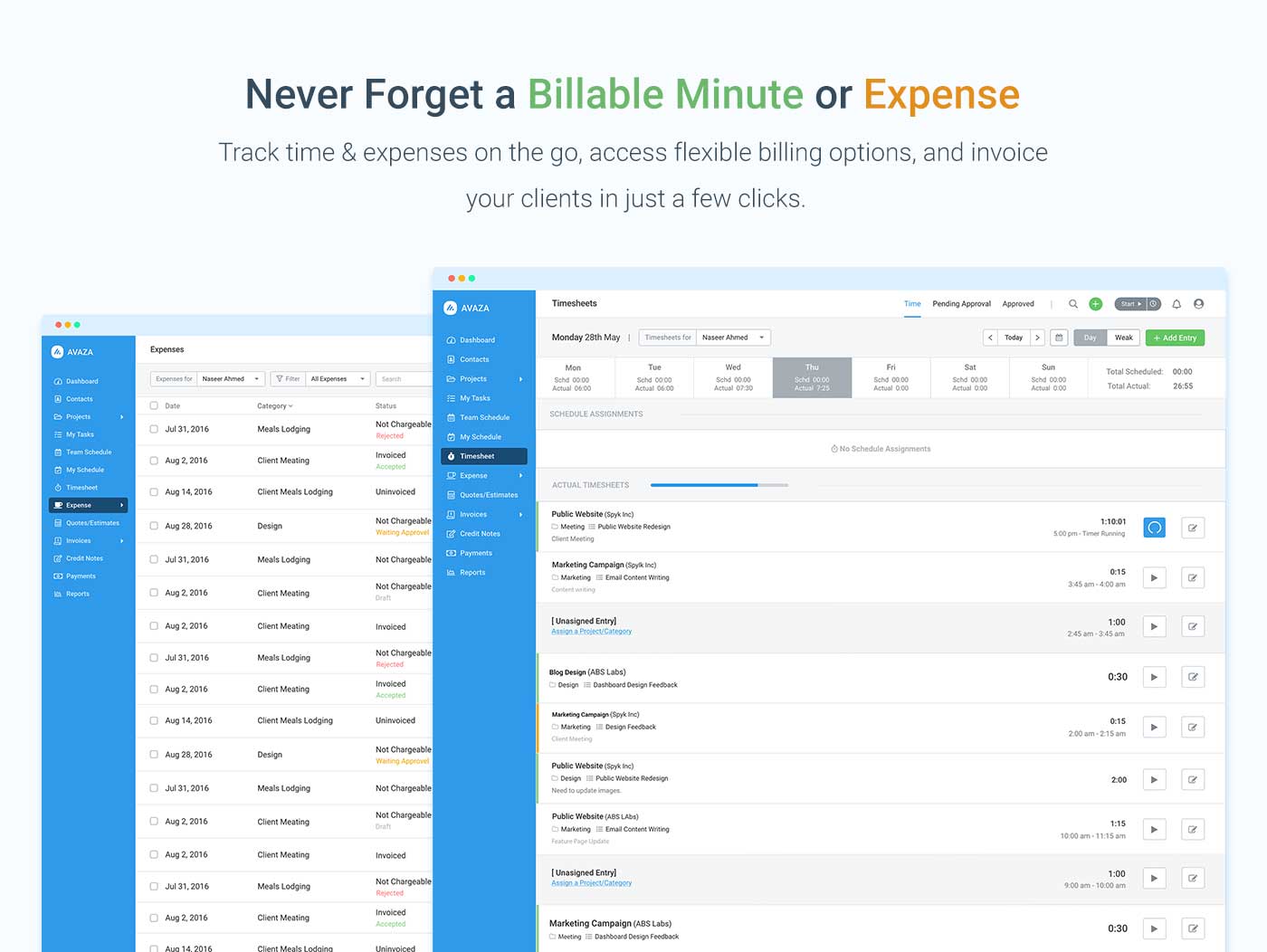
Avaza is a software suite targeted for all business sizes. It includes modules for project management and collaboration, resource scheduling, team chat, time tracking, expense management, quoting and invoicing. Depending on their business needs, companies can use as many, or as few, of the modules as they need. Avaza offers reporting functionality, and the project management module is designed with both list view and Kanban style task management, so users can choose…
$0
Unlimited Project Collaborators, 1 Admin, 1 Timesheet/ Expense User, 1 Resource Scheduling User
Webex App
Score 8.3 out of 10
N/A
The Webex App brings together Webex Calling, Meetings, and Messaging into a single application, fostering collaboration and unlocking more productive ways to work.
$0
user/month
Pricing
AvazaWebex App
Editions & Modules
Free Plan
$0
Unlimited Project Collaborators, 1 Admin, 1 Timesheet/ Expense User, 1 Resource Scheduling User
Startup Plan
$11.95
per month
Basic Plan
$23.95
per month
Business Plan
$47.95
per month
Basic Plan
$0.00
user/month
Meet Plan
$13.50
user/month
Meet + Call Plan
$25.00
user/month
Enterprise Plan
Contact Sales
Offerings
Pricing Offerings
AvazaWebex App
Free Trial
YesYes
Free/Freemium Version
YesYes
Premium Consulting/Integration Services
NoNo
Entry-level Setup FeeOptionalOptional
Additional Details
More Pricing Information
Community Pulse
AvazaWebex App
Features
AvazaWebex App
Project Management
Comparison of Project Management features of Product A and Product B
Avaza
8.0
Ratings
4% above category average
Webex App
6.9
Ratings
11% below category average
Task Management10.00 Ratings7.30 Ratings
Resource Management7.00 Ratings00 Ratings
Gantt Charts7.00 Ratings7.90 Ratings
Scheduling8.00 Ratings8.00 Ratings
Team Collaboration10.00 Ratings00 Ratings
Support for Agile Methodology7.00 Ratings00 Ratings
Support for Waterfall Methodology7.00 Ratings00 Ratings
Document Management9.00 Ratings00 Ratings
Email integration8.00 Ratings00 Ratings
Mobile Access8.00 Ratings8.00 Ratings
Timesheet Tracking7.00 Ratings00 Ratings
Budget and Expense Management8.00 Ratings00 Ratings
Workflow Automation00 Ratings5.30 Ratings
Search00 Ratings6.40 Ratings
Visual planning tools00 Ratings5.40 Ratings
Professional Services Automation
Comparison of Professional Services Automation features of Product A and Product B
Avaza
10.0
Ratings
28% above category average
Webex App
-
Ratings
Quotes/estimates10.00 Ratings00 Ratings
Invoicing10.00 Ratings00 Ratings
Project & financial reporting10.00 Ratings00 Ratings
Integration with accounting software10.00 Ratings00 Ratings
Communication
Comparison of Communication features of Product A and Product B
Avaza
-
Ratings
Webex App
7.7
Ratings
3% below category average
Chat00 Ratings8.50 Ratings
Notifications00 Ratings8.60 Ratings
Discussions00 Ratings8.90 Ratings
Surveys00 Ratings6.40 Ratings
Internal knowledgebase00 Ratings6.90 Ratings
Integrates with GoToMeeting00 Ratings10.00 Ratings
Integrates with Gmail and Google Hangouts00 Ratings2.10 Ratings
Integrates with Outlook00 Ratings10.00 Ratings
File Sharing & Management
Comparison of File Sharing & Management features of Product A and Product B
Avaza
-
Ratings
Webex App
7.4
Ratings
6% below category average
Versioning00 Ratings8.00 Ratings
Video files00 Ratings7.40 Ratings
Audio files00 Ratings8.30 Ratings
Document collaboration00 Ratings8.00 Ratings
Access control00 Ratings8.80 Ratings
Advanced security features00 Ratings9.00 Ratings
Integrates with Google Drive00 Ratings1.20 Ratings
Device sync00 Ratings8.70 Ratings
Best Alternatives
AvazaWebex App
Small Businesses
Stackby
Stackby
Score 9.0 out of 10
Stackby
Stackby
Score 9.0 out of 10
Medium-sized Companies
InEight
InEight
Score 8.3 out of 10
Troop Messenger
Troop Messenger
Score 9.8 out of 10
Enterprises
InEight
InEight
Score 8.3 out of 10
HCL Connections
HCL Connections
Score 9.0 out of 10
All AlternativesView all alternativesView all alternatives
User Ratings
AvazaWebex App
Likelihood to Recommend
10.0
(0 ratings)
9.0
(0 ratings)
Likelihood to Renew
10.0
(0 ratings)
9.0
(0 ratings)
Usability
9.0
(0 ratings)
8.9
(0 ratings)
Availability
-
(0 ratings)
8.0
(0 ratings)
Performance
-
(0 ratings)
9.9
(0 ratings)
Support Rating
10.0
(0 ratings)
8.2
(0 ratings)
In-Person Training
-
(0 ratings)
8.2
(0 ratings)
Online Training
-
(0 ratings)
8.5
(0 ratings)
Implementation Rating
-
(0 ratings)
6.0
(0 ratings)
Configurability
-
(0 ratings)
6.5
(0 ratings)
Ease of integration
-
(0 ratings)
9.0
(0 ratings)
Product Scalability
-
(0 ratings)
7.1
(0 ratings)
Vendor post-sale
-
(0 ratings)
9.0
(0 ratings)
Vendor pre-sale
-
(0 ratings)
8.0
(0 ratings)
User Testimonials
AvazaWebex App
Likelihood to Recommend
There are teams who work hard, and there are those who work smart. Avaza helps you be the latter--it's is a great tool for any team collaborating on several projects, especially multiple projects with a lot of simultaneously moving parts. It has just about everything you need - from team schedules to timesheets, down to the task and sub-task monitoring. The best part for me is that we can switch from List View to Kanban to Gantt charts!
Read full review
It is best suited for invitation-only paid online events with a professional moderator and someone who takes care of the technical issues. The downside I see is that people are less familiar with Webex than other platforms. This creates a barrier. Also, It would help if transcription supported Slovenian. It is less appropriate for events and meetings in Slovenian.
Read full review
Pros
  • Helps keep track of time spent on each project
  • Helps employees break down their time spent throughout the day
  • Encourages better time management skills
Read full review
  • High-quality, high-impact communications in our workflow.
  • It's great for sharing large documents, it doesn't slow down our communications.
  • The dark mode is excellent, it has a good image and seamless integration features.
  • We can record meetings, which is perfect for backing up any information that may be overlooked.
Read full review
Cons
  • I wish sub-tasks could also have due dates
  • For really big projects, we hope there could be phases (aside from sections)
  • In the chatbox, it would be great if photo attachments could be displayed as screenshots (instead of downloading the file)
Read full review
  • Easier group discussions, as default title is always "General" then the people listed, it can be difficult for some users to visualize who they are talking to if done quickly.
  • The ability to set my status as "available" so people know they can reach out to me, even if I haven't been at my desk for 10 minutes.
  • The ability to send a message based on someone's availability status (i.e. not in a meeting, or not presenting) rather than just time.
Read full review
Likelihood to Renew
Because it has been amazing and easy to work with.
Read full review
We really like the flexibility of jabber. With the exception of a few quirks that we have found, we see a bright future with it. We depend on it daily and will continue to do so for several years to come. As our team grows, more users will be using it and more screen sharing will be done. It it an indispensable tool that we simply could not imagine going without. It makes communicating so much easier when time is of the essence.
Read full review
Usability
Avaza is very easy to use, but the mobile app needs work.
Read full review
Webex is quite usable, and it is, in fact very easy to use as well. You don't need a lot of documentation to learn how to use the app as it's mostly self-explanatory. The user interface is easy on the eyes, and people can see buttons without issues. Overall, WebEx's front-end design is great and I don't have much issue with it.
Read full review
Reliability and Availability
No answers on this topic
I would say every time I open it, it is there, there are times that our users have to sign out and back in to get it to work or even do a full exit as the app will disconnect from the controlling the desk phone, but some easy steps to sign-out or fully exit the app gets the user back up and running quickly.
Read full review
Performance
No answers on this topic
On standalone it works fine, it used to consume a considerable amount of system resources in the past, but with updates and upgrades, this has improved quite a lot. As far as integrations with other systems, we have not come across any critical issues with the app.
Read full review
Support Rating
They are always available and open to doing a call or a shared screen to walk through the issues.
Read full review
The support team is quick in reverting to the issues faced, and it has multiple language support, which would be very helpful for some instances. Their expertise in resolving queries is instantaneous. Most of the common lags/issues in the application are identified and fixed with regular updates.
Read full review
In-Person Training
No answers on this topic
I would rate the in-person training 9/10. The session was highly interactive, providing opportunities for real-time questions and hands-on experience, which made the learning process more engaging. The trainer was knowledgeable, addressing our specific needs and ensuring that all participants fully understood the material. The structured approach and practical exercises helped reinforce key concepts. However, allocating more time for hands-on practice and group discussions could have further improved the overall experience, making it even more effective.
Read full review
Online Training
No answers on this topic
Very easy to create. All operations are done without any problems with our business growth. All people like the experience including me as an instructor. The tools that WebEx App offers us are very complete for working in a virtual classroom, whether it is sharing the screen, the different display modes, the whiteboard, or even the scoring tools on the screen, it allows me to do my job as an instructor as if I was face to face with the participants.
Read full review
Implementation Rating
No answers on this topic
There was quite a bit of back and forth with TAC and Cisco Reps to get it fully up and running but we did get there. Some of which had to do with documentation was not fully understandable. But with Cisco TAC we were able to get fully up and running.
Read full review
Alternatives Considered
I've used Trello before, but Avaza has way more features and is more applicable for cross-team collaboration. We selected Avaza for it's ability to not only project manage, but also for invoicing, expenses and it's ability to track time. We've gotten more accurate with estimate project hours, and therefore create more accurate proposals
Read full review
Microsoft Teams is the main competitor of the Webex App. But it provides services for less cost than Webex App. And also teams are used by majority of companies in software industries due to its support for other Microsoft services.
Read full review
Scalability
No answers on this topic
Once everything is in place on the back end getting Webex on a user's PC is now very easy and with single sign-on, users are able to sign in without having to remember another password. Just make sure you have all the user settings in CUCM, CUC set right, and that they have the needed licenses in Webex Control Hub.
Read full review
Return on Investment
  • Avaza has made it easier to see how long I spend on certain types of projects and where I could be spending more time.
Read full review
  • Webex App has really helped in implementing virtual work or working from home, thereby increasing the productivity by saving the traveling time to office. So, it's hard to express it in some measurable matrix, but for sure it has increased the productivity and also, the better document sharing and presentation tools, helps the meeting to be very crisp and super productive.

Read full review
ScreenShots

Avaza Screenshots

Screenshot of avaza, appearing across platformsScreenshot of visual project resource scheduling for teamsScreenshot of time and expense trackingScreenshot of team chatScreenshot of time trackingScreenshot of the expense management interface