Chose AWeber
AWeber just needs to improve landing page features and ready-made templates.

| Product | Rating | Most Used By | Product Summary | Starting Price |
|---|---|---|---|---|
 AWeber | N/A | AWeber is an email marketing and automation solution. It provides support for mobile-friendly HTML email newsletters, autoresponder campaigns, subscriber segmentation and management, RSS-to-email features, signup forms for websites or blogs, and more. | $15 per month Starting at | |
 Zoho Campaigns | N/A | Zoho Campaigns is an email marketing and social networking campaigning tool for smaller companies that helps create, send, and track effective email campaigns. It features list management and segmentation, A/B Testing, tracking and reporting, automation, and mobile campaign management. | $0 |
| AWeber | Zoho Campaigns | |||||||||||||||
|---|---|---|---|---|---|---|---|---|---|---|---|---|---|---|---|---|
| Editions & Modules |
|
| ||||||||||||||
| Offerings |
| |||||||||||||||
| Entry-level Setup Fee | $79 one-time fee | No setup fee | ||||||||||||||
| Additional Details | AWeber offers usage-based pricing starting at $15/month. Plans scale based on the number of subscribers and features needed. Options include: Lite Plan – Core tools like email automation, landing pages, sign-up forms, and AI Writing Assistant. Plus Plan – Advanced features including split automation paths, behavioral triggers, analytics, A/B testing, ecommerce, and custom branding. Done For You – A fully built email marketing system (emails, landing pages, and automations) delivered in 7 days, with 30 days of unlimited edits. All plans include 24/7 support. 14-day free trial available. | — | ||||||||||||||
| More Pricing Information | ||||||||||||||||
| AWeber | Zoho Campaigns | |
|---|---|---|
| Considered Both Products |  AWeber Chose AWeber AWeber made it easy to get started. They were priced competitively, but we felt they had better customer support, which is especially important when you are just setting up an email list for the first time, and want to ensure you have the workflow correct. They also took the …  Mukesh K. Singhmar Cofounder & CEO Chose AWeber If you are evaluating an email marketing or email broadcast software that is easy to use, at a reasonable price and does the makes sure the emails get delivered in the inboxes and not in the spam folders and has all the necessary reporting functionality then try AWeber. … Chose AWeber We could have used the tracking systems that come with each marketing campaign software we use (or get asked to use) but we wanted the best automated permissions management system we could find. They have the experience, the technology, and the great support we are always able …  Suzanne Glorie Owner Chose AWeber Mailchimp all of a sudden came up with all of these restrictions. I found that they did not communicate that well with their existing users. I have used Act-On at one of my customer's businesses. This is really an enterprise marketing automation tool and is not suited for …  Ibrahim Campos IT Network Manager Chose AWeber AWeber has more capacity than Mailchimp, so it depends a lot on the need of the company. You must take into account the cost of the two. Another detail is that Mailchimp can be really tedious to configure the automation of emails. Without a doubt, AWeber has more advanced …  Ruby Javaid Chief Designer Chose AWeber I found Constant Contact's dashboard and email editor clunky and annoying to use. It's been several years so perhaps they have improved and updated it. MailChimp is pretty comparable, and it just depends on your needs as to which is more appropriate. I do feel that MailChimp's …  Haley Fox President & CEO Chose AWeber Drip is definitely for the advanced marketing team, it is not user friendly and very confusing for anyone that doesn't know how to set up a funnel. However, for anyone that does it is amazing.  Mohammed Anzil Founder and Chief Editor Chose AWeber The reason we [opted for] AWeber over others is for its email delivery rates. AWeber is great for freelancers, large enterprises, mid-zize business, etc. A 14% discount is available if you pay quarterly and more if you pay annually. AWeber is priced roughly in the middle of …  Joe Gatto VP of Marketing & International Business Development Chose AWeber AWeber is more robust, and for professional marketers because it has so many features like tagging, and moving people to different lists based on triggers. Its analytics features are important for marketing managers. AWeber's deliverability is better than MailChimp or Constant …  Nicole Steen, M.A. Virtual Assistant Chose AWeber It is less expensive than Constant Contact but more expensive than MailChimp. We ended up recently switching to Kajabi because it integrates landing pages. Constant Contact and MailChimp both have easier user interfaces and better design options.  Gene Sower Internet Marketing Agency Chose AWeber Compared to Constant Contact, I find Aweber very easy to use. Setting up an autoresponder sequence is very straightforward, at least for us because we've used it for so long. Constant Contact is a very difficult and hard to use service. We hate it and knock it every chance …  Greg Dungan Owner Chose AWeber I have also used Constant Contact, MailChimp, and Lead Master. I think that Aweber is superior to these other applications in it's ability to "get down to business" so to speak. By this I mean that the interface is less about cartoony graphics and done-for-you simplicity. …  Vilhelm Kruse Innovation Coach Chose AWeber If you send out less than 2000 emails monthly then Mailchimp is a free alternative. It's hard to argue with free although I am not sure how much the free mailchimp version includes in terms of automation.  Andy Ryan Video Marketing Strategist | Speaker | Consultant Chose AWeber At the time we used it , AWeber offered features that MailChimp (free version) wasn't offering. We used AWeber instead of Infusionsoft because of the price. We have since switched from AWeber to ActiveCampaign for our email marketing. We liked how ActiveCampaign worked. It was … |  Zoho Campaigns  Swadesh Padhi Marketing Ambassador Chose Zoho Campaigns Zoho Campaigns is lower in cost than ActiveCampaign. ActiveCampaign definitely was much powerful and easier to use, but Zoho Campaigns works for us.  Joseph Daniel Finance and Operations Specialist Chose Zoho Campaigns We didn’t like the pricing of Maropost and we have found Zoho best when it comes to pricing and the other reason to move from Maropost to Zoho was the leaders that were less as compared to that offered by Zoho Campaigns. Moreover, Zoho has created much ease in our work. It is …  Brandon Stuhr COO (Chief Operating Officer) Chose Zoho Campaigns While we still believe that Mailchimp has more options for expansion at this point, Zoho Campaigns works better for us so we don't have to leave the Zoho suite of programs so much. Since our main e-mail is through Zoho Mail, the integration of both products is integral.  Alyssa Storm Senior Designer Chose Zoho Campaigns Zoho Campaigns is not for beginners to email marketing, but it’s an excellent choice for those who want to send out a lot of emails with few restrictions and great reporting. It’s a no-brainer if you’re already a Zoho user, as Campaigns is included in Zoho One subscriptions and …  Matthew Christensen CEO (Chief Executive Officer) Chose Zoho Campaigns The main reason we picked Zoho Campaigns was that we needed to use Zoho Books. QB Desktop, Online and Xero all didn't support the features we needed so we went with Zoho Books. It was the best decision we made. We now get Zoho CRM, Campaigns, Inventory, and 20+ other major …  Stacy Venditto Executive Consultant Chose Zoho Campaigns I have not chosen Zoho Campaigns over any other solution, I use all of them for different business scenarios and various client initiatives. I use smaller campaigns under 5k subscribers and use the other solutions for larger campaigns.  Vincent Frisina Director of Marketing Chose Zoho Campaigns Zoho Campaigns is a clumsy attempt to further bring your customer management under the Zoho umbrella. Contact management and CRM integration need a lot of work. Master style definitions, custom templates, and deliverability statistics would be good improvements. On the other …  Mehdi Aherraki General Manager Chose Zoho Campaigns We chose Zoho Campaigns because we already use their suite of applications, and the UI/UX is quite the same. Zoho Campaigns is a quite excellent and powerful app for campaign management, but other products are more developed technically and visually. But Zoho Campaigns gets the …  Jared Hansen Research Assistant Chose Zoho Campaigns I've used MailChimp before, which is a great tool (I might prefer it in many situations), but for our needs in our organization, we went with Zoho Campaigns. This decision was made because of the painless integration with Zoho CRM, which we already use and love. This was the …  Alexis Correa Dueño principal Chose Zoho Campaigns In my experience, I liked Mailchimp a lot because of the many features it has. In comparison with Zoho Campaigns, I feel that it is superior but what I find most helpful, and the main reason why I use Zoho Campaign, is that the applications I use can be integrated and I can see …  Jason Ensign Marketing Manager Chose Zoho Campaigns Campaigns came with Zoho CRM, so that's the ONLY reason I use this product. I can't justify paying for MailChimp when I have a free product. BUT, if I paid for this I would have switched a long time ago. In fact, I would have never picked it because it doesn't even compare …  Justin Roodman Program Expert Chose Zoho Campaigns We already use Zoho CRM so it made sense to use Zoho Campaigns to make importing from the CRM easier. MailChimp and Zoho both have an editor for editing HTML directly, so there was no clear advantage there. Mailchimp was slightly more expensive than Zoho Campaigns (by about …  Jon Porreca Project Support Chose Zoho Campaigns Mailchimp is great, and probably a bit more intuitive, but the seamless integration with Zoho CRM won it over for us with Zoho Campaigns. That and the ability to choose from two different pricing structures. Another thing to mention, the saved template feature, which is a basic … |
| AWeber | Zoho Campaigns | ||||||||||||||||||||||||||||||
|---|---|---|---|---|---|---|---|---|---|---|---|---|---|---|---|---|---|---|---|---|---|---|---|---|---|---|---|---|---|---|---|
| Email & Online Marketing |
| ||||||||||||||||||||||||||||||
| Reporting & Analytics |
| ||||||||||||||||||||||||||||||
| Pre-Send Testing |
|
| AWeber | Zoho Campaigns | |
|---|---|---|
| Small Businesses |  Mad Mimi Score 10.0 out of 10 | Mad Mimi Score 10.0 out of 10 |
| Medium-sized Companies |  VerticalResponse Score 10.0 out of 10 | VerticalResponse Score 10.0 out of 10 |
| Enterprises |  Emma by Marigold Score 9.4 out of 10 | Emma by Marigold Score 9.4 out of 10 |
| All Alternatives | View all alternatives | View all alternatives |
| AWeber | Zoho Campaigns | |
|---|---|---|
| Likelihood to Recommend | 8.0 (0 ratings) | 6.2 (0 ratings) |
| Likelihood to Renew | 6.8 (0 ratings) | 10.0 (0 ratings) |
| Usability | 8.0 (0 ratings) | - (0 ratings) |
| Support Rating | 10.0 (0 ratings) | - (0 ratings) |
| AWeber | Zoho Campaigns | |
|---|---|---|
| Likelihood to Recommend |
|
|
| Pros |
|
Jason Ensign Marketing Manager |
| Cons |
 Yvonne Herbst Owner |
Jon Porreca Project Support |
| Likelihood to Renew |
 Nichol Skaggs Virtual Assistant and Online Business Manager |
Stacy Venditto Executive Consultant |
| Usability |
Yvonne Herbst Owner | No answers on this topic |
| Support Rating |
Yvonne Herbst Owner | No answers on this topic |
| Alternatives Considered |
|
Alyssa Storm Senior Designer |
| Return on Investment |
Greg Dungan Owner |
|
| ScreenShots | AWeber Screenshots      | Zoho Campaigns Screenshots 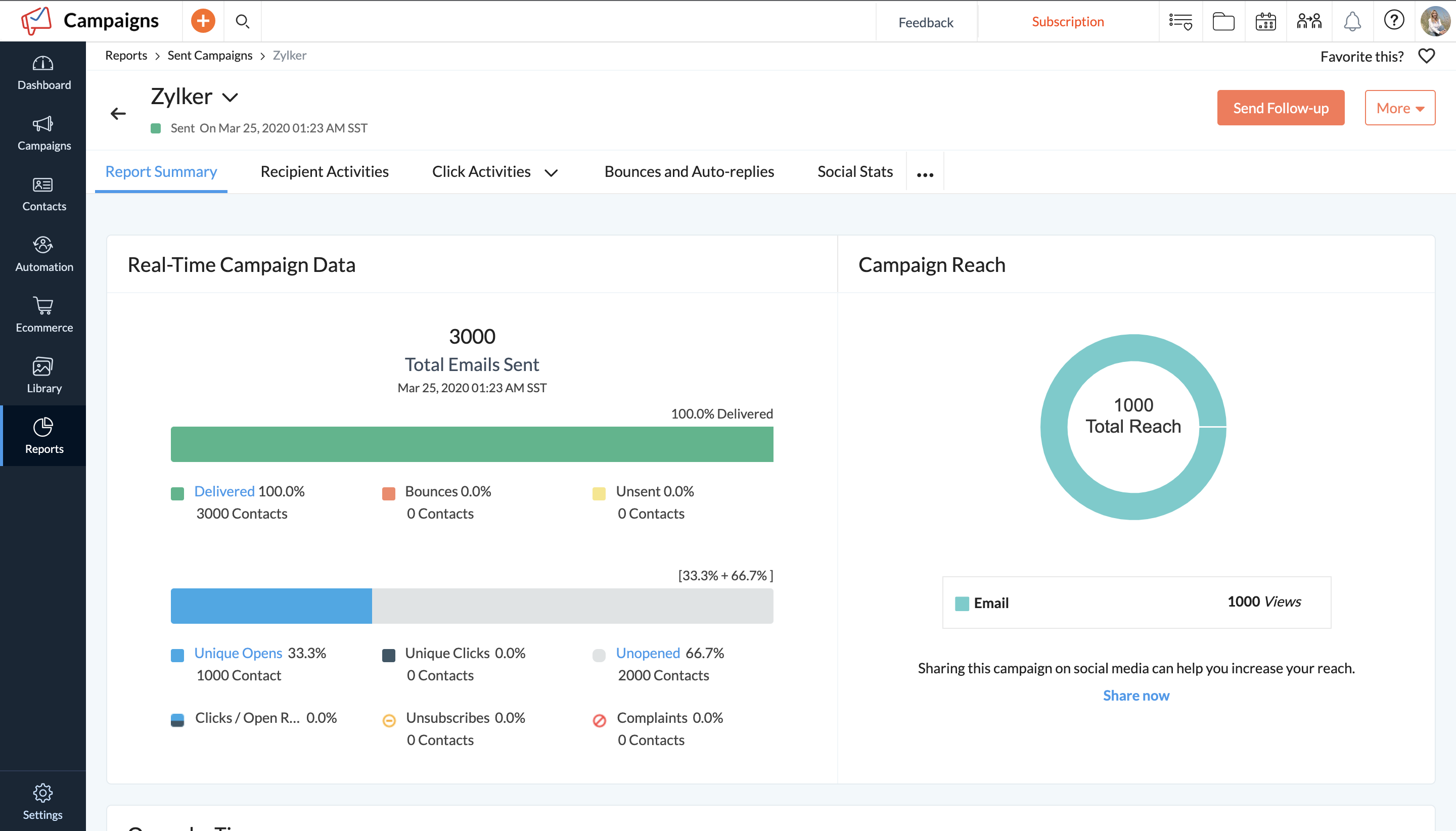 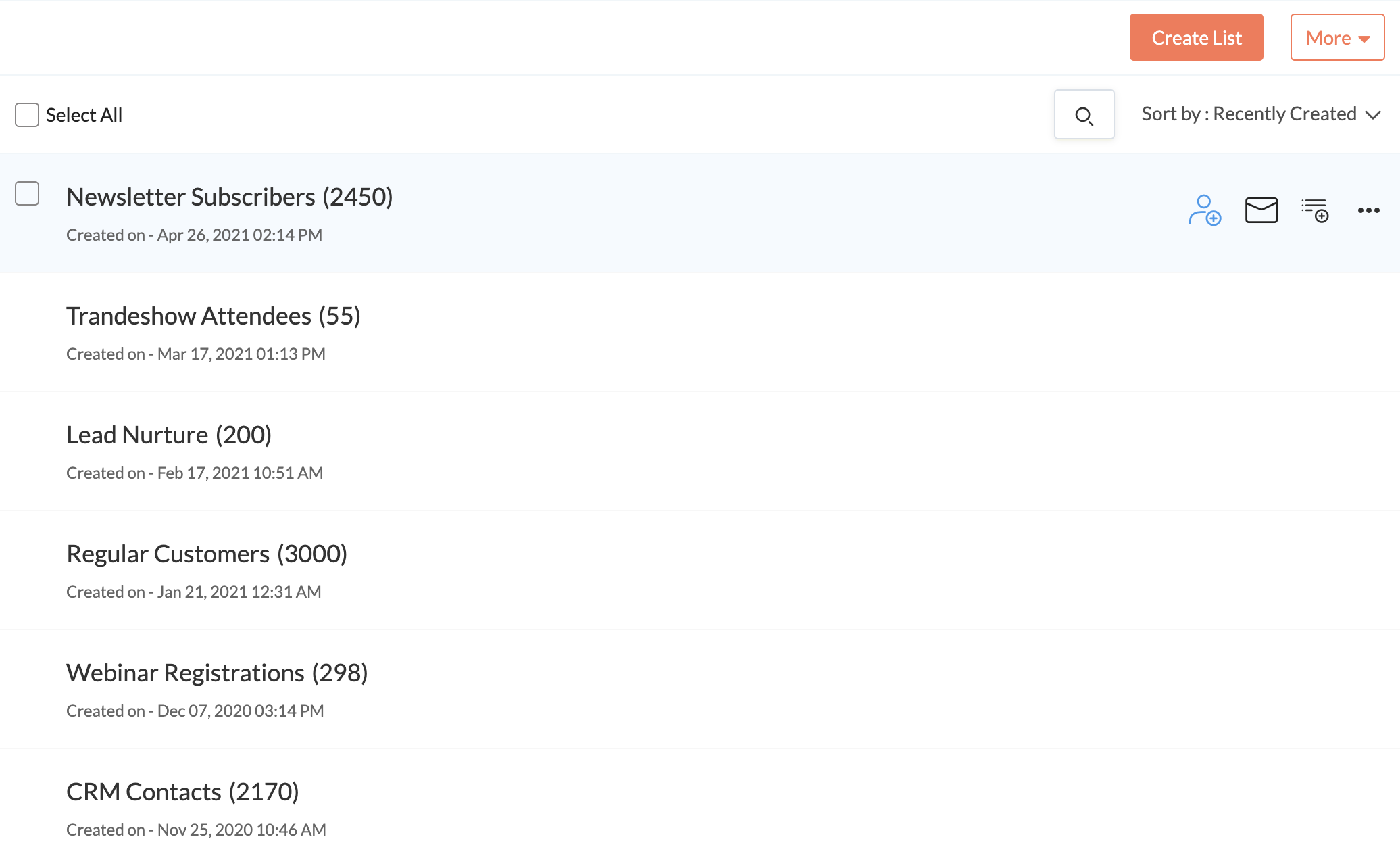 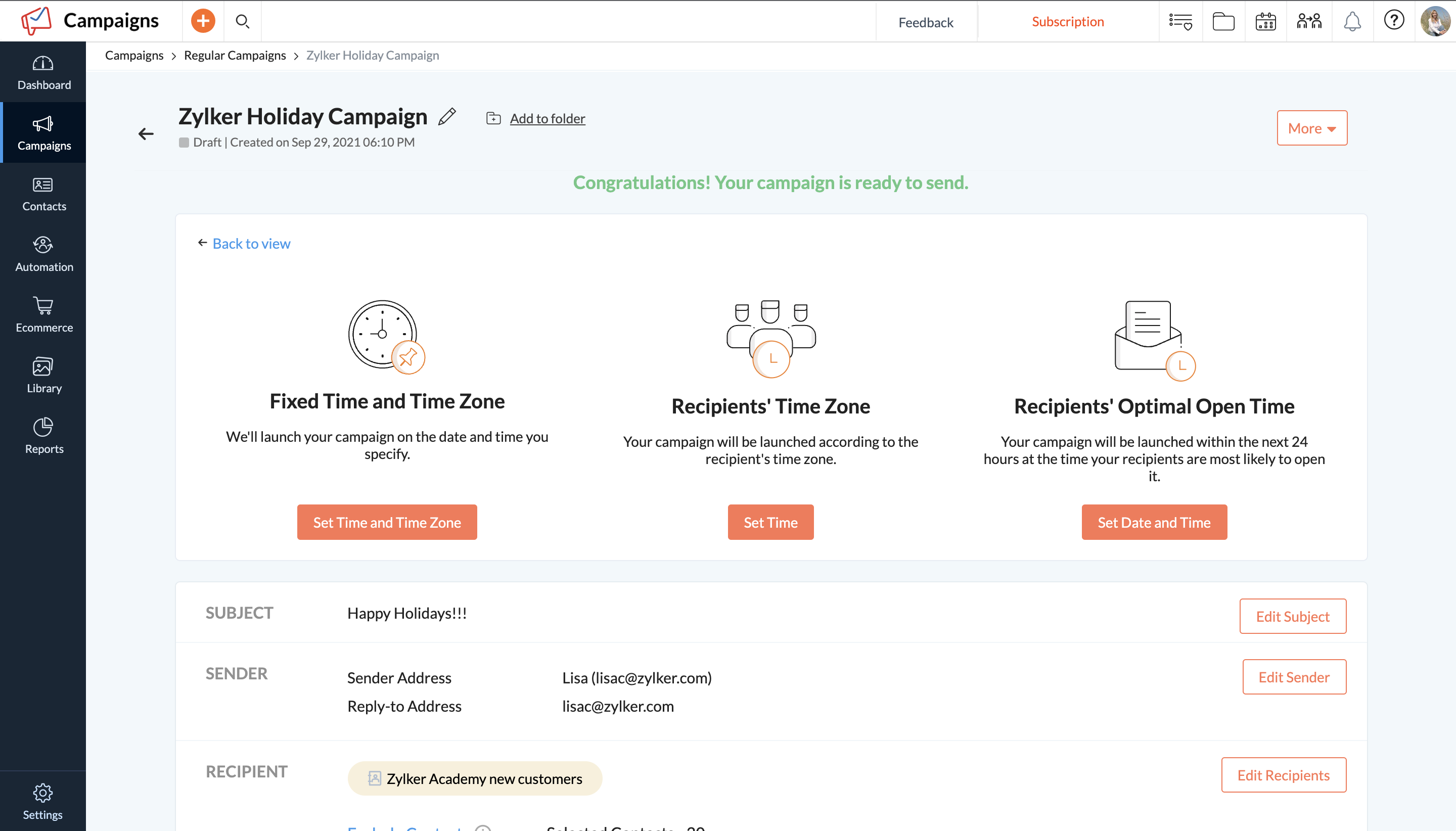   |

