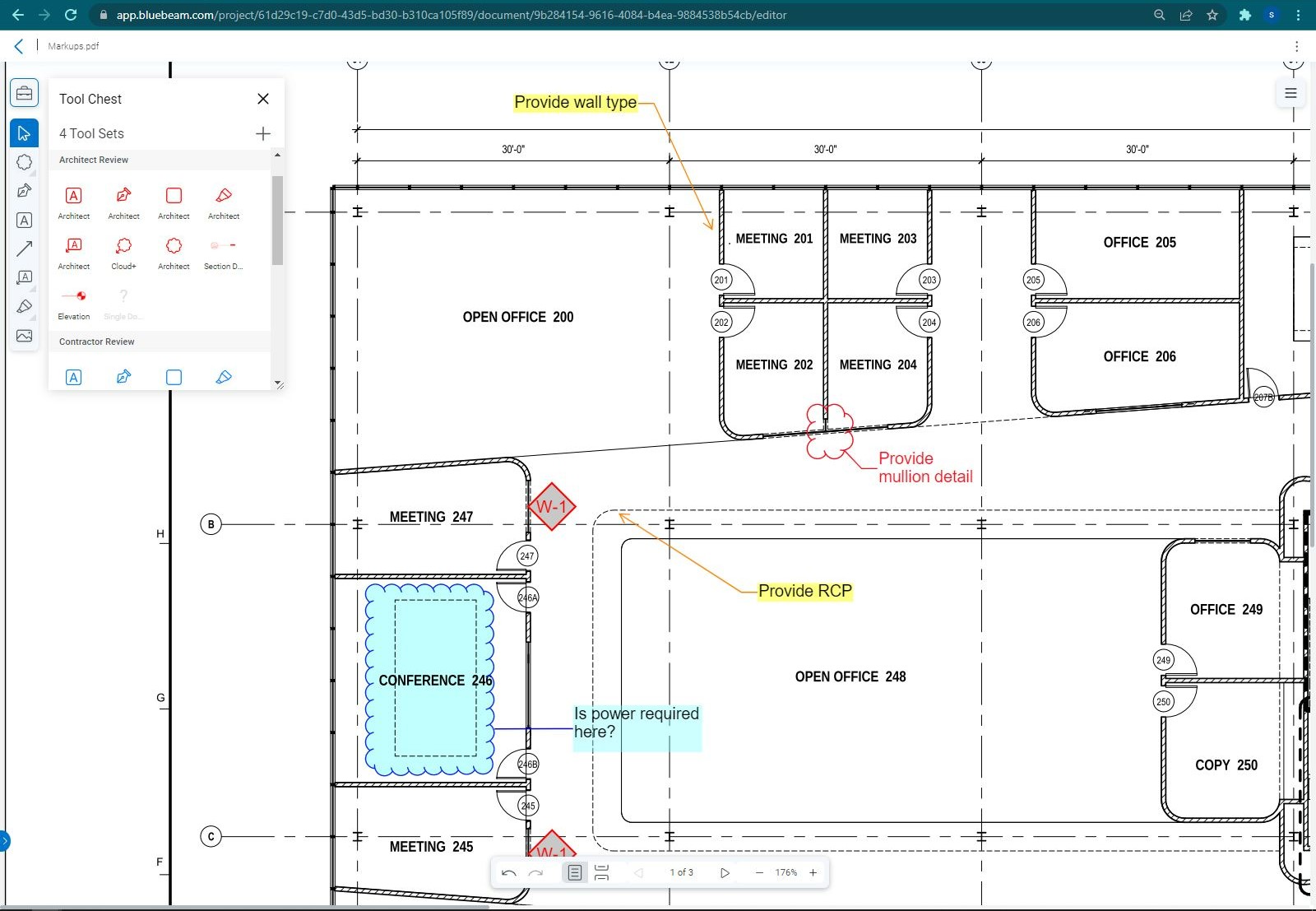
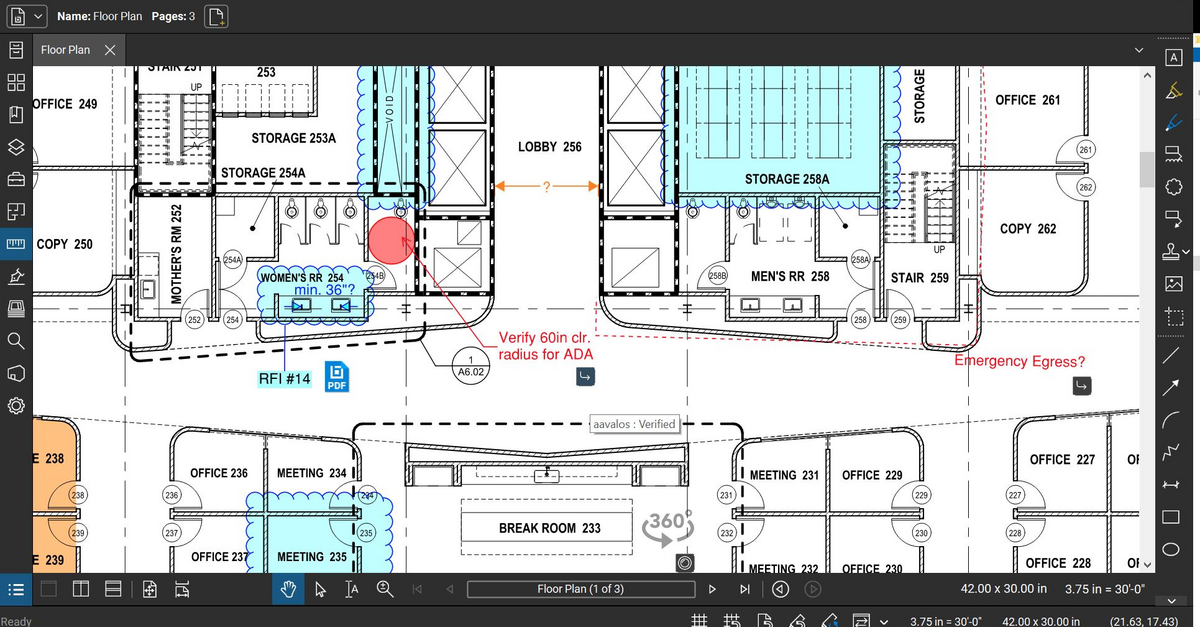
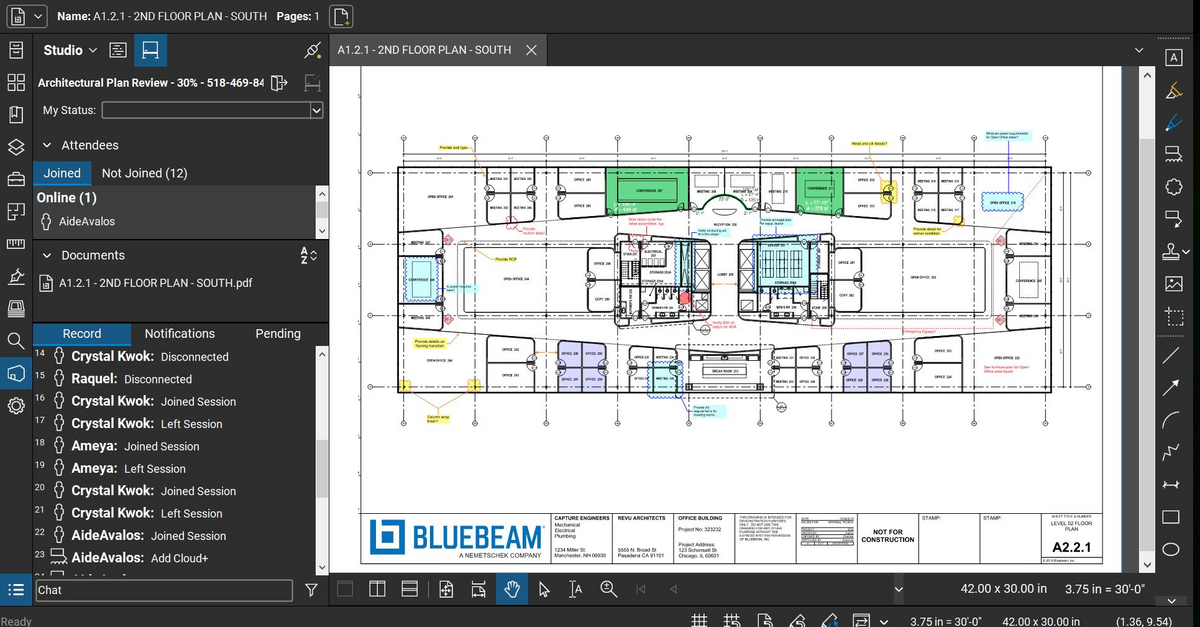
Bluebeam Revu is a PDF management, control, and editing tool. It enables collaboration and markup within shared documents across projects’ life cycles and has takeoff and bid creation capabilities.
$349
per seat
Wondershare PDFelement
Score 8.0 out of 10
N/A
PDFelement is a document management solution from Wondershare Software headquartered in China.
$79.99
per year per user
Pricing
Bluebeam
Wondershare PDFelement
Editions & Modules
Revu Standard
$349
per seat
Revu CAD
$449
per seat
Revu eXtreme
$599
per seat
PDFelement
79.99USD
per year per user
PDFelement
129.99USD
one-time fee per user
Offerings
Pricing Offerings
Bluebeam
Wondershare PDFelement
Free Trial
Yes
Yes
Free/Freemium Version
No
No
Premium Consulting/Integration Services
No
No
Entry-level Setup Fee
No setup fee
No setup fee
Additional Details
—
For Individuals:
Yearly Plan: $79.99/user;
2-Year Plan: $109.99/user
Perpetual Plan(one-time): $129.99/user
For Teams:
Yearly plan starts at $109/year for 1 user
For Education:
Yearly Plan: $47.99/user;
Perpetual Plan(one-time): $99.99/user
More Pricing Information
Community Pulse
Bluebeam
Wondershare PDFelement
Considered Both Products
Bluebeam
Verified User
Anonymous
Chose Bluebeam
I believe Bluebeam is actually easier to learn and use versus Adobe Acrobat. With it’s how to videos and great customer support, there’s basically not a problem that cannot be figured out. As far as PDF modification, I believe Bluebeam’s tools and screen configuration is very …
Bluebeam is targeted towards construction professional and offers features and built-in markups that I use everyday. Acrobat is a generic program that requires more training and set-up for use specific to construction and design. Bluebeam was more cost-effective than Acrobat, …
I haven’t spent enough time with Revit to give a full comparison. But three architects I’ve worked with have all said they enjoy both programs and Bluebeam was highly recommended for my needs in the company.
Years ago I used Adobe which was not well suited for CAD drawings. I soon found Bluebeam which at the time was a wonderful game changer. Sadly, my recent experience has caused me to begin searching elsewhere for new software.
Bluebeam I believe is much better then Smartsheets because there are way more features that just make sense and are construction minded. I am able to host and share these documents with other users who do not need to have a Bluebeam license to view or download them from the …
Bluebeam is a more advanced PDF editor and better suited for the engineering and construction industry. It has far more tools and better capabilities for collaborative viewing, marking up, and sharing of documents.
Much better. The features are greater, the layout is better and you can just do so much more. The features alone and what you can do with it makes it worth it. Also, it allows for you to edit and create in a much more user friendly way. All of our engineers love using it …
Bluebeam Revu has essentially replaced Adobe Acrobat as our default PDF viewer and editor, because its robust suite of architecturally-focused tools allow for better review of documents and creation of simple graphic diagrams. The scale and measurement tools are especially …
PDF file sharing is really easy and simple, so users can markup and others can view them in real-time. Also, editing PDF files to crop, batch, remove, or replace pages is really efficient compared to Adobe Acrobat DC. Plus, the licensing fee is pretty small compared to Adobe …
Bluebeam Revu is a no-brainer in the AEC space. Stop wasting money on owning adobe and Revu. Revu can replace all of your Adobe usage. With a good change management process, Revu can meet the needs of your entire organization. The Bluebeam team will be with you every step …
Revu was much easier to use, more cost-effective, and is more generally used in the construction and design industry than Adobe. We found Adobe to be more of a resource hog, as well as being bloated with offers for other Adobe applications, which many times would slow down a …
Bluebeam is a good in-between of Adobe and Photoshop. If you're not looking to do photo editing, but need more capabilities than just line work, Bluebeam is perfect.
I select Bluebeam Revu when I have to as directed by the client or the owner. Otherwise, when the user does not need such a specific or robust piece of software, I usually go to one of the less expensive competitor's PDF editors. They suite our needs just fine and cost half …
Bluebeam definitely blows Adobe out of the water in the basic to the basic comparison. You will have to do more research on how exactly to use all the tools if you have never used the program before such as myself.
Bluebeam Revu has a much more sophisticated interface that allows you to mark up documents in many different ways. It can store tools for standard markup use. It provides digital signatures which can be very useful for many document types. By creating a Revu studio, multiple …
We've used these other products in conjunction with Bluebeam mainly because Bluebeam lacks RFI/COR/PO/Mark-up/revision tracking, and doesn't handle punch lists or tasks.
The newer Adobe interfaces are poor. Adobe does not do as well with drawing markup or takeoff tools. Adobe does seem to render some drawing files more quickly though. Adobe text document markup feels a bit more polished. Bluebeam was selected for better tools specific to …
This is by FAR the most powerful product that I have used. I have not turned back to Adobe for modifying documents since we purchased Bluebeam. I am not sure of the cost of the program, but sure it is worth it to the company. As to doing take-offs, this is a great tool as well …
Procore is excellent for tracking documents and links. Bluebeam is superior at editing, scaling, and marking up documents. You can track projects of any size at a very low price point with Bluebeam.
There is no comparison. The editing tools, batch tools drafting tools, personal environment profiles, settings, printing, calibrating, direct connecting apps that links Bluebeam to AutoCad and Revit. This is an extremely powerful program that is amazingly helpful and I probably …
PDFelement is the ideal solution for Adobe Acrobat because of its small size, clean interface, quick start, strong features, light system resource usage, and low pricing.
They are doing quite aggressive marketing, therefore it is very present everywhere. Pricing is in the range for private users. If features are improved, I probably would buy it again, otherwise think next time would try the competition (e.g., Nitro).
I used Adobe Acrobat for around 15 years in different large scale companies. But it is too expensive for single users or small enterprises and Adobe offers only yearly subscription which I personally do not like.
Adobe PDF is the alternative for me but much more expensive. It has more features but I don’t need them. For a small business PDFelement's affordability makes it a cost effective option.
I didn't try or buy other programs, but did a good bit of research on them. I went with PDFelement because of the lower pricing, and because of the rich features I learned it had.
I also appreciated the great customer service I received from reps in the community forums, which …
PDFelement has among the several options available in the market, a productivity solution with relevant acquisition costs associated with the benefits offered. Among the functions available in the application, other companies have the same function with lower performance and …
I haven't used any other product besides PDFelement. I found a product that I love and I'm sticking with it. I will say that I went with PDFelement based on reviews and based on the features that this product supplies vs. the others. I trust the company behind PDFelement (been …
As stated before, the mobile application is a great companion to the desktop version. Either one works great in viewing, editing and saving documents. While the measurement tool is handy to have, we have found the precision to be lacking when measuring scaled drawings (construction design drawings). While it is a good rough place to start for measurements, we wouldn't recommend relying on the precision of the measurements taken on something with a very large scale.
PDFelement Pro is well suited for all of our needs and our clients' needs. I bought the Windows version and liked it so much that I purchased the Mac version at the discount that I was offered at checkout. It performs well and is easy to learn and use. Companies could save so much money by using PDFelement instead of Adobe Acrobat Standard/Pro
If you have several tabs open and you try to drag one out for a side by side view then you do not have all the modification options and you have to combine them back together.
There is a lag time when hitting the print option.
There is also a lag time when opening files, sometimes I think the window is frozen.
I wish the basic version also had basic file editing, as in editing a document as Adobe does.
I wish there was a lighter program for just reviewing a document and then to transition seamlessly to an editing mode. It takes a few seconds longer to load than Preview on my Mac, and based on that frustration, I use Preview to view documents.
Bluebeam is a powerful PDF viewer and mark-up tool. We are more familiar with it than Adobe Acrobat Pro or other viewers, and it has more features geared towards construction document managers than Acrobat Pro does.
I'm constantly finding that Bluebeam Revu does more than I knew it could. And when I find something that it can't do, I've found that Bluebeam truly listens to its user base and will work to incorporate any good suggestion when feasible.
There is a lot of learning. Although some of the functions you can probably pick up relatively quickly, some of them, including compressing the size or using a different language, remains a myth to me.
Its hard for me to give a rating on this one as we rarely have to use the support feature for Bluebeam. However, when we have used it, they have been ultra supportive in helping us get exactly what we needed. I know another engineer was trying to figure out a feature and the rep gave a detailed tutorial on how to complete the task
Recently I have had a problem with introducing another laptop to the same license. I wrote an email to the Support Team of Wondershare Software and they successfully fixed the issue in less than 24 hours. Very unusual and impressive.
Bluebeam is a diverse program with many functions and tools, whereas competitive programs only specialize in one or few tasks. Although there are many tools within the program, users can still quickly learn how to use the program to best fit their needs. There is always a help tab for any assistance needed.
I haven't used any other product besides PDFelement. I found a product that I love and I'm sticking with it. I will say that I went with PDFelement based on reviews and based on the features that this product supplies vs. the others. I trust the company behind PDFelement (been using Wondershare Ultimate Video Converter for years), so I trusted the name
A major positive aspect is being able to take your computer home without taking the entire set of paper drawings. They have made it so easy to navigate a set of drawings that I can work at home using only the digital drawings.
Collaboration with owners and architects has been a great feature. Setting up a Bluebeam studio and having everyone get in and mark things up, then having the architect be able to go in and see what markups have been added, has made the constructability review process much much better.
Even when not working on drawings, Bluebeam is a very good tool for working with standard PDF documents. The markup tools are very easy to use.
The negative aspect is the takeoff function because some people would like estimators to use the Bluebeam takeoff because it would make their job easier down the road; however, the actual act of doing a full scale takeoff in Bluebeam would require much more time.