
Lauren Rich, aPHR™
Social Media Manager
Chose Buffer
Sprout social buffers content for accurately then Buffer

| Product | Rating | Most Used By | Product Summary | Starting Price |
|---|---|---|---|---|
 Buffer | Small Businesses (1-50 employees) | Buffer is a social sharing tool. When browsing content, clicking on the Buffer icon automatically stores the content and schedules posts to social media channels throughout the day. | $0 | |
 Coosto | Enterprise companies (1,001+ employees) | Coosto is a single solution for social media applications. Organizations can use this solution to monitor their brand and reputation, respond to questions from their customers, detect leads or plan and publish their social media content in 150 languages and 200 countries. The vendor says their user-friendly interface and unmatched data quality ensures that many people choose their solutions. The vendor says their product is mainly used for: Customer service via… | N/A |
| Buffer | Coosto | |||||||||||||||
|---|---|---|---|---|---|---|---|---|---|---|---|---|---|---|---|---|
| Editions & Modules |
| No answers on this topic | ||||||||||||||
| Offerings |
| |||||||||||||||
| Entry-level Setup Fee | No setup fee | No setup fee | ||||||||||||||
| Additional Details | A discount is offered for annual billing. | Custom Pricing. We look at main application, number of users, etc. API integration, inclusion of offline media, inclusion of geographical data and optional consulting require a small additional fee. | ||||||||||||||
| More Pricing Information | ||||||||||||||||
| Buffer | Coosto | |
|---|---|---|
| Considered Both Products |  Buffer Lauren Rich, aPHR™ Social Media Manager Chose Buffer Sprout social buffers content for accurately then Buffer  Allie Cobb Digital Director Chose Buffer Buffer is much more affordable than Hootsuite. Another benefit is that Buffer allows more accounts to be loaded onto the platform. Hootsuite charges in tiered levels based on how many accounts you want to load onto the software. This makes it difficult to schedule and post for …  James Crook Business Coach at The Health Leader Co Chose Buffer Buffer's interface when logged in is more beautiful and easier to use than the others I've tried. Especially HighLevel which does a lot of other stuff as well - the difference with Buffer is that it is ONLY for social scheduling so it does that really well and the entire screen …  Jesse Sumrak Senior Content Marketing Manager Chose Buffer I think Sprout Social and Hootsuite provide more comprehensive tools and analytics, but they have more expensive plans that don't cater to businesses of all sizes. Plus, all of that complexity can make it hard to find what you're looking for. That's where Buffer excels. It's …  Luke Paulin Marketing Director Chose Buffer Buffer had the best free version, but Zoho social had the most social media channels available in the price range. Hootsuite was the tool we first wanted, but the price was considerably more, for tools we are not sure if we need at this time.  Trigun Prakash Computer software Chose Buffer Both software are good, but personally I like Buffer just because it is easy to use and it has good costumer support. Buffer lets me put my updates on a schedule so I can set it up for weeks at a time and then not have to worry.  Mishka Panwar Researcher Chose Buffer Both of them are great at their own levels but I find Buffer quite easy to go and the way they perform every task is quite like my way of work so I personally like Buffer more, it has helped me save my most of the time hence improved my work efficiency and also the creativity …  Joseph Kahn President and Director of Marketing Chose Buffer We tried CloudCampaign and Social Bee (that wasn't on the list above) - and they all are good. Buffer is in a class of its own and super useful to individuals and companies alike.  Alex Chaidaroglou Director & Co-Founder Chose Buffer I haven't really tried a Buffer alternative since it works for us and our needs are very simple.  Ameer Hamza Corporate Communications Manager Chose Buffer Both Hootsuite and Buffer are excellent tools but they both target different users. If you're an individual user, small firm, or non-profit and you want to simplify your social media challenges, then Buffer is likely your best option. Hootsuite on the other hand is more likely …  Harsh Hingorani ⚡️ Product Marketing Manager Chose Buffer The reason for selecting Buffer was mainly due to good UI and easy to use functionality. Hootsuite was not that user friendly and a bit complicated. Buffer is more straight forward and easy to use when you compare it with Hootsuite. Also, I like Buffer's mobile friendliness …  David Fox President | Sales & Marketing Advisor Chose Buffer We have not used any other similar products to manage, organize, schedule, and analyze our social media posting. We have used other posting platforms within the channels themselves, however. Facebook is slightly more advanced than Buffer for posting on Facebook — but that is …  Ronnie Rask Director of Marketing Chose Buffer The price point is very affordable compared to other products that offer more features but charge a lot more. For my entire team, the price point has made it easy to get a good ROI. More than anything, it allows us to do what's necessary. Hootsuite definitely provides more … |  Coosto  Bram Koopman Marketeer Chose Coosto Coosto is much more user friendly and more complete. |
| Buffer | Coosto | ||||||||||||
|---|---|---|---|---|---|---|---|---|---|---|---|---|---|
| Publishing |
| ||||||||||||
| Reporting/analytics |
| ||||||||||||
| Account management |
|
| Buffer | Coosto | |
|---|---|---|
| Small Businesses |  CoSchedule Marketing Suite Score 10.0 out of 10 |  Simplify360 Score 7.8 out of 10 |
| Medium-sized Companies | CoSchedule Marketing Suite Score 10.0 out of 10 |  Mention Score 9.4 out of 10 |
| Enterprises |  Social Suite by Reputation.com Score 9.4 out of 10 | Social Suite by Reputation.com Score 9.4 out of 10 |
| All Alternatives | View all alternatives | View all alternatives |
| Buffer | Coosto | |
|---|---|---|
| Likelihood to Recommend | 8.8 (0 ratings) | 10.0 (0 ratings) |
| Likelihood to Renew | 8.0 (0 ratings) | - (0 ratings) |
| Usability | 9.0 (0 ratings) | - (0 ratings) |
| Availability | 8.2 (0 ratings) | - (0 ratings) |
| Performance | 8.0 (0 ratings) | - (0 ratings) |
| Support Rating | 6.1 (0 ratings) | - (0 ratings) |
| Implementation Rating | 8.0 (0 ratings) | - (0 ratings) |
| Configurability | 10.0 (0 ratings) | - (0 ratings) |
| Product Scalability | 8.6 (0 ratings) | - (0 ratings) |
| Buffer | Coosto | |
|---|---|---|
| Likelihood to Recommend |
|
|
| Pros |
|
|
| Cons |
 Michelle Green Arnson Marketing and Communications Manager |
Bram Koopman Marketeer |
| Likelihood to Renew |
 Deanna Ayres SEO/Growth Hacker & Community Outreach Supervisor | No answers on this topic |
| Usability |
| No answers on this topic |
| Reliability and Availability |
 Len Gordon Art Relations | No answers on this topic |
| Performance |
| No answers on this topic |
| Support Rating |
| No answers on this topic |
| Implementation Rating |
| No answers on this topic |
| Alternatives Considered |
Mishka Panwar Researcher |
|
| Scalability |
Len Gordon Art Relations | No answers on this topic |
| Return on Investment |
Joseph Kahn President and Director of Marketing |
|
| ScreenShots | Buffer Screenshots      | Coosto Screenshots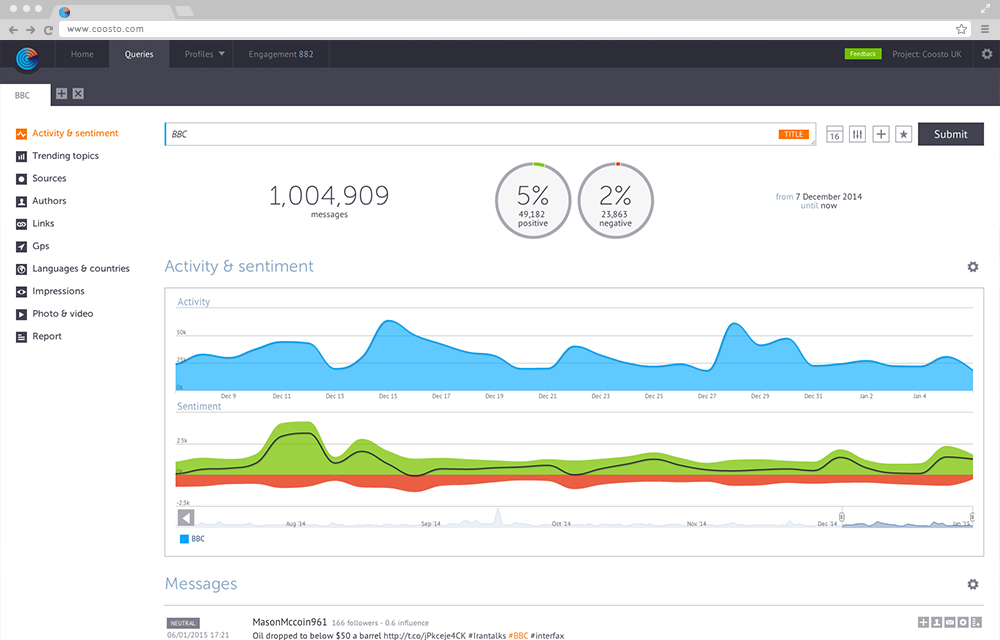      |