Calabrio ONE vs. NiCE CXone Mpower

Overview
ProductRatingMost Used ByProduct SummaryStarting Price
Calabrio ONE
Score 9.8 out of 10
N/A
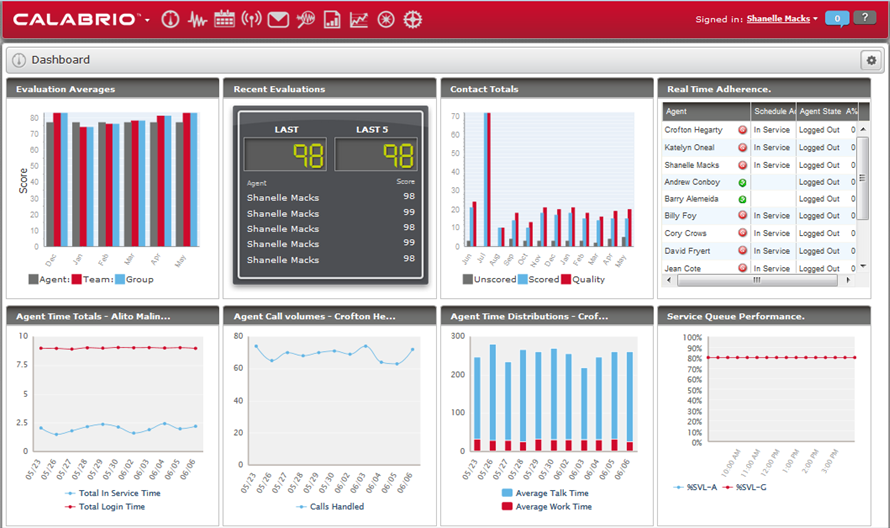
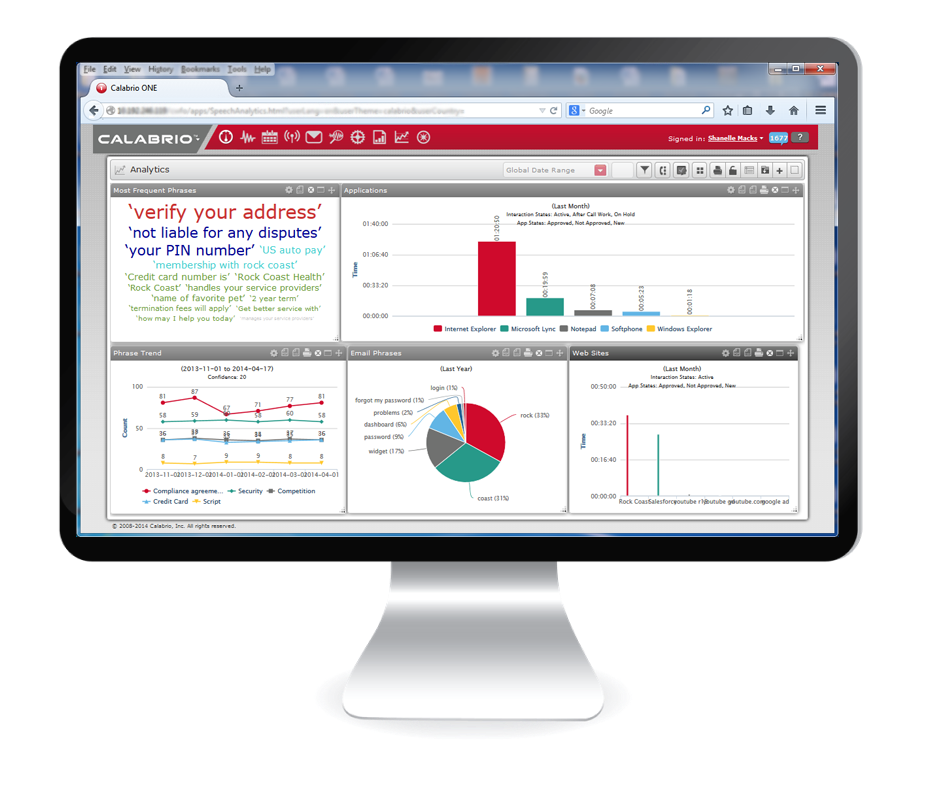
Calabrio One is a workforce optimization (WFO) platform for call centers, combining workforce management with call recording and analytics, from Calabrio headquartered in Minneapolis, MN.N/A
NiCE CXone Mpower
Score 8.9 out of 10
N/A
NICE CXone Mpower is a cloud-based contact center platform that manages customer interactions across multiple communication channels. It includes features such as automatic call distribution (ACD), interactive voice response (IVR), omnichannel routing, workforce optimization, feedback management, and interaction analytics.
$71
per month per user
Pricing
Calabrio ONENiCE CXone Mpower
Editions & Modules
No answers on this topic
CXone Mpower Digital Agent
$71
per month per user
CXone Mpower Voice Agent
$94
per month per user
CXone Mpower Omnichannel Agent
$110
per month per user
CXone Mpower Essential Suite
$135
per month per user
Cxone Mpower Core Suite
$169
per month per user
CXone Mpower Complete Suite
$209
per month per user
CXone Mpower Ultimate Suite
$249
per month per user
Offerings
Pricing Offerings
Calabrio ONENiCE CXone Mpower
Free Trial
NoYes
Free/Freemium Version
NoNo
Premium Consulting/Integration Services
NoNo
Entry-level Setup FeeOptionalNo setup fee
Additional Details
More Pricing Information
Community Pulse
Calabrio ONENiCE CXone Mpower
Considered Both Products
Calabrio ONE
Chose Calabrio ONE
We actually switched to Verint monet thinking that they will stack up against Calabrio but I guess it was a bad decision.
Chose Calabrio ONE
Both applications are used for different jobs. They serve different purposes and they do their jobs well.
Chose Calabrio ONE
It was better and more reliable/resilient then both of the products stated above. It is in-house though while the competition was cloud-based. Both of the platforms mentioned above had more problems and more failed screens then Calabrio.
Chose Calabrio ONE
They are very similar in many areas. Reporting is about the same, and I can see why some people may go for the bigger names. But one of the things that I have noticed that has made a difference is the way that the tool evolves with you. A lot of the features that Calabrio has …
Chose Calabrio ONE
Switched over from an older system that was often confusing, had an old look and feel to it, and bad customer service.
Chose Calabrio ONE
Calabrio One has far better customer engagement and customer service than the previous vendor. Calabrio is very easy to use and quick to obtain search results. We have had great success with Calabrio and are very happy with our move.
Chose Calabrio ONE
Head and shoulders above our Altigen configuration is Calabrio - more reliable, more features, reporting, evaluation abilities, ease of access, scalability. The list goes on and on. Calabrio has also provided a more centralized way to administrate recordings across the company …
Chose Calabrio ONE
I have approximately a decade of experience using the Aspect Workforce management software package. Aspect has many power user functions that are not available in Calabrio. The strength of Aspect is that is has extensive power user options. The drawback to Aspect is that to be …
Chose Calabrio ONE
Calabrio is much easier to use, more dependable and an overall better product.
NiCE CXone Mpower
Chose NiCE CXone Mpower
Pros of NICE when compared to Verint:
1. Better options to manage leaves, schedules and update employee settings, line of businesses etc
2. The managers and supervisors have more powers in terms of scheduling, updating leaves, adherence etc
Chose NiCE CXone Mpower
Both were great but desktop only supported limited interactions. Nice enlighten AI is more up to date and supports many different channels which is great when your business or company is more robust and utilizes many methods.
Chose NiCE CXone Mpower
When it comes to this specific situation (cell centers) NICE definitely has an ADP beat. The analytics, scheduling, and forecasts are extremely well-tailored for this situation. ADP has a more comprehensive solution in my opinion - I feel their UI and mobile app are also more …
Chose NiCE CXone Mpower
We have not had a chance or a need as of yet to review or try any other products like NICE Uptivity.
Chose NiCE CXone Mpower
I could say that it is compared in a more personal way, since it is not a very well-known tool, many of its functions are for more private teams and for specific organizations.
Chose NiCE CXone Mpower
NICE inContact is for our soft phone or virtual phone. They have their own functions in our organization. They are both useful and easy to use. Two different functionality but same NICE. Very friendly tools and recommend this two in their platform. NICE software are really …
Chose NiCE CXone Mpower
While custom reports update a much faster rate than inContact, the scope of pre-built reports is much larger in PureConnect and it is much easier to schedule reports and deliver them via email attachment. PureConnect has issues with scheduled reports, sometimes they run later …
Chose NiCE CXone Mpower
It had the best features for the pricepoint.
Chose NiCE CXone Mpower
Superior to Verint in its agent self-service options and the ability to get more detailed schedule activity. Strongly compares with Aspect. Specific features that work for a given business will separate the best choice.
Chose NiCE CXone Mpower
Interactive Intelligence
Cisco Express and Enterprise.
Chose NiCE CXone Mpower
inContact blows ININ away (now bought by Genesys systems). ININ requires a lot of money to upgrade, wouldn't do any customization for free, and would not be able to integrate as nice with Salesforce.
Chose NiCE CXone Mpower
Cosmo had zero support and growth flexibility
Chose NiCE CXone Mpower

Uptivity by far works better than NICE. I have many issue when trying to pull up calls, locate calls, and evaluate calls within the NICE platform however with the simple logic of Uptivity I never have issues.


Chose NiCE CXone Mpower
I have used numerous amounts of text analytics, including: Clarabridge, Polyvista, SPSS, and other tools in the past. Attensity was by far the best of the lot. It was a bit pricier than some of the other solutions out there, but if you need a positive return on understanding …
Chose NiCE CXone Mpower
We looked at several tools for turning text into data.
The easy to understand tools had limited functionality, the analytical tools required a PHD to attend the sales pitch.
Attensity had taken the approach of including reporting and alerting with their text engine.
Features
Calabrio ONENiCE CXone Mpower
Contact Center Software
Comparison of Contact Center Software features of Product A and Product B
Calabrio ONE
-
Ratings
NiCE CXone Mpower
9.4
Ratings
13% above category average
Agent dashboard00 Ratings9.20 Ratings
Validate callers00 Ratings9.60 Ratings
Outbound response00 Ratings9.50 Ratings
Call forwarding00 Ratings9.30 Ratings
Click-to-call (CTC)00 Ratings9.20 Ratings
Warm transfer00 Ratings9.80 Ratings
Predictive dialing00 Ratings9.60 Ratings
Interactive voice response00 Ratings9.50 Ratings
REST APIs00 Ratings9.30 Ratings
Call scripts00 Ratings9.20 Ratings
Call tracking00 Ratings9.50 Ratings
Multichannel integration00 Ratings9.30 Ratings
CRM software integration00 Ratings9.00 Ratings
Workforce Optimization (WFO)
Comparison of Workforce Optimization (WFO) features of Product A and Product B
Calabrio ONE
-
Ratings
NiCE CXone Mpower
9.4
Ratings
14% above category average
Inbound call routing00 Ratings9.50 Ratings
Omnichannel inbound routing00 Ratings9.20 Ratings
Recording00 Ratings9.60 Ratings
Quality management00 Ratings9.10 Ratings
Call analytics00 Ratings9.20 Ratings
Historical reporting00 Ratings9.40 Ratings
Live reporting00 Ratings9.40 Ratings
Customer surveys00 Ratings9.60 Ratings
Customer interaction analytics00 Ratings9.70 Ratings
Best Alternatives
Calabrio ONENiCE CXone Mpower
Small Businesses
8x8 Contact Center
8x8 Contact Center
Score 7.5 out of 10
CloudTalk
CloudTalk
Score 7.2 out of 10
Medium-sized Companies
Eleveo
Eleveo
Score 10.0 out of 10
CloudTalk
CloudTalk
Score 7.2 out of 10
Enterprises
Calabrio WFM
Calabrio WFM
Score 8.5 out of 10
Google Cloud Contact Center AI
Score 7.0 out of 10
All AlternativesView all alternativesView all alternatives
User Ratings
Calabrio ONENiCE CXone Mpower
Likelihood to Recommend
8.9
(0 ratings)
9.7
(0 ratings)
Likelihood to Renew
8.0
(0 ratings)
10.0
(0 ratings)
Usability
7.0
(0 ratings)
9.3
(0 ratings)
Availability
-
(0 ratings)
8.5
(0 ratings)
Performance
-
(0 ratings)
7.9
(0 ratings)
Support Rating
6.0
(0 ratings)
9.1
(0 ratings)
In-Person Training
-
(0 ratings)
8.7
(0 ratings)
Online Training
-
(0 ratings)
8.4
(0 ratings)
Implementation Rating
7.0
(0 ratings)
8.1
(0 ratings)
Configurability
-
(0 ratings)
8.5
(0 ratings)
Ease of integration
-
(0 ratings)
7.3
(0 ratings)
Product Scalability
-
(0 ratings)
7.6
(0 ratings)
Vendor post-sale
-
(0 ratings)
7.9
(0 ratings)
Vendor pre-sale
-
(0 ratings)
7.9
(0 ratings)
User Testimonials
Calabrio ONENiCE CXone Mpower
Likelihood to Recommend
If your company uses phones and needs recordings, the Calabrio ONE Quality Management is for you. Period. End of argument. It is hands down one of the best products of its type on the market. If you don't have a bunch of people you are needing to rotate through scheduling and no part time people, the WorkForce Management portion may not be for you as much as someone who has 200 employees in a contact center working across 3 shifts and needs to ensure phones are always covered at the right times.
Read full review
NICE CXone Mpower offers a great suite of products and tools appropriate for contact centers. It is a one stop shop for all of the monitoring, scheduling, reporting, and quality tools a large or small contact center may need. It is very feature rich and has many components, some of which we haven't even grown to adopt yet but may in the near future.
Read full review
Pros
  • The audio and screen recordings are done well at least with the collaboration with the Cisco platform.
  • The platform is stable and does not fail much. The most resilient program for screen capture I have seen so far and I have used four platforms for QM.
  • It is customizable and management of the platform is not that difficult.
Read full review
  • Workforce management is very easy to use
  • Quality management allows evaluations to be objective
  • Real time adherence allows me to know what everyone on the team is doing at a glance
  • Reports allow us to evaluate the performance and helps us improve
Read full review
Cons
  • Our Version 9.3 needs a lot of improvement with sorting, filtering capabilities that I believe later versions address.
  • Version 9.3 does not send notice emails to agents when a schedule has been changed. Our former software did. I believe newer versions have this feature.
  • No "what if" function or module to test schedules/forecasts without Agents seeing their own schedules. If you want to "play with" scenarios, you have to use a time frame/schedule far into the future to prevent Agents from seeing this. I don't believe any of the newer versions have addressed this problem/issue.
  • Agents are not able to submit Shift Preferences in Calabrio. Our former WFM software had that capability. Now I have to record Agents' preferences on an Excel spreadsheet and schedule regular intervals for which they can submit their preferences.
Read full review
  • There can be changes in interface of the app, however it's still very good
  • I would appreciete detailed web page with all necessary information, but when I need anything, the customer support is very quick and provide all the information
  • Hardly to find any other :)
Read full review
Likelihood to Renew
Because I think they're ready for a multi-skilled contact center support or OMNI
Read full review
Nice made it possible for employees to work from anywhere with access to the internet, it made it possible to extract data from contacts in a very thorough way. In addition, the meticaes can be fully customized and the day-to-day monitoring of the operation is more visible.With nice, contacts with clients abroad became easier.
Read full review
Usability
It would've been a higher rating if they're able to partner up with other platforms like Liveperson chat support and have a better sense of urgency when it comes to resolving issues
Read full review
NICE CXone offers a very intuitive interface that is easy for our customers to understand in a short period of time and easy for us to administrate. All tools like Admin, ACD, Reporting, and Analytics are very user-friendly, and with little training, customers can reap the benefits of the tools.
Read full review
Reliability and Availability
No answers on this topic
NICE inContact CXone is available when you need it. I have been using it for about a year and I have never suffered any issues that caused my not to have access to the product. If there are updates, they must be downloaded and install in the background because I do not see them
Read full review
Performance
No answers on this topic
NICE inContact CXone performs very well even on old computers that are limited in resources. I use a older computer with limited memory and it seems to handle NICE inContact CXone very well in most cases. There will be times when it acts up for whatever reason bust over ninety percent of the time.
Read full review
Support Rating
Because, it took them time to coordinate back some updates for us when we had to report a few major issues. ie Volume data feed for our Email support/channel. I like the webinars, however to keep the community alive. I hope they improve the training modules too and how they training new WFM guys as part of their package
Read full review
inContact only allows specific users to contact them for support. Even though I use the product daily and it accounts for a large amount of my workload, I still have to contact an authorized user to create an incident. These users are managers and their schedules are very busy. This can result in delays in incidents being opened and resolved.
Read full review
In-Person Training
No answers on this topic
The In-person training was fine for a general overview. I think it would have been really helpful to have a review of pre-built reports and how to use them as tools.
Read full review
Online Training
No answers on this topic
The training was very brief, teaching how to use the features for my role. Over time, I discovered many other features that were not explained. I believe that if it were done more completely, it would know the features earlier. An example of this is the productivity page, where I needed to measure together with my colleagues, to know the real information that the screen brought and, to my surprise, it was very useful.
Read full review
Implementation Rating
No I don't have as I wasn't part of the implementation
Read full review
We love the use of our new tools. However, NICE staff turnover was frustrating. We lost ground each time a new team took over. Some people were good some were not as much. Some people did great training while others were not as helpful
Read full review
Alternatives Considered
Calabrio One has far better customer engagement and customer service than the previous vendor. Calabrio is very easy to use and quick to obtain search results. We have had great success with Calabrio and are very happy with our move
Read full review
When it comes to this specific situation (cell centers) NICE definitely has an ADP beat. The analytics, scheduling, and forecasts are extremely well-tailored for this situation. ADP has a more comprehensive solution in my opinion - I feel their UI and mobile app are also more user-friendly. But in terms of performance management functionality, NICE has a more robust system and is able to create additional metrics if we need them When I used ADP there were no custom options available.
Read full review
Scalability
No answers on this topic
The scalability is awesome because of the multiple uses it is able at performing for users. A large organization with several user can use this product in the same fashion that a smaller organization could. I believe the larger organization would see more benefits because of the users ability between communication coworkers
Read full review
Return on Investment
  • A positive return that we have had is the ability to see the portion of the day that we are likely to be over and under staffed and use that data to modify schedules to allow for overtime or additional time off of the phones.
  • A negative impact that we have had is the additional use of WFM man hours to manually make changes to individual schedules since there is not a good option to quickly adjust several simultaneously.
  • Being able to monitor agent calls and activity has given us the ability to retain and promote high performing agents and remove agents that are not well suited to the contact center.

Read full review
  • WFM and net staffing bar have allowed us to see hour by hour if we are over or under-staffed. This keeps us on track with our SLAs.
  • The ability to evaluate calls and have the reps review the evaluations has been a crucial part of keeping our KPI where it needs to be.
Read full review
ScreenShots

Calabrio ONE Screenshots

Screenshot of Screenshot of Screenshot of

NiCE CXone Mpower Screenshots

Screenshot of a holistic view of omnichannel call center metrics, with insights for everyone in the contact center. The CXone Mpower Dashboard aggregates both real-time and historical cross-domain data.Screenshot of CXone Mpower Copilot for Agent, which empowers agents with smarter interactions, personalized coaching, and automation opportunities.Screenshot of the CXone Mpower AgentScreenshot of CXone Mpower Orchestrator, a tool that does not require programming skills, but instead empowers everyone—from business user to routing flow programmer—to build and manage routing flows for all channels.Screenshot of CXone Mpower Interaction Analytics, used to get actionable insights from every voice, digital, and self-service customer interaction.Screenshot of CXone Mpower Performance Management, which aligns employee performance, contact center goals, and customer expectations with continuous improvement.