TrustRadius: an HG Insights company

Calabrio ONE

Score9.7 out of 10

42 Reviews and Ratings

What is Calabrio ONE?

Calabrio One is a workforce optimization (WFO) platform for call centers, combining workforce management with call recording and analytics, from Calabrio headquartered in Minneapolis, MN.

Media

1 / 3

My Calabrio ONE Review

Use Cases and Deployment Scope

We use Calabrio ONE to communicate each of our employees' schedules and days off. Some issues we may face as a business are employees not being scheduled how they want or wish. Another issue is employees had to send us emails with their preferred shift or day off and this is time-consuming and causes delays. With Calabrio ONE, employees are now able to view each other's schedules and submit shift trade requests. The request is immediately sent to the other party and once accepted the immediate supervisor is acknowledged and can either accept or decline.

Pros

  • Submit shift trade requests.
  • At home access.
  • Very user friendly.

Cons

  • Requests are automatically declined with supervisor's acknowledgement.
  • Automatically changes schedules.

Most Important Features

  • Schedule viewing.
  • Shift Trade.
  • Day off requests.

Return on Investment

  • More effective work schedules.
  • Better communication.
  • Greater outcome.

Alternatives Considered

NICE Adaptive WFO

Other Software Used

Playvox, Calabrio Teleopti WFM, Outlook4Gmail

Calabrio ONE is a great tool for businesses!

Pros

  • Creating consistent schedules
  • Having a process to create trade and time off requests

Cons

  • The process to request time off or a trade request is a little confusing and I wish it could be simplified or reworded.

Return on Investment

  • It's helped our business run smoothly

Alternatives Considered

Kronos Workforce Central

Other Software Used

Kronos Workforce Central

A reliable and resilient in-house product with good Support

Pros

  • The audio and screen recordings are done well at least with the collaboration with the Cisco platform.
  • The platform is stable and does not fail much. The most resilient program for screen capture I have seen so far and I have used four platforms for QM.
  • It is customizable and management of the platform is not that difficult.

Cons

  • The platform at my current levels does not support NAT, not sure if the latest versions do.
  • The service when running is resilient but can fail to start up sometimes, especially when there are windows updates that happen. A delayed service start did the trick for us regarding this disadvantage.
  • The storage of files could have a better file structure based on date/time.

Return on Investment

  • It worked well for a client/call center that needed 100% call recordings. Now, it did not achieve 100% but it was pretty close and saved us penalty fees in general by meeting our SLAs.

Alternatives Considered

Genesys PureConnect and NICE inContact CXone

Other Software Used

NICE inContact CXone, Genesys PureConnect

Calabrio ONE WFM v9.3

Pros

  • The Copy Schedule feature has definitely been a plus. We did not have that feature in our former WFM software.
  • The particular window views for the Scheduler Role are more aesthetic/user friendly than our former WFM software.
  • Being able to add activities, exceptions or projects in as little as 5 minute increments is a plus.

Cons

  • Our Version 9.3 needs a lot of improvement with sorting, filtering capabilities that I believe later versions address.
  • Version 9.3 does not send notice emails to agents when a schedule has been changed. Our former software did. I believe newer versions have this feature.
  • No "what if" function or module to test schedules/forecasts without Agents seeing their own schedules. If you want to "play with" scenarios, you have to use a time frame/schedule far into the future to prevent Agents from seeing this. I don't believe any of the newer versions have addressed this problem/issue.
  • Agents are not able to submit Shift Preferences in Calabrio. Our former WFM software had that capability. Now I have to record Agents' preferences on an Excel spreadsheet and schedule regular intervals for which they can submit their preferences.

Return on Investment

  • Negative: I've had to create more workarounds and scheduling seems to be more time consuming. However, it has had a positive effect in that some processes have been improved because of the workarounds.
  • Positive: Our former WFM software was not upgraded regularly. We have planned upgrade(s) for Calabrio. I'm looking forward to seeing the improvements made with the newer version.
  • Positive: Calabrio's customer service has been a plus. I believe they listen to what their customers are saying, even when it may be painful, and seem to always be striving to improve their product, and maintain good customer service.

Calabrio ONE... The multidisciplinary tool you were looking for!

Pros

  • Call recording is very easy to navigate and find the calls you are looking for without complicated filters.
  • Planning (Forecasting, Staffing) - The fact that within 5 minutes you can run a forecast, schedule, and know what your needs are... AMAZING!!
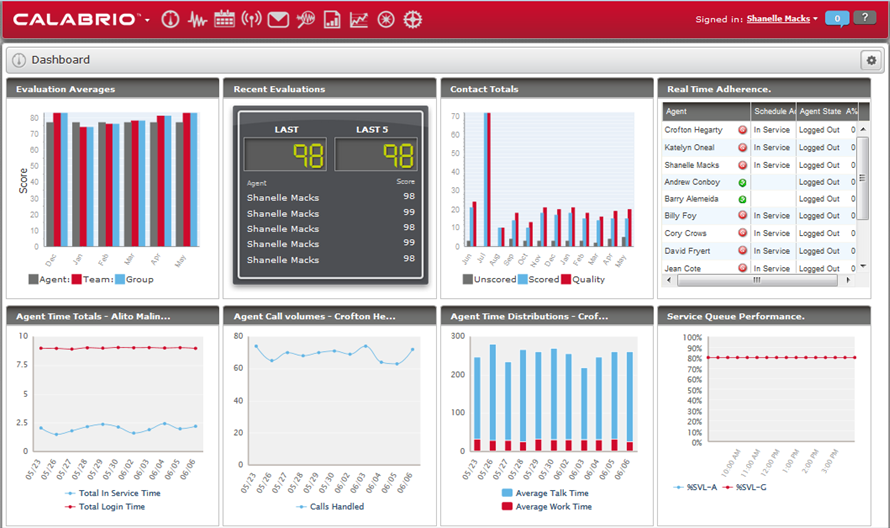
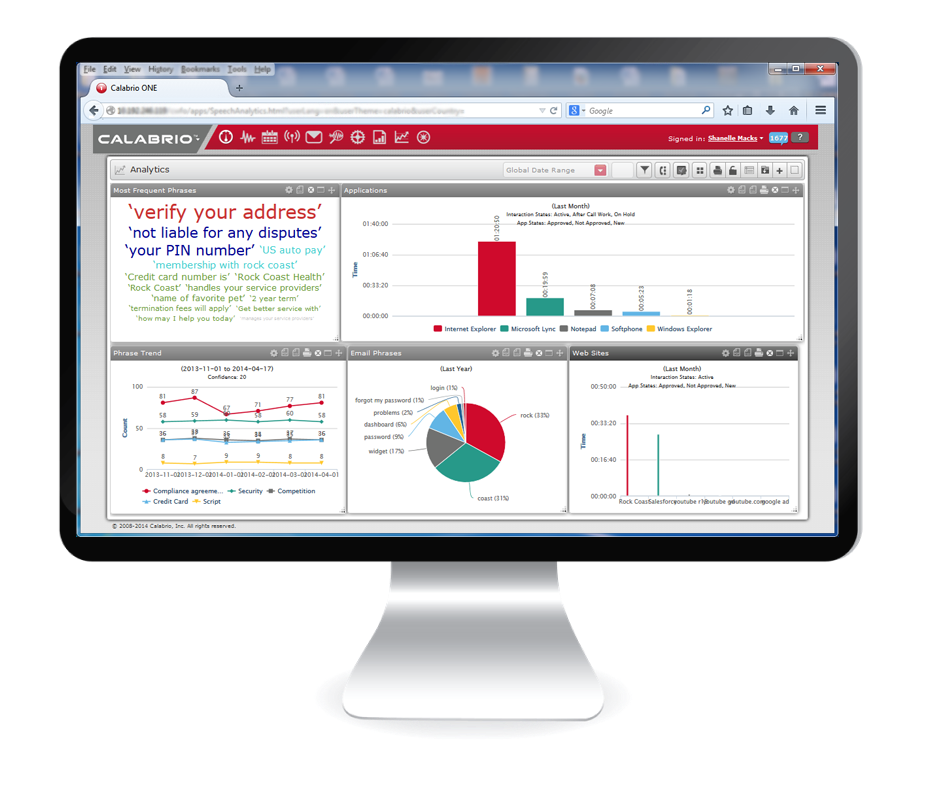
  • Analytics are very intuitive. It is easy to create dashboards so your information is more "digestible," which is a big win. We're still pushing the limits to see what else we can get out of it.
  • Workflows... they sure make your job that much easier!

Cons

  • Reporting I think could be a little more robust, but then again, they do have Calabrio advanced reporting. We are not using it at this time, but it is on my wishlist. The reporting that comes with it is still pretty decent. You can create some good reports for high level information from your automatic call distributor data, but for the Calabrio Data, it is really good. I wish it would have more ways to summarize the information instead of interval. Having that option would be nice.

Return on Investment

  • I think one of the biggest things it brings to the table is helping your staffing, i.e. being able to staff appropriately for the right shifts, rather than guessing. Also, being able to identify issues that can potentially lose you a client, or avoid a much bigger issue by identifying compliance areas.

Alternatives Considered

NICE Workforce Optimization and Verint Workforce Optimization