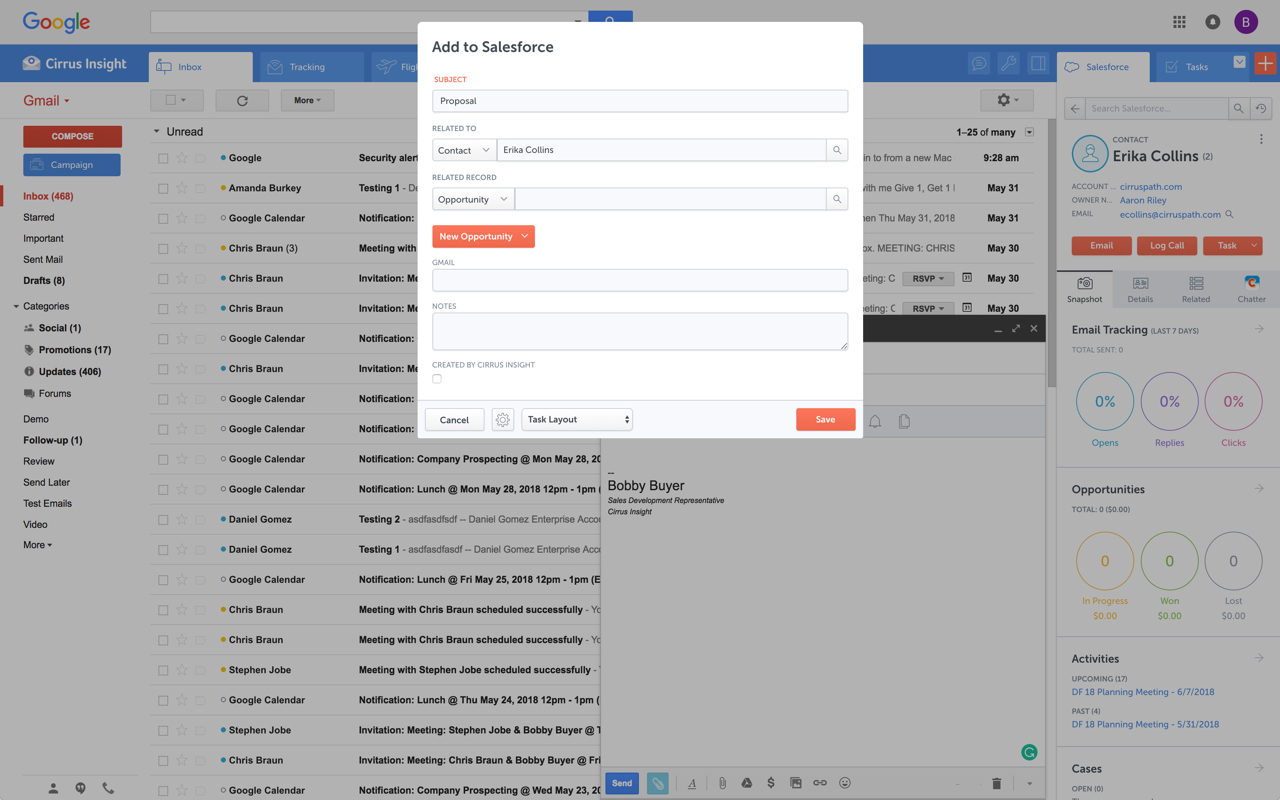
Cirrus Insight integrates Salesforce with Gmail, Google Calendar, and Google Contacts. Instantly View Contextual Salesforce Information in Your Inbox. Save Emails & Attachments to Salesforce with a Click. Sync Your Google & Salesforce Calendars. Create & Edit Salesforce Records on the Fly. Customize Your Salesforce Workflow in Gmail. Add Google Contacts to Salesforce. Salesforce Tasks Integration. Salesforce Templates Integrated with Gmail.
$27
per user/month
Mailtrack
Score 9.7 out of 10
N/A
Mailtrack is a free email tracker for Gmail, boasting over 1,5 million active users. The vendor states users will Ffollow up with more accuracy, find out the moment emails have been read, track the…
We used Cirrus Insights for a period of time and then switched to Salesforce Inbox because Salesforce Inbox was included in our Salesforce license which made the change easier to do since there was no financial impact of making the switch. We didn't spend very much time …
We use Outreach to drive campaigns now. We've been successful with it for several reasons: 1- Our business operations team knows it and is able to coach us on how to use it 2- We use it across several departments (Marketing, SDE team, AE team, Customer Success - though we may be …
Yesware regularly sent me alerts that my emails had been opened by someone who I hadn't sent them to, from locations they couldn't possibly have been. I also don't recall its Salesforce activity logging working as smoothly, though I last used Yesware more than 12 months ago so …
We were just using the free email to Salesforce option, which sends your email to an inbox within Salesforce. Then you are required to address it to the correct location. It's a two step process, so that was cumbersome. Or, some of my coworkers would drag the email onto their …
Cirrus Insight is a light-weight affordable tool that offers reasonable bang for your buck. However it does not have the reliability of other more enterprise-like platforms nor does it have the advanced features that are becoming of an email support tool - such as more advanced …
The decision was made at my current role before I was hired, but I made the decision in a previous role to personally pay for Cirrus Insight, as I found it that valuable. This was after my entire sales team did a trial of Yesware, which I found to be a bit clunky and not as …
While I really liked Toutapp's social integration, it left a lot to be desired with the SFDC integration, which was a higher priority for me. It does what both Boomerang and Yesware do IMO for my purposes in one, easy to use app that doesn't dominate my screen.
Boomerang for Gmail was tested. It works well, but wanted to see what else is available before making any commitment. Mailtrack provides a really nice daily summary of emails sent which Boomerang did not.
There's a free tier. Obviously, there are other things to love, like notifications about your email being read, the fact that if an email hasn't been responded to in some time it gets bumped up. The fact that if other people have Mailtrack you will actually get notified who …
I have not yet used any other product or service other than Mailtrack. The reason why I love Mailtrack is because it was easy to download and even easier to use. What is more, is that it has a lot of really nice features as well, this makes it user friendly too.
I have not used any other tracking software for my emails since this was recommended online and by a few people as well. I've been told that it's a really good tracking software and so far, I have no complaints as such. Cannot comment on how it would measure up against other …
I used the pre-installed/internal features of the "mailing box" for tracking email and correspondence. I can not say it was a perfect experience, (will not use product names), but at the moment MailTrack is better.
To be perfectly honest I have only used the same function on Outlook so I don't have anything else to compare it to. However it stacks up very well against Outlook and some aspects are actually superior.
I used Outlook email many years ago with the feature of receiving a confirmation that the email was read, but these days, Outlook is not working for me, as I want to be able to use the Gmail platform for all the emails of my organization, and Mailtrack is working perfectly for …
My company uses SalesForce and it has an email tracking system. I found it to be unreliable and it seemed that some people were somehow able to get around it letting me know when it was opened. It just always should unopened, even after I had gotten a reply from my email.
Mailtrack is the first program I have ever utilized as a tracking system, and I have no intention to utilize anything else. I am perfecting satisfied with it, as it has delivered everything that I have been seeking in an email tracking service. I would highly recommend this …
I have not used any other product except Mailtrack. Previously MS Outlook had the feature of read receipt. This feature got lost when I switched to Web based Gmail which doesn't have this feature.
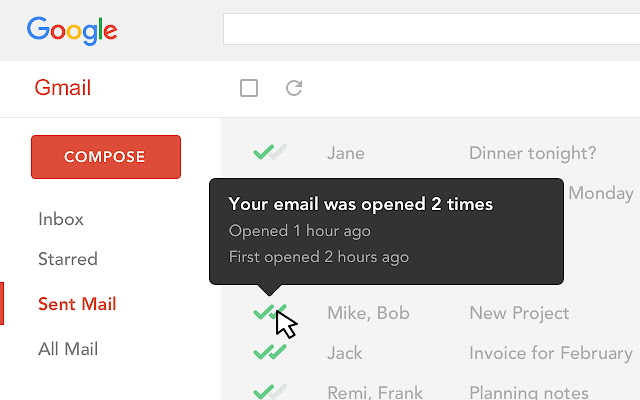
Basically I have not used any other product for email tracking before this. I am not aware about other competitors' features and usability. But I am completely satisfied with Mailtrack because of its simple usability. It just shows us using green ticks like WhatsApp whether a …
I haven't used any email-tracking software in the past few years. Last time I used one was many years ago, and unfortunately, I don't remember the name. But I do remember that they didn't allow you to remove the watermark, which is when I stopped using it because it was …
For someone who uses both Gmail and Salesforce as part of their main role, this software is an invaluable connector for them both. Some of the features are also not Salesforce specific - such as the Meeting Scheduler, which has proved invaluable to me, and I would recommend to any Gmail user who frequently set up meetings (either internally or externally).
It is critical in Sales to understand if someone received and read the email you sent, and Mailtrack is perfect for this. It is not a critical tool when you are receiving emails but definitely a critical tool when sending emails and you need to know the status and to understand if they even read what you sent.
Log email to Salesforce. You click one button and it logs for you. This is easier than adding the BCC email address that Salesforce provides as a way to log email.
Track views and engagement on these emails. It's nice to know if the email was opened and if links were clicked.
Update quick fields in Salesforce directly from their inbox using Cirrus. This prevented reps from needing to click into Salesforce, wait for it to load, then update fields like the phone number or name.
If the rep did need to open Salesforce, Cirrus provides a quick button to navigate to the Lead/Contact/Opportunity page quickly.
It is the best google to salesforce integration on the market. support is incredibly responsive and very helpful. They are constantly adding new features, and the current feature set is well beyond anything else that is currently offered in the market
Very easy to use. Everything opens in a familiar interface right inside the google apps sidebar. It brings in salesforce records, so as long as you know google apps / gmail and salesforce you'll be all set. It's point and click.
I would rate Mailtrack's overall usability as a ten out of ten. The reasons for this are actually quite simple. For now, only I have been using Mailtrack. However, looking at the rather easy to use characteristics Mailtrack has to offer, I would not hesitate to recommend it to the rest of my colleagues.
This rating is fully deserved for the reasons I mentioned earlier. Namely, firstly, ease of use. Secondly, the reliability and speed of the application. Thirdly, the unobtrusiveness of its functioning. Fourth, the positive effect that the application has on the process of management communication between company employees. Fifth, the overall usability of the application due to the minimum settings.
The plugin is installed inside your internet browser as an extension/add-on. It can be found in most add on stores and is easy to install. Usually just a few clicks. It handles authorization for you once you sign in, and then takes care of all the rest. It couldn't be easier to get working right out of the box. You're up in running in less than 5 minutes.
Yesware regularly sent me alerts that my emails had been opened by someone who I hadn't sent them to, from locations they couldn't possibly have been. I also don't recall its Salesforce activity logging working as smoothly, though I last used Yesware more than 12 months ago so my memory isn't as fresh as it could be
The biggest alternatives I've tried are whole email systems - Polymail and Newton. Newton was bar none the best email handling application AND the best email tracker, however, unfortunately, they went out of business at the end of summer 2018. Mailtrack is different because it only does one thing, it tracks email. Without Newton (Polymail is also iOS only, and expensive), Mailtrack is really the only decent solution for email tracking without buying a big system like a CRM. I didn't want to pay $100+/month for user seats, I just wanted to track my own emails for some better intel. That's what Mailtrack does, and that's what Mailtrack is priced to do.
After I started using the Mailtrack, the responses to my emails increased by at least 30%.
Once I submitted/sent an important email and got the notification that the email was sent, I feel safe that my email/request has been processed/viewed without being worried that the email went to the spam box.