Basecamp is a web-based project-management tool. Basecamp offers features standard to project management platforms, as well as mobile accessibility, unlimited users, and 3rd party integrations. Basecamp is priced by space requirements and concurrent projects.
$15
per month per user
ClickUp
Score 8.5 out of 10
Small Businesses (1-50 employees)
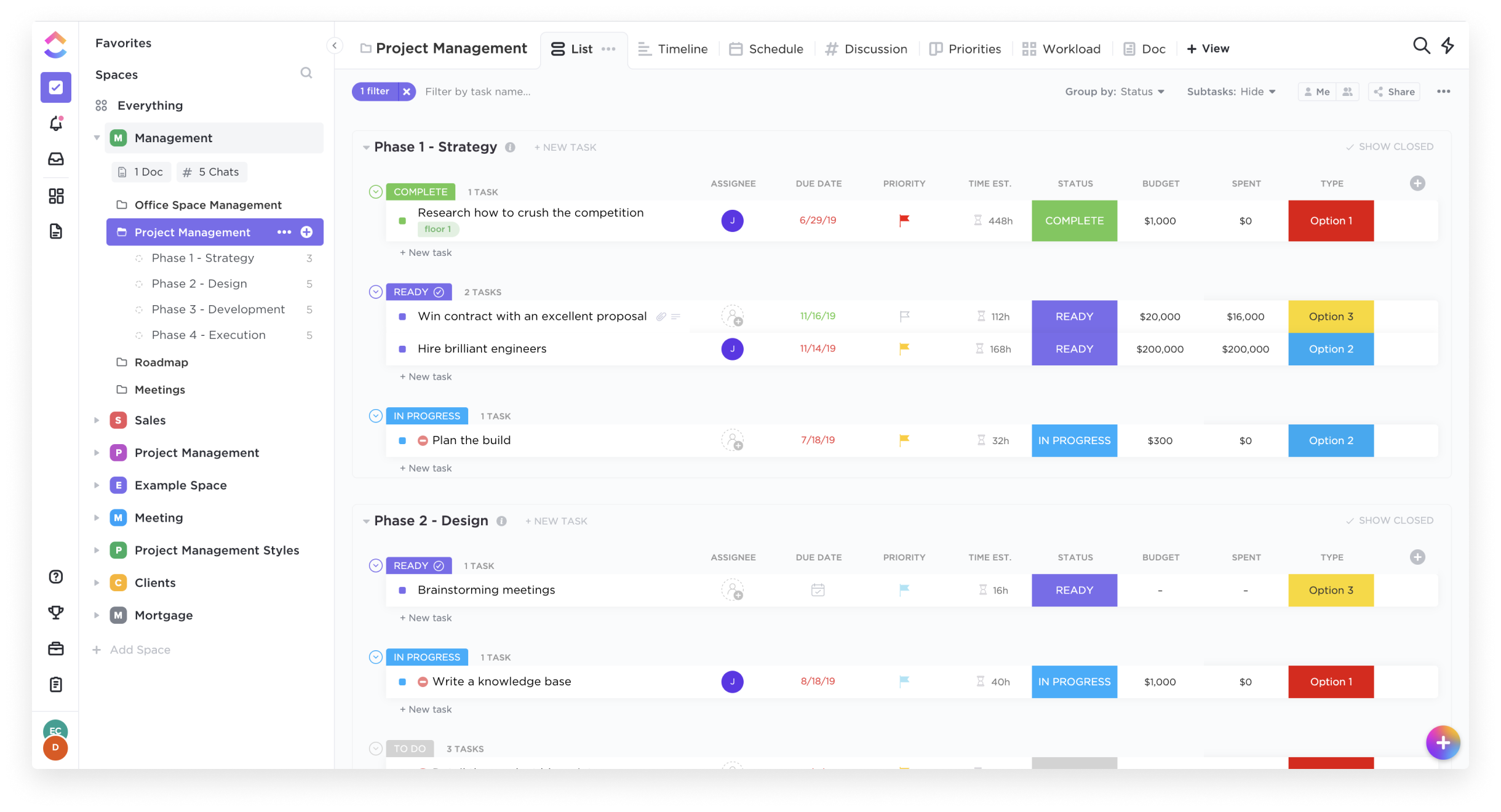
ClickUp is an all-in-one productivity platform. It’s a hub where teams can come together to plan, organize, and collaborate on work using tasks, Docs, Chat, Goals, and Whiteboard. Customized with just a few clicks, ClickUp helps teams of all types and sizes deliver work more effectively, to boost productivity to new heights. ClickUp aims to make the world more productive by removing friction caused by using many different applications. The platform boasts millions…
$0
Pricing
Basecamp
ClickUp
Editions & Modules
Basecamp Plus
$15
per month per user
Basecamp Pro Unlimited
$299
per month (billed annually)
Basecamp Free
Free
Limited Capabilities
Free
$0.00
Unlimited
$9.00 ($5.00)
per member per month (annual contract pricing)
Business
$19.00 ($12.00)
per member per month (annual contract pricing)
Business Plus
$29.00 ($19.00)
per member per month (annual contract pricing)
Enterprise
Contact Sales
Offerings
Pricing Offerings
Basecamp
ClickUp
Free Trial
Yes
Yes
Free/Freemium Version
Yes
Yes
Premium Consulting/Integration Services
No
No
Entry-level Setup Fee
No setup fee
No setup fee
Additional Details
—
—
More Pricing Information
Community Pulse
Basecamp
ClickUp
Considered Both Products
Basecamp
Verified User
Anonymous
Chose Basecamp
in my opinion, it is Inferior, clunky, ugly product as compared to the others. I only selected Basecamp on recommendations from someone else who was using it, and have moved on to ClickUp. This Basecamp app failed to notify myself, my teammates and the client so many times, …
I've also used ClickUp and Asana. My personal favorite is ClickUp although it is limited in how it integrates with Slack which caused me to switch to Asana. ClickUp has a ton of features, including on their free plan and in my opinion is much better than Basecamp. Asana is …
Basecamp if far simpler than ClickUp. We use ClickUp to manage our internal task management, as it provides more customization, additional views and more room for extreme detail in tasks. We used Basecamp for clients because of its simplicity and ease-of-use. Basecamp requires …
Trello is less expensive and the free version works pretty well. For the paid version, Trello is also a really great tool. Overall, I do like Basecamp better. It's a more simple layout and structure to the software. I like the communication threads better on Basecamp. Trello …
Basecamp is probably my least favorite. As a project manager, I'm always auditing our workflow and processes, so I try to run at least trials of project management software to get a feel for if they would help us do things more efficiently. I struggled the most with Basecamp.
Basecamp is simple to understand, easy to use, and does not come with the bloat and complications of a solution like Teams. It is certainly more organized and easy to follow than simply having a group chat on Slack and Viber. If you need to easily find information, it can be …
There is a simplicity that basecamp offers where most other project management systems seem to miss. They've worked hard at keeping the right things in place and not adding so many of the extra features that just get in the way of getting work done. The thing I liked most …
We were limited with the way Basecamp was designed. ClickUp allowed us to fully customize the experience to fit our needs. This also helped us be able to identify projects with a unique number/letter sequence, which helped us to better archive completed work on shared servers.
Basecamp: ClickUp far outshines Basecamp in a number of ways, with the primary way being the innate flexibility of the platform. Basecamp has a much easier onboarding experience, but the ceiling of the platform is much lower. ClickUp can simply do more. Slack: ClickUp does not …
It's easier than Asana, more complete than Trello (even in the free version!) and easier to use than Basecamp...And the ability to integrate with other services like Google Calendar, made me choose clickup rather the competition.
Tools like Asana and Basecamp have a very straightforward approach and structure that they lock you into. There's very little flexibility in its hierarchy and structure, which is where ClickUp shines. Notion does well with its linked databases, but suffers greatly from an …
Throughout my career, I have used at least a dozen different project management platforms and tools for keeping projects moving along. While I have used project management tools from some impressive names, I found that most of them weren't very impressive at all. In so many …
It's give and take. ClickUp has some features that the others don't but it is also something that requires more education to use to it's fullest. Other products are more simplistic and we have had to really emphasis training on ClickUp so everyone feels like they are on the …
ClickUp Compared to like an Asana or Trello - it's ClickUp Hands Down! ClickUp gives you so many more features and tools to use that will help get and keep your teams on track. Your clients and staff will all be super happy once implemented.
ClickUp blows other products out of the water from what I've seen or been able to do with them in the past. It's not only super flexible, it also contains functions that may require you to duplicate information between different software's elsewise or at least need you to use …
With each of the other platforms I've used, there was no one-stop-shop. We always had to use outside platforms or add-on processes to supplement what was missing. Sure they had good enough features but good enough wasn't good enough. We are an innovative company that operates …
It has all of the capabilities of these other platforms and more (at least from what I remember when using these apps). There is also greater capabilities in customization and integrations.
ClickUp has greater flexibility - particularly in the views than all the other software we've tried. The ability to see tasks for yourself or your team or multiple teams is incredibly powerful for accountability and focus on priorities.
ClickUp is a project management tool that surpasses all of these. The other are basically to-do lists, but ClickUp can actually let you automate interaction between tasks with conditions. This alone makes it stand out significantly.
All of the ones we evaluated had some features we needed, but only ClickUp had all the features that we were looking for. monday.com and Asana were close, but the extra features that ClickUp had, as well as all the training webinars, were what ultimately influenced us to go …
Small to mid-size would be a great fit [for Basecamp]. It's simple to use and does not require a ton of ramp-up. Unlike other platforms that require you to learn their terminology in order to use the platform this works well for the non technical user whom just needs to put in simple task updates[.]
Great for project management, reoccurring task management, building trackers and keeping track of what everyone is up to. Like all software that has great functionality, having solid governance and control over access is essential. I recommend ensuring that your admins/owners have a close eye on what is going on across the space or it can turn into an unmanageable nightmare.
Task management - It is very easy to add, organize and discuss tasks within Basecamp's interface.
The "Campfire" function is great for communicating when you just have a quick question for someone on the team.
Notifications - Basecamp lets you decide how often and about what you'd like to be notified. The ability to respond to messages in Basecamp directly via email saves a lot of time.
High Learning Curve. It's true that it can be easy to use, but to use well and effectively takes some time to learn. It's recommended to have an agreed-upon system in your team of what tools to use and when.
Notification Overload. If people aren't careful they could send a notification to everyone when only a couple people were meant to be prompted. And since emails are sent by default, you could have your mailbox overloaded with unnecessary updates. This is where it takes a bit of training in your team to have an agreed-upon system.
Lack of organization with Archived Projects. I will often need to reference an archived project to make a new one, but there is only a list of archived projects in alphabetical order, with no way to organize by archive date, or even search.
When I bring new people onto a project, it's immediately obvious how to use Basecamp. I don't have to worry about teaching them the features or walking them through it, it's just incredibly user-friendly. For this reason, I'll continue to renew my subscription even as new people are brought onto production jobs or the client changes.
We're very pleased with how the system works in general. For over a year we've barely ever had any problems with ClickUp and there might have only been one or two times when it wasn't operational for us due to a global emergency. Moreover, when we had a problem once with renewing our licenses we've been contacted directly by our account manager and taken care of in a very professional way (with a due refund as well). The exceptional customer service makes us firmly believe that ClickUp is just the right tool for us.
I would give it a ten but we have some very minor issues. Those have all been easy to work around and I still really like Basecamp. We also have trouble with some clients who can only handle email—but those are rare cases when technology is just not their thing.
Far easier to use than any other PM tool. ClickUp is incredibly intuitive and had us saving time and energy within the first week of implementation. In my opinion, PM software should make it easier to focus on the deliverables - it shouldn't take all your time and energy to learn how to use the tool in the first place. ClickUp is a user-friendly tool that actually helps us focus on what's important.
I've never experienced downtime while using Basecamp, or been unable to access it when I needed it. That's not to say they've never had downtime, but I've been lucky enough not to encounter any, and I work odd hours, including late nights when maintenance is often undertaken.
For over a year ClickUp was unavailable to us just twice for a couple of hours. I would say for a system this big and working globally that was a minor issue. They managed to fix all the issues within a couple hours and then it was back up and running perfectly fine.
The speed of ClickUp is average to be honest. This is one of the biggest flaws of the system, sometimes it's also lagging a little bit but we also have a lot of documents, lists etc. on our workspace. However, with the next version of ClickUp I've seen they are planning to increase the speed by almost 500%, probably by changing the technology, so I am more than looking forward to it.
For the many reasons I've given, Basecamp is a very strong program. There are a few features I can imagine that might make it even better, but I don't have a basis for comparison to be able to say that there is definitely a better one out there. I've noticed that Basecamp has evolved a bit from the time I started using it until now, so that makes me think that the producer of this program values it and believes in continuous improvement. If you could use the features offered by Basecamp, I would think you could use it with confidence.
Support are genuinely helpful and really nice to deal with. I had a bug on my workspace that I’d been experiencing for a while. They looked into it for me and asked some questions. Once they found the issue and resolved it, they even filmed a video detailing how they’d fixed it. That level of support is fantastic.
There are multiple guides on literally all of the functions you can find within the system, therefore it's easy to learn anything you'd really like to use, starting from project and people management, down to Gantts, mind maps, time tracking, inviting Clients as guests to work with you on the projects and so much more.
Decide the process before implementation - i.e. when it's due 8/9 does that mean 8am, noon, 5pm, 11:59pm? Check your to-do list frequently Set-up templates - just not with the dates (they can be funky)
Start small. Don’t try to build the most elaborate plans first. Resist the urge to get into Gantt charts if no one is used to them. Just get work written, add dates and assignees, and start getting used to it. If you did not use a work management tool before, you need to be gracious with yourself about the fact that you likely do not have the muscle memory for working this way yet. But you will get there.
And leverage people who know it if possible. Look for ClickUp experts and vendors. They can really supercharge your effectiveness at building the tool out and speed up the process.
Basecamp is the best application we've found for our team to interface with external clients. It makes project management simple, and allows our clients visibility into their projects, which in turn builds trust, fosters open communication, and improves customer satisfaction. It's easy to learn and use, and has just enough customizability to work for many different types of projects.
Every other tool I have used has been for organizing tasks and work only. There were some of the other features, but none of them had the ability to do everything we need to manage a project from start to finish
Scaling with ClickUp is superb. If you create a workflow best suited for your organization then it's all about creating new accounts and teaching the new employees the workflow you're using. It's that simple. There is no black magic when it comes to Clickup.