Countly vs. Kissmetrics

Overview
ProductRatingMost Used ByProduct SummaryStarting Price
Countly
Score 8.0 out of 10
Mid-Size Companies (51-1,000 employees)
Countly is a product analytics solution and innovation enabler that helps teams track product performance and customer journey and behavior across mobile, web, and desktop applications. Ensuring privacy by design, Countly helps the user to innovate and enhance products to provide personalized and customized customer experiences, and meet key business and revenue goals. Countly empowers companies of any size or location to grow their business by helping them securely process billions of…N/A
Kissmetrics
Score 9.6 out of 10
Mid-Size Companies (51-1,000 employees)
Kissmetrics is a customer engagement automation platform. This solution includes behavioral analytics, segmentation, and email campaign automation.
$500
Monthly Tracked People
Pricing
CountlyKissmetrics
Editions & Modules
Countly Enterprise Edition
Personalized Plans
per month per data point
Countly Community Edition
Free Forever
Growth
$500
Monthly Tracked People
Power
$850
Monthly Tracked People
Enterprise
Custom
Monthly Tracked People
Offerings
Pricing Offerings
CountlyKissmetrics
Free Trial
YesYes
Free/Freemium Version
YesNo
Premium Consulting/Integration Services
NoNo
Entry-level Setup FeeNo setup fee$1,500 per installation
Additional DetailsCustomizable, with free Community Edition (free forever) and free Enterprise Edition trial (free for 1 Month).What are Monthly Tracked People? Monthly Tracked People are unique visitors that engage in an Event on your website or with your product, that gets tracked by you in Kissmetrics. Monthly Tracked People can be anonymous or identified.
More Pricing Information
Community Pulse
CountlyKissmetrics
Considered Both Products
Countly
Chose Countly
Google Analytics is a big giant and Countly has impressed me with its features. I say well done.

Chose Countly
Countly have two main elements that make it the better option. First is open sourced so you can edit with code new options and new events, also you can use a variety of plugins depending of the necessities of the users and the objectives of every analysis. The second …
Chose Countly
Well, Countly is open-source. It got a very helpful community in its back that will surely help you on your projects. Countly is known for its mobile analytics and marketing platform for businesses. It excels at mobile data analysis and working directly with customers to boost …
Chose Countly
Matomo has poor integrations and SDK support compared to Countly. It is also significantly harder to set up compared to Countly. There have also been complaints about Matomo having security flaws. Additionally, Matomo seemed to lack common analytics platform features, like …
Kissmetrics
Chose Kissmetrics
Kissmetrics is the best software for processing website data. Easy to install and quick to integrate. Your visitor tracking and basic reports are impressive.
Chose Kissmetrics
Very good competition. Kissmetrics stacks well against the google analytics playing a huge market competitor.
Chose Kissmetrics
Kissmetrics is a next-level step up for people who are used to getting their tracking and reporting from Google Analytics or Shopify's CMS. While HubSpot arguably has a better user interface, Kissmetrics certainly has the power and usability necessary to track important …
Chose Kissmetrics
It has some unique features when compared to Squarespace and Hotjar.
1. Multiple Site Management 2. Keyword Tracking, and 3. Campaign Management. User video tracking is not possible in Kissmetrics, but Hotjar provides it for free and paid subscribers.
Chose Kissmetrics
It has been a while since I demoed Heap and Optimizely but the main points that stick out in my head are that Kissmetrics had more transparent and cheaper pricing. Kissmetrics offered all the same functionality, and at least from my personal experience, the staff at Kissmetrics …
Chose Kissmetrics
Kissmetrics gives much more detailed user data vs page data on Google Analytics. For a small business, the free Google Analytics is often the more appropriate approach, but when you need detailed user data and interaction and funnel tracking, Kissmetrics does the job very …
Chose Kissmetrics
Although Google analytics is a great web analytical tool that is free, for the most part, it is not as intuitive as Kissmetrics in providing the end user with actionable insights. The insights report alone is worth the monthly fee for the analytics solution. Although there is a …
Chose Kissmetrics
The Google Analytics Premium is a more complex tool, with possible integration to AdWords, Tag Manager etc.
Kissmetrics offers a narrower set of IT features, that however fully suit most needs. Google Analytics for example limited the data exports to 10,000 lines per click - to …
Chose Kissmetrics
Kissmetrics fills a very specific marketing void for our organization; however, we find it more useful when it is integrated with our other data solutions. For many organizations Kissmetrics won't be the only data analysis tool since it doesn't do everything great; however, for …
Chose Kissmetrics
Kissmetrics and Google Analytics both have their strengths and weaknesses, but for individual user and advanced campaign tracking, Kissmetrics wins. As complicated as Kissmetrics can be (depending on how advanced you want to get with it), it's still significantly easier to set …
Chose Kissmetrics
I haven't done a vendor comparison in 2 years so It would be challenging to answer this question well. I am grandfathered into great pricing with Kissmetrics, so I have no intentions on switching.
Chose Kissmetrics
Much easier to implement with Kissmetrics and/or the others don't let you customise your events to the same extent without hardcoding events into the website.
Chose Kissmetrics
KISSmetrics compliments the features of Google Analytics very well, and I'd recommend using both in conjunction.
Chose Kissmetrics
At first, KISSmetrics seemed to provide the information we were looking for.
Chose Kissmetrics
They are close but, the constant material KISSmetrics is putting out makes me want to support them.
Chose Kissmetrics
Difficult to yet know how KM stacks up against those listed. The decision to use KISSmetrics was made by someone else on the team based on their previous experience using it.
Chose Kissmetrics
KISSmetrics has better tools to create cohort analysis.
Chose Kissmetrics
Google Analytics, SiteCatalyst - KM does what it does well, which is user-level analysis. The other products are very good for segmentation, data extraction, etc...KM is good for very specific analysis.
Chose Kissmetrics
KISSmetrics is great, Google Analytics is too difficult for the average marketer, but is less expensive - be wary
Chose Kissmetrics
We were mainly familiar with Google Analytics before, KM is great in being able to dive much deeper. We also see discrepencies in "unique" visitors between KM and GA. GA is not as discerning of what a unique visitor is. KM is extremely accurate with unique visitors to make sure …
Chose Kissmetrics
We still use Google Analytics, because it still has some good reports (real time analytics for example) but it lacks the power of KM cohort reports, funnel reports, user timeline, ... I must admit that configuring KM does require some good analysis before you start and a good …
Best Alternatives
CountlyKissmetrics
Small Businesses
Fullstory
Fullstory
Score 9.1 out of 10
StatCounter
StatCounter
Score 9.0 out of 10
Medium-sized Companies
Whatfix
Whatfix
Score 8.2 out of 10
Siteimprove
Siteimprove
Score 10.0 out of 10
Enterprises
Whatfix
Whatfix
Score 8.2 out of 10
Optimal
Optimal
Score 9.0 out of 10
All AlternativesView all alternativesView all alternatives
User Ratings
CountlyKissmetrics
Likelihood to Recommend
8.0
(0 ratings)
8.9
(0 ratings)
Likelihood to Renew
-
(0 ratings)
7.4
(0 ratings)
Usability
-
(0 ratings)
7.1
(0 ratings)
Availability
-
(0 ratings)
8.3
(0 ratings)
Performance
-
(0 ratings)
8.5
(0 ratings)
Support Rating
7.0
(0 ratings)
9.0
(0 ratings)
In-Person Training
-
(0 ratings)
9.1
(0 ratings)
Online Training
-
(0 ratings)
8.6
(0 ratings)
Implementation Rating
-
(0 ratings)
7.3
(0 ratings)
User Testimonials
CountlyKissmetrics
Likelihood to Recommend
Countly is wonderful. It mhas affordable options for startups that are experimenting with event and market-tracking services that can't afford more expensive services but do have the cloud credits to operate Countly. For later-stage companies that have the money, but not the time to set up a service like this, a service like Amplitude, Segment, or Mixpanel may be a better alternative.
Read full review
[Kissmetrics is well suited for the] abandon cart scenario to re-engage users on the purchase journey. Engaging users to personalized content using the visit metrics derived from the data captured at each digital touch points. [Implementing] website campaign and journey orchestration is easy. You get visitor profile to segment upon using different visit metrics and action.
Read full review
Pros
  • It helps in understanding the user journey.
  • Customer attributes and persona is also a good feature.
  • Analytics & attribution as well real time user data.
Read full review
  • Kissmetrics has a fantastic dashboard where you can see all relevant metrics immediately after login.
  • Kissmetrics was extremely easy to implement in our site and it works across different platforms.
  • After the initial setup, managing and creating new events to track is super simple.
  • You can monitor live usage. This feature allows you to monitor user interactions as they are happening and as events you are tracking are triggered. You can see exactly what users are doing real time, which is really a very cool feature. At the time, this kind of realtime monitoring was not possible with Google Analytics.
Read full review
Cons
  • Bad UI - The UI is quite outdated and poorly designed, which was one of the principal reasons for us moving away from Countly.
  • Some poor documentation - 3rd-party documentation and tutorials for some of their mobile SDKs are better than Countly's own documentation.
  • Server requirements can be a bit high - For startups with trial credits on cloud computing services, this may not be a problem. Otherwise, Countly can get as expensive as hosted services like Segment and Mixpanel.
Read full review
  • The biggest issue, is that I have lost faith in the accuracy of the data.
  • There have been a few examples of the system producing what looks like spurious data. I triangulate the data using Google Analytics, and on a few occasions, there have been very wide discrepancies that indicate a potentially serious problem. For example, Google might indicate 1,000 page views, while KISSmetrics indicates 5,000.. This is not a constant problem, but it has happened enough where my faith in the data is shaken.
  • It really doesn't matter how good the front-end functionality is if my faith in data accuracy is not 100%.
  • A/B testing is much more difficult than it needs to be. It is possible to structure the product to enable A/B testing, but this involves reading a bunch of help files and writing some code. I would have expected this to work out-of-the-box. In Google Analytics, for example.you only have to enter two URLs and then it works. This was a surprise.
Read full review
Likelihood to Renew
No answers on this topic
I used KISSmetrics on a daily basis whilst a summer analyst at a language-learning software startup company called Voxy. To my knowledge, the company continued to use KISSmetrics. I am no longer at Voxy but we were pleased with KISSmetrics.
Read full review
Usability
No answers on this topic
For basic operations, the product is relatively user-friendly, considering how complicated a topic data and analytics can be. The engineering integration work is very straightforward, and building standard report types is pretty easy. However, there were a few rough spots. Event mapping and some of the deeper account settings are not well explained. And the Power Reports functionality is just utterly, impossibly confusing
Read full review
Reliability and Availability
No answers on this topic
In a year, we had trouble logging-in just once. But even then all tracking data was later available once the site came back up. also, the system down notices were very informative - they explained the reason for the downtime and were constantly updated with progress in getting the problem resolved.
Read full review
Performance
No answers on this topic
Speed improved dramatically as the service matured. Early iterations of the publicly-released application would occasionally provide slow processing of results, but those delays became much rarer occurrences during the last year that we used KISSmetrics. One of the more impressive views (which started out feeling more like a toy) is the live view of visits. Knowing that you could see, in real time, what events a user triggered, was gratifying and instructive.
Read full review
Support Rating
Countly practically does everything you need it to do. However, it can have challenges of its own sometimes.
Read full review
Everytime that I've needed or contacted support, I've received a quick response and timely help! There was even a major issue we had with connecting Unbounce into Kissmetrics. They brought in multiple people and worked with us for hours to make sure we could figure out the issue and get everything running! I have no complaints about the support team!
Read full review
In-Person Training
No answers on this topic
Again, we were fortunate to work with KISSmetrics as they built their application, but Hiten, their CEO and founder, was incredibly helpful to me personally, and to our metrics-driven business as a whole, as we adopted their tool.
Read full review
Online Training
No answers on this topic
I loved this aspect of the product. It wasn't just that the documentation and online tutorials are great - which they are - the on-boarding process though was really stellar. Once you have set everything up, you get a welcome message followed by a step-by-step guide to get you started that is built right into the product interface. For example, the UI asks you to first do X, and then copy this code snippet and send it to your developer who will know what to do with it. When you come back after the first interaction with the product, it continues the process by explaining right in the UI how to track events etc. This kind of step-by-step approach is incredibly efficient. Although there are various forms of supporting documentation (PDFs videos etc) to support every step, you don't really need them. This approach means that you are up and running very quickly with virtually no training time or documentation consultation. Highly efficient process.
Read full review
Implementation Rating
No answers on this topic
In order to build trackability down to revenue, there was quite a lot of work to integrate Kissmetrics with our software and internal process. We had to build the hooks so that Kissmetrics could call back into our software and billing system, etc.. However, we didn't need additional expertise to do this. Once you understand the API, and you own systems, making it work is not too difficult. We did not require an outside consultant or anything like that
Read full review
Alternatives Considered
Well, Countly is open-source. It got a very helpful community in its back that will surely help you on your projects. Countly is known for its mobile analytics and marketing platform for businesses. It excels at mobile data analysis and working directly with customers to boost engagement. Its main job in "user retention" is to assist you to comprehend custom activity in any component of your app and communicating that data to the server. Its user-friendly and well-designed app features improve consumer happiness. Unique features like in-app activity tracking and analysis can increase in-app usability and user experience, resulting in higher retention and income.
Read full review
It has been a while since I demoed Heap and Optimizely but the main points that stick out in my head are that Kissmetrics had more transparent and cheaper pricing. Kissmetrics offered all the same functionality, and at least from my personal experience, the staff at Kissmetrics was easier to work with and nicer to interact with.
Read full review
Return on Investment
  • Allowed me to understand my customer on a deeper level
  • Allowed me to tweak my content and sales pages
  • Allowed me to better understand my target market.
Read full review
  • Improved product
  • More insights into users
  • More insights into marketing channels and their performance
  • Must admit that the live stream was a little bit addictive the first couple of weeks, but it's a necessary evil when you launch new features :)
Read full review
ScreenShots

Countly Screenshots

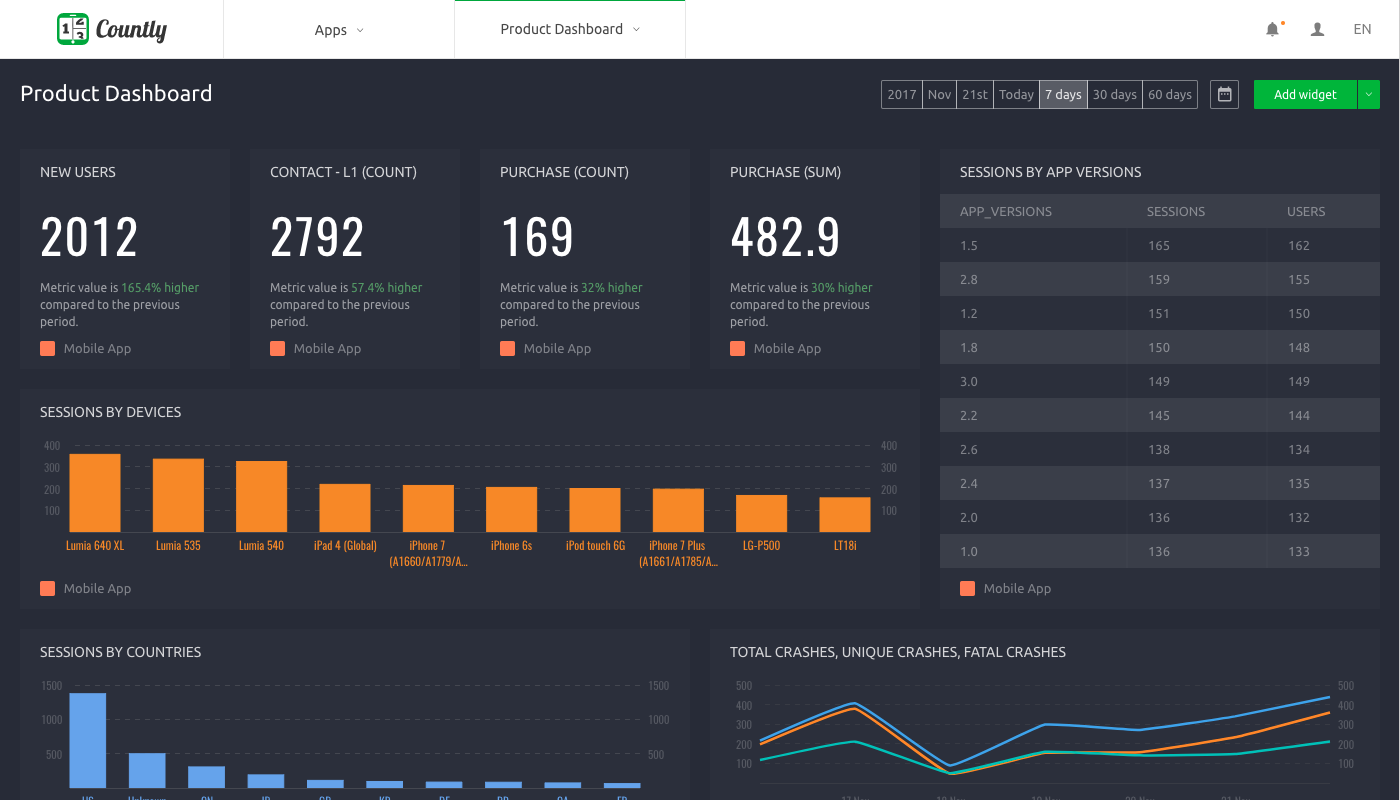
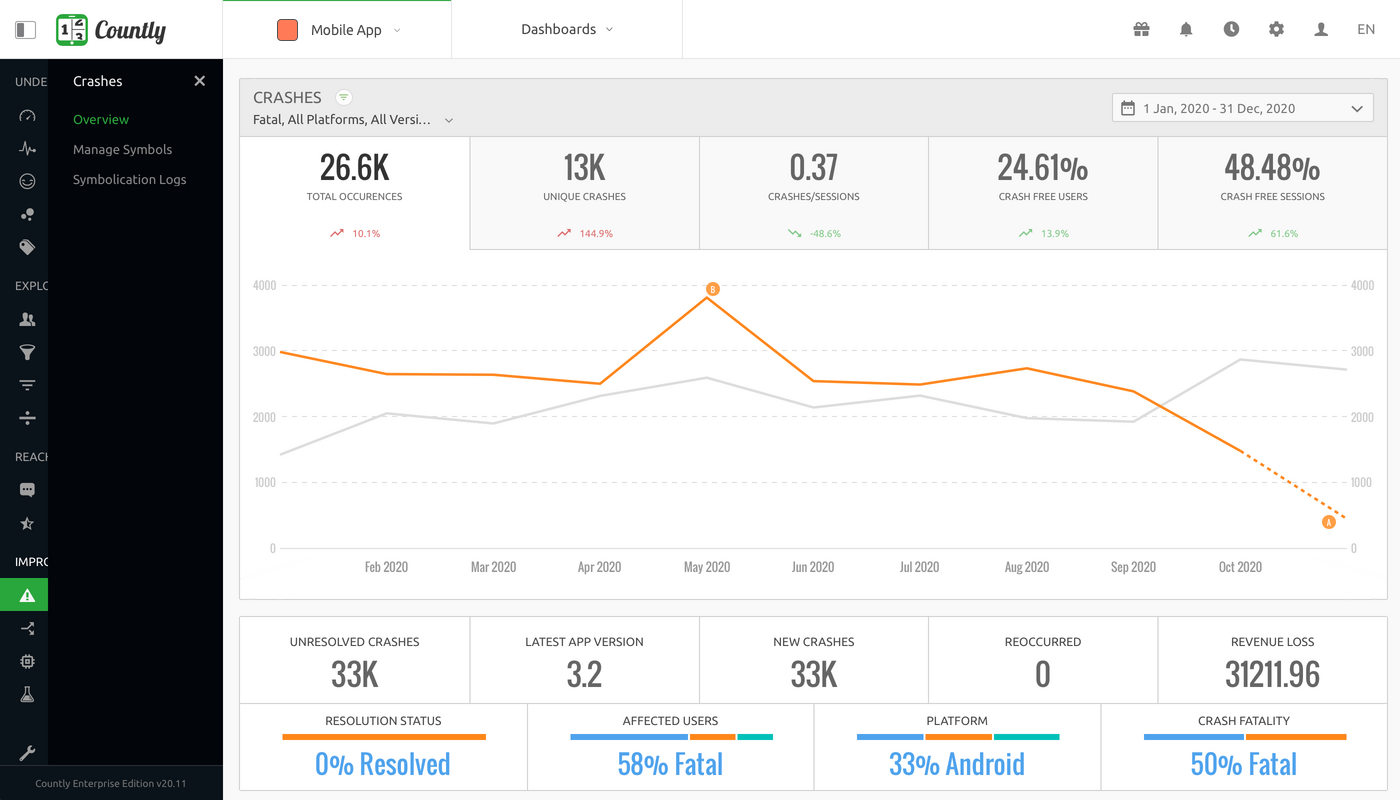
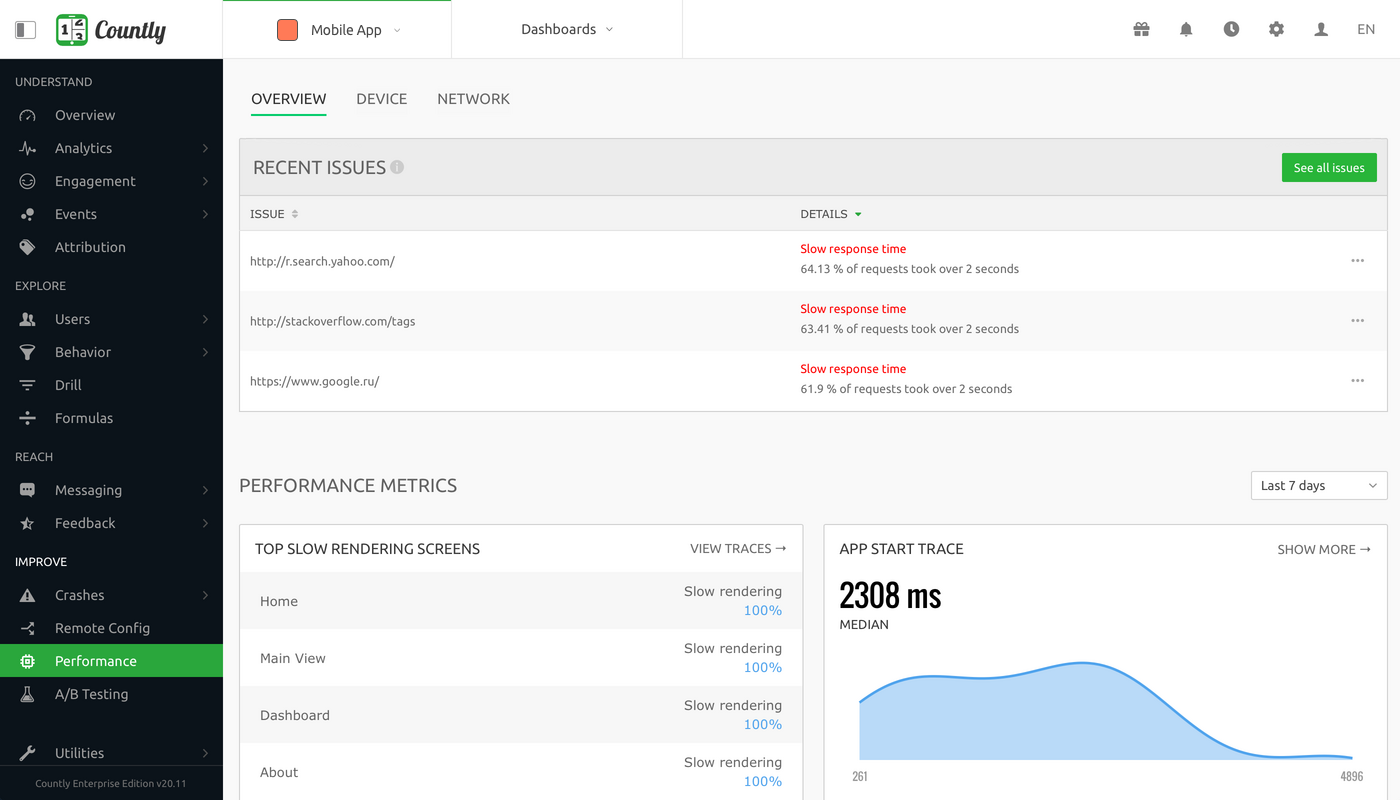
Screenshot of Overview - Product analytics platform to understand and enhance customer journeys in web, desktop and mobile applicationsScreenshot of Dashboard - Visualise metrics that matter the most to your businessScreenshot of User Profiles - Explore your product analytics data with individual user detailScreenshot of Crashes - Always be on top of crashes and exceptions in your applications, and resolve them quicklyScreenshot of Funnels - Track step-by-step goal completion rates inside your applicationScreenshot of Performance Monitoring - Keep track of your applications' network requests, perform code level profiling

Kissmetrics Screenshots

Screenshot of Kissmetrics Activity Report is a part of our report suite called AnalyzeScreenshot of Kissmetrics Populations allow your to track your most important segment over timeScreenshot of Kissmetrics Campaigns allow you to engage your user with automated behavior-based emails when it is most effective