Deputy vs. HotSchedules

Overview
ProductRatingMost Used ByProduct SummaryStarting Price
Deputy
Score 7.1 out of 10
Small Businesses (1-50 employees)
Deputy is a web-based workforce manager solution. Deputy is designed to help users simplify their scheduling, timesheets, tasking, employee communication and administrative tasks. It includes various apps and one click payroll integration that aim to make workforce management easier. The Deputy platform enables users to schedule in line with demand, prepare accurate payroll, and communicate more clearly. Deputy streamlines employee admin, so teams can focus on what…
$2.50
per user
HotSchedules
Score 8.0 out of 10
N/A
HotSchedules is a cloud-based scheduling, labor and communication management software solution serving the restaurant and hospitality industry. According to the vendor, key benefits include: Build & Communicate Schedules The scheduling and labor management software reduces the time it takes managers to create and communicate schedules. All scheduling and employee information is stored in one central location, so managers have access to time-off requests,…
$2
per month per employee
Pricing
DeputyHotSchedules
Editions & Modules
Scheduling Only
$2.50
per user
Scheduling, Time and Attendance
$4.50
per user
Enterprise
Custom pricing for enterprise clients
per user
Essentials
$2
per month per employee
Plus
$4
per month per employee
Quote-Based
Quote-based pricing
Offerings
Pricing Offerings
DeputyHotSchedules
Free Trial
YesYes
Free/Freemium Version
YesNo
Premium Consulting/Integration Services
NoNo
Entry-level Setup FeeOptionalNo setup fee
Additional Details
More Pricing Information
Community Pulse
DeputyHotSchedules
Considered Both Products
Deputy
Chose Deputy
Deputy surpasses expectations with its intuitive simplicity and outstanding value. It eliminates guesswork from the equation while delivering exceptional cost-effectiveness.

Chose Deputy
Deputy is less clunky than Clockify and offers more advanced integration options. I also can't stress enough how nice it is to have something just mounted to the wall running Deputy that can be on 24/7 and after five years not have some sort of breakdown.
Chose Deputy
Feature and functionality wise they are very similar. I liked the UI for both platforms. The main reason we ended up choosing Deputy is because of their good pricing, Deputy was significantly less costly, thus we are getting more value. The other reason was that I liked the …
Chose Deputy
7Shifts was not able to provide the integration we needed for our payroll system and no support to integrate with our HR system. It also did not have the ability to create custom reports or create reports in a format that we could use for payroll. The user interface was a bit …
Chose Deputy
I have used Ontheclock which is basic timekeeping but doesn't integrate with my payroll system.
Chose Deputy
Deputy provides a comprehensive approach to time tracking for employees and scheduling. I like how Deputy includes state labor laws and integrates with our payroll provider to sync hours and paid time off during each pay run. Other software providers with built-in time tracking …
Chose Deputy
I tested HomeBase and Deputy at the same time. I gave up testing HomeBase when I found Deputy immediately more user-friendly and, as I thought, more ingeniously designed. However, I did not do in-depth testing of HomeBase. I simply jumped to Deputy when I realized it would do …
Chose Deputy
I previously used ADP Workforce at another firm. When using ADP back then, there was not an app, although there may be one now. I like that Deputy offers an app and I like how user-friendly and easy it is to use. At a previous firm we also used ADP to house a lot of HR …
Chose Deputy
N/A - we were previously writing our schedule via email.
Chose Deputy
Kronos was not user-friendly. It was very limited on what could be done and my staff struggled to use it as well. Deputy is updated and continues to update. One of the biggest differences is my staff being able to swap shifts with other staff members. This gives so much more …
Chose Deputy
Unlike Clockify, Deputy offers an all one program from rostering and approving timesheets to payroll and HR admin. It has really helped our company keep everything in the one place and save on costs having multiple programs and software. Our staff is much happier using Deputy …
Chose Deputy
At the time I tried it (a couple of years ago, think it might have been called T-Sheets?) it really was not something we could use for running a business where the field employees didn't work fixed shifts. It would have been more work than staying with the manual timesheets.
Chose Deputy
We only had When I Work for employees to enter their hours. The functions of Deputy is way better and all employees think that it is much easier to use. It is now a year since we changed to Deputy, so I don't know if the other app has improved, but at the time Deputy was …
Chose Deputy
We did a trial of When I Work prior to implementing Deputy. Although it has been a few years, it didn't seem to have the same features and functionality as Deputy, although our pricing was less with When I Work if I recall. It may have changed since then so they are probably …
Chose Deputy
Don't remember, did the evaluations 2 years ago.
Chose Deputy
I haven't used any other product except manual word documents. Obviously using Deputy has had a huge impact on the efficiency of my administrative tasks such as timesheets rosters and payroll.
Chose Deputy
As already mentioned, it was the charging by shift scheduled and the ability to choose which employees I want working that drew me to Deputy. I had looked at Deputy several years ago, but until they implemented the "Pay by Shift Scheduled" feature, it was going to be too …
Chose Deputy
I am not quite sure about this. I did not get to use when to work a lot.
Chose Deputy
Deputy is scheduling-based. If you are looking for a HIRIS system to have everything under one umbrella it is difficult as most platforms are not geared towards scheduling and are as basic as an excel sheet. If looking for an all-in-one system make sure to see if Deputy can …
Chose Deputy
the very intuitive feature makes rostering process very fast.
Chose Deputy
I do not remember the other tools I looked at when choosing Deputy. But I do know that it offered the most features for the most reasonable cost. And it helped to eliminate the headaches I was having with the use of paper schedules. I had too many instances of “I didn’t realize …
HotSchedules
Chose HotSchedules
[Schoox] takes a long time to build out and is not the easiest interface. Feels old.
Chose HotSchedules
We looked at a few different types before choosing HotSchedules. It had the most requirements for our industry. It was very well suited for varied and ever changing schedules. It was also in our price range. Some of them were very much out of an independent's price range. …
Chose HotSchedules
Jolt has features I wish HotSchedules had, specifically labor management. Currently with HotSchedules, leaders have to use a separate spreadsheet to track labor for the week so that they can plan around that. However, other than this, HotSchedules seems easier for the employees …
Chose HotSchedules
HotSchedules from a feature, user adoption, and functionality standpoint is head and shoulders above all viable alternatives.
Chose HotSchedules
HotSchedules was the first to tie into a POS to control clocking in and out for employees compared to a canned product from major POS providers. HotSchedules is more widely used by hourly employees in the industry, so there is less of a training curve.
Chose HotSchedules
We used a scheduling system that was integrated into our budget planning programs, but we had no implementation to our staff so it was the managers job to deliver the schedule and keep track of availabilities/ time off requests. It was a lot more work and wasted about 5-6 hours …
Chose HotSchedules
We have not used any other software that really compares to HotSchedules. Before Hotschedules we were using Excel to schedule all of our employees. It was confusing and a jumbled mess for each employee. Allowing the employee to see only their schedule has helped with confusion …
Chose HotSchedules
My company chose this system I have previously used Aloha systems, and Hot Schedules is better.
Chose HotSchedules
I’ve used systems at other companies that are not as efficient and effective.
Chose HotSchedules
I have never used any other products like HotSchedules. I remember something called Deputy through ADP, but I don't recall if they performed the same functions or not.
Chose HotSchedules
A little more in-depth with metrics on labor forecasting, and you can edit punches throughout the day, but it's relatively the same program.
Chose HotSchedules
I was not privy to the selection process. We hired a manager who used your platform in their previous jobs. We jumped right in, feet first.
Chose HotSchedules
Time and Attendance helps me see who is showing up to work and who is punctual. This helps me know who I need staffed.
Chose HotSchedules
I have not used any other Scheduling software for employees. As a campground manager in the summer season, we are using campground master for reservations. it is very similar in process to employee scheduling. the ability to the user of that program to set up their own …
Chose HotSchedules
HotSchedules is the only system of it's kind that I have used. Seems to work perfectly well for all of our companies needs.
Chose HotSchedules
Simple functions the only difference I have seen is miss matched punches are not highlighted.
Chose HotSchedules
Right now it’s better than anything out there. But the competition is closing the gap.
Chose HotSchedules
It is easy and convenient to use. It is well organized and a more effective tool to use when it comes to employee scheduling compared to alternatives.
Features
DeputyHotSchedules
Workforce Management Software Features
Comparison of Workforce Management Software Features features of Product A and Product B
Deputy
6.0
Ratings
12% below category average
HotSchedules
-
Ratings
Scheduling and Shift Management8.00 Ratings00 Ratings
Workforce Reporting and Analytics5.00 Ratings00 Ratings
Workforce Compliance Monitoring9.00 Ratings00 Ratings
Mobile Accessibility10.00 Ratings00 Ratings
Task Assignment and Tracking5.00 Ratings00 Ratings
Forecasting and Resource Planning3.00 Ratings00 Ratings
Staffing Forecasting and Resource Planning3.00 Ratings00 Ratings
Shift Swapping and Time-Off Requests5.00 Ratings00 Ratings
Best Alternatives
DeputyHotSchedules
Small Businesses
When I Work
When I Work
Score 8.6 out of 10
7shifts
7shifts
Score 9.9 out of 10
Medium-sized Companies
Paypro Workforce Management
Score 9.7 out of 10
Jolt
Jolt
Score 9.7 out of 10
Enterprises
SAP Fieldglass
SAP Fieldglass
Score 8.5 out of 10

No answers on this topic

All AlternativesView all alternativesView all alternatives
User Ratings
DeputyHotSchedules
Likelihood to Recommend
7.7
(0 ratings)
1.0
(0 ratings)
Likelihood to Renew
8.8
(0 ratings)
9.1
(0 ratings)
Usability
9.1
(0 ratings)
8.9
(0 ratings)
Availability
9.5
(0 ratings)
-
(0 ratings)
Performance
9.2
(0 ratings)
-
(0 ratings)
Support Rating
8.4
(0 ratings)
8.9
(0 ratings)
In-Person Training
10.0
(0 ratings)
-
(0 ratings)
Online Training
10.0
(0 ratings)
-
(0 ratings)
Implementation Rating
6.2
(0 ratings)
-
(0 ratings)
Configurability
7.8
(0 ratings)
-
(0 ratings)
Ease of integration
6.7
(0 ratings)
-
(0 ratings)
Product Scalability
9.3
(0 ratings)
-
(0 ratings)
Vendor post-sale
9.0
(0 ratings)
-
(0 ratings)
Vendor pre-sale
8.8
(0 ratings)
-
(0 ratings)
User Testimonials
DeputyHotSchedules
Likelihood to Recommend
[My own feeling on the subject is] that large teams will probably enjoy the features much more than a smaller team. [In my opinion] I would not have signed up with Deputy had it not been for the integration with my payroll provider. [From my point of view] the cost is not worth it for a small team. [I've found] it has a lot of features geared towards big teams and those are not things you can "opt-out" of from a cost/tier standpoint [as far as I'm concerned].
Read full review
HotSchedules can be implemented in any organization that has to staff a store with varying hours. I have recommended this to my colleague who has 8 employees, yet he has seen great results with the shift swaps and availability tracking/time off requests. I do wish we could see some more attention to general staffing and training VS. the heavy emphasis on restaurant businesses. It feels HotSchedules has grown into many more areas and should work away from marketing so directly to restaurant businesses. Some training programs for other business would be a welcome sight.
Read full review
Pros
  • Timesheet scheduling & alerting employees of schedules
  • Ease of use - the guys can easily clock in and out and adjust time sheets as needed
  • Communication with our accounting package - it integrates seamlessly with Xero and speeds up payroll significantly.
Read full review
  • All the information needed for your employees can all be found in one place. From the availability of an employee to their pay rate to their phone number. It's all just a click away. Before HotSchedules all of this information was kept in different places and the managers would need to open several documents and contact lists to find what they were looking for about a single employee.
  • Control over how indepth you use the product. The possibilities of this service are seemingly endless. However if you are solely looking for a specific feature HotSchedules offers you have the ability to soley use that feature. HotSchedules can simply schedule, or it can automatically schedule, or you can assign a specific job to a specific person on a specific day. For us, we have employees who are doing a specific job/task one week and then they are needed for a different job/task the next week. HotSchedules allowed us to narrow down our options starting with department, moving to location, moving down to the job they would be preforming for that scheduled day.
  • The ease of changing/releasing shifts. If an employee wants more hours they can go in and select shifts that are up for grabs or request to work on a specific day at a specific time. The opposite is also true. If an employee is worried they will have too many hours that week, they can release their shift and put it up for grabs by a different employee. And of course, all of this is fairly customizable to what you want your employees to have the ability to do, with or without your intervention and approval. In our case, if a shift lead releases a shift we only want other shift leads to be able to pick up the shift. HotSchedules allows us to do just that.
Read full review
Cons
  • Integration with various point of sale systems to pull sales data vs. scheduled and/or worked hours.
  • Ability to "re-invite, " change a password or fix an employee-level account if they didn't set things up correctly.
  • An easier way of loading all holidays or facility closure dates for the year. e.g. Google reminds you, Are you open for Thanksgiving this year?
Read full review
  • I find that the system of assigning jobs and rates is a little tedious, but understand the need for it.
  • I'm not familiar enough with the copy and setting the next week's schedule, but it's not necessarily hard to use.
  • The whole assigning welcome letter and with log in and password is difficult with the Spanish speakers even though you have a Spanish version.
  • Many of our employees do not have email or smart phones, so I find that HotSchedules is not as useful to them or us.
Read full review
Likelihood to Renew
The basic functionality and overall efficiency it provides is enough to renew. I still would like to see improvements in reporting and leave management, but overall it is absolutely worth it to have the program. I especially like having remote access and supervisors scheduling and approving time sheets of employees
Read full review
Ease of use, efficiently creating and posting staff schedules.
Read full review
Usability
The fact that my older staff, that do not know how to use a computer, can accurately clock in and out, request time off, and view their schedules, shows how easy Deputy is to use. The app you can download on your phone, it makes these actions, even more, user-friendly.
Read full review
6 Years of Experience provides me the insight on the upgrades and changes that HotSchedules has done to improve the experience of its users. There are so many features that we still have not started or used to the fullest, but we believe that we are currently getting a strong value out of the money that is paid for this product.
Read full review
Reliability and Availability
We have never had a problem with deputy being unavailable
Read full review
No answers on this topic
Performance
Everything is quick and easy
Read full review
No answers on this topic
Support Rating
Every time I have contacted support they have answered my question within the hour and solved every problem we have had. They follow up to make sure we are satisfied with our results which has been great when we are busy and get distracted
Read full review
Always cheerful, informative, and educated staff. Each person seems to want to find a way to help us with any issues or questions we have. I love that all the staff is friendly and in a good mood when you call, I have never had a rep be unhelpful or short tempered, or ever less than accommodating to our needs!
Read full review
In-Person Training
It was super easy and quick
Read full review
No answers on this topic
Online Training
Did a great job of getting us up to speed with their online documentation.
Read full review
No answers on this topic
Implementation Rating
I was told that deputy and Xero would interact and that I could do automated payslips and that’s true but they don’t [separate weekdays] and weekends which attract different pay grades. When trying to troubleshoot there has never been a solution.
Read full review
No answers on this topic
Alternatives Considered
Deputy provides a comprehensive approach to time tracking for employees and scheduling. I like how Deputy includes state labor laws and integrates with our payroll provider to sync hours and paid time off during each pay run. Other software providers with built-in time tracking failed to include these essential features. Furthermore, Deputy archives employee scheduling data and timesheets indefinitely even after the employee leaves, so that you have a record as required by law. We highly recommend Deputy.
Read full review
HotSchedules was the first to tie into a POS to control clocking in and out for employees compared to a canned product from major POS providers. HotSchedules is more widely used by hourly employees in the industry, so there is less of a training curve.
Read full review
Scalability
We have gone from using deputy simply to schedule a couple of members of staff on coffee shop shifts, to also scheduling staff in the retail unit part of our business, to now also scheduling team days and having remote working staff start on schedule shifts to track their working hours.
Read full review
No answers on this topic
Return on Investment
  • Hundreds of man-hours saved monthly that previously was spent on recording hours work.
  • Holiday management is very clear and support fair treatment of staff.
  • The 100% accuracy of timesheets is amazing. Once approved thousands of timesheets just land in our payroll system thanks to the export/import functions.
Read full review
  • Saving time on scheduling means our managers can focus more on guest experience, managing the floor and other areas that contribute to the success of our business.
Read full review
ScreenShots

Deputy Screenshots

Screenshot of Manage your business from your pocket.  See who is currently on the clock and who is late.Screenshot of What if someone doesn't show up for a shift? Find a replacement from your phone in seconds!Screenshot of Enterprise level experience in an elegantly designed iPad app.

HotSchedules Screenshots

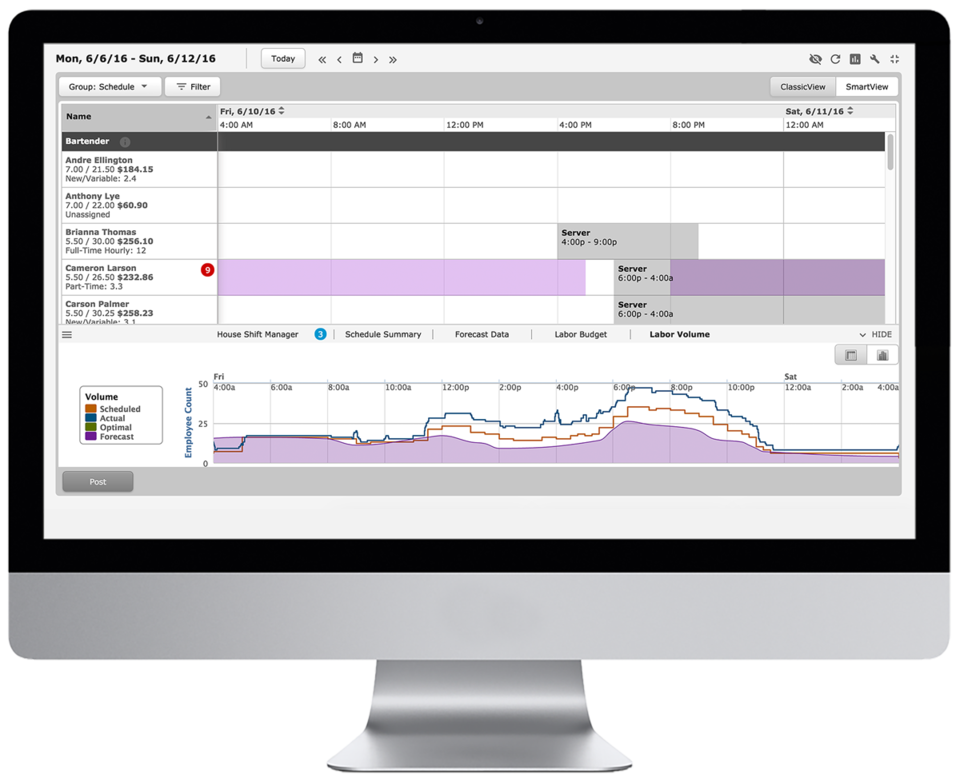
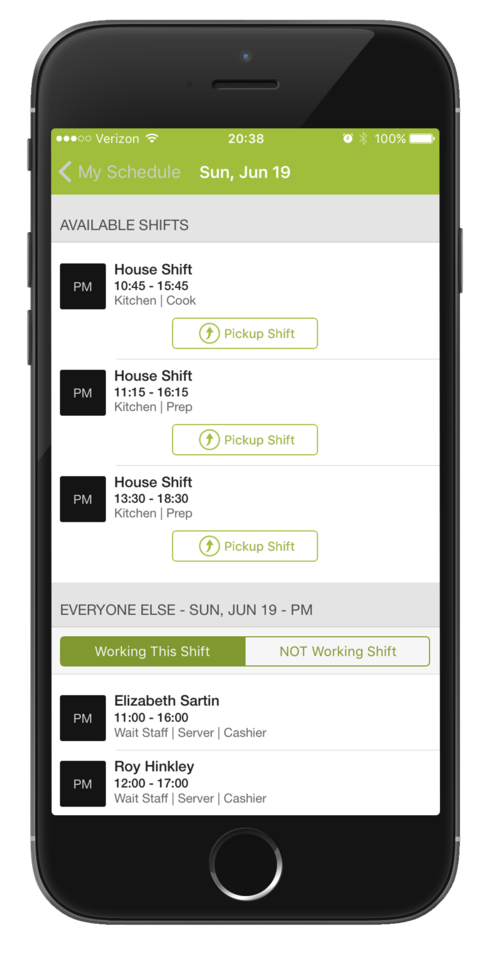
Screenshot of Time-Off, Availability, Employee Hours, Sales Volume are all available in the scheduler.Screenshot of Employees are able to swap and pick-up shifts from the HotSchedules Mobile App. All shift changes or requests require a manager's approval.Screenshot of Managers and employees can communicate with each other from the mobile and web apps - from anywhere and at anytime.Screenshot of Employees can submit a time-off, request - paid, or unpaid - and can request to work or request off right from the mobile app.Screenshot of Managers can view sales and labor data from their phone.