Overview
ProductRatingMost Used ByProduct SummaryStarting Price
Dovetail
Score 8.3 out of 10
Mid-Size Companies (51-1,000 employees)
Dovetail, headquartered in Sydney, aims to enable the world to create better products and services through deep customer understanding. Dovetail states they empower 45,000+ people, from agencies to universities to Fortune 100 companies, to make sense of their customer research in one collaborative research platform.
$0
Hotjar
Score 8.3 out of 10
N/A
Hotjar is a conversion rate optimization tool for digital marketers. Features include heatmapping, visual session recording, conversion funnel analytics, form analytics, feedback polls and surveys, and usability testing. The tool is used by digital analysts, UX designers, web developers and product marketers. Hotjar was acquired by Contentsquare September 2021, and is now a Contentsquare brand.
$39
per month 100 daily sessions
Pricing
DovetailHotjar
Editions & Modules
Free
$0
Professional
$15
per month
Enterprise
Contact Sales
per year
Hotjar Observe - Plus
$39
per month 100 daily sessions
Hotjar Ask - Plus
$59
per month 250 monthly responses
Hotjar Ask - Business
$79
per month Starting from 500 monthly responses
Hotjar Observe - Business
$99
per month Starting from 500 daily sessions
Hotjar Scale - Business
$213
per month Starting from 500 daily sessions
Hotjar Ask - Scale
Contact Sales
per month unlimited volume
Offerings
Pricing Offerings
DovetailHotjar
Free Trial
YesYes
Free/Freemium Version
YesYes
Premium Consulting/Integration Services
NoNo
Entry-level Setup FeeOptionalNo setup fee
Additional DetailsDiscount available for annual billing on the Professional plan.Discount available for annual pricing.
More Pricing Information
Community Pulse
DovetailHotjar
Considered Both Products
Dovetail
Chose Dovetail
Better usability but less powerful in terms of integration. EnjoyHQ felt better for quantitave data when i used it for the last time. But my knowledge is not up to date.

Chose Dovetail
Dovetail is 10X better. So much easier and truly meant for having one centralized workspace. Everything from the highlights and tags and videos and column customization when editing makes it easy to call them the winner in this field. I wouldn't want to go back to my other …
Chose Dovetail
Marvin's approach to AI has always been a core part of their platform, and so the integration of AI features (and the focus on building an AI product that works effectively for the kind of research we are doing) has always been at the forefront of their thinking and design. …
Chose Dovetail
Dovetail is the most stakeholder-friendly research tool we've used. Its visual insights, highlight reels, and intuitive interface make it easy for non-researchers to understand and act on customer feedback. Stakeholders can engage directly without needing deep training, making …
Chose Dovetail
Dovetail meets our needs the best with global codebooks, data retention rules, etc. Other platforms offered functionality we had in other tools or limited our ability to control data management and access controls. We would love even more in Dovetail, but like the direction …
Chose Dovetail
Haven't used EnjoyHQ in the last three years, so cannot compare the new capabilities like AI. We switched to Dovetail because it was easier to use at the time.
Chose Dovetail
I tried this product and must say I think the AI features are way better here and more accurate
Chose Dovetail
We chose Dovetail because it was more powerful and simple to use when we evaluated these tools.
Chose Dovetail
I work at Notion and we could also save our docs within Notion
Chose Dovetail
Dovetail outperforms in qualitative research analysis by offering advanced tagging transcription and centralized insights. I think notion is good for large or complex documentation but Dovetail is nice for qualitative documentation. Maze is better for usabilty testing , …
Chose Dovetail
Dovetail has some niche capabilities for market research that these alternative competitors do not like embedded transcription, insight clipping, sharing across a research team, etc. The others in my list have more features and are designed for knowledge management. For …
Hotjar
Chose Hotjar
Hotjar is the only tool like this that I've used. It is easy to use and beneficial. I would recommend it to anyone looking for this kind of tool.
Chose Hotjar
In my opinion, Hotjar is much easier to set up and use than Microsoft Clarity
Chose Hotjar
For surveys, I think Hotjar is better than Maze by a mile. The functionality is directly embedded in the SaaS or webapp which is a major plus.

Qualtrics is a survey powerhouse with many more functionalities for surveys as well as reports, but I think Hotjar has better UX and …
Chose Hotjar
Compared to Sprig and Usabilla, Hotjar has robust functionality. Again, as stated earlier, the ability to summarize rage clicks, trigger recordings for a/b experiments, and run intercept surveys on mobile is very useful. Hotjar is also noticeably more intuitive to use than …
Chose Hotjar
The fact that it has a trial period in which you can fully try each feature of the platform. The fact that is very intuitive for us to understand each feedback given by the users and to interpret how they move and what they observe on the pages we need to test.
Chose Hotjar
For us, Hotjar was really simple to implement and the user interface is really easy to use and get accustomed to. Some of the other products we evaluated didn't have as rich features and were way overpriced which made us choose Hotjar. Also, Hotjar allows you to capture …
Chose Hotjar
There was not something specific negative that we noticed in the other products, hotjar came in the discussion through a referral from one of our colleagues, was covering all the tickboxes that we had set and decided to move forwards with it
Chose Hotjar
Whatever software does, Hotjar does better. Integration and setup are really fast and you can have data to analyze in a few minutes. Also, the support team is very dedicated and there's a lot of documentation and examples you can follow.
Chose Hotjar
There are overlaps of a few features, but session recording is a unique feature of Hotjar.
Chose Hotjar
I have not used any other services and only used Hotjar so I cannot say how this service compares to others in their vertical. I have used Survey Monkey and I have found that their survey templates do not match that of Hotjar's. I also think that the reporting/tracking is more …
Chose Hotjar
Hotjar was significantly cheaper for us, and they’ve been brilliant at honouring their legacy pricing model which is much cheaper up until recently. We find that Hotjar also offers a wider range of tools that we would otherwise need to pay more for elsewhere like surveys. The …
Chose Hotjar
Cmparing with other products in the same vertical, we found the UX UI for Hotjar the best. It is easier to integrate with and has lot many more features as compared to its nearest competitors. We fount the product to be robust and accurate with lot of customizable options to …
Chose Hotjar
I liked the Hotjar User interface a little more and it seemed a little bit easier to set up. For some users with just the basic needs smart look was overly complicated. whereas in Hotjar everything you need is in one simple easy-to-view dashboard. Also, it offered more free …
Chose Hotjar
I test drove Lucky Orange and decided to keep Hotjar as the UI is easier to use. The competitor had no compelling features vs the ones offered by Hotjar. I also found the standard sound effects in Lucky Orange very overbearing and obnoxious.
Chose Hotjar
Hotjar was relatively more known to the team and they had past experience as well with the tool which made the adoption relatively easier. As such we didn’t find a lot of difference between the two tools when it comes fulfilling our use cases so for us specifically both were …
Chose Hotjar
They have a user-friendly website and product and the accuracy of the feature and also more development feature
Chose Hotjar
We used different tools but Hotjar combines several functionalities in one tool. So we used and are still using SurveyMonkey for bigger Surveys but it's handy to also have a tool where we can create short single questions surveys. We selected Hotjar because it is a good …
Chose Hotjar
Hotjar is the full deal and provides fantastic functionality and options for me to track my users on my website. The other software is good but I personally feel Hotjar is the best for purposes. I know it’s a little pricey, but if you use it right, it will ultimately help you …
Chose Hotjar
HotJars UX is much better Crazy egg has a bit more capabilities I.E. A/B testing.
Chose Hotjar
Hotjar has more robust functionality than CrazyEgg. Optimizely is a little more advanced and more expensive than what we needed.
Chose Hotjar
Google Analytics is a much more robust platform than Hotjar, but works great as a complement to Google Analytics - in other words, it was a matter of choosing both, not either/or. While there are workarounds for them on Google Analytics, heatmaps and screen recordings are much …
Chose Hotjar
Hotjar is better at taking screenshots from landing pages which help us better visualize clicks, scroll and mouse movements. With Hotjar, we can better see what users are doing on our landing pages. This way you'll have a much more accurate picture of how people arrive at …
Chose Hotjar
I've really liked Hotjar for our web app and haven't had a need to look for other products. We've used Hotjar for three years and it gets us the answers we need for our web app UI changes or releases. I've really enjoyed using it.
Chose Hotjar
I just find Hotjar to be simpler, cleaner, easier, and more flexible. Lucky Orange was a tool that another client of my had installed and, while it 'worked' and did similar things, I found that Hotjar was simpler. I don't know if there are cost differences between the two …
Chose Hotjar
Mouseflow matches nearly every feature that Hotjar offers – although, they may work a little differently.
The most relevant difference is in data capture. Hotjar offers unlimited options for heat maps, recordings, forms and comments as long as you are a paying customer. In …
Best Alternatives
DovetailHotjar
Small Businesses
Smartlook
Smartlook
Score 8.2 out of 10
Smartlook
Smartlook
Score 8.2 out of 10
Medium-sized Companies
Optimal
Optimal
Score 9.0 out of 10
Siteimprove
Siteimprove
Score 10.0 out of 10
Enterprises
Optimal
Optimal
Score 9.0 out of 10
Contentsquare
Contentsquare
Score 7.2 out of 10
All AlternativesView all alternativesView all alternatives
User Ratings
DovetailHotjar
Likelihood to Recommend
7.5
(0 ratings)
10.0
(0 ratings)
Likelihood to Renew
-
(0 ratings)
5.1
(0 ratings)
Usability
6.0
(0 ratings)
9.7
(0 ratings)
Support Rating
-
(0 ratings)
9.6
(0 ratings)
Ease of integration
-
(0 ratings)
9.0
(0 ratings)
User Testimonials
DovetailHotjar
Likelihood to Recommend
See 1st question answer for my use case, I went into depth there for the specific use cases we have. For less appropriate (touched on this earlier) the final report is not great in dovetail. The formatting options are not great and does not look professional because of the lack of customization and layouts. For my customer we wouldn't be able to present that data as it's constructed. So we have to copy and paste all the quotes and insights to a word doc. That's ok but then it means if we want to use Dovetail as a repository of data we have to then re-import a pdf of the report into the project page.
Read full review
Hotjar is well suite for organizations that want to get a good glimpse into user behavior on their websites. The tool is easily installed through Google Tag Manager, and then users simply select which pages or paths they want the tool to analyze. After a few days, users can start seeing patterns develop, helping them understand what areas of the user journey flow they need to test out and improve. Hotjar is primarily for web-based experiences, not for mobile applications and other non-web digital applications.
Read full review
Pros
  • The tagging, linking, and repository features make it simple to maintain a living library of knowledge, ensuring past work is never lost.
  • Dovetail enables our researchers and non-research partners to engage more directly with findings, fostering a stronger culture of evidence-based decision-making.
  • Dovetail makes it simple to track engagement metrics with research insights proving overall ROI.
Read full review
  • Heat mapping is great on Hotjar. It is a good place to start when you are looking at the UX & CRO on your website. You can see the % of people clicking on elements on a page, how far they scroll, and mouse movements.
  • Hotjar is great for session recordings. These record the mouse movements, clicks, pages and scrolls of a user in video format. You can watch these to investigate what works well on a site and identify potential roadblocks and bugs.
  • Hotjar is great as it ensures that users details are anonymous; for instance, if you are watching a session recording, you cannot see what a user types in a form field, as Hotjar blanks this out.
  • Hotjar has a poll function, so you can have polls on your website.
Read full review
Cons
  • Search can be challenging for a company with multiple products and many user types.
  • Charts generated from survey data could have settings to allow us to change how they are filtered / displayed.
  • Having a table of contents in insights / linkable headers would help direct people the right spot of an insight.
Read full review
  • The video recording feature is very slow to use. I know there is a very powerful process going on (saving your CSS and the DOM movements you make) but anyway it's slow to use.
  • Hotjar itself is heavy and has effects on your load times. This is a very important issue and I hope they're working on that.
  • Adding more segmentation would be nice. For example, being able to connect your API or more information to show relevant polls or feedback buttons to certain users. Aggregated info is hard to process.
Read full review
Likelihood to Renew
Because we are really happy with the tool and it’s capabilities at the moment. The price increase is the main issue we can have but the features are getting better and better. It really saves a lot of time for our team and allow us to collaborate more efficiently with certain stakeholders that often did not réalise how much research we conduct. Now they can just have a look to it by themself!
Read full review
Even though the heat maps and user recordings were useful, our website was significantly slowed down after we installed Hotjar, so much so, that it took over a minute for our blog to load. The data that we gathered was not worth the length that it took our website to load.
Read full review
Usability
One of Dovetail’s key strengths is that it’s very easy to get started with — even for people without a research background. Uploading a transcript, tagging highlights, and generating a quick summary is intuitive and low-effort, which helped drive organic adoption at Dext.
However, mastering the more advanced features — like taxonomy management, insight reporting, or strategic tagging structures — does require more time and guidance. The learning curve becomes steeper as you try to scale insight operations or enforce consistency across teams.
Read full review
So easy and simple to use! Straightforward anyone in the team is able to easily go in and set up anything in Hotjar. The UI is really simple. Whenever you give feedback to Hotjar they continously take on board the feedback and improve the tool.
Read full review
Reliability and Availability
I’ve never had any access issues with Dovetail, so I don’t see any problems in that area.
Read full review
No answers on this topic
Performance
Regarding performance, I would say it’s satisfactory. Adding data and transcriptions is really fast and efficient, and can be done in the background, so I’m never hindered by these aspects. However, all the new AI-generated features are still somewhat slow to run. It’s nothing major, but it should improve in the future.
Read full review
No answers on this topic
Support Rating
My customer success manager is very responsive and has always been able to answer my questions and resolve issues quickly. The collaboration is smooth, so I have no complaints in that regard.
Read full review
Hotjar is a SaaS-based company, and as such has a good support service. Users can quickly submit support tickets through Hotjar's online portal. Enterprise customers get access to additional support members and have SLAs to support their larger, more complex needs. Overall, Hotjar is extremely reliable and I've never had to reach out to customer support.
Read full review
Online Training
The training went very well, and we co-built it to really address our needs. I also think it was beneficial to have feedback coming from someone other than myself (since I manage the tool), as it helped reinforce the points I wanted to highlight. The team’s feedback on the training was very positive.
Read full review
No answers on this topic
Alternatives Considered
Dovetail is 10X better. So much easier and truly meant for having one centralized workspace. Everything from the highlights and tags and videos and column customization when editing makes it easy to call them the winner in this field. I wouldn't want to go back to my other tools I've used in the past due to the amount of time it takes and would choose Dovetail over Google Workspace, UserTesting, and Basecamp hands down
Read full review
Compared to Sprig and Usabilla, Hotjar has robust functionality. Again, as stated earlier, the ability to summarize rage clicks, trigger recordings for a/b experiments, and run intercept surveys on mobile is very useful. Hotjar is also noticeably more intuitive to use than Usabilla, with a cleaner interface and navigation.
Read full review
Scalability
Management is quite straightforward; it’s easy to change access if certain stakeholders need to use it. The repository features are accessible to all teams, making it a good entry point into the tool. The more people use it, the more powerful the tool becomes, so it seems truly scalable to me. The limits are more financial, in terms of accessing additional features.
Read full review
No answers on this topic
Return on Investment
  • Researchers and designers now spend less time digging through scattered notes or redoing similar studies. Centralizing everything in Dovetail has significantly reduced the time needed to prepare synthesis reports, align stakeholders, or onboard new teammates into past research.
  • With Dovetail, user insights are no longer abstract or anecdotal—they're traceable, searchable, and backed by real quotes. Product teams feel more confident making roadmap decisions based on what users actually need, not assumptions.
  • Dovetail has encouraged more non-designers to engage with user feedback directly. This democratization of insights helps align everyone around real user problems, which ultimately leads to better product-market fit and faster iteration loops.
Read full review
  • Our UX team can now use hard data to back up and validate design decisions that we make. Our role as usability experts is becoming more respected and integral to business objectives because we now have data that can back up our field of study and prove that our roles are demonstrably useful and necessary.
  • HotJar allows our small team of 3 UX designers to get research data as if we were a much larger team. Instead of painstakingly using our time to do guerrilla research, endless user observations, and other types of manual testing, we can now get a significant portion of our data from HotJar.
  • Using HotJar is actually giving our team a sense of excitement and enjoyment in our day-to-day usability work. Instead of seeing UX as a chore, HotJar is making data gathering and analyzing more fun, because we can see tangible results from a much larger pool of user/user-data than we could in the past.
Read full review
ScreenShots

Dovetail Screenshots

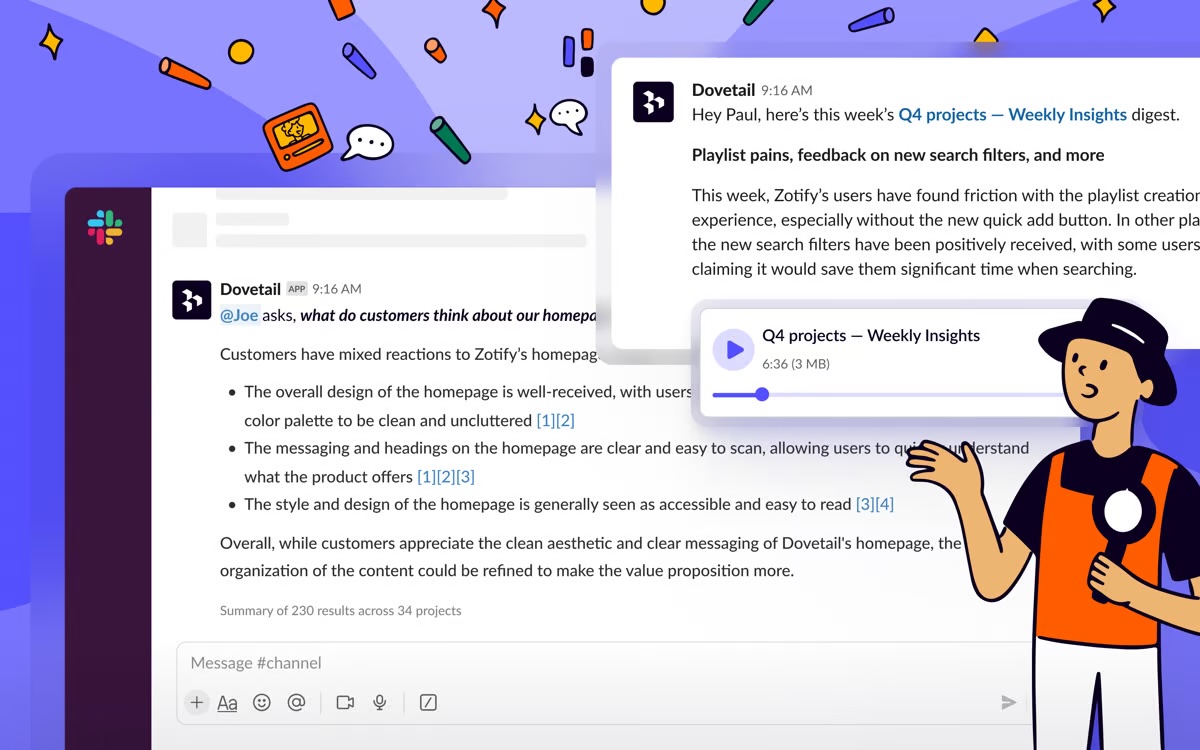
Screenshot of the Contacts interface, used to find, schedule, and incentivize research participants.Screenshot of a visualization of customer feedback, used to identify patterns before they become problems. Using LLM and ML techniques, Channels continuously classifies and tracks themes in large data sets like support tickets, app reviews, and feedback.Screenshot of an example of a conversational insight, available in Slack. Here, users can quickly ask questions to access automatic podcast-style updates for all related data across Dovetail in Slack and Microsoft Teams.Screenshot of the navigation and project interface, designed to makes it easy for everyone to get started and find what they need in Dovetail.