Edsby vs. PowerSchool Student Information System

Overview
ProductRatingMost Used ByProduct SummaryStarting Price
Edsby
Score 8.0 out of 10
Mid-Size Companies (51-1,000 employees)
Edsby is a cloud-based learning management system (LMS) for K-12 school districts that uses web and mobile technologies to connect teachers, students, parents and administrators in new ways. This LMS allows students and parents to check grades, attendance, homework and more from a browser, tablet or mobile phone. The vendor says what sets this LMS apart from others is that Edsby is designed specifically for the special requirements and needs of K-12. To make district-wide…
$5
per user/per year
PowerSchool SIS
Score 8.4 out of 10
Mid-Size Companies (51-1,000 employees)
The PowerSchool Student Information System covers administrative needs, such as scheduling, attendance, reporting, data management, faculty management, emergency/medical and health management, registration, and more for K-12 schools and districts. It is easy to use and boasts an industry-leading gradebook, PowerTeacher Pro. Users enjoy a fully web-based SIS that is flexible, configurable, and scalable with real-time updates on any operating system, browser or device.N/A
Pricing
EdsbyPowerSchool Student Information System
Editions & Modules
Edsby
5+
per user/per year
No answers on this topic
Offerings
Pricing Offerings
EdsbyPowerSchool SIS
Free Trial
NoNo
Free/Freemium Version
NoNo
Premium Consulting/Integration Services
NoNo
Entry-level Setup FeeRequiredNo setup fee
Additional DetailsEdsby charges an up-front fee for initial integration. There are also annual costs, variable with the number of students. Parent, teacher and administrator accounts are free. Certain other features are charged for annually. Special pricing applies for private schools. Contact Edsby for details.
More Pricing Information
Community Pulse
EdsbyPowerSchool Student Information System
Considered Both Products
Edsby
Chose Edsby
Far superior, more tailored to the needs of the classroom
Chose Edsby
Edsby and Google Classroom are two entirely different services, yet they can be used together with increased learning effectiveness as the result. When used in tandem, they combine the best features of both platforms and blend them together to get the best learning platform …
Chose Edsby
EDSBY was piloted at the school last semester, and I found it made my job easier, which is a boon since time is fleeting and I could get more done with less effort with Edsby. After the pilot the entire school district was signed up to use Edsby. I like it very much. I did use …
Chose Edsby
Edsby is far more intuitive to use so it provides a better user experience.
PowerSchool SIS
Chose PowerSchool SIS
Each software I used in my career had special features which were specifically unique for them. PowerSchool Student Information System was an impressive software that offered the ability to ease student registrations and admissions online using web forms where students and …
Chose PowerSchool SIS
Price and features way back just were much better in PowerSchool. We have not evaluated much in the recent years.
Chose PowerSchool SIS
I have heard good things for Infinite Campus and Skyward. I would [evaluate] each of them and see what fits your needs. Each has their strengths and weaknesses and so picking the right one for your needs is important. PowerSchool [Student Information System] does have some …
Chose PowerSchool SIS
PowerSchool was the learning management system that was in place when I started at this institution but I approve of it. It definitely does help simplify the amount of work that goes into the grading process. Grades can easily be calculated as long as a proper setup has been …
Chose PowerSchool SIS
I have been a PowerSchool Student Information System user since 2003 and we were one of the very first districts to adopt it. Since I have used it for so long, entertaining the idea of moving to another platform is not on the table.
Chose PowerSchool SIS
PowerSchool Student Information System does a great job of organizing information in ways that other educational software does not.
Chose PowerSchool SIS
I have used Desire 2 Learn (D2L) and Synergy Student Information System (Synergy SIS) and PowerSchool Student Information System stacks up against them this way:

Chose PowerSchool SIS
We moved away from Jupiter because we found that Jupiter did not handle all aspects of the school that we needed it to.
Chose PowerSchool SIS
I was a huge advocator for Boardingware and worked closely with them to try and create a more well-rounded program for the private school I worked at, but definitely think PowerSchool works best and most effectively for public school. In terms of grading PowerSchool works much …
Chose PowerSchool SIS
PowerSchool replaced an old version of Apple School. PowerSchool outperforms Apple's product and is so much easier to use. It was even simple to convert the old Apple student files to the PowerSchool system for a seamless transition. Once we transitioned, we were able to see …
Chose PowerSchool SIS
PowerSchool has many more features than Blackboard such as attendance, grades, performance review standards platform, lunch, etc. Blackboard makes it easy to find a parent’s email or phone number quickly which is not in PowerSchool.
Chose PowerSchool SIS
Our previous SIS went out of business, and we needed something fairly soon. PowerSchool was the SIS that had the best ability for our state reporting. We liked what we heard from other states and districts about the innovation and continued improvement by PowerSchool.

Admin, …

Chose PowerSchool SIS
Nothing stacks up against PowerSchool in terms of usability and flexibility. Every other product I have used has not come close to the user friendliness of PowerSchool, nor they do not allow immediate flexibility.
Chose PowerSchool SIS
We used a different grade management system over 5 years ago that was efficient but not as user-friendly as Powerschool. I cannot remember the name of that application. Our school system has been using PowerSchool for over 5 years and so far it has served our purpose. Each year …
Chose PowerSchool SIS
As noted, I think it would be hard to find anything else that is better than this tool for your school or district, this SIS is really the total package. It has a great teacher grade book, and while there are always things that can be improved, because you can customize it, the …
Chose PowerSchool SIS
Each of the above products has great features, but PowerSchool has features that each of the above products has, all in one system. This means that you could more easily use JUST PowerSchool without needing extensions and other systems to supplement features. This is less …
Chose PowerSchool SIS
I used Blackbaud at a different school system so there was not a choice or selection. I feel that it was pretty similar to PowerSchool so I had a very smooth transition from one platform to the other. The gradebooks felt very similar, along with the recording and reports …
Chose PowerSchool SIS
We found that PowerSchool Student Information System provided the platform we needed to manage student information, assignments and grades, school schedules, etc. Although Schoolnet provided assessment and instructional management tools, it did not allow us to keep track of the …
Chose PowerSchool SIS
I have used a product called SASI. It does not compare to this at all. SASI was a site based system and the backend was not a true database. I have also use Sungard Pentamation before. Although it was a centralized system, it wasn't as user-friendly and the interface was has to …
Chose PowerSchool SIS
PowerSchool Student Information is the gold standard for Student Information Systems. They know what they are doing, how to serve K-12 schools and school districts. The other Student Information Systems did not meet our districts minimum standards for the needs that we have, …
Chose PowerSchool SIS
PowerSchool blows the other Student Information System that my school used out of the water. The other Student Information System was a glorified grade book/report creator, and had no other function. PowerSchool has so many functions and elements inside of one program that it …
Chose PowerSchool SIS
I used Infinite Campus previously while working at a different school. My position was the same at both schools. PowerSchool is more user-friendly than Infinite Campus for those staff members who are not strong with utilizing technology. Infinite Campus allows users to print …
Chose PowerSchool SIS
The systems seem to stack up pretty well, however we have stuck with PowerSchool mostly due to our history with the product. The cost and feature set differences wasn't substantial enough to warrant a migration. The amount of work involved with training staff and end users is …
Features
EdsbyPowerSchool Student Information System
Learning Management
Comparison of Learning Management features of Product A and Product B
Edsby
9.0
Ratings
9% above category average
PowerSchool Student Information System
-
Ratings
Player/Portal10.00 Ratings00 Ratings
Mobile friendly9.00 Ratings00 Ratings
Progress tracking & certifications7.00 Ratings00 Ratings
Assignments9.00 Ratings00 Ratings
Learning administration10.00 Ratings00 Ratings
Social learning9.00 Ratings00 Ratings
Student and Faculty Administration
Comparison of Student and Faculty Administration features of Product A and Product B
Edsby
-
Ratings
PowerSchool Student Information System
8.5
Ratings
3% above category average
Integrations with 3rd-Party Education Technology00 Ratings9.00 Ratings
Online Registration Management00 Ratings10.00 Ratings
District Communications, such as messaging and alerting00 Ratings8.10 Ratings
Roster Management00 Ratings9.00 Ratings
Platform Customization00 Ratings7.70 Ratings
Teacher Self-Service00 Ratings9.00 Ratings
Student Data Security00 Ratings9.40 Ratings
Community Support00 Ratings7.40 Ratings
Class Scheduling00 Ratings9.40 Ratings
State and National-level Reporting00 Ratings7.10 Ratings
Compliance Support00 Ratings7.60 Ratings
Teacher and Parent Mobile Application00 Ratings8.00 Ratings
Best Alternatives
EdsbyPowerSchool Student Information System
Small Businesses
iSpring Learn
iSpring Learn
Score 9.6 out of 10

No answers on this topic

Medium-sized Companies
Schoology Learning
Schoology Learning
Score 9.7 out of 10
Schoolmint Hero
Schoolmint Hero
Score 9.7 out of 10
Enterprises
Schoology Learning
Schoology Learning
Score 9.7 out of 10
Schoolmint Hero
Schoolmint Hero
Score 9.7 out of 10
All AlternativesView all alternativesView all alternatives
User Ratings
EdsbyPowerSchool Student Information System
Likelihood to Recommend
8.0
(0 ratings)
9.0
(0 ratings)
Likelihood to Renew
-
(0 ratings)
10.0
(0 ratings)
Usability
9.0
(0 ratings)
8.0
(0 ratings)
Support Rating
-
(0 ratings)
8.5
(0 ratings)
Implementation Rating
-
(0 ratings)
8.0
(0 ratings)
Vendor post-sale
-
(0 ratings)
10.0
(0 ratings)
Vendor pre-sale
-
(0 ratings)
10.0
(0 ratings)
User Testimonials
EdsbyPowerSchool Student Information System
Likelihood to Recommend
I use only Edsby - I have no use for a google classroom as well as an Edsby page. I try to convince and how teachers how easy it is to use only one system
Read full review
PowerSchool is great for schools to keep track of student information, schedules, and grades. It integrates with other programs to make setting up classes easier and faster. PowerSchool gives teachers a singular place to find information or input students' grades. It also has an app for parents or guardians to use to check their student's grades which is very useful.
Read full review
Pros
  • Intuitive - Parents find it simple to use.
  • Email - because Esdby links to our SIS producing class lists and broadcast emails are a snap.
Read full review
  • PowerSchool houses student or staff information that can be easily accessed by those teachers and administrators who need the information. This allows everyone to go to one place to access information.
  • Parents can view their child's grades at any time with their protected login on a parent portal. This allows teachers to keep parents informed and involved in their child's progress at school. When everyone works together it increases our students' chance for success.
  • PowerSchool offers videos to train new users. When we have new employees, the videos can be accessed at any time the employee needs as opposed to them waiting for someone to help them.
Read full review
Cons
  • Edsby could make the sorting and collecting of information such as attendance easier.
  • Enhancements to the messaging system are needed - sorting into folders, searching, etc.
Read full review
  • The user interface could be more intuitive. Because of the many features, it can sometimes be difficult for administrators to find what they are looking for.
  • A recent upgrade allowing for more flexibility in the relationship between students and parents was long in coming and didn't go very smoothly. We are now dealing with a ton of clean-up after the upgrade. Even after we have cleaned everything up, there is still a ways to go before PowerSchool is on par with other SIS systems in that area. In their defense though, they are actively working on getting caught up.
Read full review
Likelihood to Renew
No answers on this topic
The district is unlikely to change systems due to the cost of training and tech support to facilitate such a switch.
Read full review
Usability
The user interface is widely modelled on a web 2.0 design (e.g. Facebook). This is not a criticism per se, as it makes moving around the site very easy and familiar. The mobile site is also very well designed, it makes good use of space and is also easy to navigate.
Read full review
Great features, but it can feel very cumbersome at times
Read full review
Support Rating
No answers on this topic
Overall, I have not had to use support for PowerSchool Student Information System because our school district gives us training in each area in which we will be utilizing PowerSchool Student Information System. In terms of in-user support, I feel that there is mild to moderate user support that is built into PowerSchool SIS.
Read full review
Alternatives Considered
EDSBY was piloted at the school last semester, and I found it made my job easier, which is a boon since time is fleeting and I could get more done with less effort with Edsby. After the pilot the entire school district was signed up to use Edsby. I like it very much. I did use a blog on First Class which was extremely difficult to learn, and a blog on WordPress which was easier to learn how to use but not interactive like Edsby is. To my mind, Edsby is far superior to the former.
Read full review
Each software I used in my career had special features which were specifically unique for them. PowerSchool Student Information System was an impressive software that offered the ability to ease student registrations and admissions online using web forms where students and parents could submit and upload their information and necessary documents to the school/institute with just a few clicks. Even though this feature is available on a few other similar software, PowerSchool Student Information System was the only software that was specialized in this area.
Read full review
Return on Investment
  • For the most part, teachers, parents and students love the system. It provides easy access to the information that they need when they need it.
Read full review
  • Having one system within the school district is beneficial. Teachers are able to access a variety of information and also do input all within the same program.
  • Communication with parents has been impacted greatly, as they always have information at their fingertips without teachers having to call or email them with a grade update. Parents are able to check student's grades at any time.
Read full review
ScreenShots

Edsby Screenshots

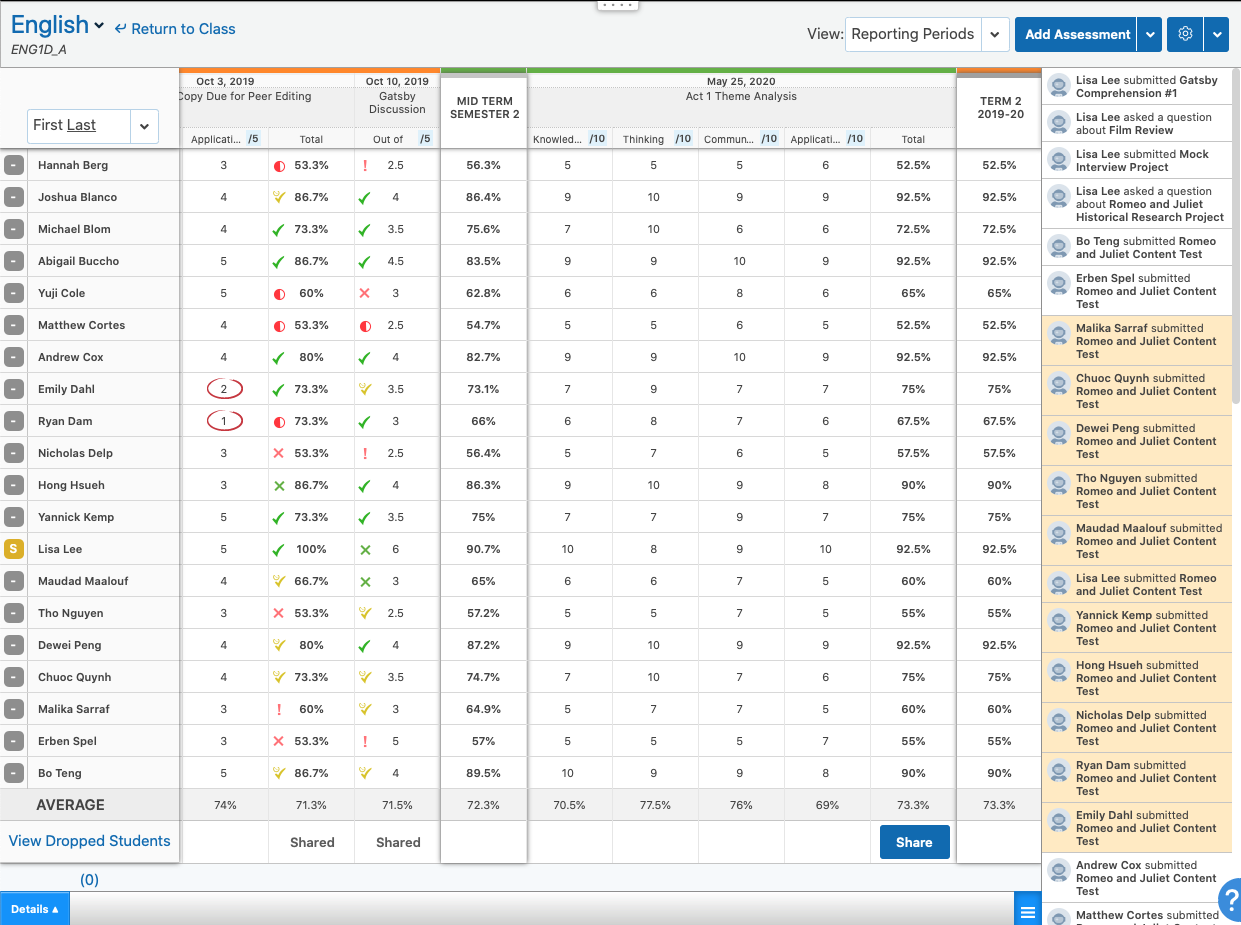
Screenshot of the student's dashboard view in EdsbyScreenshot of private teacher observations of students in Edsby, taggedScreenshot of mobile Edsby clients available for iOS and AndroidScreenshot of a teacher's view of an Edsby class, the heart of the Edsby learning and analytics platformScreenshot of the teacher's view of a class gradebook in the Edsby learning and analytics platformScreenshot of a student eportfolio in the Edsby learning and analytics platform

PowerSchool SIS Screenshots

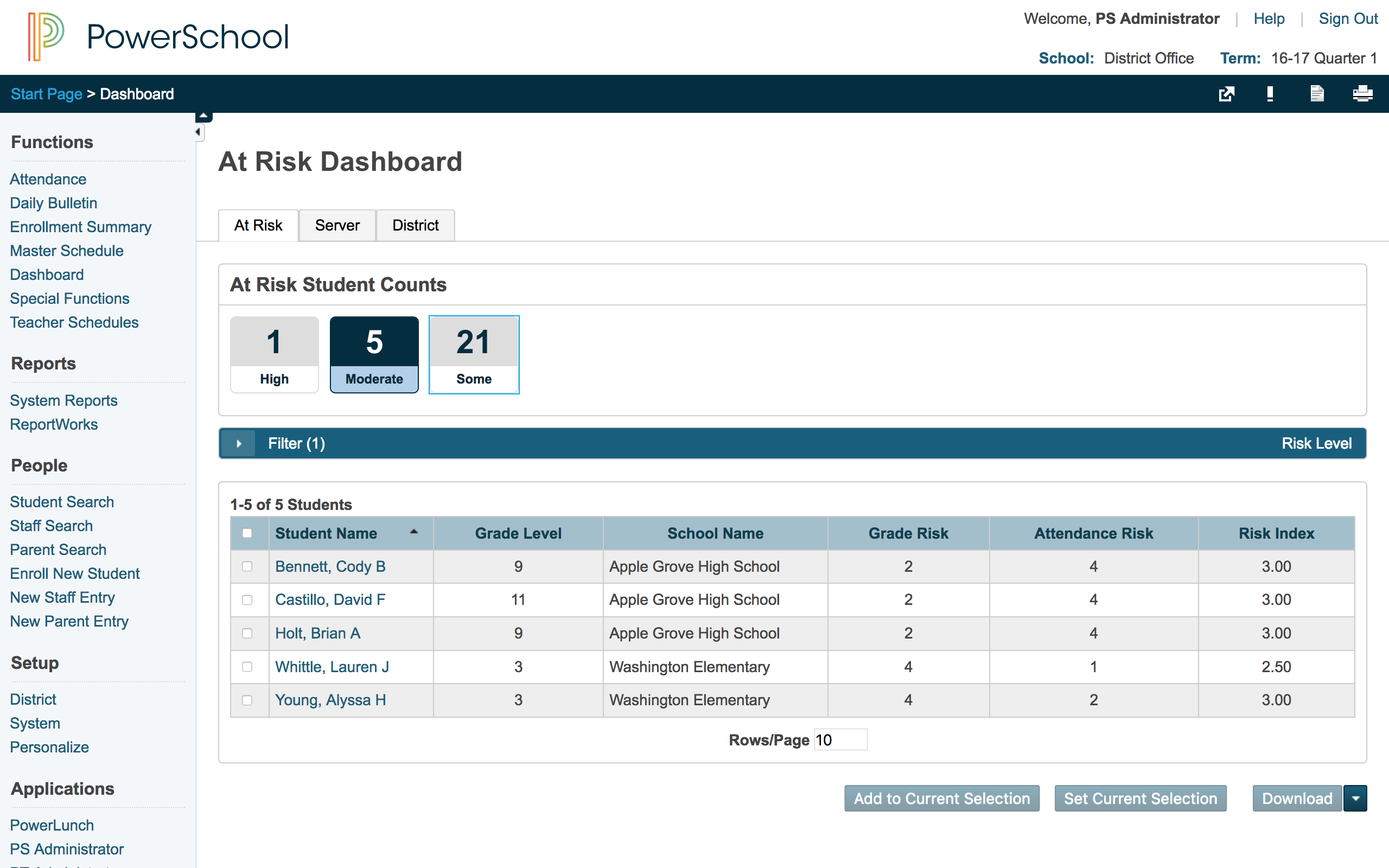
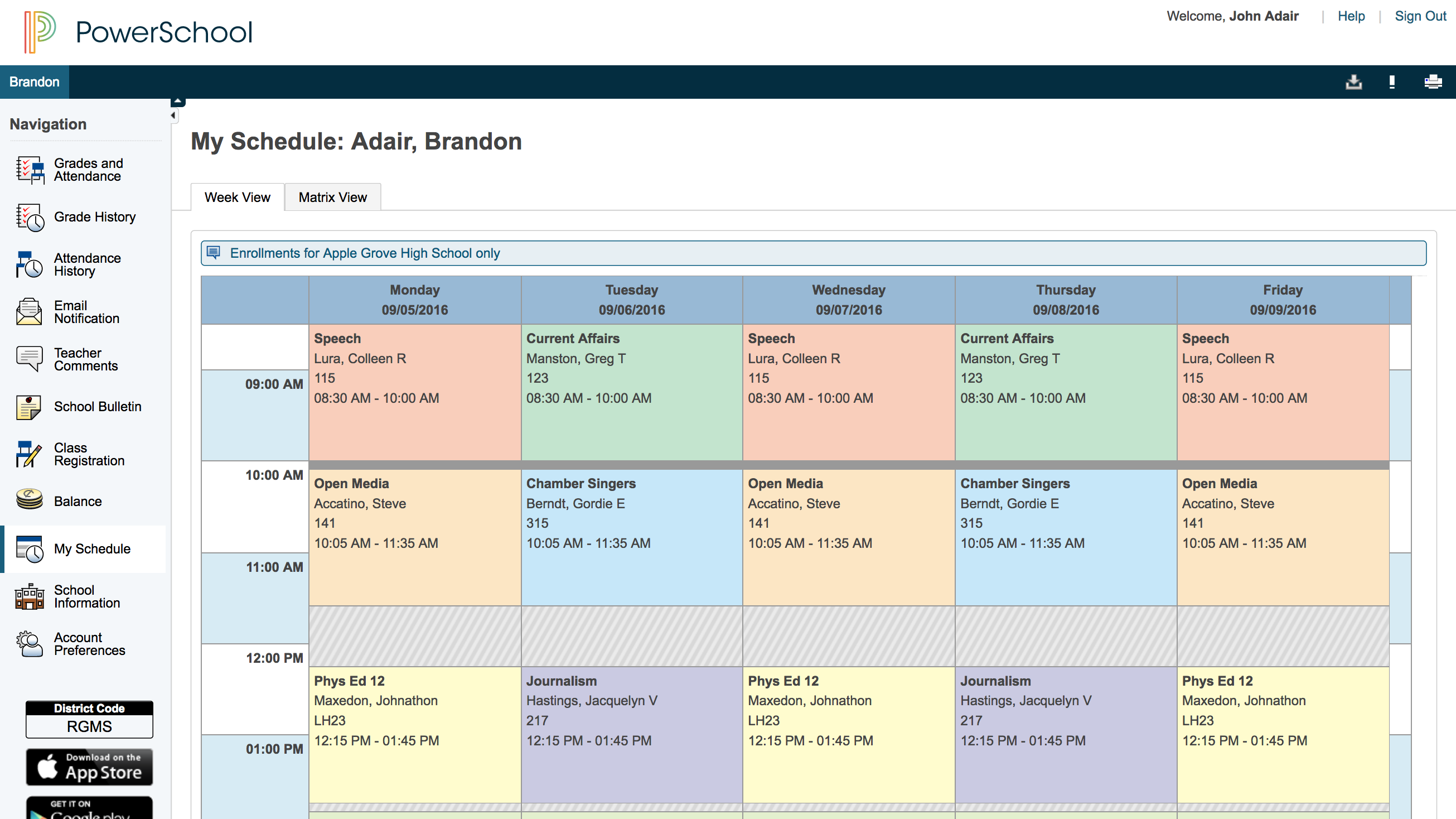
Screenshot of Student attendanceScreenshot of Standards-based gradingScreenshot of At-risk dashboardScreenshot of Parent view of student schedule