Flokzu Cloud BPM vs. OnBase

Overview
ProductRatingMost Used ByProduct SummaryStarting Price
Flokzu Cloud BPM
Score 9.9 out of 10
N/A
Flokzu is a cloud-based, agile business process management tool. It provides a low-code environment for supporting various tasks from bug reporting and lead development to customer support and incident analysis.
$15
Per User - 1,000 Process instances per month - 10 Gb storage - 5 Public Forms - Unlimited Databases - 10 Custom Reports
OnBase
Score 7.8 out of 10
N/A
OnBase by Hyland is an enterprise content management platform with business process and case management capabilities. It is modular by design and allows users to tailor the solution to their specific requirements.N/A
Pricing
Flokzu Cloud BPMOnBase
Editions & Modules
Standard
$15.00
Per User - 1,000 Process instances per month - 10 Gb storage - 5 Public Forms - Unlimited Databases - 10 Custom Reports
Premium
$21.00
Per User - Unlimited Process instances - Unlimited storage - Unlimited Public Forms - Unlimited Databases - Unlimited Custom Reports
Starter
$50.00
Unlimited Users - 50 Process instances per month - 1 Gb storage - 1 Public Form - 5 Databases - 1 Custom Report
No answers on this topic
Offerings
Pricing Offerings
Flokzu Cloud BPMOnBase
Free Trial
YesNo
Free/Freemium Version
NoNo
Premium Consulting/Integration Services
NoNo
Entry-level Setup FeeNo setup feeNo setup fee
Additional DetailsWe offer Special pricing for educational institutions & nonprofit organizations. To apply, please get in touch with us. We also work with large organizations and offer a volume discount for teams of 50+ people. Contact us for a quote.
More Pricing Information
Community Pulse
Flokzu Cloud BPMOnBase
Considered Both Products
Flokzu Cloud BPM
Chose Flokzu Cloud BPM
We selected Flokzu because it suited our needs, had a very friendly interface, and easy to use features.
Chose Flokzu Cloud BPM
Flokzu better suited our needs in terms of:

  • Balancing simplicity with powerful features.
Chose Flokzu Cloud BPM
We tried Kissflow, but it lacked the functionality we needed at this time and it doesn't support BPMN.
We also tried Pipefy, their UI was great, but it was too simple for us. Finally, we evaluated some traditional on-premise BPM Suites like Oracle and AuraPortal… too expensive …
OnBase
Chose OnBase
I have worked with SharePoint in the past. Workview is comparable, but having the Workflow engine blows it out of the water! We have actually migrated serval SharePoint applications to OnBase because SharePoint lacked the functionality. We have a subsidiary that completely …
Chose OnBase
A core solution like Jack Henry works really well with other Jack Henry products or solutions but is not as versatile as a solution like OnBase in that it can support much different software or document solution needs.
Chose OnBase
IntelliChief (Quadrant product) was used as the first AP invoice workflow and content repository in 2006. Very hard to compare since I haven't used a current version.
RVI - Real Vision Inc. was used for Credit/Collections documents and workflow. No way to compare
Haven't had …
Chose OnBase
OnBase provided a very robust workflow process compared to others.
Chose OnBase
The version of SharePoint we were utilizing was not very practical. We oftentimes had issues with archived documents, where they could be found or opening them all together. It seemed the older the document the harder it was to access when logged into SharePoint. This is …
Chose OnBase
From what I understand after I stopped using ImageNow Hyland bought the property so I do not know that there is a difference at this point. I have not used Microsoft's Azure Data Storage but they may be poised to have a viable competitor due to the powerful tools they can …
Chose OnBase
A strength with OnBase over many other applications is the ease of the point and click configuration.
Chose OnBase
What helped in making the decision to switch to OnBase were three elements that were very important in reaching our company goals. Hyland's consistent track record of being committed to customer success, OnBase's lower total cost of ownership compared to the product used …
Chose OnBase
Perceptive Content (Used)
We switched off of Perceptive Content because their support was absolutely horrendous and the company just completely stopped innovating. Their platform didn't provide the ability to integrate like OnBase does today. There are no limits to what we can …
Chose OnBase
I did not participate in the search for this solution, so I do not know how Onbase by Hyland compares to the other products that are available. I am not familiar with other such products that can do what OnBase by Hyland is doing for us. Knowing our IT department who made the …
Chose OnBase
The city had made the decision to go with OnBase by Hyland before I got here. It seems to work well for city needs and processes.
Chose OnBase
I would say I like this system better for the housing of secure type documents as it is super safe and has security measures attached on saving and printing, and some documents are super confidential and this software allows that use better than other software I've used. I …
Chose OnBase
OnBase combines all of its features into one user-friendly platform.
Chose OnBase
I suppose that Google Drive is the closest comparable software that I have personally used. I can't say that I know enough about Google Drive from a professional use perspective to be able to compare though.
Chose OnBase
It's much easier to administrate and is very user-friendly compared to my experience with Kofax.
Chose OnBase
OnBase is a very extensible platform that can do anything as long as you're willing to pay for the add-on for it. Many of the other competitors out there do content management well but don't easily integrate, or integrate at all, with third party systems. I highly recommend …
Chose OnBase
We went with OnBase because other organizations we work with use it, so we wanted to use something similar. Also, other solutions are way more expensive.
Chose OnBase
Oracle and Seismic are two competitors that I know of. OnBase is less expensive than either. However, it is less polished than Seismic. Overall, they serve slightly different functions. OnBase is better used for overall document storage and centralization, while both Oracle and …
Chose OnBase
We selected OnBase because Hyland had purchased the company who we were using previously. We migrated all of our documents and processing workloads to OnBase about 4 years ago and have been using the product since then. We're impressed by the capabilities of the program but are …
Chose OnBase
I have never used any other products, so I can't make that decision.
Features
Flokzu Cloud BPMOnBase
Reporting & Analytics
Comparison of Reporting & Analytics features of Product A and Product B
Flokzu Cloud BPM
9.9
Ratings
19% above category average
OnBase
-
Ratings
Dashboards9.90 Ratings00 Ratings
Standard reports9.90 Ratings00 Ratings
Custom reports9.90 Ratings00 Ratings
Process Engine
Comparison of Process Engine features of Product A and Product B
Flokzu Cloud BPM
9.4
Ratings
12% above category average
OnBase
-
Ratings
Process designer9.90 Ratings00 Ratings
Process simulation8.60 Ratings00 Ratings
Business rules engine8.90 Ratings00 Ratings
SOA support9.90 Ratings00 Ratings
Process player8.20 Ratings00 Ratings
Support for modeling languages10.00 Ratings00 Ratings
Form builder9.90 Ratings00 Ratings
Model execution9.90 Ratings00 Ratings
Collaboration
Comparison of Collaboration features of Product A and Product B
Flokzu Cloud BPM
10.0
Ratings
17% above category average
OnBase
-
Ratings
Social collaboration tools10.00 Ratings00 Ratings
Content Management Capabilties
Comparison of Content Management Capabilties features of Product A and Product B
Flokzu Cloud BPM
9.9
Ratings
19% above category average
OnBase
-
Ratings
Content management9.90 Ratings00 Ratings
Enterprise Content Management
Comparison of Enterprise Content Management features of Product A and Product B
Flokzu Cloud BPM
-
Ratings
OnBase
8.2
Ratings
3% above category average
Content capture & imaging00 Ratings9.00 Ratings
File sync, storage & archiving00 Ratings9.00 Ratings
Document management00 Ratings10.00 Ratings
Records management00 Ratings8.00 Ratings
Content search & retrieval00 Ratings8.00 Ratings
Enterprise content collaboration00 Ratings8.00 Ratings
Content publishing & creation00 Ratings8.20 Ratings
Security, risk management & information governance00 Ratings9.00 Ratings
Contract lifecycle management00 Ratings8.40 Ratings
Automated workflows00 Ratings9.00 Ratings
Artificial intelligence00 Ratings5.80 Ratings
Mobile support00 Ratings7.60 Ratings
Integration00 Ratings7.00 Ratings
Best Alternatives
Flokzu Cloud BPMOnBase
Small Businesses
Square 9 Softworks
Square 9 Softworks
Score 9.1 out of 10
Square 9 Softworks
Square 9 Softworks
Score 9.1 out of 10
Medium-sized Companies
Square 9 Softworks
Square 9 Softworks
Score 9.1 out of 10
MediaValet
MediaValet
Score 9.1 out of 10
Enterprises
CMW Platform
CMW Platform
Score 8.9 out of 10
MediaValet
MediaValet
Score 9.1 out of 10
All AlternativesView all alternativesView all alternatives
User Ratings
Flokzu Cloud BPMOnBase
Likelihood to Recommend
9.9
(0 ratings)
9.9
(0 ratings)
Likelihood to Renew
-
(0 ratings)
8.8
(0 ratings)
Usability
8.6
(0 ratings)
8.6
(0 ratings)
Support Rating
10.0
(0 ratings)
5.8
(0 ratings)
In-Person Training
-
(0 ratings)
9.1
(0 ratings)
Online Training
-
(0 ratings)
8.2
(0 ratings)
Implementation Rating
-
(0 ratings)
8.7
(0 ratings)
Configurability
-
(0 ratings)
9.1
(0 ratings)
Vendor post-sale
-
(0 ratings)
9.1
(0 ratings)
Vendor pre-sale
-
(0 ratings)
7.3
(0 ratings)
User Testimonials
Flokzu Cloud BPMOnBase
Likelihood to Recommend
  • Distributed teams (like our case), from all over Argentina, Paraguay, Perú, and Uruguay.
  • Collaborative needs, like sharing documents, getting approvals.
  • Manager needs: supporting alerts (deadlines and reminders) and custom reports for performance tracking.
  • Tracking needs: when you need to know where a request, or a proposal, or a claim or a commercial lead is.
Read full review
OnBase is a content services solution for organizations that need high visibility to documents or information across multiple teams or departments. It supports users' access control, workflow functionality with transaction history, electronic document retention, and destruction documentation. Hyland can support the organization for implementations or solutions, or the organization can utilize the education services and build out the solution themselves.
Read full review
Pros
  • Process Versioning and automatic migration to the latest version.
  • Process Sandbox lets you test and try processes before going to production.
  • BPMN 2.0 support.
  • Real Low-Code (no programming skills needed).
  • Zapier and WebService integration out of the box.
  • 100% cloud (no installments or complex configurations needed).
  • An easy method to add new users/roles.
Read full review
  • Houses documents for easy retrival.
  • Allows for simple document scanning and storage.
  • Has the ability to allow paperless document import so document do not have to scanned.
  • Makes the review and document sharing process easy.
  • Has security features that allow you to keep only the staff you want to view documents able to access them.
Read full review
Cons
  • Doesn't allow to use the product as white-label.
  • Doesn't include connectors to SAP (it could be connected via Web Services).
Read full review
  • The Administrator interface, while powerful, is antiquated and has so many options to chose from it can be overwhelming at times trying to find what you need in order to accomplish a task.
  • The Unity application is a work in progress and is missing out of some features that are much better in the thick client, such as scanning documents in at high volume. This has improved over time, though.
  • Hyland Onbase is a content management platform and, while it does handle ingestion and scanning processes, does require a 3rd party application to really complete the whole package. Hyland's Perceptive platform or Kofax Capture complement it greatly.
Read full review
Likelihood to Renew
No answers on this topic
OnBase has become a core part of our enterprise solutions toolkit due to its ever-growing integration capabilities. Any business process that produces or tracks documents or object entities can be modeled and managed within OnBase and used to supplement almost any line-of-business system that we use.
Read full review
Usability
I'm not an expert, nor IT girl, but Flokzu has been so easy to use and setup that I could do it by myself.
Read full review
You get out of something what you put into it. You reap what you sow! If an organization will spend time setting the solution up, dedicating staff to its development and ongoing support, and always keep the end-user in mind during development, you will have one of the most well-received solutions in your organization. So many organizations that I speak with stand up a solution but don't commit someone to its upkeep and development. It is vital that you have the staff to work within the solution on a daily basis.
Read full review
Support Rating
Nice people both on chat and e-mail, always willing to help us.
Read full review
I have had exceptional support from Hyland; however, I am a direct customer from Hyland and receive support directly from Hyland support technicians. I have heard complaints from other customers who have partner relationships as then the support is 100% driven through the partner and you are dependent on the skills and abilities of your partner corporate support team.
Read full review
In-Person Training
No answers on this topic
The trainer was very knowledgeable and was a Hyland employee. The training was at their corporate headquarters, so it allowed our team to become familiar with organization and culture.
Read full review
Online Training
No answers on this topic
With the Premium subscription, there is a tone of training with audio and practice options.
Read full review
Implementation Rating
No answers on this topic
Using Hyland professional services to assist with the implementation made things much easier. They have the knowledge and experience to get the system live as users are expecting
Read full review
Alternatives Considered
BPMN support. More powerful process modeler. Better customer support.

Read full review
IntelliChief (Quadrant product) was used as the first AP invoice workflow and content repository in 2006. Very hard to compare since I haven't used a current version. RVI - Real Vision Inc. was used for Credit/Collections documents and workflow. No way to compare Haven't had to look for a replacement for any reason since purchasing OnBase.
Read full review
Return on Investment
  • Not allowed to publish the ROI, but I can tell you it has been a great investment.
  • The more relevant outcome has been the ability to deploy new process and new versions of existing processes in hours/days.
  • The knowledge base and easy of use made us autonomous, so we don't need external consultancy services.
Read full review
  • OnBase provides a very reliable ECM platform for the company.
  • OnBase helped to remove the dependency on paper files and file folders. This saved real estate cost as well as facilitated the ability to work from anywhere.
  • OnBase made same day processing of all incoming and outgoing documents a reality.
Read full review
ScreenShots

Flokzu Cloud BPM Screenshots

Screenshot of Define & customize your form with an amazing Form Builder. Arrange your fields using a grid layout. Multiple field types and visibility options can be combined to meet every possible need.Screenshot of Using the international standard BPMN and a simple drag-and-drop interface you can model your cloud workflow according to your organization's reality.Screenshot of Improve your efficiency by measuring and analyzing the performance of your organization through the 'Metrics & Reports' section. Custom Reports let you focus on what matters the most to you and your team.Screenshot of Execute the process. Assignees will receive pending tasks on their Inbox in their PC or mobile. As the process instance moves along the workflow, each task will be assigned to a user or role automatically.

OnBase Screenshots

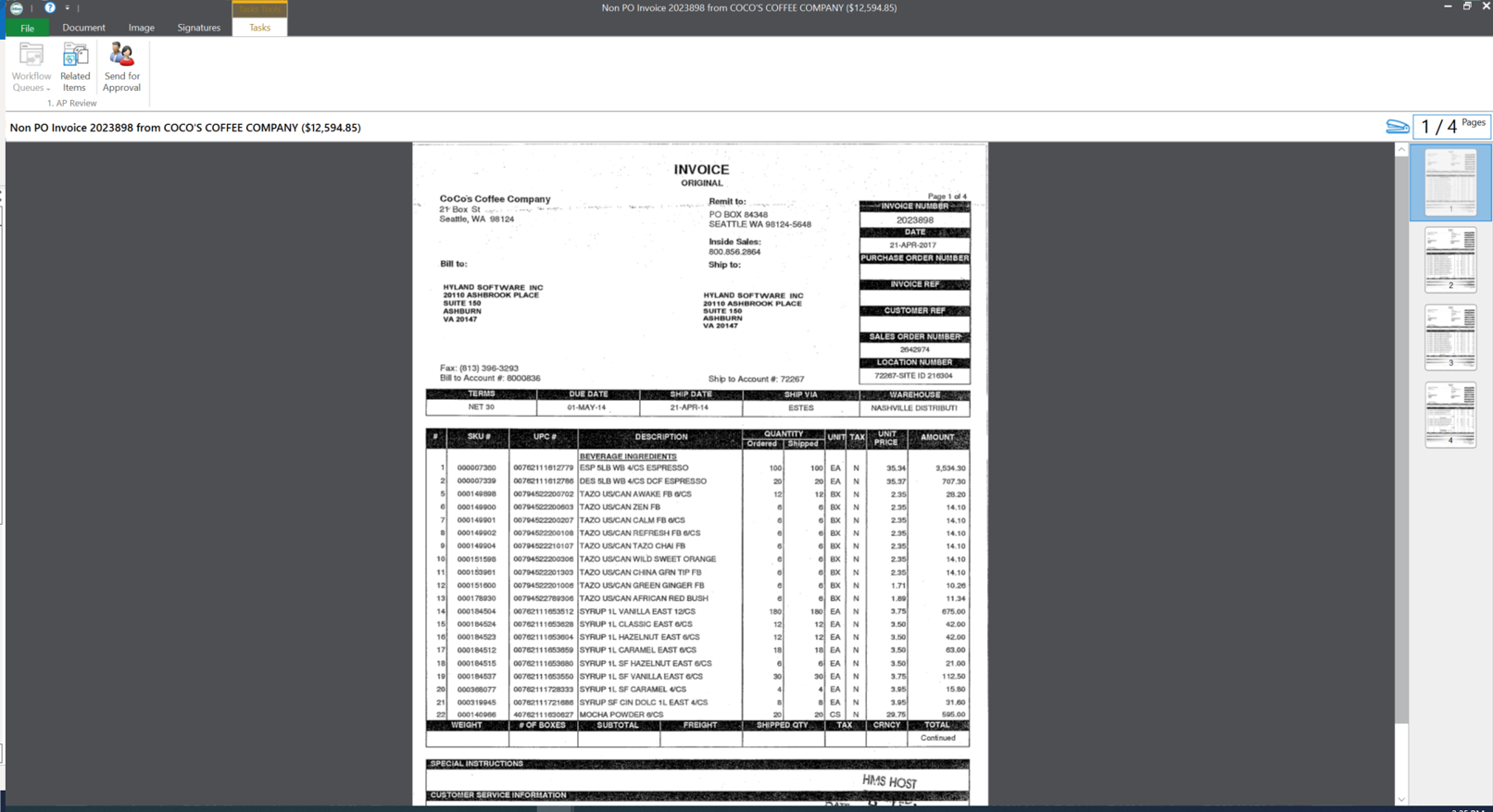
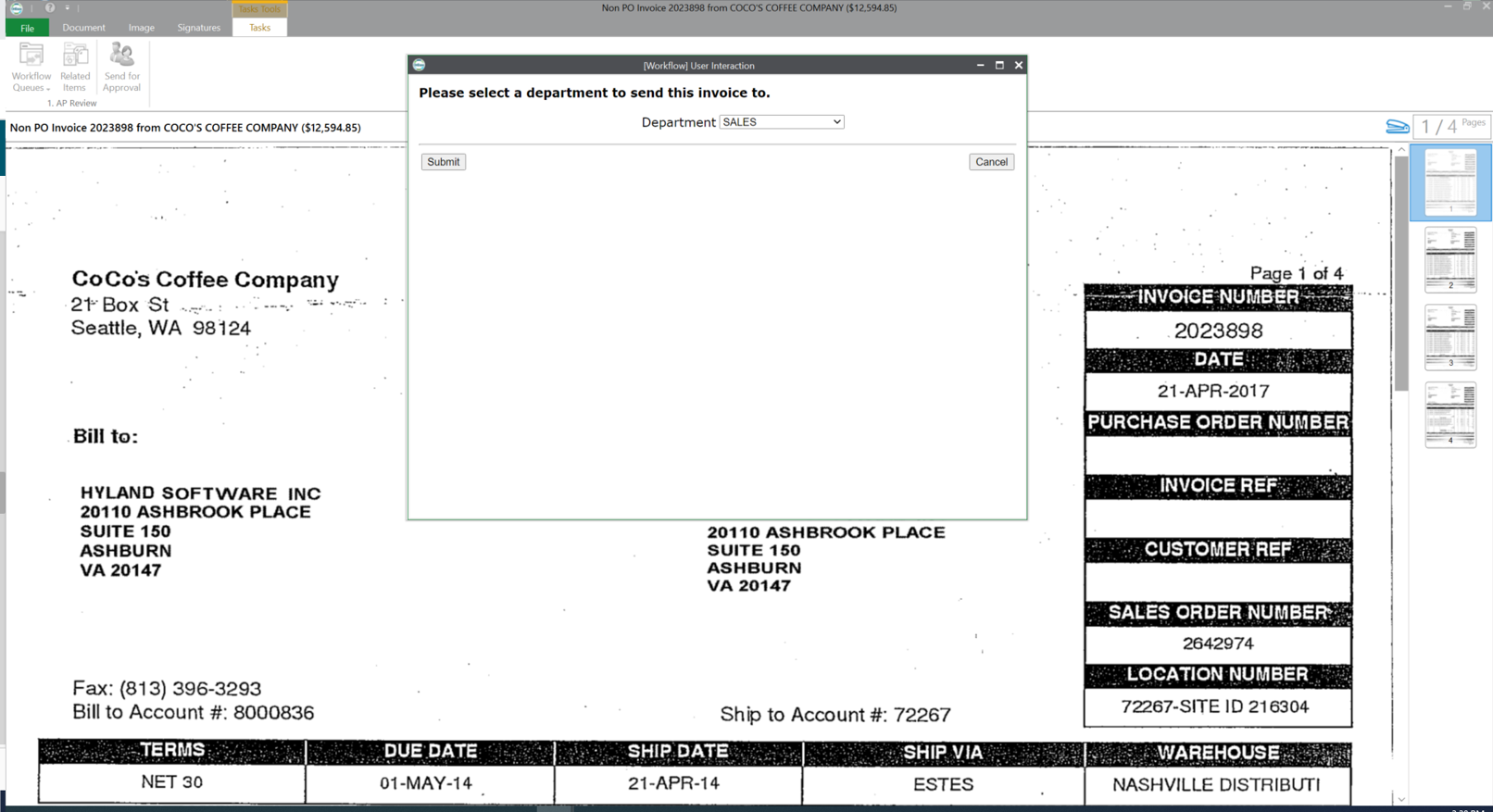
Screenshot of an Approval for an Ad-Hoc Task.Screenshot of Onbase's Dark Mode.Screenshot of the Document Viewer.Screenshot of the Send to Department feature.Screenshot of the Workflow Stage.