Gainsight PX vs. Quantum Metric

Overview
ProductRatingMost Used ByProduct SummaryStarting Price
Gainsight PX
Score 7.9 out of 10
N/A
For SaaS products, Gainsight's product experience software enables companies to track every step of their user's journey and fully understand how they're interacting with a product over time.
$0
100 or less MAUs (Monthly Active Users)
Quantum Metric
Score 8.0 out of 10
Enterprise companies (1,001+ employees)
Quantum Metric is designed to help organizations build better digital products faster. Their platform for Continuous Product Design gives business and IT teams a single version of truth which the vendor describes as fast, quantified, and grounded on what customers actually experience. The solution ultimately aims to help teams agree on priorities, build products customers love, and innovate with speed and confidence.N/A
Pricing
Gainsight PXQuantum Metric
Editions & Modules
Starter (Free)
$0
100 or less MAUs (Monthly Active Users)
Starter
Starting at $400/M
500+ MAUs (Monthly Active Users)
Growth
Custom
Per MAUs (Monthly Active Users) and more
No answers on this topic
Offerings
Pricing Offerings
Gainsight PXQuantum Metric
Free Trial
YesNo
Free/Freemium Version
YesNo
Premium Consulting/Integration Services
NoNo
Entry-level Setup FeeNo setup feeNo setup fee
Additional Details
More Pricing Information
Community Pulse
Gainsight PXQuantum Metric
Considered Both Products
Gainsight PX
Chose Gainsight PX
Unfortunately, I haven't used any other product like Gainsight PX so will move to the next question.

Chose Gainsight PX
I have used and evaluated a few similar products to Gainsight PX, including Appcues, WalkMe, and Pendo. I found that Gainsight PX was the most comprehensive and user-friendly platform, offering features such as customizable onboarding flows, product usage tracking, and …
Chose Gainsight PX
We leaned towards Gainsight PX because of the tight integration with Gainsight. Implementations were somewhat similar but the ease of mapping for all features and modules was superior for PX.
Chose Gainsight PX
Because of better UI then the competitors. Also the usage statistics were well drafted in graphs and were easy to understand.
Chose Gainsight PX
It's been a couple years since I've used Pendo and admittedly we were not set up in the best way for Pendo to work like we have PX. Specifically I am referring to how our elements were tagged.

That being said, here is what I recall as main differences:
Chose Gainsight PX
The feature on Gainsight PX are easy to understand and implement in the solution, the pricing is also very competitive and functionalities like Customer health score, Customer monitoring, playbooks, surveys etc helps us to provide great insight to the team.
Chose Gainsight PX
Heap has a great value proposition and very nice user experience. But it lacks the clear funnel analysis that Gainsight PX provides. Plus Heap also does not have integration with a lot of CRMs and Customer data platforms. Also, Additionally if you go in the market to find Heap …
Chose Gainsight PX
I did not select Gainsight and we recently switched some of our products to other software which give us better targeting options but are more difficult to implement.
Chose Gainsight PX
Mixpanel was much less mature when we ditched it for Gainsight, and the Salesforce integration was very important to us, and Gainsight was the main service that offered it at the time. Mixpanel is probably better today if you look at the big picture, and don't need a specific …
Chose Gainsight PX
Churnzero is similar in its NPS and walk-through abilities as is user IQ but neither fits in the exact same category. Px is unique to anything I've used for the data extraction it offers. It's not a CS tool like those I mentioned but it is easily the best in terms of tracking …
Chose Gainsight PX
HelpHero is a very flexible and powerful walkthrough tool. We've used it alongside PX. We still use PX for most customer messages, CES surveys, and in-app badges.

I also evaluated Pendo, WalkMe, and a few other DAPs.
Chose Gainsight PX
I trusted Gainsight PX from the start since I am familiar with other Gainsight products.
Chose Gainsight PX
We have explored a few options this year and found that Gainsight PX was still the best option for us.
Chose Gainsight PX
Between the products analyzed, Pendo and Gainsight PX were most complete/mature. At the time, Pendo's UI seemed more intuitive than Gainsight PX. Chameleon and Appcues seemed easiest to use, but were lacking some of the functionality we were looking for. Ultimately chose …
Chose Gainsight PX
Working with both Gainsight PX and Mixpanel, my experience has been that the integration of Gainsight PX was much easier. Additionally controlling profiles and personas to make sure each group is getting the data they need, and only the data they should see, is easier with …
Chose Gainsight PX
We chose Gainsight PX over Pendo because of the connector with Gainsight CS for the Customer Success Team.
Chose Gainsight PX
The main reason is that Gainsight PX offers a perfect combo - analytics and customer engagement. That allows us to make the engagement contextual, based on real-time analytics results.
Chose Gainsight PX
WalkMe: while the in-app engagements were powerful, there was no email capability, and the analytics were an afterthought (rather than a core part of the solution).
WhatFix: the concept was great; the in-app engagements could be made into documentation and videos. However, we …
Quantum Metric
Chose Quantum Metric
It is used for different functions; Quantum Metrics shows great advantages in the control and administration of data generated by a website. It allows the report and knowledge of online records, also the errors registered. Recordings of login sessions on web pages help resolve …
Chose Quantum Metric
Nowadays user journey is very important and for big companies you must use softwares like that
Chose Quantum Metric
Quantum Metric has unmatched support and is easy to use. The simple data visualization gave us an excellent analysis on specific pages and was a game changer. In other words, other tools may offer the same, but that's all. An easy-to-understand breakdown of how customers spent …
Chose Quantum Metric
its well suited for the environments for the workloads of huge transactions,huge I/O,avoiding delays for the workloads which need immediate attention with great workflows.For the great transformations and data mining it would be helpful,for great customer behaviorial, it would …
Chose Quantum Metric
Impressive interface to help me with getting a detailed journey of where my user is and clearly define the challenges these users face while moving from one step to another, backed with data points.
Chose Quantum Metric
Other tools might provide the tool in a very similar way, but that's it. Quantum Metric actually helps remove the abstraction from the data, their support is available in a very fast manner, they help us set goals and reach them, also helping us track them through the tool. …
Chose Quantum Metric
Quantum Metric is more sophisticated than Hotjar in every way (also much more expensive). If you've been using Hotjar and are ready for the next level of service, you should investigate Quantum Metric. However, if you have been using Hotjar and the service provides everything …
Chose Quantum Metric
Better Tech support & training; More features in the tool; Better reporting; Faster load time.
Chose Quantum Metric
Quantum Metric is a huge leap up from Mouseflow, which is very basic. Quantum offers more filters so I'm not sifting through thousands of recordings to find one or two. My organization uses Adobe for our everyday analytics and not Quantum. They do different things and I don't …
Chose Quantum Metric
Quantum's support is unmatched, and implementing new tracking is a breeze. Quantum makes it easy to dive beneath the numbers and see the customer sessions behind them. It enables more empathy and behavioral understanding.
Quantum's visualizations aren't as easy to use, and the …
Chose Quantum Metric
I found Tealeaf has many limitations related to logs and reviewing user sessions. Quantum Metric does not have these limitations.
Chose Quantum Metric
In other tools we cannot see the user journey, in other tools we need to write multiple queries but here the choice of filter is very easy. We can easily filter out the required data without any complicated query. It shows the customer journey like a video and we can play it …
Chose Quantum Metric
Quantum Metric feels a lot better when used. It is much smoother and seems much more reliable. It does not get stuck as much and finds the sessions a lot quicker.
Chose Quantum Metric
I haven't used any other products similar to QM.
Chose Quantum Metric
I have used other tools like Dynatrace. Quantum Metric is better suited to look for errors and spot issues in user sessions, it has a more friendly UI.
Chose Quantum Metric
The biggest QM advantage is that you can see customer's actions on the live preview and almost immediately. So you can catch customers up, on the session, while the customer is still using your portal. There is a lot of information provided on the session, like API calls and …
Chose Quantum Metric
I like it more because it is much more quick for searches and replays, also making dashboards is much more easy with QM.
Chose Quantum Metric
We were using Clicktale at the same time as Quantum for Order Form Optimization recommendations but found that the amount of time invested and the quality of the tool from Quantum just seemed like a better fit for our organization.
Chose Quantum Metric
Quantum Metric was the one who could provide a solution which worked across all platforms. (iOS, Android and Web).
Chose Quantum Metric
We selected Quantum Metric for its great user experience, fast replay and easy reporting.
Features
Gainsight PXQuantum Metric
Mobile Capabilities
Comparison of Mobile Capabilities features of Product A and Product B
Gainsight PX
-
Ratings
Quantum Metric
8.7
Ratings
8% above category average
Responsive Design for Web Access00 Ratings8.40 Ratings
Mobile Application00 Ratings8.60 Ratings
Dashboard / Report / Visualization Interactivity on Mobile00 Ratings9.00 Ratings
Mobile App Analytics00 Ratings8.60 Ratings
Results and Analysis
Comparison of Results and Analysis features of Product A and Product B
Gainsight PX
-
Ratings
Quantum Metric
9.1
Ratings
3% below category average
Heatmap tool00 Ratings9.30 Ratings
Click analytics00 Ratings9.20 Ratings
Scroll maps00 Ratings9.00 Ratings
Session Recording and Replay00 Ratings8.80 Ratings
User Segmentation00 Ratings9.00 Ratings
Best Alternatives
Gainsight PXQuantum Metric
Small Businesses
Fullstory
Fullstory
Score 9.1 out of 10
Smartlook
Smartlook
Score 8.2 out of 10
Medium-sized Companies
Whatfix
Whatfix
Score 8.2 out of 10
Contentsquare
Contentsquare
Score 7.1 out of 10
Enterprises
Whatfix
Whatfix
Score 8.2 out of 10
Contentsquare
Contentsquare
Score 7.1 out of 10
All AlternativesView all alternativesView all alternatives
User Ratings
Gainsight PXQuantum Metric
Likelihood to Recommend
8.0
(0 ratings)
9.2
(0 ratings)
Likelihood to Renew
8.2
(0 ratings)
7.5
(0 ratings)
Usability
8.0
(0 ratings)
7.7
(0 ratings)
Support Rating
7.3
(0 ratings)
8.7
(0 ratings)
Implementation Rating
-
(0 ratings)
9.1
(0 ratings)
Ease of integration
7.7
(0 ratings)
-
(0 ratings)
User Testimonials
Gainsight PXQuantum Metric
Likelihood to Recommend
It’s a robust tool that allows you to easily map and track key features and actions within your products. It also allows for in app communications to help guide the user through the path you want them to follow. The ability to connect with Gainsight CS also allows you to leverage that data to drive actions for the account team, incorporate it in health scoring, and use it to trigger digital programs. You do need a well thought out strategy for management of the platform, the data and how you will use it.
Read full review
If you're looking to go beyond session replay and have a tool with intelligence to show you specific issues, and prioritize those, I think this is a good tool. Retailers that have had ups and downs, and are maybe seeing an increase in their online traffic/sales, who want a better view of how to improve the customer experience. You need a fairly mature digital analytics environment for this to make sense. If you have a more basic analytics environment, or you don't have the people/skills to use all the information QM can provide, it's probably not a good fit.
Read full review
Pros
  • Mapping your product is easier with PX than with Google Analytics (mapping your product makes usage data appear as hits on mapped URLs, buttons, etc)
  • PX is good at showing simple messaging popups to customers.
  • PX Badge functionality—a persistent hover- and click-enabled popup launcher, positioned on select pages and attached to select elements—works well as a self-serve resource for users. It can be unobtrusive yet right there when needed.
  • PX modal content is fully editable HTML with plenty of flexibility.
  • Audience filters are really powerful. You can target users by many built-in and dev-configurable attributes, like device-type (which helped me work with mobile web users), browser, account, parts of the application visited/used in the last day, and many more.
Read full review
  • Identifying user pain points and frustrations. Quantum Metrics has a data point called Rage Click which shows when a customer has clicked multiple times back to back on a particular section of the website.
  • Replaying a session to see everything that is loading on the front end to the customer, as well as the backed end of the website, has been critical in troubleshooting the experience.
  • Heatmaps are a awesome tool we have found very useful in showing engagement with different content on the page, how far user scroll & drop off and to see a split side by side view of the same page in an a/b test.
Read full review
Cons
  • Generate reports based on predefined segments is not possible. This is essential for us for creating an onboarding workflow.
  • On-screen guides randomly lose their mapping and need re-calibration. This might be due to our application responsive technology.
  • Missing customization on certain engagements - Creating a delay is not possible for all types which is needed.
Read full review
  • Quantum could share some use cases implemented by similar industries in accordance with the key problems as inputs.
  • We should be able to see some of the most common solutions that could be integrated within our product based on the step of the user journey I am at.
  • Expanding capabilities to integrate with high-level tools integrated.
Read full review
Likelihood to Renew
I like the product, find it pretty easy to use. As we move forward, looking forward to using more of the functionality.
Read full review
Quantum is a nice tool and is user friendly however I believe there always room for improvement. We have experienced minor issues with a few sessions which were solved by Quantum support reps in a timely manner and some of the dashboards are not as robust as other tools we use
Read full review
Usability
It is a good product, but like with every product, there is room for improvement or even just things I, as a user, would prefer, such as the ability to click on a company and have it go to Salesforce instead of Insight. It can also be difficult to find certain reports.
Read full review
For a new user, it's pretty intuitive to onboard and start doing the basic functionalities. But QM has a lot of functionalities which can be leveraged by more team members (especially when you don't have analysts dedicatedly using this) if further enhancements to usability are made.
Read full review
Support Rating
I have not had to contact support frequently but when I have I used the chat and my questions were answered immediately. I've also used their knowledge center, help documentation and training videos which are all very thorough. The support we've received from our Customer Success Manager has been helpful as well.
Read full review
I've been very impressed with the support Quantum Metric has provided. Our amazing Customer Success team has provided excellent service and has gone above and beyond in helping us use and understand the tool. We hold weekly calls with multiple teams and QM has been proactive in bringing things to our team's attention and making suggestions. The support has been one of the most important aspects of having QM and has allowed us to make great strides in improving how we use data and user research in our work.
Read full review
Alternatives Considered
I have used and evaluated a few similar products to Gainsight PX, including Appcues, WalkMe, and Pendo. I found that Gainsight PX was the most comprehensive and user-friendly platform, offering features such as customizable onboarding flows, product usage tracking, and automated customer success workflows.
Read full review
Quantum Metric has unmatched support and is easy to use. The simple data visualization gave us an excellent analysis on specific pages and was a game changer. In other words, other tools may offer the same, but that's all. An easy-to-understand breakdown of how customers spent their time is provided. It makes it easier to empathize with others and understand their behaviors. Quantum Metric offers the whole package, unlike other tools.
Read full review
Return on Investment
  • Customer Sentiment. Customers have been excited when we can show them data around usage and where we can improve.
  • Deciding to remove features. We have used PX to identify features that have little to no usage which allows us to get rid of unnecessary process and maintenance.
  • Identifying areas of improvement. We are able to find areas of our product that we need to focus on improving where previously we would have missed or had a tough time justifying spending time and resources.
Read full review
  • The service is not cheap, so don't commit unless you're going to use it.
  • Really improved our tech support process by allowing us to identify problems much sooner.
  • Helped identify potential frustrations, which could be eliminated to reduce friction at checkout.
Read full review
ScreenShots

Gainsight PX Screenshots

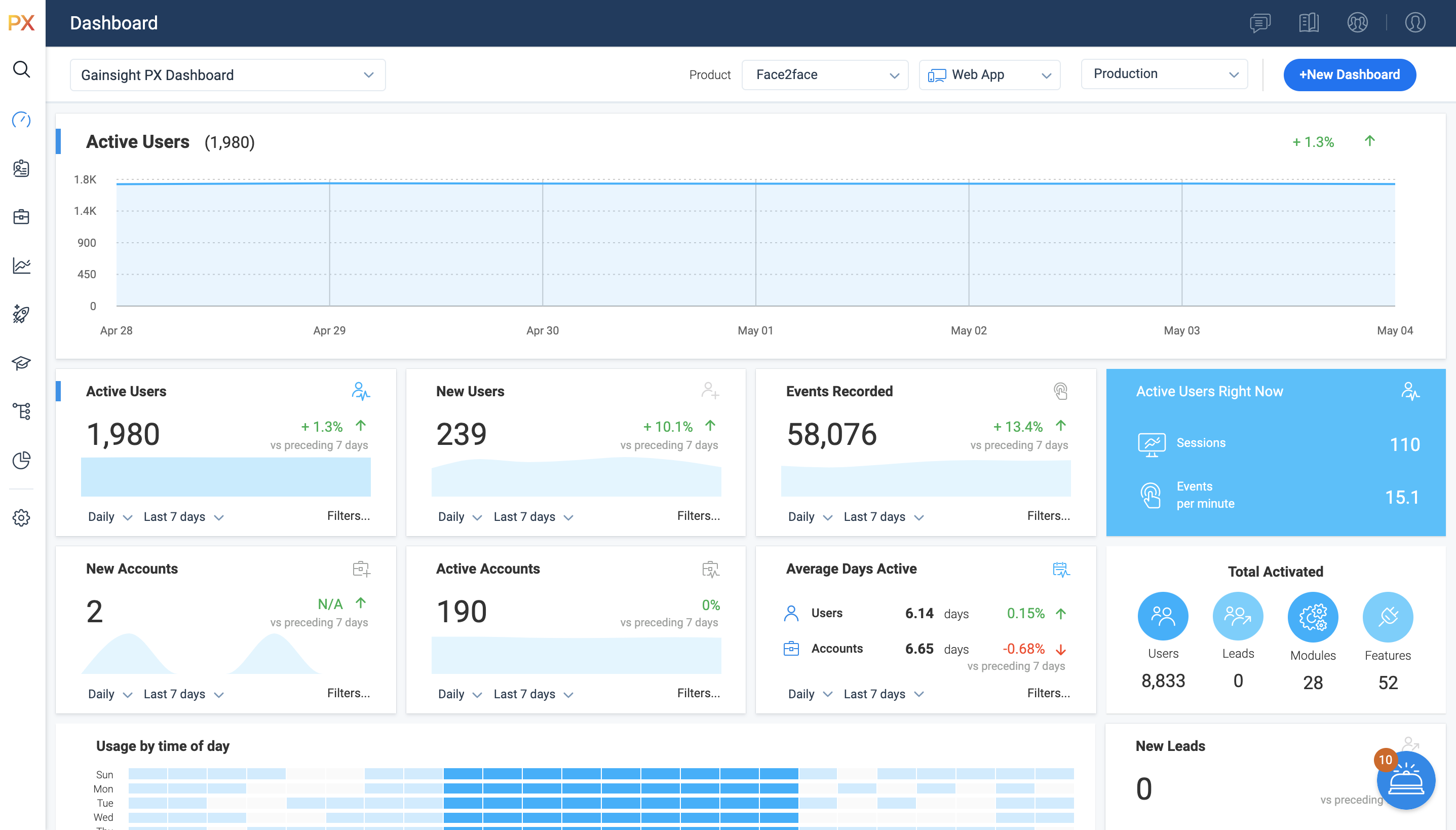
Screenshot of Access all of your key metrics in one place.Screenshot of PX Dashboards offer an interactive way of viewing data. By default, Gainsight provides you with the Gainsight PX Dashboard, but you can create separate Dashboards for each user, based on their requirements. 

For example, you can create a Dashboard, set it to private and grant access only to the top-level executives who are interested in viewing the performance of company KPIs. You can create a Dashboard for a Product Manager and include widgets which show key metrics for the product they own.Screenshot of Gainsight PX connects directly to your CRM and other customer data sources, letting you leverage custom events with no limits on what you can explore – all without using any query language.

Track specific events and compare any number of different cohorts and behaviors to learn more about a specific behavior or validate a specific hypothesis. You can use the group by functionality to aggregate results based on specific fields, and you can analyze custom event properties based on the property values. This may come handy when you want to measure the event properties such as video play counts or monetary values you're passing to Gainsight PX via custom events.Screenshot of Product Mapper® is an easy to use way of describing your product features with a simple "point, click and describe."   Each mapped feature can be viewed hierarchically within your Product Feature Tree®.   

Features can be organized in any way that makes sense for your particular application.  For example, you can organize by modules and features or you can nest sub-modules under modules and add features at any level.Screenshot of You can use existing templates while setting up Guide engagements. You can even save the newly created/modified template and use the saved template in the future in order to save time. Once you select the template, you can modify your template–no coding required, but it's there if you want it.Screenshot of Present targeted and timely in-app surveys so you can get more relevant feedback from the right people to better understand their needs and wants, and easily see the results in real-time.

Quantum Metric Screenshots

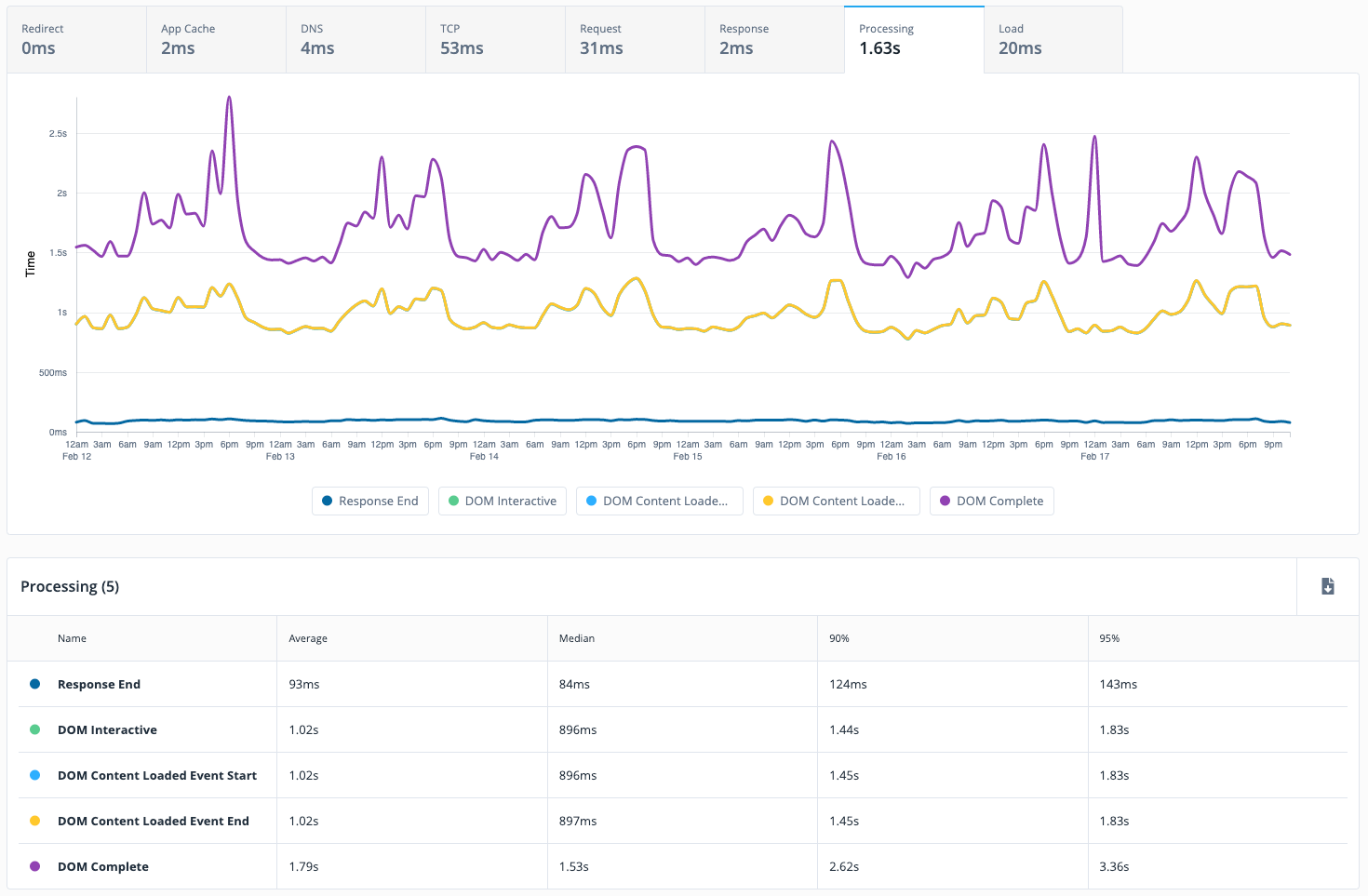
Screenshot of Industry specific Atlas guides helps improve sections of the user experience on a site or app.Screenshot of Quantum Metric Sales Funnel - Shows data in context with respect to previous weeks.Screenshot of Integrates NPS to quantify customer feedbackScreenshot of Performance timings can be calculated