TrustRadius: an HG Insights company

Gainsight PX

Score7.9 out of 10

48 Reviews and Ratings

What is Gainsight PX?

For SaaS products, Gainsight's product experience software enables companies to track every step of their user's journey and fully understand how they're interacting with a product over time.

Media

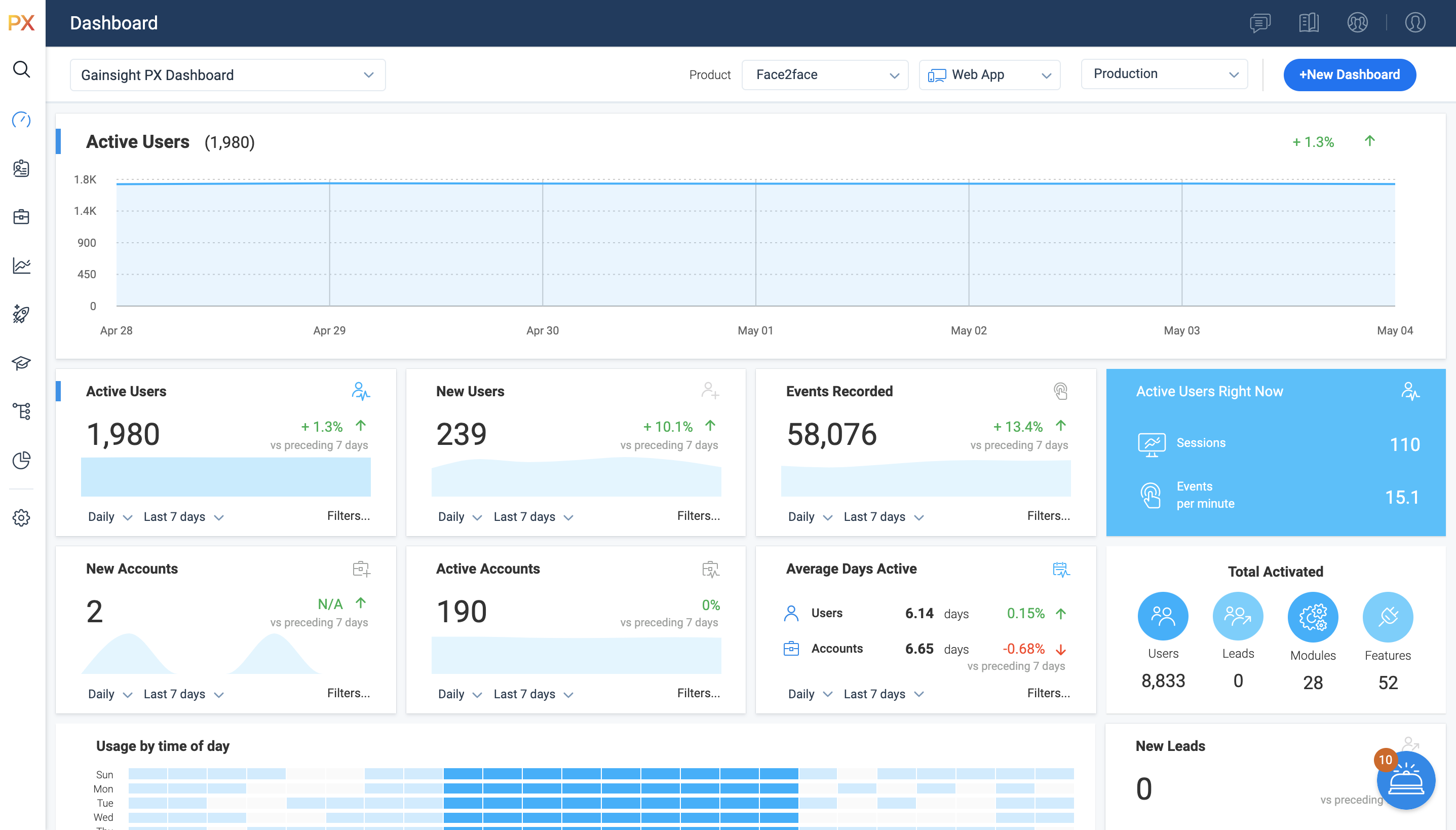
Access all of your key metrics in one place.
PX Dashboards offer an interactive way of viewing data. By default, Gainsight provides you with the Gainsight PX Dashboard, but you can create separate Dashboards for each user, based on their requirements. 

For example, you can create a Dashboard, set it to private and grant access only to the top-level executives who are interested in viewing the performance of company KPIs. You can create a Dashboard for a Product Manager and include widgets which show key metrics for the product they own.
Gainsight PX connects directly to your CRM and other customer data sources, letting you leverage custom events with no limits on what you can explore – all without using any query language.

Track specific events and compare any number of different cohorts and behaviors to learn more about a specific behavior or validate a specific hypothesis. You can use the group by functionality to aggregate results based on specific fields, and you can analyze custom event properties based on the property values. This may come handy when you want to measure the event properties such as video play counts or monetary values you're passing to Gainsight PX via custom events.
Product Mapper® is an easy to use way of describing your product features with a simple "point, click and describe."   Each mapped feature can be viewed hierarchically within your Product Feature Tree®.   

Features can be organized in any way that makes sense for your particular application.  For example, you can organize by modules and features or you can nest sub-modules under modules and add features at any level.
You can use existing templates while setting up Guide engagements. You can even save the newly created/modified template and use the saved template in the future in order to save time. Once you select the template, you can modify your template–no coding required, but it's there if you want it.
Present targeted and timely in-app surveys so you can get more relevant feedback from the right people to better understand their needs and wants, and easily see the results in real-time.

1 / 6

Good product, would be amazing with a few tweaks.

Use Cases and Deployment Scope

The CS reps at my company use it to track communication, risk, escalations, and other metrics for our team/clients. It helps keep all the information from the sales force, zoom meetings, emails, and phone calls in one place and allows us to track metrics and KPIs better. It also allows us to see our CTA's and Salesforce cases and pull reports based on what products our clients are using currently.

Pros

  • Integrate with Salesforce.
  • Integrate with gmail.
  • Zoom AI recording.

Cons

  • Can be difficult to pull reports.
  • Don't like things are spread between home, dashboard, and timeline.
  • The search function is a little wonky in my opinion.

Return on Investment

  • I am just a user so I do not think I can speak to this.

Usability

Other Software Used

Salesforce CMS

Gainsight PX

Use Cases and Deployment Scope

We use it to launch in app engagements with in our products. We also use it to link to other resources we have internally for our customers.

Pros

  • Surveys and data on that
  • In app engagements
  • Flexibility

Cons

  • Can be challenging to find the right item in PX to adjust the engagement in the application

Return on Investment

  • We are still working on showing the ROI

Usability

Gainsight PX: Powerful Insights and Seamless User Engagement

Use Cases and Deployment Scope

Tracking user actions inside our products. Utilizing the knowledge base and in app guides to direct the user throughout the product, introduce new features, and highlight key features. Conducting in application surveys to gather feedback.

Pros

  • Product feature mapping
  • Surveys
  • Integration with Gainsight CS

Cons

  • Dashboards and reporting

Return on Investment

  • Allowed quick introduction and adoption of new features
  • Leverage in app surveys to gather and address feedback

Usability

Gainsight PX: A Powerful Tool to Maximize Your Customer Experience!

Use Cases and Deployment Scope

We use Gainsight PX to measure and optimize customer experience and engagement across our website, mobile app, and other digital channels, from onboarding to retention. It helps us identify areas of improvement and develop strategies to improve customer engagement and satisfaction.

Pros

  • Gainsight PX provides powerful segmentation capabilities to help marketers target the right customers with the right message. Through its segmentation capabilities, Gainsight PX enables marketers to create custom segments based on user behavior, demographics, and other criteria to ensure that the right message is delivered to the right customer.
  • Gainsight PX offers robust analytics capabilities to help marketers gain insights into customer behavior and engagement. Through its analytics capabilities, Gainsight PX enables marketers to track user engagement, identify customer trends, and gain insights into customer behavior.
  • Gainsight PX provides an intuitive user interface to help marketers quickly and easily create and manage campaigns. Through its user interface, Gainsight PX enables marketers to create and manage campaigns with ease, allowing them to quickly launch campaigns and track their progress.

Cons

  • Reporting and Analytics: Gainsight PX currently offers basic reporting capabilities, but there is room for improvement in terms of creating more detailed and interactive reports. Additionally, Gainsight PX could benefit from the addition of more advanced analytics capabilities, such as predictive analytics and machine learning.
  • Automation: Gainsight PX currently offers some automation capabilities, such as automated emails and surveys, but there is room for improvement in terms of creating more sophisticated automated workflows. For example, Gainsight PX could benefit from the addition of automated triggers based on customer behavior or automated segmentation based on customer data.
  • Integrations: Gainsight PX currently offers some integrations with third-party applications, such as Salesforce and Marketo, but there is room for improvement in terms of expanding the number of available integrations. Additionally, Gainsight PX could benefit from the addition of more robust APIs that would allow for deeper integrations with other applications.

Return on Investment

  • Since implementing Gainsight PX, we have seen a dramatic increase in customer retention. Our customer churn rate has decreased, and our customer lifetime value has increased.
  • We have also seen a marked improvement in customer sentiment, with our Net Promoter Score increasing by a small percentage.
  • Finally, we have seen a reduction in our time to value, with our onboarding process being completed in half the time.

Alternatives Considered

Appcues

Other Software Used

Salesforce CMS, SearchUnify, Figma

HUGE Fan of Gainsight PX

Use Cases and Deployment Scope

User analytics primarily. What features are being used? How frequently? Who is using them? The ability to launch in-app engagements and release notes and target them to different environments has been a considerable time saver and increased my productivity significantly. Also targeted in-app surveys have been a great way to collect and analyze product feedback.

Pros

  • User Analytics
  • In-App Engagements - Release Notes, Surveys
  • KPI Dashboard of Product Feature and Module Usage
  • Knowledge Center Bot

Cons

  • Automatic Feature Mapping
  • Targeting Users based on survey results
  • HTML Editor

Return on Investment

  • Definitely a positive impact on ROI - this pays for itself in efficiencies gained
  • Increased awareness of product usage
  • Increased engagement with users

Alternatives Considered

Pendo.io and Amplitude Analytics

Other Software Used

Jira Software, Microsoft 365, Zendesk Support Suite