Helpjuice is a web app that companies can use to keep their help pages up-to-date. Instead of answering the same question repeatedly, companies can use Helpjuice to keep track of content. This app includes analytics that enable businesses to see the content their users are searching for the most as well as content that needs improvement. The vendor says that companies that manage a support page full of FAQs and user guides can benefit from using Helpjuice. This app can be integrated…
N/A
Kustomer
Score 8.7 out of 10
N/A
Kustomer is a customer service CRM platform built for managing high support volume by optimizing experiences throughout the customer service journey. Kustomer was acquired by Facebook in late 2020, but spun out in 2023 and re-launched as an independent entity, Kustomer, LLC.
$89
per month, per user
Pricing
Helpjuice
Kustomer
Editions & Modules
No answers on this topic
Enterprise
$89
per month, per user
Ultimate
$139
per month, per user
Offerings
Pricing Offerings
Helpjuice
Kustomer
Free Trial
Yes
No
Free/Freemium Version
No
No
Premium Consulting/Integration Services
No
No
Entry-level Setup Fee
No setup fee
No setup fee
Additional Details
Every Plan Comes With A 100% Money-Back Guarantee, No Questions Asked. Starting price includes up to 4 users.
All plans require an annual subscription and 8 users minimum.
More Pricing Information
Community Pulse
Helpjuice
Kustomer
Considered Both Products
Helpjuice
Verified User
Anonymous
Chose Helpjuice
Prior to using Helpjuice, I was using Microsoft Publisher to create all the training materials and manuals for multiple divisions within my company. It was awful. It would lag whenever I opened larger manuals, it operated like software from the late 90s, it was not intuitive, …
We had particular requirements when finding the right product for our needs. We were looking for a product that would allow review before publishing, a web-based platform, and a fair price point when entering this market. As we looked at other products, they were missing one …
I find it baffling how little data can be stored or associated with a customer in many other systems, and how difficult that can be to set up. It is fine if you already have a robust CDP that you can hook up and use to power your CRM, but it is rare that an organization has the …
It has improved a lot of the training time needed for our new hires to understand the Kustomer interface and how to handle communications fully. The time invested went significantly down, and the learning curve improved a lot as well.
Apps like Intercom, Zendesk, and Gorgios all treat customer inquiries as tickets, just tracking that one issue or interaction with a customer. Kustomer treats each customer as an individual, which allows us to provide top-notch customer service. Customers love that we're able …
Kustomer is a great fit for our organization because we can cut down on multiple contacts from the same customer and see all their information in one place. It's also infinitely customizable, so if we need changes made we can make them while still using the same platform. This …
The UI of Kustomer is a lot cooler than what we are using before. There are a lot of features that Kustomer has that make things easier and more convenient than Desk.com.
I use both in my role with the company. Our social media channels are managed through Khoros, but we use Kustomer to notate and contact customers outside of social media. I'd much rather bring our social media channels into Kustomer, to help with efficiency.
Kustomer is far more intuitive, personal, and holistic than Zendesk. As a company who has a lot of interaction with a single customer, it is such an advantage to take the customer approach rather than a single ticket approach. Zendesk was very limited in a lot of the actions …
All other systems I have used have been internally-made programs that were a lot more basic order-taking systems, no notes or call functions outside of when order was placed. Doesn't really compare here.
Kustomer simply does more than any other platform I've been able to work with. Sure some others will give you a handful of neat tricks built in for managing a channel or two but those rarely offer any external integrative capacity or limit what you can do in connections. …
I was not personally involved in the decision-making process when selecting a new CRM and ultimately settling on Kustomer. That said, I'm happy with the decision to partner with them. Compared to our previous CRMs, it is much easier to work with everything in one place and we …
Moving from Zendesk to Kustomer was driven by the clarity that the customer timeline brings for advocate engagement alongside the custom workflow abilities.
Zendesk did not give a big picture of the customer. It was more of a ticketing platform, and only gave statistics of those conversations. We were unable to track customer sentiment, or other attributes of the customer.
Kustomer is far more scalable and flexible than Zendesk, and it provides a real omni-channel experience far from the "Zendesk for mails, Zendesk chat for chats" we were used to. On the automation and customisation features, it gets even clearer how Kustomer can deal with a lot …
After a lengthy process to replace our hard-coded HTML knowledge base, we reviewed many possible replacements. Still, Helpjuice proved to be the most affordable, but also provided the most features. The onboarding process was easy and they helped us import and format our existing knowledge base into Helpjuice articles. It provides an easy-to-use and professional-looking CMS that enables us to offer more types of self-help content to our growing user base.
It works really well for you to ask a teammate to review a case/email/message and provide some input since you can all review the same conversations and client accounts. They can also cover your inbox using your email handle in case you are out of the office suing some well deserved PTO.
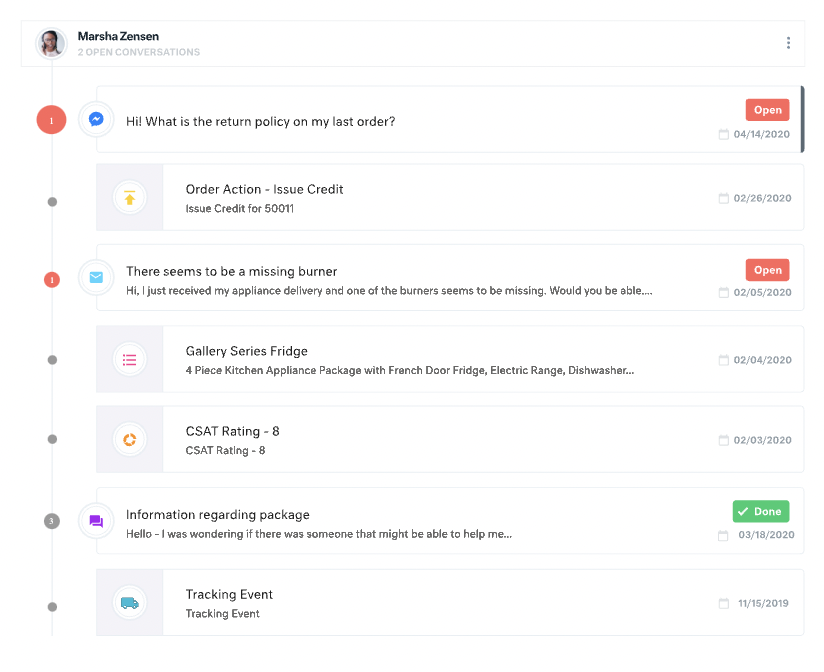
All customer data (past orders, communication with customer service, rewards account data) is in one place. This helps agents avoid confusion and reduces the number of tabs they need to open.
The Knowledge Base (or K Base) is very helpful. Any time we roll out a new policy or have a limited-time promotion, we can add all the relevant information and worksheets there for the convenience of the agents. That way they can stay in a chat while looking up the answer to a question.
We can seamlessly move from chat into email if the customer leaves or the queue times are too long. All the interactions will stay on the customer profile page, so they are kept up to date.
For our team, the feature that defaults all notes to begin in "done" status is difficult. Throughout each day we need to have notes open and assigned back and forth to different teams, and we have to remember to manually "open" each note. There is too much room for human error with this setting, and it is easy for important notes to be missed if a user forgets to open the note.
Similarly, it can be hard to remember to assign emails/notes to a particular team in addition to a user. We almost exclusively work out of team inboxes, and if someone on Care writes an email to a customer, the email will automatically be "done" when it is created, and it will be assigned to the user who wrote it, but not also to the user's team. There are instances where an email needs to be snoozed for several days/hours with further action needed, and unless the user remembers to assign the email to their team it may "awake" from the snooze and not be visible to anyone except the user who created it. Similarly to my first comment, this leaves a lot of room for human error and is not very intuitive.
Personally, I do not love that all tickets/emails/notes are jumbled together in the same inbox. While this gives visibility to everything on the "to do" list at the same time, it can be visually overwhelming. We have created unique folders for certain types of projects or categories of work, but have experienced tech glitches or just the awkwardness of another step to manually read the note, determine what type of category it is, and then manually assign it to another folder. Would love to have things auto-sort and take out this manual lift.
I love the idea of the autopilot setting, but we have not been able to use this for our work because it sorts items based on time, and not based on priority. In our line of work, we may have an urgent situation arise that needs attention before an email that was sent in 60 minutes ago. The autopilot feature would push the email to my associates sooner than it would the urgent situation from 5 minutes ago. Due to this, we manually monitor inboxes and assign work to ourselves and others.
HelpJuice is really amazing as a starter knowledge base vendor. They have great customer service and the ability to customize your website is endless. However, it is difficult to scale up.
There is a learning curve, but it is more than worth it, especially to have a dedicated resource pointed at Kustomer and any other software it interacts with. The basic implementation is useful, and powerful - certainly a MASSIVE upgrade over taking care of your customers in an email inbox or shuffling between multiple windows and applications! It is also set up really well to grow and reconfigure with your business. I'm a big fan.
It’s a great tool that has helped our company and overall customer service. I believe if we were able to edit certain setting for our specific company that would be hopeful. We have been told before that certain desires of ours would make a change throughout all of Kustomer. Which is not something we would want, we would just want that to change for our business.
Prior to using Helpjuice, I was using Microsoft Publisher to create all the training materials and manuals for multiple divisions within my company. It was awful. It would lag whenever I opened larger manuals, it operated like software from the late 90s, it was not intuitive, from a design perspective, and after migrating to a MacBook Pro as my work computer, I discovered that the program was NEVER created for Mac OS, requiring me to run Windows on my MacBook whenever I had to update any procedures that hadn’t yet migrated to Helpjuice. What a nightmare.
I find it baffling how little data can be stored or associated with a customer in many other systems, and how difficult that can be to set up. It is fine if you already have a robust CDP that you can hook up and use to power your CRM, but it is rare that an organization has the resources or the customer-focus to rally behind setting up their customer service/experience team up for success. With a platform like Kustomer, you can actually evolve the relationship over time, or use the past experiences (number of contacts, purchases, previous issues, etc.) to power your next steps with a customer, making for a much more nuanced relationship with a human, not just a ticket.
We’re getting so much positive feedback — which is not something you traditionally associate with a customer care team — because we’re making it effortless for customers to deliver both positive and negative feedback, and we can now resolve the bad feedback really really quickly.
Primarily from our increased efficiency with Kustomer, we’ve seen a significant reduction of $3 to $4 for every cost per contact.