HubSpot’s CRM enables growth-minded businesses to optimize their relationships with leads and customers. Through harnessing the power of carefully crafted sales, marketing, customer service, content management, and operations tools, the software aims to make it easy to unify team strategy and drive conversion. Additionally, the software allows users to connect with over 875 integration apps, APIs, and solutions partners to create a customizable user experience that suits the way teams work.…
$0
Per Month [Unlimited Users]
Kustomer
Score 8.7 out of 10
N/A
Kustomer is a customer service CRM platform built for managing high support volume by optimizing experiences throughout the customer service journey. Kustomer was acquired by Facebook in late 2020, but spun out in 2023 and re-launched as an independent entity, Kustomer, LLC.
$89
per month, per user
Pricing
HubSpot CRM
Kustomer
Editions & Modules
Free Forever
$0
Per Month [Unlimited Users]
CRM Bundle
$50
per month
Enterprise
$89
per month, per user
Ultimate
$139
per month, per user
Offerings
Pricing Offerings
HubSpot CRM
Kustomer
Free Trial
Yes
No
Free/Freemium Version
Yes
No
Premium Consulting/Integration Services
No
No
Entry-level Setup Fee
No setup fee
No setup fee
Additional Details
—
All plans require an annual subscription and 8 users minimum.
We use Apollo.io, but that's just for some sales automation. Mostly, HubSpot CRM has everything that a not-so-power user of a particular stream would ask for. You cannot go wrong with HubSpot CRM, and a very easy decision unless somebody has very specific requirements. As a …
I have worked for companies that used Pipedrive and Zoho CRM Plus, but despite their differences in features, I find these tools to be the same. Zoho CRM Plus is excellent software to keep clients' information in the same location, but it is too costly if you ask me. Pipedrive …
We liked the automated marketing that is available in HubSpot CRM compared to other products. It's also very easy to create reporting and view pipelines for different teams.
We've been using Hubspot for years and don't foresee making any changes away from it. It has been fully integrated into how our business operates. We ultimately selected HubSpot CRM because it had all the features and functions that our marketing, sales, and operations teams …
I used Salesforce in a previous company. It was way more complex, especially because we would receive bugs and error messages that would prevent us from fixing the issue when it was urgent, as it would cause a contract not to be sent, for example. We had a customized version …
HubSpot CRM has closed the gap and stacks up to staple CRM's like Sales Force. They've made themselves more appealing by lowering the entry-cost to get started.
HubSpot CRM definitely has the most features and is built for enterprise clients. We have been testing some other CRMs. They often have limited functionality but for a cheaper price ex. Attio.
Better in almost every way for a small business - more straightforward, more functionality out of the box, really easy to understand, and get support too.
HubSpot is easier to navigate, work in, and export data compared to these other software. Its integration with Zapier, Slack, and Chargebee has revolutionized the relationship between our sales and CS teams, making information extremely easy to find. These other platforms I …
I think SFDC does some things better than HS but overall comparable. ChurnZero literally serves a different purpose, but I will say that Company/ Contact management and reporting are much easier in CZ.
I prefer use of Monday overall and we have since transitioned to Monday for many of our teams. I think Monday has a more intuitive interface and better customization. Training is inferior to HubSpot, but customer support is superior. Monday, frankly looks cooler.
HubSpot CRM has its own strengths and is well suited for companies in the Series A/Series B range. I have used other tools which are highly customizable but when the use-cases are particularly unique and custom.
We felt that HubSpot CRM served us better when we were still a start up, and tailors also very well to scale ups. We felt Monday was a tool more for start ups that wanted a CRM and project management tool at the same time, which wasn't what we were looking for. Salesforce CRM …
We selected HubSpot CRM because it was so many tools in one and felt like the right sized platform for my agency (we are small, just a few folks). The academy and self serve option made onboarding feel easier than I thought. The other tools are mainly email providers, we …
HubSpot CRM works 'by itself', if you add different components to the suite, like Marketing, for example, you won't lose data or need to check the quality of syncs, APIs or webhooks. It's all native, all in one.
We use/used Active Campaign in one of our companies and in our current company we are using High Level. The main reason we use a combination of the two is due to the budget constraints. High Level is far more affordable, provides many if not all of the same features as …
Salesforce is the leading legacy (and modern) provider for a reason, but it should be clearly mentioned that is so admin-heavy that it is sometimes just very burdensome to work with them. Basically, you need an entire team of employees work full-time with Salesforce just to …
In our company, we previously used various CRMs that often had shortcomings and failed us at critical moments. Since adopting HubSpot CRM, we've noticed significant improvements, as it allows us to segment our databases, properly qualify leads, and generate reports and insights …
HubSpot CRM allows you to create much more complex and sophisticated workflows than most competitors that I have used. At the same time, it does the basics very well if all you want to do is create a list of contacts, send them emails, and measure your email deliverability and …
HubSpot CRM is just a very attractive well organized platform that is constantly evolving and had it not been for the cost and contract terms it would be a top recommendation.
Microsoft Dynamics is not very flexible in connecting with other apps or with other ideas and processes. Salesforce is definitely too costly and also the customer service is not working well. HubSpot is doing much better on that, and overall, it's the solution that has from our …
I find it baffling how little data can be stored or associated with a customer in many other systems, and how difficult that can be to set up. It is fine if you already have a robust CDP that you can hook up and use to power your CRM, but it is rare that an organization has the …
It has improved a lot of the training time needed for our new hires to understand the Kustomer interface and how to handle communications fully. The time invested went significantly down, and the learning curve improved a lot as well.
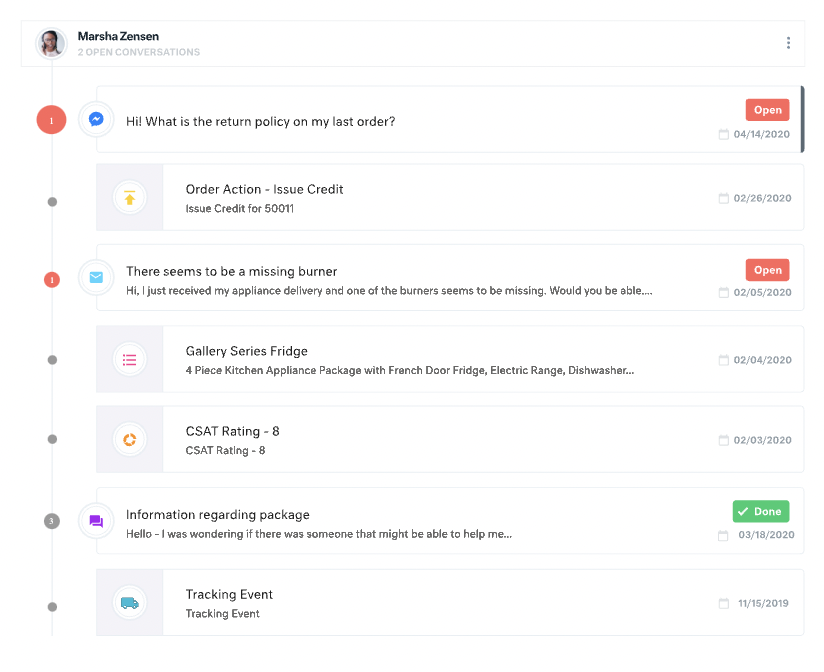
Apps like Intercom, Zendesk, and Gorgios all treat customer inquiries as tickets, just tracking that one issue or interaction with a customer. Kustomer treats each customer as an individual, which allows us to provide top-notch customer service. Customers love that we're able …
Kustomer is a great fit for our organization because we can cut down on multiple contacts from the same customer and see all their information in one place. It's also infinitely customizable, so if we need changes made we can make them while still using the same platform. This …
The UI of Kustomer is a lot cooler than what we are using before. There are a lot of features that Kustomer has that make things easier and more convenient than Desk.com.
I use both in my role with the company. Our social media channels are managed through Khoros, but we use Kustomer to notate and contact customers outside of social media. I'd much rather bring our social media channels into Kustomer, to help with efficiency.
Kustomer is far more intuitive, personal, and holistic than Zendesk. As a company who has a lot of interaction with a single customer, it is such an advantage to take the customer approach rather than a single ticket approach. Zendesk was very limited in a lot of the actions …
All other systems I have used have been internally-made programs that were a lot more basic order-taking systems, no notes or call functions outside of when order was placed. Doesn't really compare here.
Kustomer simply does more than any other platform I've been able to work with. Sure some others will give you a handful of neat tricks built in for managing a channel or two but those rarely offer any external integrative capacity or limit what you can do in connections. …
I was not personally involved in the decision-making process when selecting a new CRM and ultimately settling on Kustomer. That said, I'm happy with the decision to partner with them. Compared to our previous CRMs, it is much easier to work with everything in one place and we …
Moving from Zendesk to Kustomer was driven by the clarity that the customer timeline brings for advocate engagement alongside the custom workflow abilities.
Zendesk did not give a big picture of the customer. It was more of a ticketing platform, and only gave statistics of those conversations. We were unable to track customer sentiment, or other attributes of the customer.
Kustomer is far more scalable and flexible than Zendesk, and it provides a real omni-channel experience far from the "Zendesk for mails, Zendesk chat for chats" we were used to. On the automation and customisation features, it gets even clearer how Kustomer can deal with a lot …
Most of our clients are either government institutions or Education sector clients, such as universities, colleges, Coaching Institutes, and Competitive boards. We store their data in a single place. That means we can keep our one client's data in one place without any confusion. Our data is always clear and understandable while it is in HubSpot CRM.
It works really well for you to ask a teammate to review a case/email/message and provide some input since you can all review the same conversations and client accounts. They can also cover your inbox using your email handle in case you are out of the office suing some well deserved PTO.
The ability to create marketing campaigns and have control over when to stop and when to send the next according to your cadence design is excellent. However the ability to see the performance and the history for each prospect is so simple and so accessible - I kicked myself for not getting it sooner.
Having one place to create companies and contacts as well as score leads and track all contract products means we don't have to miss any renewals.
The Deal tracker gives us the ability to track multiple pipelines as well as team and individual metrics like average sale, percentage of goal, contribution to team effort which when mixed with an activity tracker means the team stays lean and mean to crush all goals.
The real time chat feature means prospects can navigate to our landing page for info about us, levels of product availability, pricing and begin a quick chat with members of the sales and support team.
Intel features along with lead scoring, SEO integration, podcasts and white papers all combine to be the most comprehensive CRM you could need.
All customer data (past orders, communication with customer service, rewards account data) is in one place. This helps agents avoid confusion and reduces the number of tabs they need to open.
The Knowledge Base (or K Base) is very helpful. Any time we roll out a new policy or have a limited-time promotion, we can add all the relevant information and worksheets there for the convenience of the agents. That way they can stay in a chat while looking up the answer to a question.
We can seamlessly move from chat into email if the customer leaves or the queue times are too long. All the interactions will stay on the customer profile page, so they are kept up to date.
For our team, the feature that defaults all notes to begin in "done" status is difficult. Throughout each day we need to have notes open and assigned back and forth to different teams, and we have to remember to manually "open" each note. There is too much room for human error with this setting, and it is easy for important notes to be missed if a user forgets to open the note.
Similarly, it can be hard to remember to assign emails/notes to a particular team in addition to a user. We almost exclusively work out of team inboxes, and if someone on Care writes an email to a customer, the email will automatically be "done" when it is created, and it will be assigned to the user who wrote it, but not also to the user's team. There are instances where an email needs to be snoozed for several days/hours with further action needed, and unless the user remembers to assign the email to their team it may "awake" from the snooze and not be visible to anyone except the user who created it. Similarly to my first comment, this leaves a lot of room for human error and is not very intuitive.
Personally, I do not love that all tickets/emails/notes are jumbled together in the same inbox. While this gives visibility to everything on the "to do" list at the same time, it can be visually overwhelming. We have created unique folders for certain types of projects or categories of work, but have experienced tech glitches or just the awkwardness of another step to manually read the note, determine what type of category it is, and then manually assign it to another folder. Would love to have things auto-sort and take out this manual lift.
I love the idea of the autopilot setting, but we have not been able to use this for our work because it sorts items based on time, and not based on priority. In our line of work, we may have an urgent situation arise that needs attention before an email that was sent in 60 minutes ago. The autopilot feature would push the email to my associates sooner than it would the urgent situation from 5 minutes ago. Due to this, we manually monitor inboxes and assign work to ourselves and others.
To be honest there are some barriers due to which we are unable to use Hubspot at it's full potentials. The region that we work in has some restrictions that don't allow us to make calls or text which leaves us to just Email to the client.
Once you are set up with HubSpot CRM, it becomes difficult to use any other tool, as it integrates you into the workflow and makes it a habit to log in to HubSpot to identify tasks for the day. The overall ease of use is also a brilliant factor in using HubSpot. They push you towards deal closure and revenue generation.
There is a learning curve, but it is more than worth it, especially to have a dedicated resource pointed at Kustomer and any other software it interacts with. The basic implementation is useful, and powerful - certainly a MASSIVE upgrade over taking care of your customers in an email inbox or shuffling between multiple windows and applications! It is also set up really well to grow and reconfigure with your business. I'm a big fan.
Because when I needed help HubSpot responded immediately and provided me with the information I needed which enabled me to realize that HubSpot was even more customizable and easier to use than I thought! And I already thought HubSpot was very user friendly and easy to use, and then Support showed me how to manipulate the settings, columns and the appearance of the tool.
It’s a great tool that has helped our company and overall customer service. I believe if we were able to edit certain setting for our specific company that would be hopeful. We have been told before that certain desires of ours would make a change throughout all of Kustomer. Which is not something we would want, we would just want that to change for our business.
If you've had any prior experience with cloud based marketing automation or group communication tools, you can do the implementation without paid outside support. Though getting to a SLA (service level agreement) would be best achieved with the help of a third party who can facilitate
Our team and senior managers deemed these products worth reviewing and requested that every team assess them, enabling our company to make an informed decision about the software to purchase. Everybody checked, and a survey was conducted among all those employees. We received the most votes for HubSpot CRM, as most employees preferred it.
I find it baffling how little data can be stored or associated with a customer in many other systems, and how difficult that can be to set up. It is fine if you already have a robust CDP that you can hook up and use to power your CRM, but it is rare that an organization has the resources or the customer-focus to rally behind setting up their customer service/experience team up for success. With a platform like Kustomer, you can actually evolve the relationship over time, or use the past experiences (number of contacts, purchases, previous issues, etc.) to power your next steps with a customer, making for a much more nuanced relationship with a human, not just a ticket.
Gave a ton of visibility into user and sales funnel.
Able to get back to new signups or inbound leads much faster, sometimes within minutes. We have a Slack integration that's super helpful.
Saved hours each week that were earlier spent digging through emails or spreadsheets for context; meetings are a lot shorter because it is super easy to go through the created reports.
We’re getting so much positive feedback — which is not something you traditionally associate with a customer care team — because we’re making it effortless for customers to deliver both positive and negative feedback, and we can now resolve the bad feedback really really quickly.
Primarily from our increased efficiency with Kustomer, we’ve seen a significant reduction of $3 to $4 for every cost per contact.