KACE Asset Management Appliance vs. Savee

Overview
ProductRatingMost Used ByProduct SummaryStarting Price
KACE Asset Management Appliance
Score 7.5 out of 10
N/A
KACE Asset Management Appliance (formerly Dell's Asset Manager) from Quest Software is an IT asset management (ITAM) and software asset management (SAM) solution.N/A
Savee
Score 0.0 out of 10
N/A
Savee is a VendorOS that helps businesses scale rapidly and efficiently, avoiding bloated technology footprints and unnecessary spending. It identifies vendor overlaps and potential compliance issues while uncovering cost savings and managing the approval and renewal processes. This helps business leaders scale rapidly and efficiently. Benefits of using Savee include: - Reduced spending on unnecessary technology products - Faster…N/A
Pricing
KACE Asset Management ApplianceSavee
Editions & Modules
No answers on this topic
Offerings
Pricing Offerings
KACE Asset Management ApplianceSavee
Free Trial
NoNo
Free/Freemium Version
NoYes
Premium Consulting/Integration Services
NoNo
Entry-level Setup FeeNo setup feeOptional
Additional Details
More Pricing Information
Community Pulse
KACE Asset Management ApplianceSavee
Considered Both Products
KACE Asset Management Appliance
Chose KACE Asset Management Appliance
KACE has an agent and in our situation, we made it so our KACE appliance is accessible anywhere (didn't opt for cloud version). So we're able to have clients check in - deploy updates etc.

Chose KACE Asset Management Appliance
We were not able to get SCCM to stabilize and work, it would continually fail to add computers to groups and fail to install programs/updates to computers in a defined group. Continually, user community forums kept recommending to replace it with another solution. JIRA is a …
Chose KACE Asset Management Appliance
DAM blows away what Free wear we were previous trying to tweak and change for use to benefit the County. But as we looked into DAM we saw much more available with this product compared to what we had been trying to use over the last 10 years. It took a lot of convincing to get …
Savee

No answer on this topic

Features
KACE Asset Management ApplianceSavee
IT Asset Management
Comparison of IT Asset Management features of Product A and Product B
KACE Asset Management Appliance
7.2
Ratings
9% below category average
Savee
-
Ratings
Software and hardware inventory tracking10.00 Ratings00 Ratings
License management8.00 Ratings00 Ratings
Asset lifecycle monitoring1.00 Ratings00 Ratings
Contract management9.00 Ratings00 Ratings
Asset relationship management8.00 Ratings00 Ratings
Best Alternatives
KACE Asset Management ApplianceSavee
Small Businesses
Atera
Atera
Score 8.7 out of 10

No answers on this topic

Medium-sized Companies
KACE Systems Management Appliance
Score 10.0 out of 10
KACE Systems Management Appliance
Score 10.0 out of 10
Enterprises
KACE Systems Management Appliance
Score 10.0 out of 10
KACE Systems Management Appliance
Score 10.0 out of 10
All AlternativesView all alternativesView all alternatives
User Ratings
KACE Asset Management ApplianceSavee
Likelihood to Recommend
7.0
(0 ratings)
-
(0 ratings)
Usability
8.0
(0 ratings)
-
(0 ratings)
User Testimonials
KACE Asset Management ApplianceSavee
Likelihood to Recommend
We are a small to mid-size County Government and this has been fit great for our IT HelpDesk needs for tracking tickets and creating a How-To data base for users issues. If you have a system on your network DAM will find it and report back to you on its current status and any issues or items that may need to be addressed, such as patches or updates for MS or AV!
Read full review
No answers on this topic
Pros
  • Monitors remote computers and tracks software installed on those computers.
  • Smart labels allow for automation of software installs/upgrades using analytics.
  • Contract monitoring system with alerts when a third party contract is nearing expiration.
  • Comes with a ticketing system, that can have multiple ticket queues, to manage incoming requests for support.
  • Using processes, you can automate opening multiple tickets for work needed on a task. (ie. open multiple predefined tickets for a new employee hire).
  • Kace has had substantial improvements since Quest assumed ownership from Dell.
  • You can configure notifications for almost anything, since you can utilize their wizard or manually write your own SQL queries.
Read full review
No answers on this topic
Cons
  • As with most items in IT there is a learning curve to using this product. But once you get the general idea of how this software flows it is quite easy to navigate and get information.
  • Has a good reporting base but it was easy to learn how to make your own specific reports!
  • I would like to see more color options for dash board setup is sorta blah!!
Read full review
No answers on this topic
Usability
The appliance and software does its job, as it's intended to. There aren't many other bells and whistles. integrates well with MFA (okta), integrates well with KACES SDA. The modules it has will suit most needs. If you have the money in the budge, i'd suggest going with professional services to help with the setup/integration. There are some parts that are cumbersome and may require support. Save yourself the headache
Read full review
No answers on this topic
Alternatives Considered
We were not able to get SCCM to stabilize and work, it would continually fail to add computers to groups and fail to install programs/updates to computers in a defined group. Continually, user community forums kept recommending to replace it with another solution. JIRA is a much more efficient ticketing system, and we migrated the ticketing system from KACE to JIRA.
Read full review
No answers on this topic
Return on Investment
  • Implemented inventory system without having to purchase a secondary product, cutting down cost.
Read full review
No answers on this topic
ScreenShots

Savee Screenshots

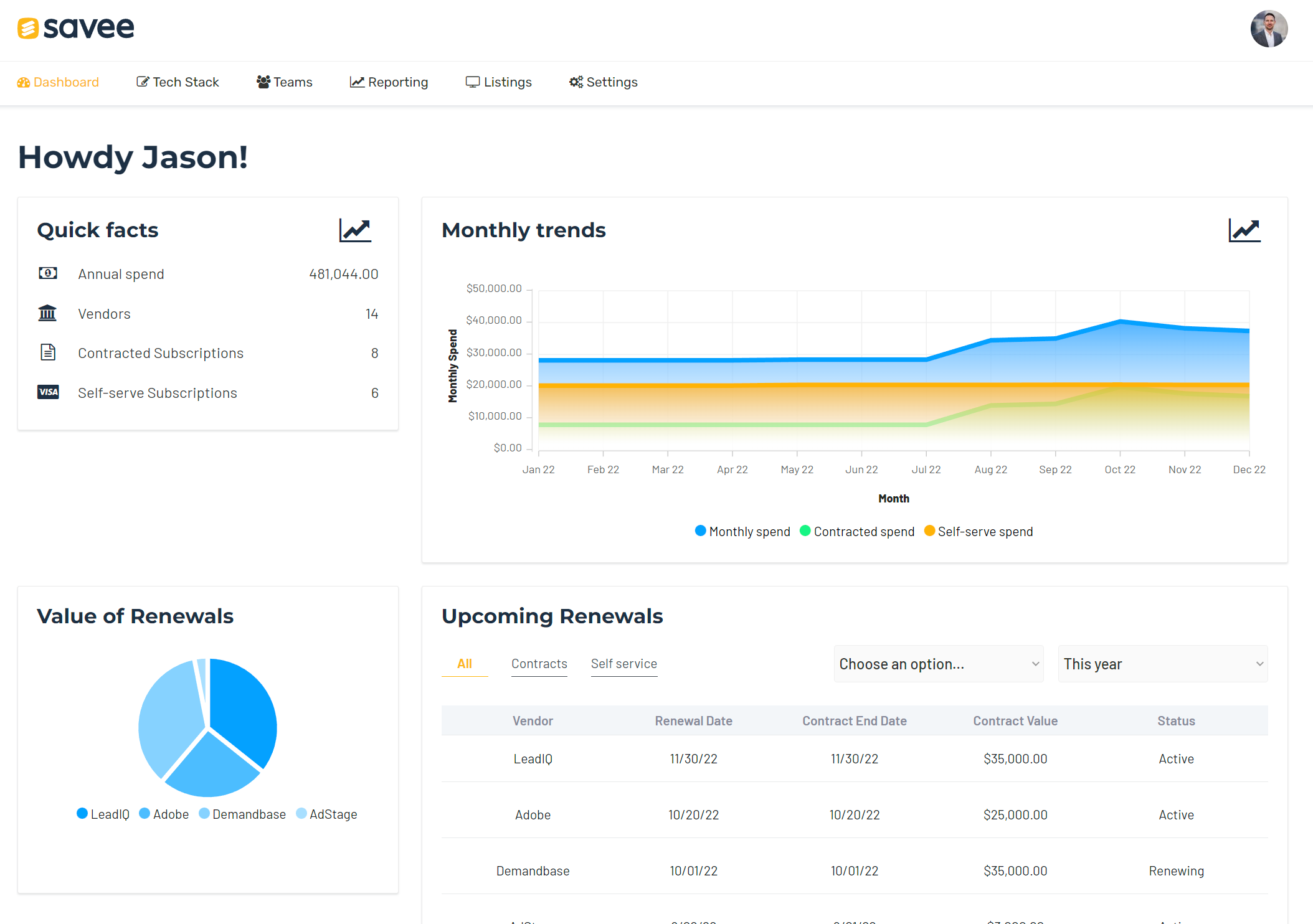
Screenshot of Vendor management showing contract history primary vendor contacts and other important informationScreenshot of Dashboard showing upcoming renewals and value of contracts over timeScreenshot of Team (department) breakdown of vendorsScreenshot of Vendor listings with in-depth detailsScreenshot of Vendor directory of over 7k applications