Chose Kayako
Basecamp is more for client project management and implementations.

| Product | Rating | Most Used By | Product Summary | Starting Price |
|---|---|---|---|---|
 Kayako | N/A | Kayako is a help desk and customer support platform that helps businesses automate workflows, improve agent productivity, and deliver personalized customer experiences across email, chat, and social media. | $79 per month | |
 SolarWinds Web Help Desk (WHD) | N/A | SolarWinds Web Help Desk is ticketing and IT asset management software. It is designed to simplify help desk management. This solution includes built-in ticketing management, asset management, change management, and knowledge base capabilities. | N/A |
| Kayako | SolarWinds Web Help Desk (WHD) | |||||||||||||||
|---|---|---|---|---|---|---|---|---|---|---|---|---|---|---|---|---|
| Editions & Modules |
| No answers on this topic | ||||||||||||||
| Offerings |
| |||||||||||||||
| Entry-level Setup Fee | No setup fee | No setup fee | ||||||||||||||
| Additional Details | — | SolarWinds also offers Perpetual licensing starting at $1129 per technician. | ||||||||||||||
| More Pricing Information | ||||||||||||||||
| Kayako | SolarWinds Web Help Desk (WHD) | |
|---|---|---|
| Considered Both Products | Kayako  Jon Shurtliff Vice President of Information Technology Chose Kayako Jira is much more pricey but more complete. It integrates with our Scrum Board and Agile Software Development platform. So we can much more easily turn Tickets into User Stories, and our techs and devs only have to live in one software platform instead of having to switch …  Joshua Tobiansky General Manager Chose Kayako Kayako is a great tool for the service industry. I think it is better suited for businesses that do 1-off interactions rather than using it to manage and maintain a larger repeat customer base. This was just our opinion based on the industry we are in. We are in the hosting …  Jericho Fulgencio IT Project Coordinator Chose Kayako We were using Spiceworks for a few years before switching to Kayako but found that it wasn't as customizable or as user friendly for our customers. The SNMP scanning and inventory features with Spiceworks was nice but we needed more of a Help Desk that would allow us to scale …  Marc Vila Business Development Manager Chose Kayako Tried Zen desk and just felt Kayako had many more controllable features.  Brandon Lee Owner / Project Manager Chose Kayako Kayako is the only helpdesk software that I've ever used. In the past we only used a Gmail inbox.  Douglas Deitle BUSINESS ANALYST (2011 - Present); MANAGER, BENEFITS ADMINISTRATION (2003 - 2011) Chose Kayako This is the only product that I have used for a Help Desk or Case management system  Nathaniel Bannister System Administrator Chose Kayako We went with Kayako at the time of purchase because there was a much more cost effective self-hosted option that we have been able to leverage to our benefit. That option has become much more expensive now, but we feel like we'd still make the decision again.  Marie McCourt Sales and Support Manager Chose Kayako We only looked at a few. For a small software company, that only wanted to provide better support, it was affordable and easy enough to assimilate into our system. |  SolarWinds Web Help Desk (WHD)  Jennifer Aguilar Senior Network Administrator Chose SolarWinds Web Help Desk (WHD) Many years ago at a different employer, we utilized CA Service Desk, which is now under the Broadcom umbrella; previously it was under Computer Associates. What a nightmare to configure and set up ... it took months to get this product off the ground. SolarWinds Web Help …  Brent Long Director of IT Chose SolarWinds Web Help Desk (WHD) SolarWinds Web Help Desk (WHD) holds its own among the top competitors for help desk systems. Some advanced functionality, and more-so the lack of polished interface knocks it down compared to some competitors. I selected SolarWinds Web Help Desk (WHD) simply because I came …  Marc Shaffer CEO Chose SolarWinds Web Help Desk (WHD) From a quality and use standpoint, they leave ALL of them in the dust. As far as support is concerned, they are faster and more accurate at resolving issues. Their software goes in easily, and functions as it is supposed to with minimal problems. And, as I have said before, …  Eric Krueger Infrastructure Manager Chose SolarWinds Web Help Desk (WHD) SolarWinds Help Desk's overall package of tools is superior in our opinion to the other Help Desk products we have evaluated and tried in the past. We selected SolarWinds because the overall ROI was greater and the efficiencies that we could implement immediately made more …  John Mahlman IV Network Systems Administrator Chose SolarWinds Web Help Desk (WHD) Web Help Desk is definitely lacking in the UI/UX department compared to most other ticketing systems I have used int he past. It's very utilitarian; however, what it lacks in UI it makes up for in extensibility and customization. The main issue that the developers need to …  Eric Nuckols Independent Consultant Chose SolarWinds Web Help Desk (WHD) Azure technician services app is too complex. SolarWinds has a lead here.  Tim Twiss Systems Administrator Chose SolarWinds Web Help Desk (WHD) BMC Track-It! was my first choice for a help desk solution, but we chose SolarWinds Web Help Desk primarily based on cost alone, a now regrettable decision. Track-It! is a far superior product and is better than SolarWinds WHD in every way. That being said, for the cost and …  Chris John Server Engineer Chose SolarWinds Web Help Desk (WHD) SolarWinds is probably the most basic of the 3 that I've worked with. SolarWinds was selected because it was the cheapest and we just wanted to use something that was fairly quick to set up and get going. Autotask is quite robust and might be a bit too much for what we need. …  Zachary Estevez Network Engineer Chose SolarWinds Web Help Desk (WHD) SharePoint is a tool that you make fit your requirements. This takes a lot of time and effort. WHD had most of the features our organization was looking for without the hassle of having to write HTML and pay licensing fees for a product that needed to be tailored to be properly …  Michael Chelone Network Support Specialist Chose SolarWinds Web Help Desk (WHD) UI overall was poorly implemented and work flow seemed wonky at best. Ease of use of SolarWinds Web Help Desk was simple and implementation was a breeze. Major plus was asset tracking over old product.  Michael Santangelo Technology Specialist Chose SolarWinds Web Help Desk (WHD) We primarily selected SolarWinds Web Help Desk because of the rich feature set and low price point. When we were doing comparisons of the different suites available, we wanted to find an easy to deploy, feature rich, and inexpensive solution. Web Help Desk met all these … |
| Kayako | SolarWinds Web Help Desk (WHD) | |||||||||||||||||||||
|---|---|---|---|---|---|---|---|---|---|---|---|---|---|---|---|---|---|---|---|---|---|---|
| Incident and problem management |
| |||||||||||||||||||||
| Self Help Community |
| |||||||||||||||||||||
| Multi-Channel Help |
|
| Kayako | SolarWinds Web Help Desk (WHD) | |
|---|---|---|
| Small Businesses |  Agiloft Service Desk (discontinued) Score 9.0 out of 10 | Agiloft Service Desk (discontinued) Score 9.0 out of 10 |
| Medium-sized Companies | Agiloft Service Desk (discontinued) Score 9.0 out of 10 | Agiloft Service Desk (discontinued) Score 9.0 out of 10 |
| Enterprises |  SysAid Score 9.1 out of 10 | SysAid Score 9.1 out of 10 |
| All Alternatives | View all alternatives | View all alternatives |
| Kayako | SolarWinds Web Help Desk (WHD) | |
|---|---|---|
| Likelihood to Recommend | 1.0 (0 ratings) | 8.5 (0 ratings) |
| Likelihood to Renew | 7.8 (0 ratings) | 10.0 (0 ratings) |
| Usability | 10.0 (0 ratings) | 10.0 (0 ratings) |
| Availability | 7.5 (0 ratings) | - (0 ratings) |
| Support Rating | 2.1 (0 ratings) | 10.0 (0 ratings) |
| Implementation Rating | 9.0 (0 ratings) | 10.0 (0 ratings) |
| Configurability | - (0 ratings) | 10.0 (0 ratings) |
| Ease of integration | - (0 ratings) | 9.0 (0 ratings) |
| Vendor post-sale | - (0 ratings) | 9.0 (0 ratings) |
| Vendor pre-sale | - (0 ratings) | 8.0 (0 ratings) |
| Kayako | SolarWinds Web Help Desk (WHD) | |
|---|---|---|
| Likelihood to Recommend |
Joshua Tobiansky General Manager |
|
| Pros |
|
John Mahlman IV Network Systems Administrator |
| Cons |
Douglas Deitle BUSINESS ANALYST (2011 - Present); MANAGER, BENEFITS ADMINISTRATION (2003 - 2011) |
Jennifer Aguilar Senior Network Administrator |
| Likelihood to Renew |
|
Michael Santangelo Technology Specialist |
| Usability |
 Derrick Green Application Support Specialist |
|
| Reliability and Availability |
Marie McCourt Sales and Support Manager | No answers on this topic |
| Support Rating |
Jon Shurtliff Vice President of Information Technology |
|
| Implementation Rating |
Nathaniel Bannister System Administrator |
Michael Santangelo Technology Specialist |
| Alternatives Considered |
|
|
| Return on Investment |
Jericho Fulgencio IT Project Coordinator |
Eric Krueger Infrastructure Manager |
| ScreenShots | SolarWinds Web Help Desk (WHD) Screenshots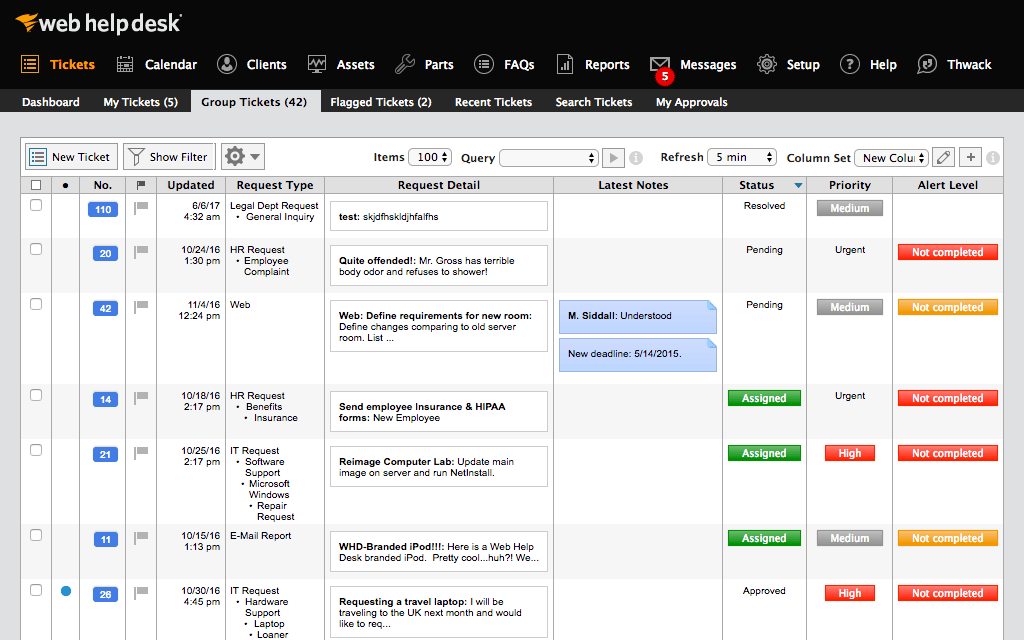      |