Chose Neon CRM
We cancelled Neon CRM after 6 years as it became horrible to use

| Product | Rating | Most Used By | Product Summary | Starting Price |
|---|---|---|---|---|
 Neon CRM | Small Businesses (1-50 employees) | Neon CRM is a constituent management platform designed for nonprofits and membership associations. Its relationship-focused system offers a comprehensive view of supporters and members, to enable more engagement and revenue. It can be used to manage fundraising campaigns, events, communications, and it offers reporting tools to give stronger insights into the user's organization. It automates processes like email marketing, workflows, volunteer management, and payment processing so that users… | $99 per month | |
 Salesforce Sales Cloud | N/A | Salesforce Sales Cloud is a platform for sales with a community of Sellers, Sales Leaders, and Sales Operations, who use the solution to grow sales and increase productivity. The AI CRM for Sales features data built right in, so that companies can sell faster, sell smarter and sell efficiently. Salesforce Sales Cloud is used for, and supports: Buyer Engagement Sales Engagement Enablement Sales AI Sales Analytics Team… | $25 per month per user |
| Neon CRM | Salesforce Sales Cloud | |||||||||||||||
|---|---|---|---|---|---|---|---|---|---|---|---|---|---|---|---|---|
| Editions & Modules |
|
| ||||||||||||||
| Offerings |
| |||||||||||||||
| Entry-level Setup Fee | Optional | Optional | ||||||||||||||
| Additional Details | All plans include unlimited system users, unlimited records, unlimited online forms, and unlimited ticket support. Essentials is a streamlined version of Neon CRM designed for smaller nonprofits. Premium support options are included with Empower. All pricing is based on the organization's revenue. | — | ||||||||||||||
| More Pricing Information | ||||||||||||||||
| Neon CRM | Salesforce Sales Cloud | |
|---|---|---|
| Considered Both Products |  Neon CRM  Kelly Moss COO (Chief Operating Officer) Chose Neon CRM We previously used Salsa CRM to store our donation information. NeonCRM is much more user friendly and has better options to store the data we need. Customer service is also much better.  Thomas Phillips Development Officer Chose Neon CRM Neon vs. The Raiser's Edge Raiser's Edge is the gold standard for fundraising-focused CRM applications. However, it is so complicated that there are higher ed courses and certificate programs you can take to learn it all. The printed manual is hundreds of pages long. You can do …  Lora Zygman Treasurer Chose Neon CRM NeonCRM can grow with us. We were able to implement a few features initially and, as time went on, incorporate others. We continue to do that.  SarahAnn S. Whitbeck Executive Director Chose Neon CRM Much less expensive, but in some ways is even more robust.  Kelli Wescott McCannell President Chose Neon CRM Salesforce and Raisers Edge are extremely expensive to set up to be functional. These are great options for very large organizations - colleges and hospitals. For a smaller operation, NeonCRM meets many needs for a much more affordable price.  Kim Wells Coordinator of Operations, Valley View Hospital Foundation Chose Neon CRM Blackbaud had terrible customer service and their product did not work. NeonCRM responds to support questions within hours and are friendly and helpful. Blackbaud did not stand behind their product. The reliability of information making it into the correct record in the correct … | Salesforce Sales Cloud  Mike Martin Chief Customer Officer Chose Salesforce Sales Cloud Salesforce Sales Cloud is fully featured and is truly a platform solution vs Hubspot and Pipedrive that are very single use focused around CRM. NetSuite is legacy and has outdated user interfaces and experiences.  Miguel Antonio Olivo Candelario Client & Services Manager Chose Salesforce Sales Cloud Allows deep customization through its Lightning Platform, enabling businesses to adapt the CRM to their unique processes. From custom objects and workflows to advanced AppExchange integrations, Salesforce Sales Cloud can accommodate even the most complex requirements.  Fabricio Trujillano Sales Development Chose Salesforce Sales Cloud This platform is superior in many ways, being able to integrate other platforms at the same time to unify management. Also, the user experience is superior, the design is friendly and allows one to work without problems and find everything in a friendly way and save time, above …  Saif Ali Patel Business Development Executive Chose Salesforce Sales Cloud Not as such platforms in my mind, but Every Sales CRM has thier own advantages and flaws for working Salesforce mainly addresses all issues but it is difficult to compare with others as the unique system of Salesforce while once I use Zoho, which also gives an edge to maintain …  Alfiya Mukadam Software Engineer Chose Salesforce Sales Cloud It is easy to learn, handy and usable. The data is cleaned and then processed, which reduces the scope of error in client prediction. The automated workflow is also a key factor  Mary Bruder Enterprise Account Executive Chose Salesforce Sales Cloud The other tools that I have previously used such as Hubspot, Mailchimp (for email list management) and Insightly do not stack up to Salesforce Sales Cloud, as Salesforce Sales Cloud is highly focused on streamlining pipeline and customer management. The other tools are a good …  Nikhil George Product Manager Chose Salesforce Sales Cloud We used Capsule CRM when the business started. It was a great tool for a small business, but as our customer base and sales team grew, we wanted to glean insights quicker, manage customers better and to do so without the use of spreadsheets. Salesforce Sales Cloud with its …  Gal Avraham Partner Chose Salesforce Sales Cloud Zoho is a poor and cheap copycat of Salesforce Sales Cloud with less reliability and much less data protection. I needed high compliance.  Naveen Gabrani Founder/CEO Chose Salesforce Sales Cloud Salesforce Sales Cloud is more flexible and can be customized based on business needs. Other CRMs typically do not provide ability to perform so much customizations. Also out of the box functionality of Salesforce Sales Cloud is extensive and can fulfill most needs of small …  Daniel Cano Merizalde Head of sales Chose Salesforce Sales Cloud Costly, larger time to market / value time, difficult and complex to set up and customize. But if you want highly customizable CRM and don´t care about user experience within a super large company Salesforce does the job well and the costs could be optimized as a larger …  Thiago Santo Regional Sales Manager Chose Salesforce Sales Cloud In this case I listed two solutions (Clari and People.ai) complementary and one competitor. In my humble opinion Pipedrive is not competing for the same target market and SFDC is 100% consolidated in Enterprise segment as the only possible option for best in class companies …  Ahmad Anggi Hakim Enterprise Sales Manager Chose Salesforce Sales Cloud In my opinion, Salesforce is at the top of the tier regarding data management size. |
| Neon CRM | Salesforce Sales Cloud | ||||||||||||||||||||||||||||||
|---|---|---|---|---|---|---|---|---|---|---|---|---|---|---|---|---|---|---|---|---|---|---|---|---|---|---|---|---|---|---|---|
| Communications and Marketing |
| ||||||||||||||||||||||||||||||
| Reporting and Analytics |
| ||||||||||||||||||||||||||||||
| Fundraising and Events |
| ||||||||||||||||||||||||||||||
| Security and Platform |
| ||||||||||||||||||||||||||||||
| Sales Force Automation |
| ||||||||||||||||||||||||||||||
| Customer Service & Support |
| ||||||||||||||||||||||||||||||
| Marketing Automation |
| ||||||||||||||||||||||||||||||
| CRM Project Management |
| ||||||||||||||||||||||||||||||
| CRM Reporting & Analytics |
| ||||||||||||||||||||||||||||||
| Customization |
| ||||||||||||||||||||||||||||||
| Security |
| ||||||||||||||||||||||||||||||
| Social CRM |
| ||||||||||||||||||||||||||||||
| Integrations with 3rd-party Software |
| ||||||||||||||||||||||||||||||
| Platform |
|
| Neon CRM | Salesforce Sales Cloud | |
|---|---|---|
| Small Businesses |  Bonterra Network for Good Score 9.6 out of 10 |  Salesmate Score 10.0 out of 10 |
| Medium-sized Companies |  Bloomerang CRM Score 8.1 out of 10 |  Creatio Score 9.7 out of 10 |
| Enterprises |  Blackbaud Enterprise Fundraising CRM Score 7.6 out of 10 | Creatio Score 9.7 out of 10 |
| All Alternatives | View all alternatives | View all alternatives |
| Neon CRM | Salesforce Sales Cloud | |
|---|---|---|
| Likelihood to Recommend | 1.0 (0 ratings) | 8.7 (0 ratings) |
| Likelihood to Renew | 1.0 (0 ratings) | 10.0 (0 ratings) |
| Usability | 1.0 (0 ratings) | 9.4 (0 ratings) |
| Availability | - (0 ratings) | 9.8 (0 ratings) |
| Performance | - (0 ratings) | 9.0 (0 ratings) |
| Support Rating | 1.0 (0 ratings) | 8.9 (0 ratings) |
| In-Person Training | - (0 ratings) | 7.9 (0 ratings) |
| Online Training | - (0 ratings) | 9.1 (0 ratings) |
| Implementation Rating | 4.0 (0 ratings) | 2.4 (0 ratings) |
| Configurability | - (0 ratings) | 10.0 (0 ratings) |
| Product Scalability | - (0 ratings) | 8.7 (0 ratings) |
| Neon CRM | Salesforce Sales Cloud | |
|---|---|---|
| Likelihood to Recommend |
Kelly Moss COO (Chief Operating Officer) |
|
| Pros |
|
|
| Cons |
|
|
| Likelihood to Renew |
|
|
| Usability |
|
|
| Reliability and Availability | No answers on this topic |
 Rob Gottschalk Corporate Controller / Director Sales |
| Performance | No answers on this topic |
|
| Support Rating |
|
|
| In-Person Training | No answers on this topic |
|
| Online Training | No answers on this topic |
|
| Implementation Rating |
|
|
| Alternatives Considered |
Thomas Phillips Development Officer |
|
| Scalability | No answers on this topic |
 Gareth Gordon Salesforce Administrator |
| Return on Investment |
|
|
| ScreenShots | Neon CRM Screenshots 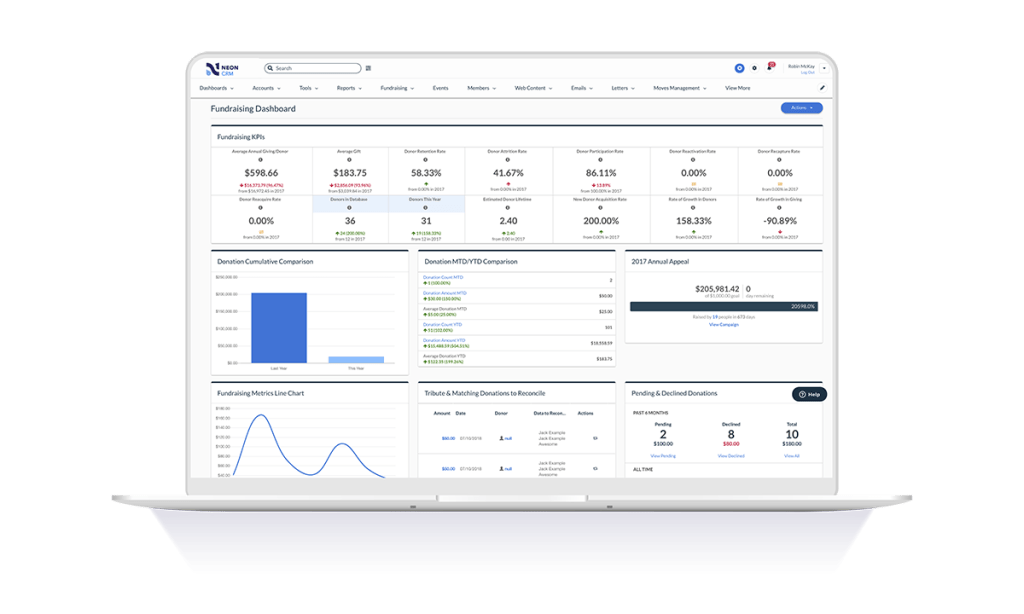     | Salesforce Sales Cloud Screenshots      |