Notion vs. Zimbra by Synacor

Overview
ProductRatingMost Used ByProduct SummaryStarting Price
Notion
Score 8.7 out of 10
N/A
Notion aims to present users with an all-in-one workspace — for notes, tasks, wikis, and databases, from Notion Labs in San Francisco.
$0
Zimbra
Score 6.8 out of 10
N/A
Zimbra is an email and collaboration platform and productivity suite that includes contacts, calendar, tasks, chat and file sharing, plus videoconferencing, document editing, and file storage.N/A
Pricing
NotionZimbra by Synacor
Editions & Modules
Free
$0
Plus
$12
per month per user
Business
$24
per month per user
Enterprise
Custom Pricing
No answers on this topic
Offerings
Pricing Offerings
NotionZimbra
Free Trial
YesYes
Free/Freemium Version
YesNo
Premium Consulting/Integration Services
NoNo
Entry-level Setup FeeNo setup feeNo setup fee
Additional DetailsA discount is offered for annual billing.
More Pricing Information
Community Pulse
NotionZimbra by Synacor
Considered Both Products
Notion
Chose Notion
Notion is far superior to OneNote.
OneNote is unnecessarily complex and quite constrained by 'old ways' of doing things.
Notion is a more simplistic interface and just 'works'.
Chose Notion
Needed something outside of Microsoft Office for overall deal and project tracking and collating our collective knowledge and learnings from different deals.
We have not evaluated against anything else.
Chose Notion
I listed only the other tools we use. These are not necessarily competitors to Notion, nor we use them for the same things. For organising tasks and collaborative work we only use Notion. Slack is good for communication, Figma for design and development, while Miro for …
Chose Notion
I like the Notion interface and possibilities.
Chose Notion
Notion brought the two together with features from each that we liked being put into one place.
Chose Notion
I like Notion more than Trello and Google Sheets because it has the best parts of both. Trello is good for making lists of tasks, but it can’t do much else. Google Sheets is great for organizing data, but it can get messy. I chose Notion because I can make lists, tables, and …
Chose Notion
The first major difference is the ability to create formulas using other columns and even using other formulas. This increases the possibility of customization to another level. I couldn't do the same things using these other tools. The second is the infinite number of things …
Chose Notion
I think Miro also has it's downsides but in general there is more options to illustrate one's creative ideas and workflows etc. Notion is slightly more limiting in that sense. And due to two facor authentification I also tend to work more in google sheets and google docs and …
Chose Notion
Notion pretty much combines all the capabilities each one of these platforms have and just takes the most important ideas and concentrates on making them stand out. I can create a "Trello" type of timeline, and use a more traditional "Jira" or "Asana" type of waterfall view. …
Chose Notion
Notion goes beyond file storage, which are what the two selected above primarily offer. Also I have used Notion for personal use cases and projects and have found it to have a really amazing user experience and UI. Microsoft products tend to fail at having a good UX. Also, …
Chose Notion
The company uses both Notion and Trello within the company. Notion is more for North America employees while Trello is used between Operation team overseas and in North America. Sometimes it's a preference of how the tools look like for project management. I would say both …
Chose Notion
Jira is a great tool, that is probably more robust than Notion and more scalable. But for a small company (under 50 people) the investment is hard to swallow without a significant revenue stream justifying it. Notion is a perfect low cost option that meets 80% of the …
Chose Notion
We found Notion to be a lot easier to use than ClickUp. They offer a similar feature set, but ClickUp was a lot less user-friendly in my opinion. We also tried Trello and Todoist, but found they were just lacking the features we needed. We still use Trello for some internal …
Chose Notion
Notion's flexibility and extensive customization options make it the perfect tool for my personal organization. I appreciate not being confined to a single format, and I find that the process of personalizing my workspace sparks creativity, which is a great asset for managing …
Chose Notion
Notion is the most in depth of all of the above applications. You can make a simple to-do list and share it with other people, or dive deep into formulas and page linking. I appreciate that it does not take a large time to set up like Monday.com, but it still offers a huge …
Chose Notion
Notion has a powerful feature, and it is their templates within databases. They allow our operation to flow seamlessly and create new tasks with defined subtasks in seconds.
Chose Notion
not nearly as useful, it is just a file organiser tool but Notion has the functionality of creating many thing in one page, allowing to include more pages and link with other spaces. such as Miro, google drive, calendar, etc
Integration is part of what makes Notion the best …
Chose Notion
A lot more features for collaboration and sharing information.
Chose Notion
I think that Notion adds a better user experience which is more customisable. Some of these apps are really rigid and dont give youthe flexability that Notion does.
Chose Notion
I found that Notion offered the most versatility. In particular it allowed me to super easily format and reformat information depending on how I was using it. This has proven incredibly useful. And has allowed me to store various types of information all in the same place.
Chose Notion
Notion is less complicated than ClickUp and more user friendly, especially for those who prefer simplicity. I am aware that ClickUp does offer simple template and let us scale it but Notion is one step ahead because of the UI design is easier to use.
I like Confluence at work …
Chose Notion
I've used Evernote in the past and currently use Asana alongside Notion, so I can compare them based on my experience.

Notion is much more flexible than Evernote. While Evernote is great for basic note-taking, Notion allows me to structure my notes with nested pages, databases, …
Chose Notion
We were using Nation for the whole company and it's amazing, however, for the CS team with the tech/ops we are using Trello. As a CS & Operation manager, the reminders/alarms/notifications are the most important for handling time and minimizing the SLAs, so I created automation …
Zimbra
Chose Zimbra
We used Zimbra Email & Collaboration in two scenarios: first, on-premise with the open-source version to save costs, especially since solutions like Office 365 or Google Workspace were not as mature or widespread at the time. Later, we benefited from cost advantages with Zimbra …
Chose Zimbra
There are a lot of features that Zimbra Email & Collaboration has that gmail and m365 have. You can chat within your team members with Zimbra Email & Collaboration. The issue that we have not been able to figure out though is mobility of Zimbra Email & Collaboration. You can …
Chose Zimbra
We chose Zimbra because Zoho Mail is too pricey with less-functionality than Zimbra. Zoho's UI is better, but we need more than just UI, we need many features that Zimbra has. G Suite is the best for team collaboration of course, but because of the price and our needs we …
Chose Zimbra
Zimbra is undeniably a complete package and offers many practical tools, in addition to the knowledge that the company has. It is a great acquisition for a company that will soon see a significant change in terms of organization, deadlines, efficiency, and more. It has an …
Chose Zimbra
Zimbra is a more specialized software designed for our company and its needs. The software was customized to represent our colors and project our brand, what other companies do not have. With Zimbra, we have a private network of only employees which allows us to confidentiality …
Chose Zimbra
Zimbra is a significantly cheaper option than one of the Microsoft solutions, such as Exchange. It is able to run in a free environment, as it is in the case of Linux. It offers the advantages of a powerful mail manager, such as indexed searches and the integration of contacts …
Chose Zimbra
We selected Zimbra because it has a lower cost in the market, offers more development features for its open source, has a very easy to use interface and adjusts to the needs of the company.
Chose Zimbra
Zimbra provides a robust and reliable software that delivers what is promised. We have tested Zimbra in a pilot project before deploying it in production. Incidents and crashes are rare and you have tools to recover it if necessary. Initially we had a contract with support to …
Chose Zimbra
  • We were originally a Groupwise shop before changing to Zimbra in 2008. Zimbra, from an end-user standpoint, pricing, system administration, and management is a far better system.
  • We use Google Apps for our students. We did not find it to be suitable for faculty and staff due to …
Features
NotionZimbra by Synacor
Project Management
Comparison of Project Management features of Product A and Product B
Notion
9.9
Ratings
25% above category average
Zimbra by Synacor
9.0
Ratings
15% above category average
Task Management9.50 Ratings9.80 Ratings
Gantt Charts10.00 Ratings8.10 Ratings
Scheduling10.00 Ratings9.80 Ratings
Workflow Automation10.00 Ratings7.20 Ratings
Mobile Access10.00 Ratings9.70 Ratings
Search10.00 Ratings9.80 Ratings
Visual planning tools10.00 Ratings8.50 Ratings
Communication
Comparison of Communication features of Product A and Product B
Notion
9.6
Ratings
19% above category average
Zimbra by Synacor
6.6
Ratings
18% below category average
Chat10.00 Ratings7.00 Ratings
Notifications10.00 Ratings5.20 Ratings
Discussions10.00 Ratings2.00 Ratings
Surveys9.30 Ratings7.70 Ratings
Internal knowledgebase10.00 Ratings7.70 Ratings
Integrates with Gmail and Google Hangouts8.90 Ratings8.00 Ratings
Integrates with Outlook9.00 Ratings7.50 Ratings
Integrates with GoToMeeting00 Ratings7.60 Ratings
File Sharing & Management
Comparison of File Sharing & Management features of Product A and Product B
Notion
9.9
Ratings
23% above category average
Zimbra by Synacor
5.6
Ratings
34% below category average
Versioning10.00 Ratings5.10 Ratings
Video files10.00 Ratings1.30 Ratings
Audio files9.90 Ratings1.30 Ratings
Document collaboration10.00 Ratings5.10 Ratings
Access control10.00 Ratings8.70 Ratings
Advanced security features10.00 Ratings9.70 Ratings
Integrates with Google Drive9.20 Ratings6.60 Ratings
Device sync10.00 Ratings6.60 Ratings
Best Alternatives
NotionZimbra by Synacor
Small Businesses
Stackby
Stackby
Score 9.0 out of 10
Stackby
Stackby
Score 9.0 out of 10
Medium-sized Companies
Troop Messenger
Troop Messenger
Score 9.8 out of 10
Troop Messenger
Troop Messenger
Score 9.8 out of 10
Enterprises
HCL Connections
HCL Connections
Score 9.0 out of 10
HCL Connections
HCL Connections
Score 9.0 out of 10
All AlternativesView all alternativesView all alternatives
User Ratings
NotionZimbra by Synacor
Likelihood to Recommend
8.3
(0 ratings)
7.9
(0 ratings)
Usability
10.0
(0 ratings)
7.0
(0 ratings)
Implementation Rating
-
(0 ratings)
8.0
(0 ratings)
User Testimonials
NotionZimbra by Synacor
Likelihood to Recommend
At the company I work for, we use Notion as an organizational base for all sectors and projects. For example, we use it for the marketing team, customer support team, among others. And for each one, we can create pipelines, tasks, due dates, execution time, tags with different colors. It's something very versatile that helps with everything around here. We've even created a sales funnel in Notion.
Read full review
I consider Zimbra Email & Collaboration a viable alternative to the major American cloud email platforms. In a scenario where data protection and privacy are critical, especially in an on-premise environment, Zimbra is a very suitable solution. It is also capable of offering a comprehensive set of tools and additional features (tasks, calendars, contacts, briefcase) in an integrated manner.
Read full review
Pros
  • I love that you can create nested pages, allowing for separate sections to organize information as needed.
  • I appreciate the convenience of effortlessly uploading images to any section.
  • I appreciate that when adding links, you can embed them so the website displays directly on the page.
Read full review
  • The management of incremental mail backup. It is very simple, and the administrators of my company recover information quickly.
  • The management of the distribution lists is structured. This allows easy distribution of mass information.
  • The web application is very complete and intuitive.
Read full review
Cons
  • I use Notion on my personal tablet, and unlike on the computer, I have a lot of difficulty editing backgrounds, GIFs, and page dividers. It's not as user-friendly, and often the elements end up cut off or misaligned, which is frustrating.
  • While the current calendar feature is helpful, I'd love to see more customization options. The Google Calendar style isn't always ideal, especially for tasks without specific times or for ongoing projects that require daily maintenance.
  • It would be fantastic to have more flexibility in customizing Notion pages. For example, I'd love to create planners with the freedom to add illustration boxes, stickers, or GIFs without being restricted to a fixed layout.
Read full review
  • User web interface could be more friendly, but it is enough for daily use. It could be renewed and has to consider some usability concerns. Improving usability would significantly improve users' satisfaction.
  • Message backup recovery is not a simple activity.
  • As an administrator, some of the features work better using the command-line interface.
  • The webclient uses ajax requests in almost every event. Because of that you may need a fast internet connection to have a good experience. You can switch to HTML version but it will limit what you can do.
Read full review
Likelihood to Renew
We're too settled in the ecosystem and we have no major complaints with it. No reason to move unless you have a burning pain point
Read full review
No answers on this topic
Usability
Notion addresses most of our needs and help teams to organize their tasks, track their progresses and then archive for future reference. The company uses Notion to share announcement, holiday schedules, employee contact information and organizational structures. Everyone finds it useful and helpful. The notifications are instant. Reminders are on time.
Read full review
The web usability of the solution is adequate, with all functions integrated into a single interface. However, it is important to note that in the desktop environment, it lacks its own application and relies on ActiveSync synchronization with reference solutions like Outlook or Thunderbird. Some features, such as the briefcase, will be excluded. The same happens on smartphones.It is also common for competing solutions to include integrated chat or video call tools, which Zimbra lacks. These shortcomings are among the most frequently requested by users.
Read full review
Implementation Rating
No answers on this topic
Overall, we were satisfied with the implementation. We perhaps should have spent more time consulting with Zimbra or others regarding best practices but as we got to know the system better we were able to make changes relatively easily after the fact.
Read full review
Alternatives Considered
Notion is much more robust than Google Tasks, which I find very limited. Notion is far more customizable and affordable than Asana, which is more of a turnkey solution for teams that want to work within a pre-defined structure. Notion and ClickUp are comparable, in my opinion, in terms of task management and affordability, however Notion is the more customizable and expansive option whereas ClickUp is mostly just for task management.
Read full review
  • We were originally a Groupwise shop before changing to Zimbra in 2008. Zimbra, from an end-user standpoint, pricing, system administration, and management is a far better system.
  • We use Google Apps for our students. We did not find it to be suitable for faculty and staff due to its lack of shared accounts.
  • We are moving from Zimbra to Office 365. Office 365 offers just about all that Zimbra had, though its web interface is inferior to that of Zimbra. It does offer us greatly reduced costs though, and high availability. If Zimbra were to have a fully HA environment, we may have stayed with them.
Read full review
Return on Investment
  • It has streamlined our processes across various teams to all work from a signle source of truth
  • Maintaining this source of truth is a full time job
  • It has reduced our overall tool set by completely eliminating two other softwares we were paying for
Read full review
  • Improved internal communication and dissemination and distribution of messages and corporate objectives.
  • The creation of an internal network of employees is something that gives us security and confidence.
  • Having a private and exclusive messaging system differentiates us from the competition and from other companies.
Read full review
ScreenShots

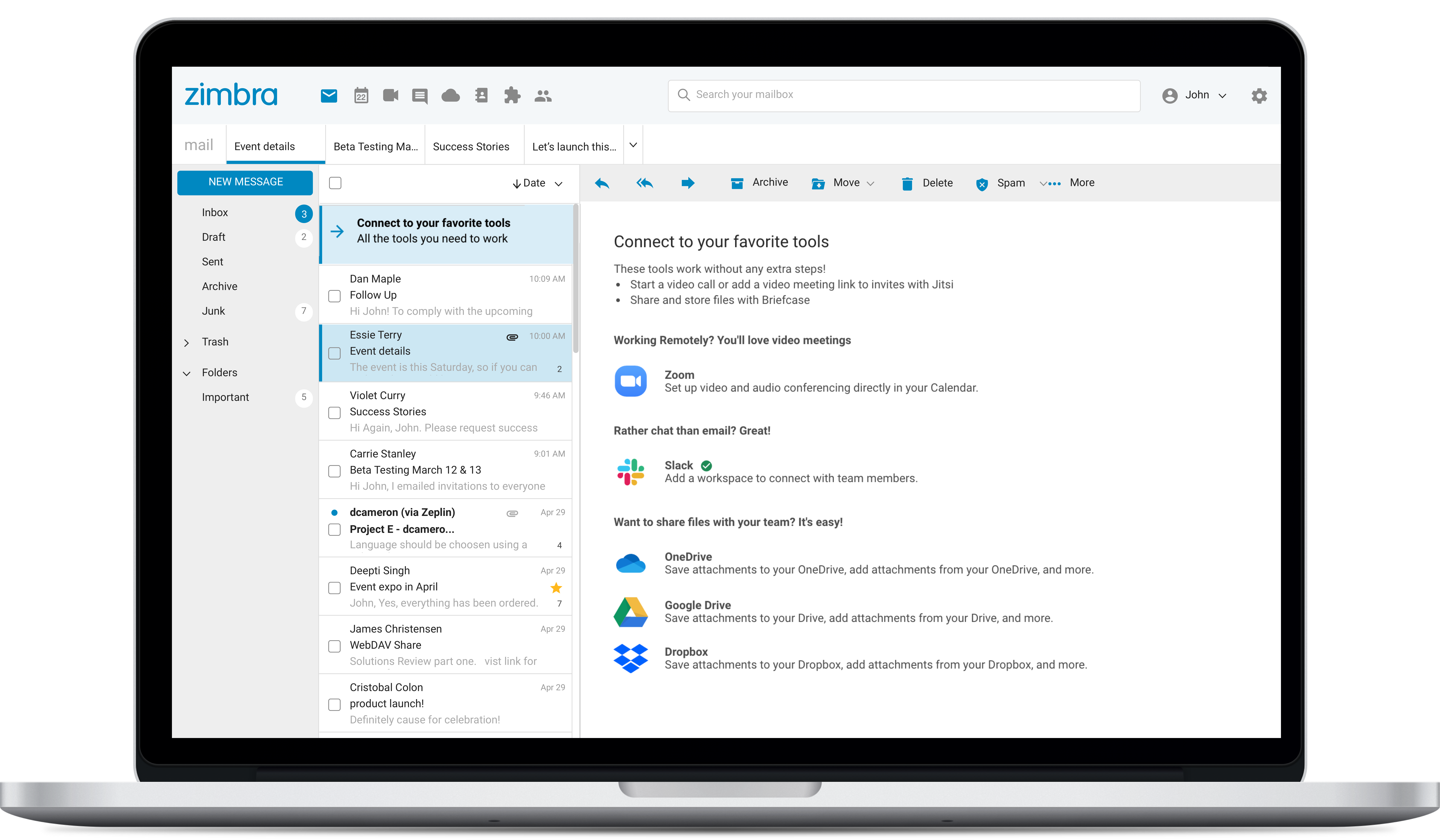
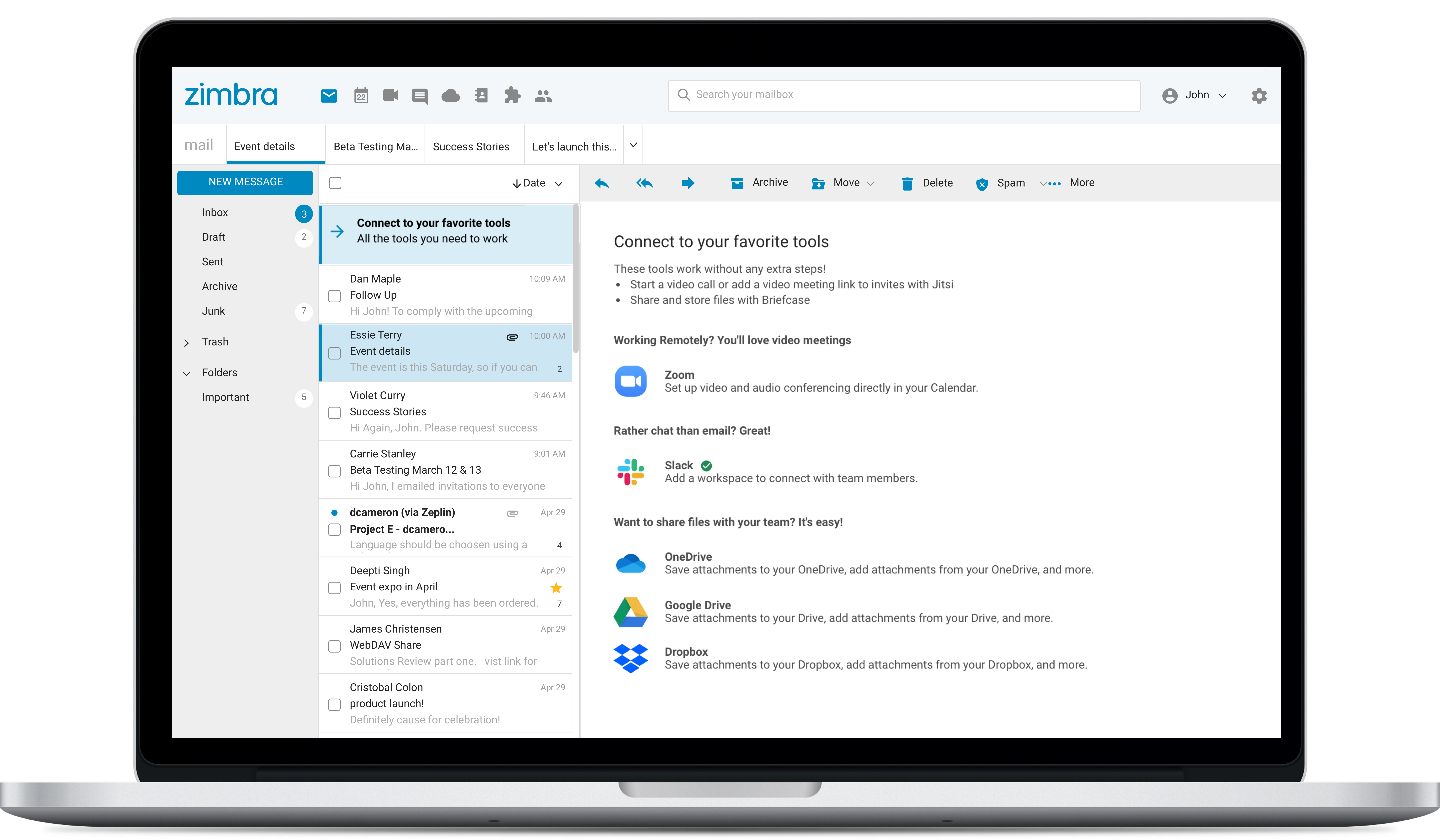
Zimbra Screenshots

Screenshot of Screenshot of Screenshot of