Paycor vs. Sage HRMS

Overview
ProductRatingMost Used ByProduct SummaryStarting Price
Paycor
Score 7.1 out of 10
N/A
Paycor provides core HR functions scaled towards small and mid-sized businesses. Paycor offers an integrated benefits platform for interfacing directly with insurance carriers and an adaptable time management platform.N/A
Sage HRMS
Score 9.8 out of 10
N/A
Sage HRMS is an HR management solution that integrates payroll, benefits, recruiting, employee self-service, and analytics capabilities.N/A
Pricing
PaycorSage HRMS
Editions & Modules
No answers on this topic
Offerings
Pricing Offerings
PaycorSage HRMS
Free Trial
YesNo
Free/Freemium Version
NoNo
Premium Consulting/Integration Services
NoNo
Entry-level Setup FeeOptionalNo setup fee
Additional DetailsPaycor's pricing for small, mid, and enterprise companies varies based on product bundle and company size. Because Paycor HR software is built to help businesses scale and grow, plans are based on the mix of HR products needed, and company size. Payroll is at the core of Paycor's offering, and their products are sold as a part of their payroll and HR platform.
More Pricing Information
Community Pulse
PaycorSage HRMS
Considered Both Products
Paycor
Chose Paycor
I've used quite a few other pay apps through different companies I've worked with over the years. Truthfully, I don't feel like Payor is any better or worse than the rest of them.
Chose Paycor
Much more intuitive and includes timecards. Harder to get data out of Paycor then it was with J1.
Chose Paycor
very similar. Paycor counts time down to the hour. ADP was increments
Chose Paycor
Paycom is terrible or at least it was 5 plus years ago. The in The interface is terrible, there was no mobile app.. it was not a great solution solution and did not have good integrations. Over all the product was terrible for admins and employees In times of critical need …
Chose Paycor
You have way better control when running payroll. Also way easier to adjust individual employees paycheck. Peoplesoft benefits was difficult so we didn’t use it to enroll employees into health insurance . We used excel spreadsheets to calculate.
Chose Paycor
Paycor is much easier to set up and make changes on the go as the organization evolves. Paycor has a more pleasing interface for managers, software andmin, and employee experience. Reporting is probably more customizable with ADP and they seem to have better and more usable …
Chose Paycor
I think that Paycor's customer service is way better than ADP API Central.
Chose Paycor
I was a big ADP fan and rolled out the system at my previous two jobs. Once I got to my new company I realized how and simple and awesome Paycor is. I would not switch to another company.
Chose Paycor
Paycor is better than Paylocity because at least with Paycor we get responses to our questions and concerns. We do have the best customer success rep and technical account manager who have done wonders for our experience and our account. There is SO much potential with Paycor, …
Chose Paycor
I prefer Quickbooks, it was the easiest system to process, approve, pay, and log. Taxes were easier however it was the most expensive and we were all told that the changes were being made.
Chose Paycor
Paycor seemed simpler and still allowed the employer to control many aspects of what the employeea can do.
The cost was more effective than Paycom. The customer service was another area of concern, even though Paycor could improve on some reps speaking better English, this is …
Chose Paycor
Paycor doesn't have the same functionality for the HRIS piece as the others. Paycor was selected by our payroll provider when we were small.
Chose Paycor
Bamboo's interface and customer service is better than Paycor's. The main reason we have not switched is because of up-front implementation fees that come with every platform. If I had a blank slate, I am honestly not sure I would choose Paycor, but I don't mind having Paycor …
Chose Paycor
Paycom has all one system, so their different modules all talk to one another. They also have an excellent benefit module and EDI feed setup. We have had no problems with their benefit setup or EDI feeds; they work well!
Chose Paycor
I find Paycor to be easier to use, and workflows run smoothly.
Chose Paycor
Overall, I prefer it to the bigger HRIS systems that I work with (ADP, Paycom, Paylocity) and would chose Paycor above those listed. I do prefer utilizing other Ben Admin Systems (Gusto, Rippling, Ease) for pulling general reports, usability, and customer service needs for …
Chose Paycor
Sales rep were really respectful. I felt with some other vendors they were a bit aggressive. The demo that was made in house was nice and the guy demonstrating it knew a lot about the system which made us more confident in the decision. Also, the ability of having all in one …
Chose Paycor
I did not select Paycor. I would not pick it in future roles.
Sage HRMS
Chose Sage HRMS
Ceridian Dayforce, UKG Pro and UKG Dimensions
Chose Sage HRMS
I currently use Paycor. It is a good platform for the organization. Sage HRMS was good software, but didn't support some of the more quirkier states like PA and IN for payroll. Paycor had similar constraints. Neither is a great fit if you are doing business across multiple …
Chose Sage HRMS
Sage HRMS is pretty good, but ICIMS was more of a complete and concrete ATS package. Sage HRMS's customer service was excellent, but ICIMS was robust and user-friendly. I would rate them both close, but ICIMS would be a better applicant tracking system from an HR standpoint.
Chose Sage HRMS
Sage HRMS is popular and it's used in most organizations due to the reputation of Sage in coming up with popular and reliable business softwares. The software is not that expensive and after learning how to use it, everything becomes smooth and perfect. It's ultimate strength …
Chose Sage HRMS
Sage HRMS was very cost effective for a non-profit. It does all that we needed as a company and more. It also allows us to handle payroll ourselves instead of outsourcing [it].
Chose Sage HRMS
I would say that Sage is ranked #3.
Chose Sage HRMS
Our version of Sage does not stand up to the competition, however, the cost is also much lower as well.
Chose Sage HRMS
Prior to implementing Sage HRMS, our organization was much smaller and split into two separate companies. The smaller of the companies used a similar product called "FileBound" that served at the business' human resource management software. It was much like Sage HRMS, but …
Features
PaycorSage HRMS
Payroll Management
Comparison of Payroll Management features of Product A and Product B
Paycor
7.8
Ratings
5% below category average
Sage HRMS
4.8
Ratings
50% below category average
Pay calculation8.20 Ratings6.10 Ratings
Support for external payroll vendors8.20 Ratings4.00 Ratings
Off-cycle/On-Demand payment7.80 Ratings6.90 Ratings
Benefit plan administration6.90 Ratings2.10 Ratings
Direct deposit files8.60 Ratings8.00 Ratings
Salary revision and increment management7.50 Ratings3.00 Ratings
Reimbursement management7.30 Ratings3.20 Ratings
Human Resource Management
Comparison of Human Resource Management features of Product A and Product B
Paycor
-
Ratings
Sage HRMS
5.5
Ratings
35% below category average
Employee demographic data00 Ratings8.00 Ratings
Employment history00 Ratings8.00 Ratings
Job profiles and administration00 Ratings1.30 Ratings
Workflow for transfers, promotions, pay raises, etc.00 Ratings7.90 Ratings
Organizational charting00 Ratings6.00 Ratings
Organization and location management00 Ratings6.00 Ratings
Compliance data (COBRA, OSHA, etc.)00 Ratings1.20 Ratings
Leave and Attendance Management
Comparison of Leave and Attendance Management features of Product A and Product B
Paycor
-
Ratings
Sage HRMS
1.2
Ratings
148% below category average
Approval workflow00 Ratings1.20 Ratings
Balance details00 Ratings1.20 Ratings
Annual carry-forward and encashment00 Ratings1.00 Ratings
Employee Self Service
Comparison of Employee Self Service features of Product A and Product B
Paycor
-
Ratings
Sage HRMS
3.9
Ratings
70% below category average
View and generate pay and benefit information00 Ratings4.10 Ratings
Update personal information00 Ratings4.20 Ratings
View company policy documentation00 Ratings1.10 Ratings
Employee recognition00 Ratings6.00 Ratings
View job history00 Ratings4.00 Ratings
Asset Management
Comparison of Asset Management features of Product A and Product B
Paycor
-
Ratings
Sage HRMS
7.0
Ratings
14% below category average
Tracking of all physical assets00 Ratings7.00 Ratings
HR Reporting
Comparison of HR Reporting features of Product A and Product B
Paycor
-
Ratings
Sage HRMS
3.7
Ratings
68% below category average
Report builder00 Ratings2.00 Ratings
Pre-built reports00 Ratings1.20 Ratings
Ability to combine HR data with external data00 Ratings8.00 Ratings
Onboarding
Comparison of Onboarding features of Product A and Product B
Paycor
-
Ratings
Sage HRMS
7.0
Ratings
12% below category average
New hire portal00 Ratings7.00 Ratings
Manager tracking tools00 Ratings7.00 Ratings
Performance and Goals
Comparison of Performance and Goals features of Product A and Product B
Paycor
-
Ratings
Sage HRMS
7.3
Ratings
8% below category average
Corporate goal setting00 Ratings8.00 Ratings
Individual goal setting00 Ratings7.00 Ratings
Line-of sight-visibility00 Ratings8.00 Ratings
Performance tracking00 Ratings6.00 Ratings
Performance Management
Comparison of Performance Management features of Product A and Product B
Paycor
-
Ratings
Sage HRMS
7.8
Ratings
0% below category average
Performance plans00 Ratings9.00 Ratings
Performance improvement plans00 Ratings8.00 Ratings
Review status tracking00 Ratings7.00 Ratings
Review reminders00 Ratings8.00 Ratings
Multiple review frequency00 Ratings7.00 Ratings
Succession Planning
Comparison of Succession Planning features of Product A and Product B
Paycor
-
Ratings
Sage HRMS
8.5
Ratings
8% above category average
Create succession plans/pools00 Ratings9.00 Ratings
Candidate ranking00 Ratings8.00 Ratings
Candidate search00 Ratings8.00 Ratings
Candidate development00 Ratings9.00 Ratings
Recruiting / ATS
Comparison of Recruiting / ATS features of Product A and Product B
Paycor
-
Ratings
Sage HRMS
7.6
Ratings
2% below category average
Job Requisition Management00 Ratings5.00 Ratings
Company Website Posting00 Ratings7.20 Ratings
Publish to Social Media00 Ratings9.00 Ratings
Job Search Site Posting00 Ratings7.00 Ratings
Duplicate Candidate Prevention00 Ratings8.00 Ratings
Applicant Tracking00 Ratings8.00 Ratings
Notifications and Alerts00 Ratings9.00 Ratings
Best Alternatives
PaycorSage HRMS
Small Businesses
Dayforce Powerpay
Dayforce Powerpay
Score 9.5 out of 10
Dayforce Powerpay
Dayforce Powerpay
Score 9.5 out of 10
Medium-sized Companies
Paypro Workforce Management
Score 9.7 out of 10
Paypro Workforce Management
Score 9.7 out of 10
Enterprises
Infor Human Resources
Score 7.1 out of 10
PeopleStrong
PeopleStrong
Score 9.9 out of 10
All AlternativesView all alternativesView all alternatives
User Ratings
PaycorSage HRMS
Likelihood to Recommend
6.8
(0 ratings)
1.2
(0 ratings)
Likelihood to Renew
8.0
(0 ratings)
8.0
(0 ratings)
Usability
7.2
(0 ratings)
-
(0 ratings)
Availability
10.0
(0 ratings)
-
(0 ratings)
Performance
10.0
(0 ratings)
-
(0 ratings)
Support Rating
5.2
(0 ratings)
-
(0 ratings)
In-Person Training
10.0
(0 ratings)
-
(0 ratings)
Online Training
9.0
(0 ratings)
-
(0 ratings)
Implementation Rating
7.5
(0 ratings)
-
(0 ratings)
Configurability
10.0
(0 ratings)
-
(0 ratings)
Ease of integration
10.0
(0 ratings)
-
(0 ratings)
Product Scalability
10.0
(0 ratings)
-
(0 ratings)
Vendor post-sale
10.0
(0 ratings)
-
(0 ratings)
Vendor pre-sale
10.0
(0 ratings)
-
(0 ratings)
User Testimonials
PaycorSage HRMS
Likelihood to Recommend
In my experience, Paycor is well suited for organizations such as my own where the hiring process and fairly straightforward. A company that values ease of use, consistency, and organization will have great results with Paycor Recruiting. The system is also especially helpful when a company like mine must frequently recruit for the same exact role over and over again. That is where the customizable templates really come into play! On the other hand, a company that has a more specialized or complex recruiting process may struggle with using the platform. If more advanced integrations or data analytics are required then they would likely need a platform that is more robust in those areas.
Read full review
Sage HRMS might be great for a smaller company under 1,000 employees. I would not recommend it for larger companies. It becomes too burdensome because many processes still have to be manual and reports take forever to process if you have too many records in your system
Read full review
Pros
  • Allows employees to clock in and out on personal AND company owned devices
  • Allows employees to make notes in order to alert us of additional things or particular matters the need attention.
  • Allows employees to send notifications to administraters regarding missed punch situations and also adverse app performance.
Read full review
  • Reporting - there are three levels of reporting - 1. Standard Reports 2. Query Tool - users can create very simple list with some filtering functionality 3. Crystal Reports - user can create very simple to complex report pulling data from multiple table, calculated fields, etc.
  • Benefit Tracking - benefit plans are setup utilizing rate tables therefore rate changes are updated globally
  • Payroll - everyday payroll processing and tax filing that is very user friendly
Read full review
Cons
  • Administrative/C-Suite level of canned reports and dashboards
  • Displaying company reminders or documents to sign that are urgent in a way that doesn’t allow an employee to clock out until they have completed the task.
  • More options to build an org chart
Read full review
  • It is sometimes hard to identify parts of competency/compensation history. We built tables to store this data but it is not laid out well on the screen.
  • Sometimes, even when you tell the system to "Add to History" it doesn't update so there is history missing. This impacts someone that relies on history for troubleshooting and reports.
Read full review
Likelihood to Renew
The product is really good overall. The customer service is not the best and the benefits administration is kind of painful. However, the good outweighs the bad. We might get a different benefit admin system that can be integrated into Paycor. My controller doesn't want to switch anything for a [long] time.
Read full review
I do not work with this software anymore, and I am not involved with the renewal of it. However, if I were, I would still suggest using it unless something better was introduced
Read full review
Usability
The performance management module was so inaccessible it was impossible to implement alone. They must have received this feedback a lot as then they started offering implementation specialists ($5,000!) that actually got us up and running. Before that I could not access the module. Other areas are relatively easy to learn via their support articles and videos
Read full review
No answers on this topic
Reliability and Availability
I feel like Paycor is always up and running! If they are planning downtime, they communicate it clearly. Every once in a while, I get something that says the system isn't working but it is usually back up within the hour. I typically find by the time that the employees complain about it, that it is resolved within the system.
Read full review
No answers on this topic
Performance
For the most part, everything moves super fast. There are a few sections (Expense Management) that sometimes take a bit to load correctly. Or if they are interesting, it takes a minute to talk to each other! But reports are quickly downloaded and available! Even data heavy reports run fairly fast!
Read full review
No answers on this topic
Support Rating
I feel like support will transfer you back and forth between departments and put you on hold forever. I believe it is very difficult to see the status of an open ticket. During my experience, it feels like the client has to push all communication and request updates from support regularly.
Read full review
No answers on this topic
Online Training
The online trainings are super helpful. They have user guides that you can read through, interactive training that will walk you through it as well as plain web based ones. I've actually never had an in-person training but all of the information you need can be found online. They also will do individual support training if you are struggling with a certain area.
Read full review
No answers on this topic
Implementation Rating
I've been through a payroll software implementation multiple times in my career, ranging from upgrades to an existing platform to complete replacement of providers. This implementation was the easiest from the standpoint of confidence in my implementation personnel. The implementation consultants at Paycor were AMAZINGLY knowledgeable about the software and offered us advice at every step of the way. We never had any concerns that they didn't know what we wanted or needed.
Read full review
No answers on this topic
Alternatives Considered
Overall, Paycor is a solid system that meets most of our needs. It offers a wide range of functionality and generally performs well. However, there are a few technical issues that create challenges, particularly within the onboarding module. From the few systems we have used, Paycor has the most potential
Read full review
Sage HRMS is popular and it's used in most organizations due to the reputation of Sage in coming up with popular and reliable business softwares. The software is not that expensive and after learning how to use it, everything becomes smooth and perfect. It's ultimate strength lies in payroll management and helping in applicant tracking capabilities
Read full review
Scalability
I gave it a 10 because we only use it across one organization. However, it has allowed us to break it into multiple departments and layers of management. It is also easy for us to utilize across different locations but still under one master company. They have always provided us support when we decide to change something on an organizational level
Read full review
No answers on this topic
Return on Investment
  • We can process Payroll in a 25% of the time that we previously could.
  • Scheduling takes 2 or 3 times as much effort as it did before.
  • Onboarding allows employees to do self-service but comes with a lot of questions from team members so it is net the same amount of time at the end of the day.

Read full review
  • Sage HRMS allowed us to manage payroll in house.
  • It was disappointing that we had to use an outside vendor to file and pay our withholding tax.
  • Ultimately, the decision was made to outsource payroll after using HRMS for 3 years.
Read full review
ScreenShots

Paycor Screenshots

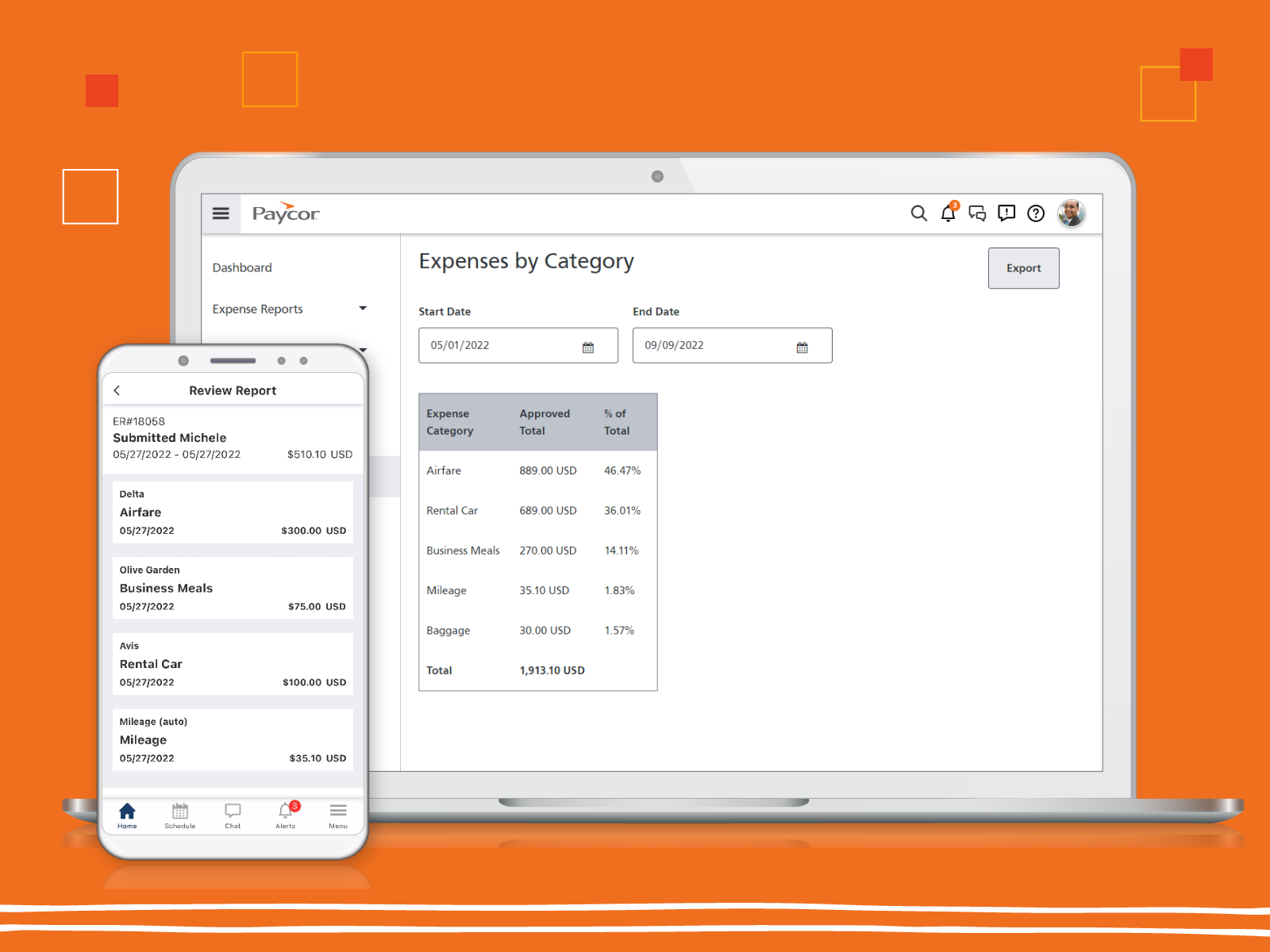
Screenshot of the real-time data insights that support critical business decisions.Screenshot of Paycor's expense reportingScreenshot of the recruiting processes streamlined in PaycorScreenshot of workforce scheduling in PaycorScreenshot of Paycor's mobile app, that allows employees to punch in and out from their phonesScreenshot of the Paycor Home Screen