QuickBooks Desktop Pro vs. Xero

Overview
ProductRatingMost Used ByProduct SummaryStarting Price
QuickBooks Desktop Pro
Score 7.8 out of 10
N/A
Quickbooks Desktop Pro is accounting software from Intuit, Inc. It includes core accounting features, plus analytics and exportable reports. It is offered in on-premise and SaaS forms.N/A
Xero
Score 7.9 out of 10
N/A
Xero is an online accounting software product for small businesses and personal finance. Its features beyond general ledger and double-bookkeeping include quotable invoicing, bank reconciliation, purchase order and expense management, and tax management. Third party apps can extend its features further.
$13
per month
Pricing
QuickBooks Desktop ProXero
Editions & Modules
No answers on this topic
Early
$13
per month
Growing
$37
per month
Established
$70
per month
Offerings
Pricing Offerings
QuickBooks Desktop ProXero
Free Trial
NoYes
Free/Freemium Version
NoNo
Premium Consulting/Integration Services
NoNo
Entry-level Setup FeeNo setup feeNo setup fee
Additional DetailsPrices in table are in USD and just apply to the US - other markets & prices are listed below: Canada - Starter $18 CAD/month, Standard $45 CAD/month, Premium 5 $58 CAD/month UK - Starter £14/month, Standard £28/month, Premium £36/month AU - Starter $29 AUD/month, Standard $59 AUD/month, Premium 5 $76 AUD/month NZ - Starter $31 NZD/month, Standard $66 NZD/month, Premium $84 NZD/month
More Pricing Information
Community Pulse
QuickBooks Desktop ProXero
Considered Both Products
QuickBooks Desktop Pro
Chose QuickBooks Desktop Pro
QuickBooks has been around longer and more people are familiar with it. Xero seems more user friendly.
Chose QuickBooks Desktop Pro
QuickBooks has way more functionality than Xero. The reporting of QuickBooks is leaps and bounds ahead of Xero
Chose QuickBooks Desktop Pro
My experience in QuickBooks has allowed the system to do what I need. The functionality of the others is somewhat limited for what I need to do for reporting purposes.
Chose QuickBooks Desktop Pro
Large user base and availability of candidates to recruit
Chose QuickBooks Desktop Pro
We prefer QuickBooks Pro over QuickBooks Online. We feel like we can work more efficiently in QuickBooks Pro. We prefer Xero over QuickBooks Pro when the features in Xero fit the client's needs. We prefer using on online accounting solution over a desktop solution.
Xero
Chose Xero
Xero lacks the AR invoice payment processing capability of all the titles listed above. I view Xero as an application for Mom and Pop grocery stores where sophisticated, business critical software isn't a requirement. As a small manufacturing business, in my opinion, the lack …
Chose Xero
Xero is the star in my book because they back their product and Xero wants to grow and become contantly better so they will make the experience as painless as possible.
Chose Xero
Xero is more affordable than other solutions, and being cloud-based it's helpful for granting accountant access.

Every other accounting package in existence has late fees and interest options built in.
Chose Xero
absolute shit product, difficult to reconcile, find transactions, duplicate bank transactions, difficult to remove those duplicates, just crap.
Chose Xero
Xero is easier to navigate and more organized in the way you navigate from module to module than QuickBooks Online. (Quickbooks Desktop was great). The help module and Xero Central are excellent and one of the best help features that I have experienced in any program.
Chose Xero
Personally, I always hated QuickBooks. I'm sure the online/cloud version is a lot different than the older desktop software, but I never found it to be easy to use and my books were always out of sync. Wave [Accounting] was the first Saas accounting software I tried, but I …
Chose Xero
QuickBooks was my grandmother's bookkeeping software. Nothing was automated and it forced me to know good accounting practices. That's what I pay my accountant for. Xero is intuitive and also limited on what you can do on each screen. If I'm ever confused, I send a support …
Chose Xero
  • Xero is easier for new businesses that need cloud-based accounting software.
  • Xero has functional integration with other applications that our clients need.
  • Gusto is a great payroll application that is now used by all our clients with their Xero software.
Chose Xero
Xero has been hands down so much better than Quickbooks. With reporting alone- Xero has exceeded Quickbooks. It is so much easier to logon - not have to back up the program having it all cloud-based. So many more functions and ease of multi-currencies is excellent as well.
Chose Xero
Xero hits our "maximum point" on the curves of simplicity, usability, and feature set. In my opinion it is by far the best in class, and the only reason it hasn't taken over Quickbooks entirely is that industry-standard products, no matter how inferior, are difficult to …
Chose Xero
Previously exclusively a desktop QuickBooks "shop". Hate the version control issues and need to collect and transfer data files to get source documents. Auto bank downloads clunky and not as intuitive as Xero bank recon features. Few clients use FreshBooks - nice customer …
Chose Xero
QuickBooks for Mac is not a viable product. PC desktop makes off-site work difficult (and hosted environments are clunky and slow). QuickBooks Online is improving, but all recent innovations seem directly in response to, and taking a lead from Xero base product. Overall, Xero …
Features
QuickBooks Desktop ProXero
Payroll Management
Comparison of Payroll Management features of Product A and Product B
QuickBooks Desktop Pro
9.3
65 Ratings
19% above category average
Xero
7.5
73 Ratings
3% below category average
Pay calculation9.961 Ratings8.065 Ratings
Benefit plan administration9.835 Ratings8.023 Ratings
Direct deposit files9.953 Ratings7.249 Ratings
Salary revision and increment management9.949 Ratings7.141 Ratings
Reimbursement management7.350 Ratings7.054 Ratings
Customization
Comparison of Customization features of Product A and Product B
QuickBooks Desktop Pro
7.9
39 Ratings
4% above category average
Xero
8.4
151 Ratings
10% above category average
API for custom integration8.032 Ratings7.979 Ratings
Plug-ins7.836 Ratings8.9138 Ratings
Security
Comparison of Security features of Product A and Product B
QuickBooks Desktop Pro
10.0
94 Ratings
18% above category average
Xero
7.1
189 Ratings
16% below category average
Single sign-on capability10.076 Ratings5.572 Ratings
Role-based user permissions10.089 Ratings8.7187 Ratings
Reporting & Analytics
Comparison of Reporting & Analytics features of Product A and Product B
QuickBooks Desktop Pro
10.0
109 Ratings
24% above category average
Xero
8.7
213 Ratings
10% above category average
Dashboards10.094 Ratings8.6209 Ratings
Standard reports10.0109 Ratings9.0211 Ratings
Custom reports10.0107 Ratings8.4187 Ratings
General Ledger and Configurable Accounting
Comparison of General Ledger and Configurable Accounting features of Product A and Product B
QuickBooks Desktop Pro
9.5
113 Ratings
20% above category average
Xero
7.3
223 Ratings
6% below category average
Accounts payable10.0108 Ratings8.7203 Ratings
Accounts receivable10.0110 Ratings8.8209 Ratings
Cash management10.098 Ratings8.4191 Ratings
Bank reconciliation10.0109 Ratings8.8216 Ratings
Expense management10.0100 Ratings8.2197 Ratings
Time tracking8.747 Ratings8.073 Ratings
Fixed asset management10.065 Ratings8.8137 Ratings
Multi-currency support10.028 Ratings7.8130 Ratings
Multi-division support10.053 Ratings8.3112 Ratings
Regulations compliance7.239 Ratings8.7112 Ratings
Electronic tax filing10.051 Ratings9.8116 Ratings
Self-service portal9.738 Ratings8.4130 Ratings
Global Financial Support7.015 Ratings7.167 Ratings
Primary and Secondary Ledgers8.837 Ratings9.065 Ratings
Intercompany Accounting10.039 Ratings4.440 Ratings
Localizations8.517 Ratings8.039 Ratings
Journals and Reconciliations10.066 Ratings9.890 Ratings
Enterprise Accounting10.034 Ratings2.433 Ratings
Configurable Accounting10.042 Ratings2.859 Ratings
Centralized Rules Framework10.025 Ratings3.333 Ratings
Standardized Processes10.049 Ratings3.659 Ratings
Inventory Management
Comparison of Inventory Management features of Product A and Product B
QuickBooks Desktop Pro
6.7
56 Ratings
9% below category average
Xero
6.6
101 Ratings
11% below category average
Inventory tracking6.453 Ratings8.997 Ratings
Automatic reordering6.132 Ratings6.224 Ratings
Location management6.229 Ratings6.229 Ratings
Manufacturing module8.216 Ratings6.016 Ratings
Order Management
Comparison of Order Management features of Product A and Product B
QuickBooks Desktop Pro
8.3
71 Ratings
7% above category average
Xero
6.2
89 Ratings
22% below category average
Pricing10.051 Ratings6.262 Ratings
Order entry10.050 Ratings6.256 Ratings
Credit card processing7.148 Ratings6.358 Ratings
Cost of goods sold10.059 Ratings6.366 Ratings
Order Orchestration9.018 Ratings6.121 Ratings
End-to-end order visibility9.021 Ratings6.124 Ratings
Order exception Resolution3.216 Ratings6.117 Ratings
Best Alternatives
QuickBooks Desktop ProXero
Small Businesses
QuickBooks Self-Employed (discontinued)
Score 8.9 out of 10
QuickBooks Self-Employed (discontinued)
Score 8.9 out of 10
Medium-sized Companies
Zoho Books
Zoho Books
Score 9.0 out of 10
Zoho Books
Zoho Books
Score 9.0 out of 10
Enterprises
Oracle Fusion Cloud Enterprise Performance Management
Score 10.0 out of 10
Oracle Fusion Cloud Enterprise Performance Management
Score 10.0 out of 10
All AlternativesView all alternativesView all alternatives
User Ratings
QuickBooks Desktop ProXero
Likelihood to Recommend
9.9
(125 ratings)
7.9
(238 ratings)
Likelihood to Renew
10.0
(18 ratings)
7.2
(35 ratings)
Usability
10.0
(32 ratings)
8.3
(163 ratings)
Availability
8.3
(2 ratings)
9.0
(10 ratings)
Performance
-
(0 ratings)
10.0
(8 ratings)
Support Rating
1.2
(29 ratings)
9.2
(36 ratings)
In-Person Training
10.0
(1 ratings)
9.1
(1 ratings)
Online Training
-
(0 ratings)
10.0
(5 ratings)
Implementation Rating
9.0
(6 ratings)
7.3
(10 ratings)
Configurability
-
(0 ratings)
9.0
(1 ratings)
Ease of integration
-
(0 ratings)
7.2
(122 ratings)
Product Scalability
8.0
(1 ratings)
10.0
(6 ratings)
Vendor post-sale
-
(0 ratings)
9.0
(2 ratings)
Vendor pre-sale
-
(0 ratings)
10.0
(2 ratings)
User Testimonials
QuickBooks Desktop ProXero
Likelihood to Recommend
Intuit
What I think the QuickBooks Desktop Pro is well suited: 1) Easy to use and effective to navigate while satisfying our financial and accounting functions' needs 2) We upgraded the version from the QuickBooks Desktop to Desktop Pro for its advanced functions and the ability to track the different projects/programs that are essential to organization.
Read full review
Xero
I am a massage and physical therapist. We are not a fancy business but business admin can take a lot of time and effort. Xero came recommended to me by colleagues in the sector. You raise invoices, you get paid. and you pay your bills. These are all daily scenarios for most businesses and Xero does this particularly well. Since my accountant can query my records directly, this greatly saves on bookkeeping time when it is time to do the company returns.
Read full review
Pros
Intuit
  • It is easy to manage and adjust inventory on hand.
  • It is easy to make reports and customize them to your needs.
  • We also use it to pay our employees directly.
  • It is easy to make year-to-year comparisons to see where we can make improvements and the current financial situation.
Read full review
Xero
  • Repeating invoices (most of my business is monthly recurring invoices) - it does these very well.
  • Reporting - particularly being able to dig into the different lines of the P&L statement.
  • Tracking categories - I assign a category to every line of every invoice so it's easy to see how much has been sold of each type of service every month and year, and compare them to previous periods.
Read full review
Cons
Intuit
  • QuickBooks Desktop Pro has been around for a few years and after an update[,] they force you to look at the changes/updates before you can use [them] after updating.
  • QuickBooks Desktop Pro does not have 2FA.
  • QuickBooks Desktop Pro should offer a way to store backups to a personal cloud without having to map a local network drive.
Read full review
Xero
  • Having different email addresses for different parts of a customer's business (eg invoices and statements to different places)
  • Easily seeing the text of emails that have been sent through Xero
  • More easily archiving old pay items. Our HR software updates rates when awards are updated which means a lot of old pay rates are in the system and they have multiple clicks to archive each one. Clicking the ones to archive in bulk and then just click archive for all would be much more efficient.
Read full review
Likelihood to Renew
Intuit
I'd love to keep using it, and do intend to - though we've not been pleased with price increases over the past several years. In fact, we used to subscribe to the payroll service, but QuickBooks priced themselves out of reach for us, so we discontinued that. Currently, pricing would be the primary reason for NOT renewing, if we didn't.
Read full review
Xero
In addition to the matters covered in this review, my reason for renewing this product is that Xero's functionality and the constant updates that the company provides, makes the software even more business friendly. The software therefore builds a brand loyalty among customers.
Read full review
Usability
Intuit
It is a great software that does everything a small business needs it to do, but there are just a few bugs and quirks that make additional software necessary. The slowness of the software occasionally might eventually be overshadowed by the quickness of cloud-based software though.
Read full review
Xero
As a standalone software, it allows users to fulfill most of the basic functions (e.g. transaction input and report generation) simply and conveniently. It also allows for multiple APIs to help augment various tasks that accounting-adjacent (e.g. claims processing). The cloud based model and portability to mobile devices allows tasks to be carried out in a more convenient way.
Read full review
Reliability and Availability
Intuit
I haven't experienced a time when QuickBooks Pro was unavailable when I needed it in the entire 20 years of using the software
Read full review
Xero
We have been actively using and 100% Xero based for our ecommerce accounting practice for over 4 years. There has on been one real outage for more than 5 minutes. Xero was open and transparent about the outage, what they were doing to resolve the issue, and provided 15 minute updates. Showing how they care about their customers and partners. Plus, showing that their customers care too, were understanding, and went surfing or in our case took a nap. Couldn't run our business without Xero as a partner.
Read full review
Performance
Intuit
No answers on this topic
Xero
Pages generally load quickly, but it's a fairly common occurrence to have pages taking a bit longer than I'd like to load (as in, 4+ seconds). Occasionally I have to refresh a page to get it to work. Bank feed and integrations tend to be slow in general, but that could easily be due to API latency on the side of the other parties. Most of the time, though, the bank feeds refresh before I login so it's not a huge problem. Not necessarily good performance compared to a local app like QuickBooks desktop, but definitely good performance for a cloud application. Room for growth? yes.
Read full review
Support Rating
Intuit
They are awful. Intuit doesn't spend real money on support. They appear to have typically said, first-level script readers who are sending messages to the senior people for anything even a little bit difficult. Many of them don't speak particularly good English. Considering that they recently doubled (or, if you are paying annually, tripled) their pricing, and touted as one of the benefits that it includes [..] support, it's a real ripoff. However, we have to use the product because it is ubiquitous. I look forward to the day a competitor comes up with something good enough, which has excellent support, that matches all the features QuickBooks Desktop Pro currently has [...] or at least gives us a way to have all the functionality we currently have without excessive sacrifice [...] so that we can switch. I was very satisfied with QuickBooks for many years. This latest [rise] in price, and their sheer gall at touting the benefit of the 100 to 200% increase as being [the] inclusion of support, is what turned me so far against them.
Read full review
Xero
Always respond and keep issues open until you are satisfied with the result. Generally good responses, in the past, I had some support responses that were really basic and really annoying. They type where "have your tried restarting your computer" style of answers. Well, of course, I went through all the basics before contacting them. Duh, but I suppose not everyone does. Otherwise, it would be a 10. The last year has shown a marked improvement in the support responses however.
Read full review
In-Person Training
Intuit
Best thing I ever did was to attend a two day training seminar on QuickBooks, I learned an immense amount in a short time with hands on training by experts. I strongly recommend such training for anyone using any part of the software. It will pay for itself in the first month.
Read full review
Xero
The format was great; someone was there to ask questions or help if you were stuck.
Read full review
Online Training
Intuit
No answers on this topic
Xero
All of Xero's training is online and available for anyone (business owner or accountants) to learn and become experts in their system. There is a range of content from product training to real world webinars from their partners. Xero is beautiful accounting software and their training is the same.
Read full review
Implementation Rating
Intuit
We implemented the software ourselves. The training we received on the software was done by taking a community course teaching us how to use QuickBooks. It allowed me to get started with some basics of how to use the program and have not needed much assistance since completing the course work.
Read full review
Xero
If it can be done, time the implementation near a new fiscal year so you can start clean. Otherwise, you have to go back and do historical data from the beginning of the fiscal year, which can be brain draining.
Read full review
Alternatives Considered
Intuit
Zoho had great end-user support and it was almost as simple to learn and was as easy to use. But its reports were not as [customizable] as QuickBooks Desktop Pro, and its job cost and department accounting [were] more cumbersome than QuickBooks Desktop Pro was. In addition, while I like an underdog (Zoho) the fact is that it is easier to find staff that [is] comfortable with QuickBooks Desktop Pro than anything else on the market.
Read full review
Xero
Each of the products I listed had their own list of drawbacks, but the one thing they all had in common, which was right on top of that list of drawbacks, was ease of use. I struggled to get myself accustomed to each system and struggled, but when it came to getting a client to even try and use it was when the true struggle started. Just found it easier to make use of Xero from the very beginning.
Read full review
Scalability
Intuit
No answers on this topic
Xero
I have yet to fully stress test the product given the size of the company where I am using it. I am sure as we scale to more customers, more vendors and more reporting requirements, I will have a better understanding of what it is capable of in terms of bandwidth and processing
Read full review
Return on Investment
Intuit
  • QuickBooks Desktop Pro is a no hassle accounting solution that ticks a lot of boxes. It almost never disappoints and organizations will usually keep using it for many years. If anything, the only time I've seen an organization migrate away from it is if they have specific accounting needs, or if the organization has grown to the point that they need a more robust accounting solution. Even then, QuickBooks can usually be maintained within another accounting software system for specific functions, like A/R & A/P for example.
Read full review
Xero
  • Xero is a basic accounting system that performs basic accounting tasks easily and accurately. For that, it provides a positive impact on our day to day accounting operations.
  • Because of Xero's basic structure, I feel it lacks some of the sophistication that some users want and need. The ability to create unique custom reports would enhance the impact Xero would have on meeting business objectives by providing current and useful accounting information.
  • In my opinion, Xero's lack of focus on their customers - their users - is a real issue with me. In my opinion, those of us that are in the trenches that work with the system on a daily basis have to deal with the shortcomings of the system with the knowledge that Xero support refuses to address the operational issues that make their user's lives difficult. I feel if Xero would focus on truly making their software better from a users point of view, it has the potential to be a great system.
Read full review
ScreenShots

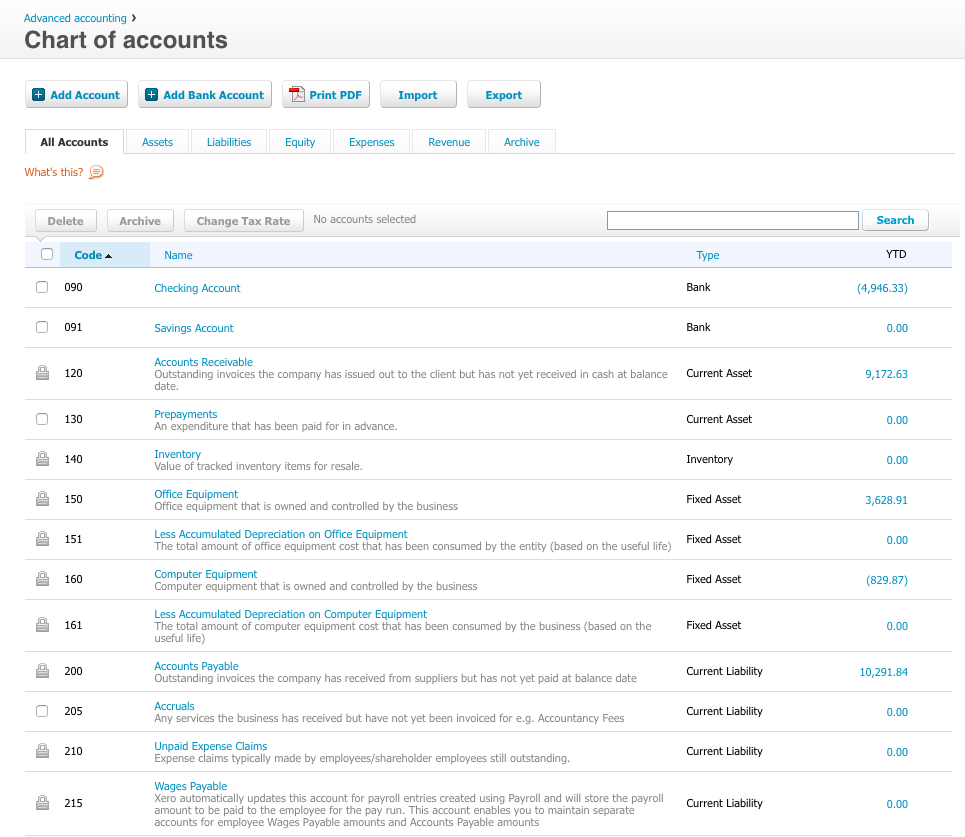
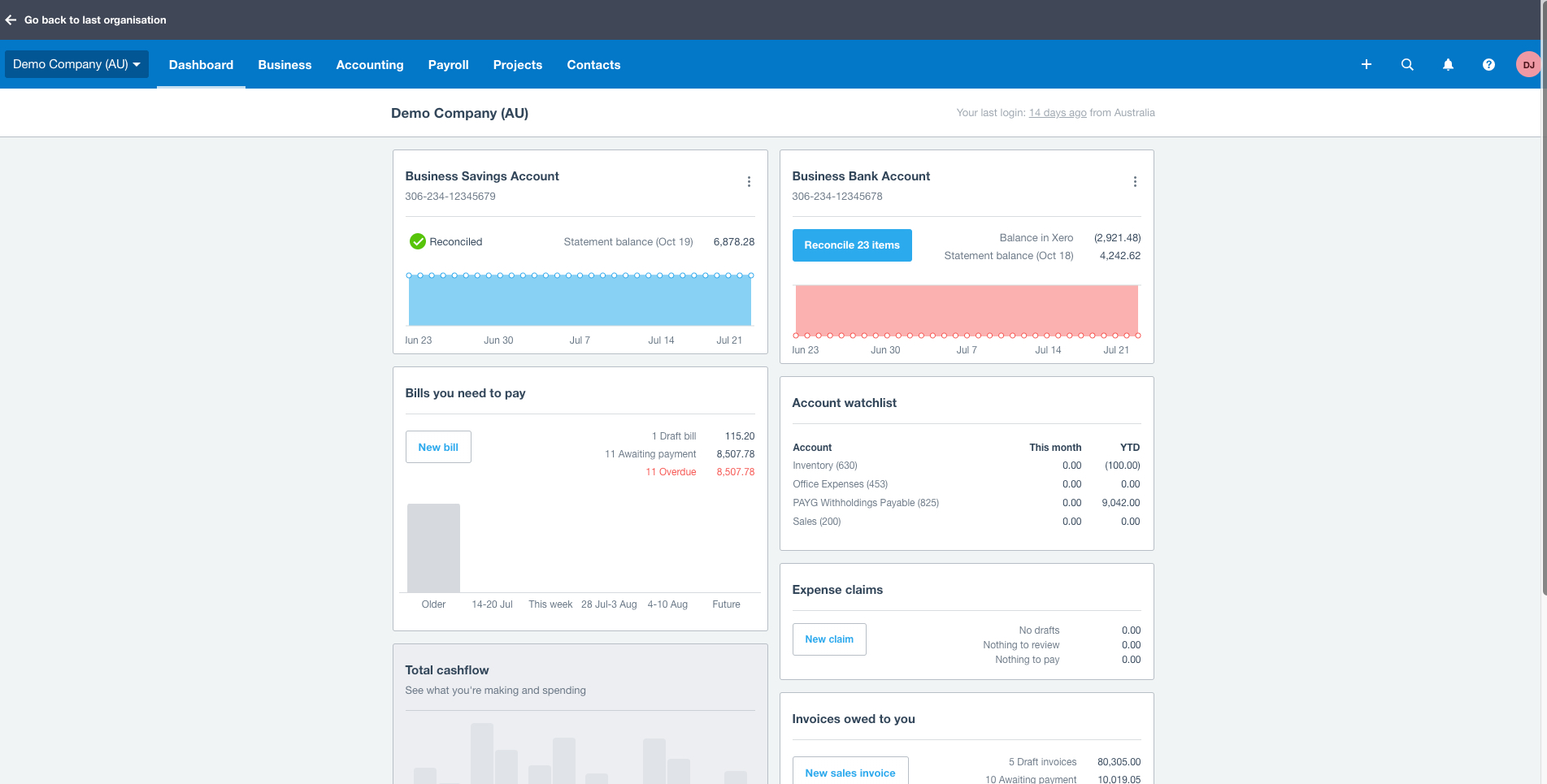
Xero Screenshots

Screenshot of Screenshot of Screenshot of Screenshot of Screenshot of Screenshot of