Salesforce Financial Services Cloud vs. Salesforce Revenue Cloud

Overview
ProductRatingMost Used ByProduct SummaryStarting Price
Salesforce Financial Services Cloud
Score 8.2 out of 10
N/A
The Financial Services Cloud from Salesforce is used to create customized experiences for users and customers, and get information at the right to improve productivity and satisfaction. The vendor states that wealth management advisors can use the CRM’s ability to better understand and address client needs, building fruitful client relationships. Retail, mortgage, and commercial bankers can get a complete customer view when and where they need it. In insurance, users of the financial services…
$300
per month billed annually per user
Salesforce Revenue Cloud
Score 8.8 out of 10
Mid-Size Companies (51-1,000 employees)
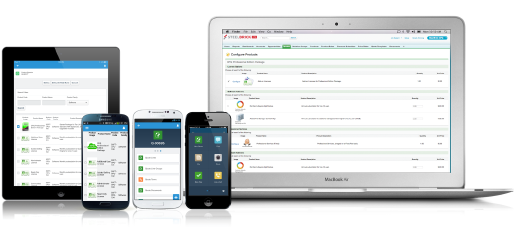
Salesforce Revenue Cloud (formerly Salesforce CPQ or SteelBrick) is built and delivered on the Salesforce Platform and Salesforce1 Mobile App which enables users to create accurate sales quotes quickly and submit error-free orders on the fly from any device.
$30
Per User per Month
Pricing
Salesforce Financial Services CloudSalesforce Revenue Cloud
Editions & Modules
Sales
$300
per month billed annually per user
Service
$300
per month billed annually per user
Sales and Service
$325
per month billed annually per user
Einstein 1 for Sales and Service
$700
per month billed annually per user
Basic
$30
Per User per Month
Professional
$50
Per User per Month
Enterprise
$75
Per User per Month
Offerings
Pricing Offerings
Salesforce Financial Services CloudSalesforce Revenue Cloud
Free Trial
NoYes
Free/Freemium Version
NoNo
Premium Consulting/Integration Services
NoNo
Entry-level Setup FeeNo setup feeOptional
Additional Details
More Pricing Information
Community Pulse
Salesforce Financial Services CloudSalesforce Revenue Cloud
Features
Salesforce Financial Services CloudSalesforce Revenue Cloud
CPQ
Comparison of CPQ features of Product A and Product B
Salesforce Financial Services Cloud
-
Ratings
Salesforce Revenue Cloud
7.7
Ratings
12% below category average
Quote sharing/sending00 Ratings7.90 Ratings
Product configuration00 Ratings5.10 Ratings
Configuration options00 Ratings5.10 Ratings
Pricing rules00 Ratings8.00 Ratings
Price adjustment00 Ratings8.00 Ratings
Purchase history and open contracts00 Ratings9.00 Ratings
Guided selling/Sales portal00 Ratings6.00 Ratings
CPQ reporting & analytics00 Ratings8.90 Ratings
CPQ-CRM integration00 Ratings9.90 Ratings
Attachments to quotes00 Ratings9.00 Ratings
Order capturing00 Ratings8.00 Ratings
Best Alternatives
Salesforce Financial Services CloudSalesforce Revenue Cloud
Small Businesses
Affinity CRM
Affinity CRM
Score 9.3 out of 10
QuoteWerks
QuoteWerks
Score 9.4 out of 10
Medium-sized Companies

No answers on this topic

QuoteWerks
QuoteWerks
Score 9.4 out of 10
Enterprises

No answers on this topic

SAP Sales Cloud
SAP Sales Cloud
Score 8.3 out of 10
All AlternativesView all alternativesView all alternatives
User Ratings
Salesforce Financial Services CloudSalesforce Revenue Cloud
Likelihood to Recommend
8.0
(0 ratings)
8.0
(0 ratings)
Likelihood to Renew
-
(0 ratings)
9.1
(0 ratings)
Usability
-
(0 ratings)
8.6
(0 ratings)
Availability
-
(0 ratings)
9.1
(0 ratings)
Performance
-
(0 ratings)
8.2
(0 ratings)
Support Rating
-
(0 ratings)
7.9
(0 ratings)
Product Scalability
-
(0 ratings)
8.2
(0 ratings)
User Testimonials
Salesforce Financial Services CloudSalesforce Revenue Cloud
Likelihood to Recommend
Salesforce helped us organize all leads into one software. Any call in or email lead we were able to record right into Salesforce. It helped coordinate/track/win/loose all opportunities. It's also very user friendly. When we bring on new employees or even interns; we are able to show them what is needed and they are able to jump right in
Read full review
CPQ is great if you can devote the time to it to make it perfect for your sales team. It requires a lot of time and energy to build it out and customize, but once that's done it is one of the most powerful tools you will have. Having an expert in CPQ is really helpful as well.
Read full review
Pros
  • Organization.
  • Tracking.
  • User friendly.
Read full review
  • Salesforce CPQ is great for being able to quickly and easily build product bundles in an intuitive and visually appealing way.
  • The product catalog and ability to easily add fields to product records makes setting up products really simple and adds a lot of value to reporting within Salesforce.
  • Basic product and configuration rules are very easy to understand and set up.
Read full review
Cons
No answers on this topic
  • Our Salesforce is very messy, which tells me it's not super easy to clean up.
  • I always have a really hard time removing a contacts from an account - it seems like you can't simply remove the relationship so we have lots of people named DO NOT CONTACT or things of that nature.
  • Sometimes when saving it doesn't seem like things actually save.
Read full review
Likelihood to Renew
No answers on this topic
The company is very easy to work with and is growing by leaps and bounds. We do not anticipate switching vendors anytime in the near future
Read full review
Usability
No answers on this topic
After the initial set up, end users who are not the most tech savy are generally finding it easy to navigate
Read full review
Support Rating
No answers on this topic
There have been some issues with multi-year pricing of certain products and services which we have been assured will be resolved but I guess are still underway, the support team apart from this has not been needed much and in the rare scenarios, it has been needed the resolutions of conflicts has been prompt and quick, so the overall support would have my high regards for being so helpful and customer-oriented so as to assure good performance of their toolset and customer satisfaction.
Read full review
Alternatives Considered
We haven't used anything previously to Salesforce. We were trying to implement what we needed as a company with our current ticketing and quoting software, but it wasn't doing what we needed. Once we found Salesforce we were able to really dial in on the important things needed as a company.
Read full review
This has better product capabilities like Manage Order, Mobile, pricing module, select product offers service channel. What I like best is the integration with Salesforce, the ability to create and connect opportunities and there is a lot of flexibility in this tool. It has a very user-friendly platform & navigation across pages is the best Also I like how fast I can create quotes. I also like how detailed you can get with reporting. Any possible metric we can think of can be tracked, measured, and integrated.
Read full review
Return on Investment
  • Helped track everything in one place.
Read full review
  • Easy access to reporting on closed-won, closed-lost, and open quotes.
  • Accuracy in data referenced in a quote - it's typically accurate as it is pulled directly from opportunity, looking up to associated subscription start/end dates, etc..
  • We lose valuable time in creating quotes ourselves. Quotes were requested and created through sales ops previously, sales did not have access to the excel templates used to generate quotes.
Read full review
ScreenShots

Salesforce Revenue Cloud Screenshots

Screenshot of Configure. Price. Quote. Anytime, anywhere, on any device.