Salesforce Mobile vs. Salesforce Revenue Cloud

Overview
ProductRatingMost Used ByProduct SummaryStarting Price
Salesforce Mobile
Score 7.0 out of 10
N/A
Salesforce Mobile (formerly Salesforce1 Mobile App) provides sales reps and marketers to update their pipeline and lead statuses on the go, as well as share notifications and keep their team and collaborators updated on the movement of prospects through the sales pipeline.N/A
Salesforce Revenue Cloud
Score 8.8 out of 10
Mid-Size Companies (51-1,000 employees)
Salesforce Revenue Cloud (formerly Salesforce CPQ or SteelBrick) is built and delivered on the Salesforce Platform and Salesforce1 Mobile App which enables users to create accurate sales quotes quickly and submit error-free orders on the fly from any device.
$30
Per User per Month
Pricing
Salesforce MobileSalesforce Revenue Cloud
Editions & Modules
No answers on this topic
Basic
$30
Per User per Month
Professional
$50
Per User per Month
Enterprise
$75
Per User per Month
Offerings
Pricing Offerings
Salesforce MobileSalesforce Revenue Cloud
Free Trial
NoYes
Free/Freemium Version
NoNo
Premium Consulting/Integration Services
NoNo
Entry-level Setup FeeNo setup feeOptional
Additional Details
More Pricing Information
Community Pulse
Salesforce MobileSalesforce Revenue Cloud
Considered Both Products
Salesforce Mobile
Chose Salesforce Mobile
Neither are simple to use, neither bring consistent results.

Chose Salesforce Mobile
I haven't tried another service yet, therefore I can't give a comparative example from another software. Nevertheless, I can say that the experience that I had so far is pretty amazing. I am able to do things for my job without the need of a laptop, like I can be walking around …
Chose Salesforce Mobile
Oracle CX Commerce (formerly Oracle Commerce Cloud)
Chose Salesforce Mobile
I have used HubSpot and Copper CRM at previous companies but both of them are fundamental CRMs. Salesforce can truly be implemented to meet your unique business attributes and can scale as your company grows. It's no wonder it's the #1 CRM in the world. Plus with 100s of …
Chose Salesforce Mobile
I have used no other CRM mobile app.
Chose Salesforce Mobile
I have not evaluated any other similar products at this time. My organization and I are very happy with our current view of Salesforce1 (formerly Salesforce 1 Mobile app). I would recommend to any other organizations in which are evaluating this tool and others to choose and …
Chose Salesforce Mobile
Don't have any experience with similar products.
Chose Salesforce Mobile
Easy to use. Easy to direct tickets to specific departments. In other apps, there are no pictures available to be shared. This allows us to show what we are talking about. I also am not limited to the kinds of tickets I submit. Meaning I can contact any company or department. …
Chose Salesforce Mobile
We use the two together. Salesforce Mobile is our generic CRM whereas we use SalesLoft for cadencing.
Chose Salesforce Mobile
Salesforce Mobile meets our needs of our business better. And with the drag and drop function, it helps us build our reports quicker. And so many fields that we can customise. Hence with the ability to manage cilents from anywhere. Hubspot seems to simple and lacking for our …
Chose Salesforce Mobile
Salesforce Mobile is by far the cleanest interface and most user friendly mobile app in comparison to similar apps I've used.
Chose Salesforce Mobile
Salesforce has been used in our organization for the past 13 years. We use it for our sales team, production team, support team, development team, accounting team, etc. We probably use it in ways that it wasn't intended, but it works for us. Being a small company it doesn't …
Chose Salesforce Mobile
We use Salesforce Mobile [(formerly Salesforce1 Mobile App)] as its our backbone for the Sales, Support, SE, Finance and Implementations team. Salesforce Mobile [(formerly Salesforce1 Mobile App)] allows all of our teams to collaborate from anywhere "live" on records or …
Chose Salesforce Mobile
Salesforce Mobile [(formerly Salesforce1 Mobile App)] is easily implemented without any hard code customization, and the application and the database are embedded into the same system, a facility that Salesforce natively provides.
Chose Salesforce Mobile
They are just alike because they both consist of your leads. But Salesforce Mobile is way better than other Linkedin Sales Navigator because in Salesforce you can manually add information for your lead and you can customize it. In Linkedin Sales Navigator it will only consist …
Chose Salesforce Mobile
Well, the Salesforce1 application is specific to managing a Salesforce platform, so the application comparison for the same base cannot be made here. However, the application overall vs. Zoho has the advantage over UI and performance. Salesforce is the clear leader, Zoho is in …
Salesforce Revenue Cloud
Chose Salesforce Revenue Cloud
This software is so complex we can say that Salesforce works so much better in the interface. Also, the features provided by Salesforce are far better than this software. It also includes Storing data, API development, and so many other functionalities which help a developer …
Chose Salesforce Revenue Cloud
This has better product capabilities like Manage Order, Mobile, pricing module, select product offers service channel. What I like best is the integration with Salesforce, the ability to create and connect opportunities and there is a lot of flexibility in this tool. It has a …
Chose Salesforce Revenue Cloud
There is no comparison to a fully functional instance of CPQ. Nothing comes close due to the amount of customization and ease of use that CPQ offers once it's fully built out. Other solutions may be easier to build or administer, but for the users and business needs, CPQ is the …
Chose Salesforce Revenue Cloud
It is complementary to salesforce so I don´t think there is a necessity to compare between groove and Salesforce Revenue Cloud.
Chose Salesforce Revenue Cloud
SalesForce Revenue Cloud has been leaps and bounds ahead of the softwares I used to use! I had used Google Sheets at first (since it was free), then bought Excel briefly thinking that would suffice as a good CRM layout. Turns out I was wrong and needed something more. Revenue …
Chose Salesforce Revenue Cloud
This program is just more advanced and customizable. It worked for our diverse team needs considering the size and complexity of our portfolio. This was just the right choice for us. The other CRM's were great for smaller-scale enterprises at the time that I used them.
Chose Salesforce Revenue Cloud
This is an efficient tool and user-friendly.
Chose Salesforce Revenue Cloud
Salesforce CPQ was faster in performance and suited our needs.
Its direct integration on the SFDC platform made it easier to implement.
Chose Salesforce Revenue Cloud
Salesforce CPQ [(formerly SteelBrick)] seamlessly integrates with Salesforce allowing us to have less integrations to manage. Releases don't break a connection causing delays in the sales process.
Chose Salesforce Revenue Cloud
We felt Salesforce had less risk with integrations to our CRM - also Big Machines couldn't handle our complexity.
Chose Salesforce Revenue Cloud
I don't know any competitor for Salesforce CPQ .
Chose Salesforce Revenue Cloud
I haven't used PandaDoc, but a friend of mine uses it at their organization and recommended it.
Chose Salesforce Revenue Cloud
It seemed really complicated comparably and didn’t seem to have the integration abilities that Salesforce CPQ has with Salesforce.
Chose Salesforce Revenue Cloud
Salesforce stacks well in terms of features like lead, quote and pricing management than other software like Zoho, bichon, agile or Hubspot, personally I believe if the entire set of tools and solutions provided by Salesforce are employed they would work like a well-oiled …
Chose Salesforce Revenue Cloud
Salesforces CPQ compares very highly to Apparound CPQ, because of the integration with the Salesforce platform. Because of the integration with the regular Salesforce platform, the tools work interchangeably with one another. This process creates a great deal of efficiency, and …
Chose Salesforce Revenue Cloud
CPQ is a more inline, integrated and user-friendly product compared to Apttus's offering. The fact that it was bought and embedded by Salesforce into the platform and the support that entails, was the big differentiator for us.
Chose Salesforce Revenue Cloud
Salesforce CPQ is much better in user interaction, automation, AI, and integration with CRM, and other business systems.
Chose Salesforce Revenue Cloud
It is a strong offering if your a Salesforce customer. We previously used Panda Doc and the integration with Saleforce was just not robust enough as we've expanded. Panda Doc allowed for much more customization and control of templates. However, the pricing rules, …
Chose Salesforce Revenue Cloud
It was not my choice to move to Salesforce CPQ. Our organization chose to move to this platform because Octiv gave the reps too much flexibility. They wanted to tighten the reins. Everyone hates Salesforce CPQ and the guy who implemented it isn't even at the company anymore.
Chose Salesforce Revenue Cloud
We looked into using BigMachines and FPX but decided to implement Apttus many years ago. The Apttus implementation never went live after several hiccups along the way and we shifted our focus to Salesforce CPQ which has had it's moments as well. Overall, Salesforce CPQ is the …
Chose Salesforce Revenue Cloud
More enterprise related and trustworthy. There is a greater brand association - Salesforce for me.
Chose Salesforce Revenue Cloud
Almost a no brainer as we already heavily use SalesForce. This process allowed for everything to be in one place. As stated before, it is better than our old solution because it pulls a lot of the info from the option for you, allows for you to cross-function with services …
Chose Salesforce Revenue Cloud
CPQ is much more intuitive and user-friendly than JDE. JDE is clunky and was not native to the Oracle CRM tool, which created problems when it came to quote creation and consistency in how deals are moved through the pipeline. We chose CPQ because we were already using SFDC as …
Features
Salesforce MobileSalesforce Revenue Cloud
CPQ
Comparison of CPQ features of Product A and Product B
Salesforce Mobile
-
Ratings
Salesforce Revenue Cloud
7.7
Ratings
12% below category average
Quote sharing/sending00 Ratings7.90 Ratings
Product configuration00 Ratings5.10 Ratings
Configuration options00 Ratings5.10 Ratings
Pricing rules00 Ratings8.00 Ratings
Price adjustment00 Ratings8.00 Ratings
Purchase history and open contracts00 Ratings9.00 Ratings
Guided selling/Sales portal00 Ratings6.00 Ratings
CPQ reporting & analytics00 Ratings8.90 Ratings
CPQ-CRM integration00 Ratings9.90 Ratings
Attachments to quotes00 Ratings9.00 Ratings
Order capturing00 Ratings8.00 Ratings
Best Alternatives
Salesforce MobileSalesforce Revenue Cloud
Small Businesses
Salesflare
Salesflare
Score 6.0 out of 10
QuoteWerks
QuoteWerks
Score 9.4 out of 10
Medium-sized Companies
Lead411
Lead411
Score 9.1 out of 10
QuoteWerks
QuoteWerks
Score 9.4 out of 10
Enterprises
Dialpad Sell
Dialpad Sell
Score 9.5 out of 10
SAP Sales Cloud
SAP Sales Cloud
Score 8.3 out of 10
All AlternativesView all alternativesView all alternatives
User Ratings
Salesforce MobileSalesforce Revenue Cloud
Likelihood to Recommend
7.0
(0 ratings)
8.0
(0 ratings)
Likelihood to Renew
10.0
(0 ratings)
9.1
(0 ratings)
Usability
9.9
(0 ratings)
8.6
(0 ratings)
Availability
-
(0 ratings)
9.1
(0 ratings)
Performance
-
(0 ratings)
8.2
(0 ratings)
Support Rating
9.9
(0 ratings)
7.9
(0 ratings)
Implementation Rating
10.0
(0 ratings)
-
(0 ratings)
Product Scalability
-
(0 ratings)
8.2
(0 ratings)
User Testimonials
Salesforce MobileSalesforce Revenue Cloud
Likelihood to Recommend
I rated a 7 because I personally like to use the desktop version over the mobile version. The app is great when I'm away from my computer but that's really the extent of my usage. I prefer the larger screen and easier navigation over the mobile version. Though I would highly suggest it for someone that's more on the go.
Read full review
CPQ is great if you can devote the time to it to make it perfect for your sales team. It requires a lot of time and energy to build it out and customize, but once that's done it is one of the most powerful tools you will have. Having an expert in CPQ is really helpful as well.
Read full review
Pros
  • The ability to construct lead list for various marketing channels and have our staff prioritize calls. It's simple to use, just has to be set up once, and it's safe.
  • The most important aspect of this app is that all of its features are incredible, especially the reporting capabilities and the ability to quickly input customer information.
  • The app allows sales reps to focus on opportunities while on the field. The app has a feature that allows you to set up quick action for a variety of tasks.
Read full review
  • Salesforce CPQ is great for being able to quickly and easily build product bundles in an intuitive and visually appealing way.
  • The product catalog and ability to easily add fields to product records makes setting up products really simple and adds a lot of value to reporting within Salesforce.
  • Basic product and configuration rules are very easy to understand and set up.
Read full review
Cons
  • It's pretty complex to use and not very straightforward as to where everything is and how to access.
  • Search function needs to be enhanced. Finding accounts in the desktop version is simple and accurate. With mobile, not so much.
  • It should be more customizable to enhance features frequently used.
Read full review
  • Our Salesforce is very messy, which tells me it's not super easy to clean up.
  • I always have a really hard time removing a contacts from an account - it seems like you can't simply remove the relationship so we have lots of people named DO NOT CONTACT or things of that nature.
  • Sometimes when saving it doesn't seem like things actually save.
Read full review
Likelihood to Renew
We have to have it !! We love the product and most of us use it everyday - many times daily !!
Read full review
The company is very easy to work with and is growing by leaps and bounds. We do not anticipate switching vendors anytime in the near future
Read full review
Usability
Salesforce Mobile is very useful to our organization. This makes the job of an agent more convenient. We can easily access it on our mobile phones. When you need an update for a certain lead, you can simply check it using your phone, you don't need to spend more time opening it on your computer or laptop.
Read full review
After the initial set up, end users who are not the most tech savy are generally finding it easy to navigate
Read full review
Support Rating
I haven't had the need to contact support, but the online community has a VAST knowledge of support if you're in need. For instance, I needed to know how I could set the dashboard up to automatically refresh and the online community helped me within minutes.
Read full review
There have been some issues with multi-year pricing of certain products and services which we have been assured will be resolved but I guess are still underway, the support team apart from this has not been needed much and in the rare scenarios, it has been needed the resolutions of conflicts has been prompt and quick, so the overall support would have my high regards for being so helpful and customer-oriented so as to assure good performance of their toolset and customer satisfaction.
Read full review
Implementation Rating
It went great - need more discovery next time
Read full review
No answers on this topic
Alternatives Considered
I haven't tried another service yet, therefore I can't give a comparative example from another software. Nevertheless, I can say that the experience that I had so far is pretty amazing. I am able to do things for my job without the need of a laptop, like I can be walking around a city where I am visiting potential clients and check all the data that we have on the way there. It really boosts my productivity.
Read full review
This has better product capabilities like Manage Order, Mobile, pricing module, select product offers service channel. What I like best is the integration with Salesforce, the ability to create and connect opportunities and there is a lot of flexibility in this tool. It has a very user-friendly platform & navigation across pages is the best Also I like how fast I can create quotes. I also like how detailed you can get with reporting. Any possible metric we can think of can be tracked, measured, and integrated.
Read full review
Return on Investment
  • Reduces the amount of times i need to get in the computer during weekends (to check stuff)
  • Reduces the heaviness of my bag when im doing field sales
  • no negatives, if it had i would just do it in the computer
Read full review
  • Easy access to reporting on closed-won, closed-lost, and open quotes.
  • Accuracy in data referenced in a quote - it's typically accurate as it is pulled directly from opportunity, looking up to associated subscription start/end dates, etc..
  • We lose valuable time in creating quotes ourselves. Quotes were requested and created through sales ops previously, sales did not have access to the excel templates used to generate quotes.
Read full review
ScreenShots

Salesforce Revenue Cloud Screenshots

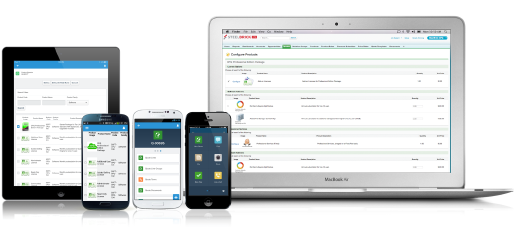
Screenshot of Configure. Price. Quote. Anytime, anywhere, on any device.