
Punnareddy Pallerla
Sr Software Engineer
Chose Salesforce Service Cloud
Best user interface and advanced features, easy to implement and best licensed

| Product | Rating | Most Used By | Product Summary | Starting Price |
|---|---|---|---|---|
 Salesforce Service Cloud | N/A | Service Cloud is a customer service platform that helps businesses manage and resolve customer inquiries and issues. It provides tools for case management, knowledge base, omni-channel support, automation, and analytics, enabling companies to deliver exceptional customer service experiences. | $25 per month | |
 SolarWinds Web Help Desk (WHD) | N/A | SolarWinds Web Help Desk is ticketing and IT asset management software. It is designed to simplify help desk management. This solution includes built-in ticketing management, asset management, change management, and knowledge base capabilities. | N/A |
| Salesforce Service Cloud | SolarWinds Web Help Desk (WHD) | |||||||||||||||
|---|---|---|---|---|---|---|---|---|---|---|---|---|---|---|---|---|
| Editions & Modules |
| No answers on this topic | ||||||||||||||
| Offerings |
| |||||||||||||||
| Entry-level Setup Fee | No setup fee | No setup fee | ||||||||||||||
| Additional Details | — | SolarWinds also offers Perpetual licensing starting at $1129 per technician. | ||||||||||||||
| More Pricing Information | ||||||||||||||||
| Salesforce Service Cloud | SolarWinds Web Help Desk (WHD) | |
|---|---|---|
| Considered Both Products | Salesforce Service Cloud Punnareddy Pallerla Sr Software Engineer Chose Salesforce Service Cloud Best user interface and advanced features, easy to implement and best licensed  Erin Gracyalny Customer Success Manager Chose Salesforce Service Cloud I honestly prefer Zendesk to Salesforce Service Cloud. I find that Zendesk is easier to manage both on the support ticket side, as well as the knowledge center side. It looks and feels easier to use than Salesforce Service Cloud. Salesforce Service Cloud is fine, but it is …  Alfiya Mukadam Software Engineer Chose Salesforce Service Cloud Zoho is not very real-time, it has limited integration capabilities, and the UI is not very satisfactory for any incoming customer. The performance is slow and impacts the overall customer journey. The data stored in the backend is slightly scattered and needs to be cleaned …  Dee Moore Executive Assistant Chose Salesforce Service Cloud We used Salesforce for years, Left for Hubspot, and then came back to Salesforce (SF). As they say, don't fix it if it's not broken. Salesforce and customizing were better for us.  Ritesh Khatri Salesforce development Chose Salesforce Service Cloud Because it has good ratings and it is easy to setup .it also has good word of mouth.  Mohammad Rashid Raza Technnical Lead Chose Salesforce Service Cloud CedCommerce Marketplace Software (B2C) and Adobe Marketing Cloud  Helen Kinnear Client Success Team Manager Chose Salesforce Service Cloud Salesforce allows a lot more visibility and allows us to build better reporting. It is initially trickier to set up and learn, however, comprehensive training and processes have lead to increased customer satisfaction and retention.  Peter Vadelnieks Customer Support and Project Manager Chose Salesforce Service Cloud Salesforce is lightyears behind Zendesk. You have to be trained as a Salesforce admin to do anything, while Zendesk takes minutes to set up and is actually customer friendly. There are not native telephony options within Salesforce and the tools you use to integrate are …  Clara Mediavilla Rizzo Customer Success Support Specialist, EF Corporate Solutions Chose Salesforce Service Cloud Well, I worked with SAP in the past when I was in other companies. It was way more complex and not user-friendly. You had to take a lot of steps in order to accomplish simple tasks and not everyone could work at the same time in the same program. I would 100% recommend …  Natalia Shlykova Senior Plus Student Advisor B2B Chose Salesforce Service Cloud I used other products in another company as a database and can say that Salesforce Service Cloud is much more user friendly for customer service needs and makes work faster to process than the named program before. Integration between departments is more clear and simple to … |  SolarWinds Web Help Desk (WHD)  Jennifer Aguilar Senior Network Administrator Chose SolarWinds Web Help Desk (WHD) Many years ago at a different employer, we utilized CA Service Desk, which is now under the Broadcom umbrella; previously it was under Computer Associates. What a nightmare to configure and set up ... it took months to get this product off the ground. SolarWinds Web Help …  Brent Long Director of IT Chose SolarWinds Web Help Desk (WHD) SolarWinds Web Help Desk (WHD) holds its own among the top competitors for help desk systems. Some advanced functionality, and more-so the lack of polished interface knocks it down compared to some competitors. I selected SolarWinds Web Help Desk (WHD) simply because I came …  Marc Shaffer CEO Chose SolarWinds Web Help Desk (WHD) From a quality and use standpoint, they leave ALL of them in the dust. As far as support is concerned, they are faster and more accurate at resolving issues. Their software goes in easily, and functions as it is supposed to with minimal problems. And, as I have said before, …  Eric Krueger Infrastructure Manager Chose SolarWinds Web Help Desk (WHD) SolarWinds Help Desk's overall package of tools is superior in our opinion to the other Help Desk products we have evaluated and tried in the past. We selected SolarWinds because the overall ROI was greater and the efficiencies that we could implement immediately made more …  John Mahlman IV Network Systems Administrator Chose SolarWinds Web Help Desk (WHD) Web Help Desk is definitely lacking in the UI/UX department compared to most other ticketing systems I have used int he past. It's very utilitarian; however, what it lacks in UI it makes up for in extensibility and customization. The main issue that the developers need to …  Eric Nuckols Independent Consultant Chose SolarWinds Web Help Desk (WHD) Azure technician services app is too complex. SolarWinds has a lead here.  Tim Twiss Systems Administrator Chose SolarWinds Web Help Desk (WHD) BMC Track-It! was my first choice for a help desk solution, but we chose SolarWinds Web Help Desk primarily based on cost alone, a now regrettable decision. Track-It! is a far superior product and is better than SolarWinds WHD in every way. That being said, for the cost and …  Chris John Server Engineer Chose SolarWinds Web Help Desk (WHD) SolarWinds is probably the most basic of the 3 that I've worked with. SolarWinds was selected because it was the cheapest and we just wanted to use something that was fairly quick to set up and get going. Autotask is quite robust and might be a bit too much for what we need. …  Zachary Estevez Network Engineer Chose SolarWinds Web Help Desk (WHD) SharePoint is a tool that you make fit your requirements. This takes a lot of time and effort. WHD had most of the features our organization was looking for without the hassle of having to write HTML and pay licensing fees for a product that needed to be tailored to be properly …  Michael Chelone Network Support Specialist Chose SolarWinds Web Help Desk (WHD) UI overall was poorly implemented and work flow seemed wonky at best. Ease of use of SolarWinds Web Help Desk was simple and implementation was a breeze. Major plus was asset tracking over old product.  Michael Santangelo Technology Specialist Chose SolarWinds Web Help Desk (WHD) We primarily selected SolarWinds Web Help Desk because of the rich feature set and low price point. When we were doing comparisons of the different suites available, we wanted to find an easy to deploy, feature rich, and inexpensive solution. Web Help Desk met all these … |
| Salesforce Service Cloud | SolarWinds Web Help Desk (WHD) | |||||||||||||||||||||
|---|---|---|---|---|---|---|---|---|---|---|---|---|---|---|---|---|---|---|---|---|---|---|
| Incident and problem management |
| |||||||||||||||||||||
| Self Help Community |
| |||||||||||||||||||||
| Multi-Channel Help |
|
| Salesforce Service Cloud | SolarWinds Web Help Desk (WHD) | |
|---|---|---|
| Small Businesses |  Agiloft Service Desk (discontinued) Score 9.0 out of 10 | Agiloft Service Desk (discontinued) Score 9.0 out of 10 |
| Medium-sized Companies | Agiloft Service Desk (discontinued) Score 9.0 out of 10 | Agiloft Service Desk (discontinued) Score 9.0 out of 10 |
| Enterprises |  SysAid Score 9.1 out of 10 | SysAid Score 9.1 out of 10 |
| All Alternatives | View all alternatives | View all alternatives |
| Salesforce Service Cloud | SolarWinds Web Help Desk (WHD) | |
|---|---|---|
| Likelihood to Recommend | 8.3 (0 ratings) | 8.5 (0 ratings) |
| Likelihood to Renew | 6.2 (0 ratings) | 10.0 (0 ratings) |
| Usability | 8.0 (0 ratings) | 10.0 (0 ratings) |
| Availability | 9.5 (0 ratings) | - (0 ratings) |
| Performance | 8.6 (0 ratings) | - (0 ratings) |
| Support Rating | 7.0 (0 ratings) | 10.0 (0 ratings) |
| In-Person Training | 10.0 (0 ratings) | - (0 ratings) |
| Online Training | 9.0 (0 ratings) | - (0 ratings) |
| Implementation Rating | 7.0 (0 ratings) | 10.0 (0 ratings) |
| Configurability | - (0 ratings) | 10.0 (0 ratings) |
| Ease of integration | 5.0 (0 ratings) | 9.0 (0 ratings) |
| Vendor post-sale | 8.0 (0 ratings) | 9.0 (0 ratings) |
| Vendor pre-sale | 8.0 (0 ratings) | 8.0 (0 ratings) |
| Salesforce Service Cloud | SolarWinds Web Help Desk (WHD) | |
|---|---|---|
| Likelihood to Recommend |
Alfiya Mukadam Software Engineer |
|
| Pros |
|
John Mahlman IV Network Systems Administrator |
| Cons |
|
Jennifer Aguilar Senior Network Administrator |
| Likelihood to Renew |
|
Michael Santangelo Technology Specialist |
| Usability |
|
|
| Reliability and Availability |
| No answers on this topic |
| Performance |
| No answers on this topic |
| Support Rating |
|
|
| In-Person Training |
| No answers on this topic |
| Online Training |
| No answers on this topic |
| Implementation Rating |
|
Michael Santangelo Technology Specialist |
| Alternatives Considered |
Erin Gracyalny Customer Success Manager |
|
| Scalability |
| No answers on this topic |
| Return on Investment |
|
Eric Krueger Infrastructure Manager |
| ScreenShots | Salesforce Service Cloud Screenshots   | SolarWinds Web Help Desk (WHD) Screenshots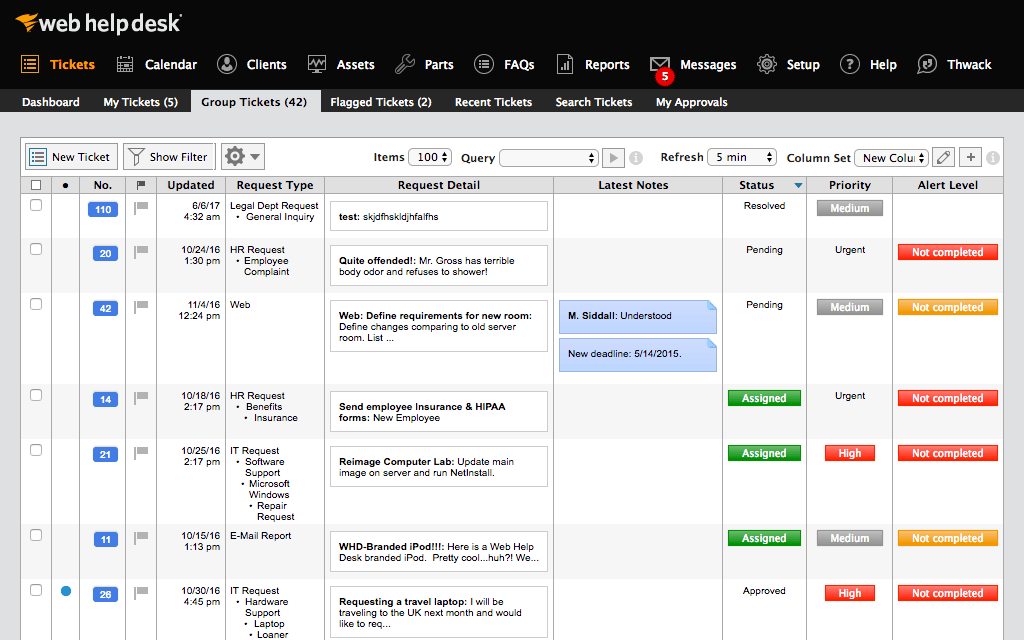      |