TrustRadius: an HG Insights company

Acronis True Image

Score9.4 out of 10

50 Reviews and Ratings

What is Acronis True Image?

Acronis True Image is a backup, cloning, cyber protection and privacy tool suite for home users.

Media

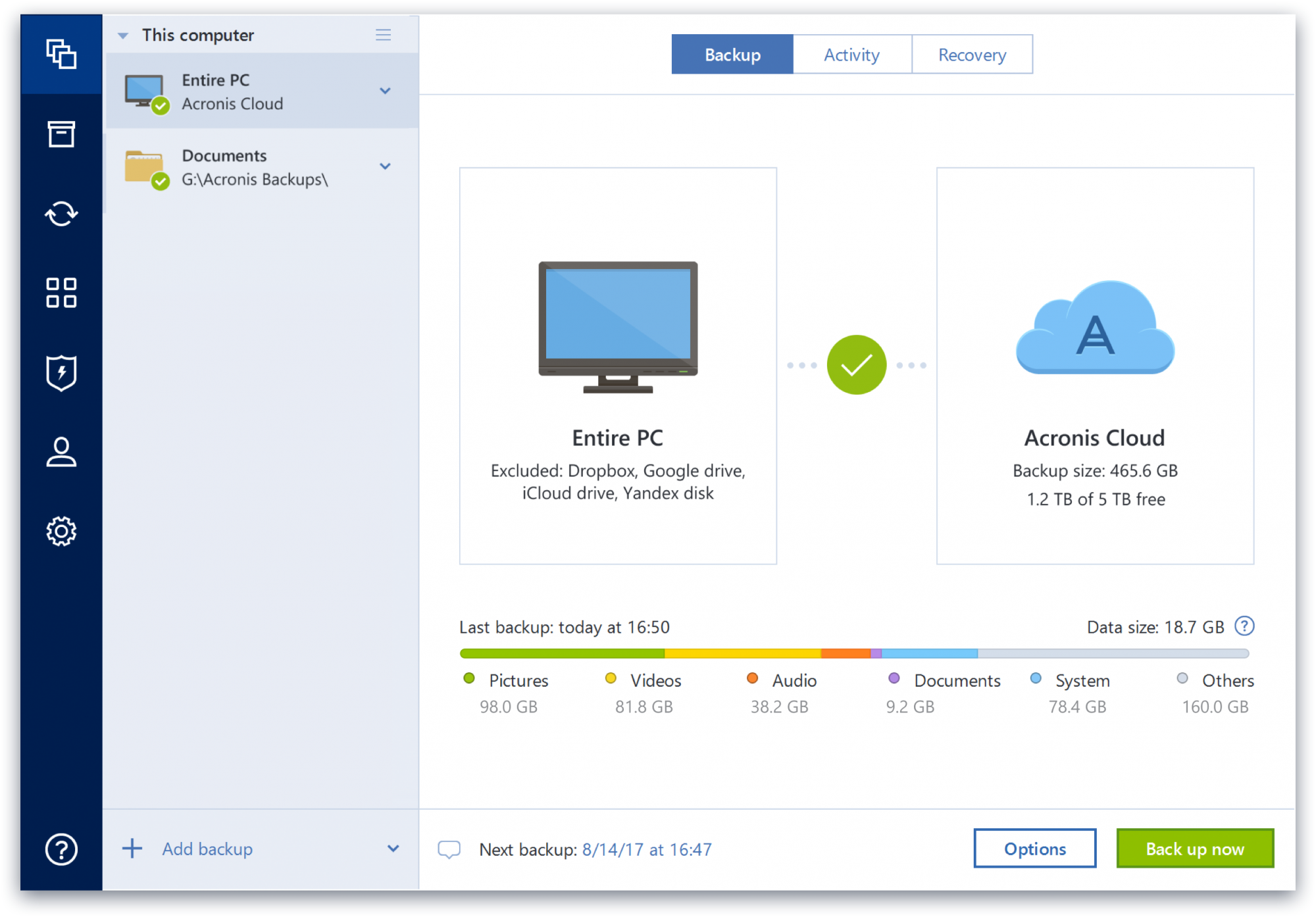
data control, which supports backup in just two clicks, and all data and backup information is displayed in one place
a display of the data that is backed up, the number of backup versions in storage, and how many photos, videos, music and documents that are available to restore.

1 / 2

Basic Data Backup & Recovery with Data Security Software: Acronis Cyber Protect Home Office

Use Cases and Deployment Scope

Acronis Cyber Protect provides data backup for critical servers and VM that are more important for business and not acceptable if any data loss in case of hardware failure, OS failures or malware or ransomware it can be up system with minimum downtime. In case of bussiness problems it will also provide data security using encription of data. We are using Acronis as backup facility, cyber security protection and compliance protection .

Pros

  • Its mostly used for data backup and recovery,data backup we can schduled as per our requiremen. we can take Image backup of any system, or can take any drive backup on network device or in cloud.also we take incremental backup that can help us to manage backup size.
  • It has One feature named Active protection protects data from ransomware or remote injection and crypto mining processes.
  • Vulranabulity assesment that will detect any vulraneble system.
  • Acronis encrypt backups with AES-256 encryption and ensure sensitive information will get protected while taking backup and restore in system.

Cons

  • Its Cloud storage Price is some what high for small business
  • While using the antimalware feature face issue of slow system performance
  • Feature of Real Time sync for backup like onedrive

Return on Investment

  • Easy to manage backup with data protection
  • Easy to use for non tech person
  • Pricing will impact for one user

Usability

Alternatives Considered

Veritas Backup Exec, OneDrive, eazyBackup, NETGEAR ReadyNAS and Synology Active Backup Suite

Other Software Used

Veritas Backup Exec, OneDrive, Acronis Advanced Backup

Acronis Home Office Suite - Lots Of Functionality With A Low Cost!

Use Cases and Deployment Scope

We utilize Acronis Cyber Protect Home Office primarily to create custom bootable media for image creation and deployment. Acronis allows me to add local driver folders to a boot image so that any model of the machine I need to utilize will function without issue. You can also create bootable CDs/DVDs with the same software - however, we stick to custom ISOs and USB drives for this usage.

Pros

  • Price Point is phenomenal for what you get.
  • Windows & Linux Bootable Media Creation.
  • Clone Disk Software.
  • Drive Cleanser software is used to strip/wipe a drive fully to protect sensitive data before physical destruction.

Cons

  • Being able to have several Windows ADK folder structures (For different versions of Windows Deployments (Win 10/Win 11) would be great. I've not figured out a way to do this properly yet.

Return on Investment

  • Positive - pairing the bootable media with an SSD allows us to deploy images to newly purchased machines in less than 7 minutes each.
  • Positive - Local software for installed computer such as software scanning for updates, System Clean-Up Software, and cloud backup gives the end-user plenty to utilize under a single "pane of glass".
  • Positive - the amount of time and money saved on quick local device backups/recoveries is substantial. Hundreds of hours per year saved.

Usability

Alternatives Considered

Microsoft 365, Adobe Acrobat, Watchguard Endpoint Security, Sophos Intercept X and Sophos Intercept X for Server

Other Software Used

Watchguard Endpoint Security, ExtremeCloud IQ

Great Product with Excellent Value with Central Management Platform for Backup and Endpoint Protection

Use Cases and Deployment Scope

Currently using Acronis Cyber Protect Home Office for protecting a SMB business as well as performing PC backups. no major issues with the product so far. Easy install, the download and executable files are easy small and compact.

Acronis Cyber Protect Home Office helps solves alot of small home users and businesses for me who cant afford all the protection and backup and also consolidates the protuct line into one with a central management platform.

Pros

  • Backup
  • Endpoint Protection
  • Browser Security

Cons

  • Users who require easy simple one click solutions
  • Small Businesses
  • Home Businesses

Return on Investment

  • Good Value for Money
  • Good Backup Product
  • Easy to use

Alternatives Considered

Veeam Backup for Microsoft 365

Other Software Used

Veeam Backup for Microsoft 365

One of the reliable and trustworthy apps in the market with great support team

Pros

  • Best Graphical interface in backups apps.
  • Fast to backup data.
  • Has ransomware protection feature which sets it apart from other backup apps and negates the need to have a separate ransomware protection software.

Cons

  • The setup takes time to install.
  • The app does not run in domain environment without domain admin login.
  • The speeds are great but can be improved a bit more.

Most Important Features

  • Partition backup.
  • File and/or folder backup.
  • Ransomware Protection.

Return on Investment

  • Acronis True Image helps us to take different kinds of backups and thus had a positive effect on our productivity and safety and user needs.
  • The easiest to use interface helps the users to take backups with little learning curve.

Alternatives Considered

OneDrive and Google Drive

Other Software Used

Macrium Reflect, AvePDF

Fairly easy to use backup software that ticks most boxes, but don't rely on this as your only backup

Pros

  • Delta backup makes backups super fast of larger files that do not change in its entirety (e.g. VM images, large PSD files)
  • Easy to use (set it and forget it)
  • Rescue media makes it easy to restore backups to different hardware and migrate to other work stations
  • Lots of backup options on the Windows version of ATI

Cons

  • Like many other backup software, its reliance on volume shadow service (VSS) can be troublesome to troubleshoot. Errors around VSS tend to be cryptic and could be caused by completely unrelated issues (Acronis VSS doctor can only help so much)
  • Mac version of ATI has many issues and occasionally fails to restore an image because of the split system and data volumes in macOS Catalina and later
  • Updater in Mac version of ATI causes constant kernel_task activity (20%+) randomly until internet connection is cut off or the updater file is made non executable
  • Error messages in ATI are often too generic and not helpful
  • ATI will also randomly delete all the previous backups except the recent one even though ample disk space is available on the destination disk. As mentioned previously, the mac version will sometimes fail to restore on Catalina (10.15) and later.

Most Important Features

  • Fast scheduled backups
  • Easy to use, (usually) easy to restore
  • Delta backup (backing up only the parts of a large file that has been changed)

Return on Investment

  • Able to quickly deploy and test new configurations since restores are generally fast with ATI
  • Saves lots of time by not having to re-configure the basic set of apps when restoring a clean image to a system

Alternatives Considered

Code42 (formerly CrashPlan) and Macrium Reflect

Other Software Used

Code42 (formerly CrashPlan), Apple iCloud