

JungleDocs
3 Reviews and Ratings
What is JungleDocs?
JungleDocs takes properties and parts of an existing document and puts them into a new one. The vendor’s value proposition is that this prevents possible mistakes and saves up to 90% of the user’s time that would be used on inputting and copy-pasting operations.
Key features include:
- Word and PowerPoint document generation and automation
- Document mail merge from SharePoint lists
- Template processing engine uses Open XML technology for very fast and accurate .docx document generation.
- Auto filling of document with content type properties and data related to the selected lookup list item
- Automatic conversion of dates to any format
- Automating conversion of numbers into words
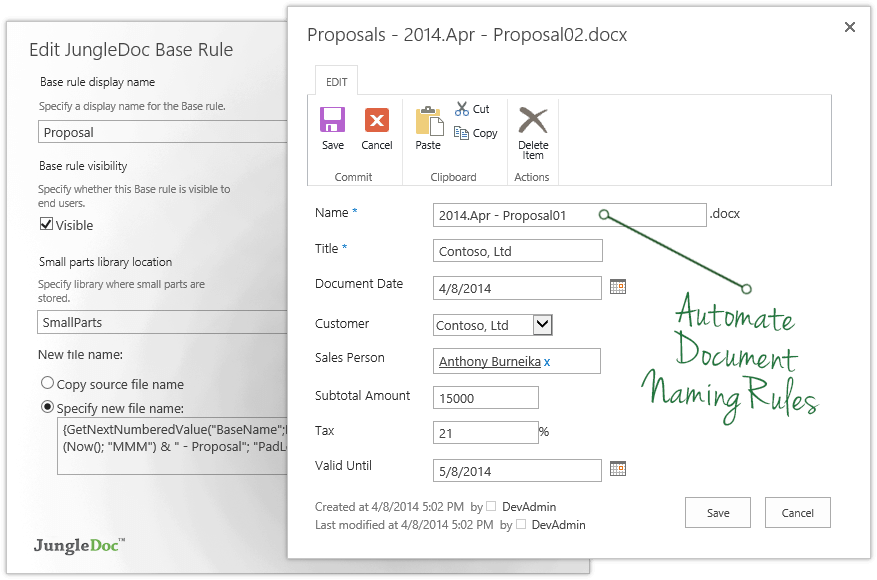
- Automatic generation of custom and unique document names
- Possibility to combine documents by clicking check-boxes
- Re-use of existing metadata and document content
- Creation of new documents from an existing document, item, folder or document set
- Document routing or auto positioning
- Transfer of metadata and parts of document content to new documents
According to the vendor, JungleDocs provides the following time-saving benefits:
- Case 1: Create a new proposal from the existing one. In a standard SharePoint environment it takes 134 seconds. In SharePoint Foundation with JungleDocs it takes 24 seconds.
- Case 2: Create a proposal followed by a sales agreement, an acceptance certificate, and an invoice. In a standard SharePoint environment it takes 908 seconds. In SharePoint Foundation with JungleDocs it takes 95 seconds.
Categories & Use Cases
Videos
Screenshots




1 / 6
Screenshot of JungleDocs Interface
Technical Details
| Deployment Types | On-Premise |
|---|---|
| Operating Systems | Windows, Mac |
| Mobile Application | No |
| Supported Languages | English, German |