TrustRadius: an HG Insights company

JungleDocs

Score7.6 out of 10

3 Reviews and Ratings

What is JungleDocs?

JungleDocs takes properties and parts of an existing document and puts them into a new one. The vendor’s value proposition is that this prevents possible mistakes and saves up to 90% of the user’s time that would be used on inputting and copy-pasting operations. 

Key features include:

  • Word and PowerPoint document generation and automation
  • Document mail merge from SharePoint lists
  • Template processing engine uses Open XML technology for very fast and accurate .docx document generation.
  • Auto filling of document with content type properties and data related to the selected lookup list item
  • Automatic conversion of dates to any format
  • Automating conversion of numbers into words
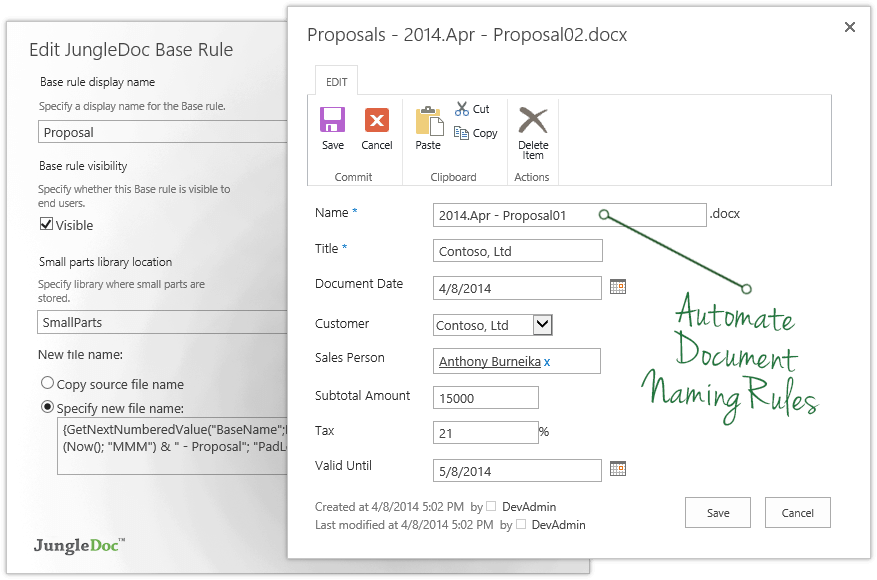
  • Automatic generation of custom and unique document names
  • Possibility to combine documents by clicking check-boxes
  • Re-use of existing metadata and document content
  • Creation of new documents from an existing document, item, folder or document set
  • Document routing or auto positioning
  • Transfer of metadata and parts of document content to new documents

According to the vendor, JungleDocs provides the following time-saving benefits:

  • Case 1: Create a new proposal from the existing one. In a standard SharePoint environment it takes 134 seconds. In SharePoint Foundation with JungleDocs it takes 24 seconds.
  • Case 2: Create a proposal followed by a sales agreement, an acceptance certificate, and an invoice. In a standard SharePoint environment it takes 908 seconds. In SharePoint Foundation with JungleDocs it takes 95 seconds.

Categories & Use Cases

Media

JungleDocs Interface

1 / 6

JungleDocs Improves Quality of our Documents and Saves Time

Pros

  • Document creation
  • Handles metadata well
  • Mail merges
  • PDF output

Cons

  • Easier to use workflow

Most Important Features

  • Document creation
  • Easy to maintain document building blocks
  • Standardized language in our documents

Return on Investment

  • Positive - Time To create document greatly reduced
  • Positive - Cost - less time equals less labor hours
  • Positive - Quality - Less mistakes when creating documents
  • Positive - Quality - Standardized language that is legally compliant

Alternatives Considered

MS SharePoint and eFileCabinet

Other Software Used

MS SharePoint, Microsoft SQL Server, Kubernetes

Tricky Startup But Increased Efficiency

Pros

  • Auto population of documents from files stored on SharePoint. Eliminates extra steps for more efficacy.
  • Can also set up automation for managing documents. Our department uses specific naming conventions for our documents and JungleDocs allows the naming conventions to be automated to help eliminate human error.

Cons

  • Takes some time to understand and get use to how the program works. Startup takes some time to learn.
  • Some of the support documents/help pages are confusing. A better tutorial would be helpful.

Most Important Features

  • Auto-population of documents to reduce the time it takes to create contracts and reports.
  • Automation of the file naming convention.

Return on Investment

  • Longer startup for member who are not familiar with metadata.
  • Some support documents are hard to follow.

Other Software Used

MS SharePoint

It works

Pros

  • Enforces standardization
  • User friendly, for the end user
  • The ability for the end user to manipulate the content
  • Works well with SharePoint

Cons

  • The ability to update fields in headers and footers, if they change after the document has been created
  • When content or metadata change, the document doesn't auto update the fields in the document, you have to manually go and click the update option (excludes fields in headers or footers footers)

Most Important Features

  • End user usability
  • Integration with SharePoint
  • Functionality

Return on Investment

  • It has been well received and used constantly by all end users in the business

Alternatives Considered

MS SharePoint

Other Software Used

MS SharePoint, ShareGate, Microsoft Teams