TrustRadius: an HG Insights company

SolarWinds Network Configuration Manager (NCM)

Score8.4 out of 10

264 Reviews and Ratings

What is SolarWinds Network Configuration Manager (NCM)?

SolarWinds Network Configuration Manager is network diagnostics and troubleshooting technology, from Austin-based SolarWinds.

Media

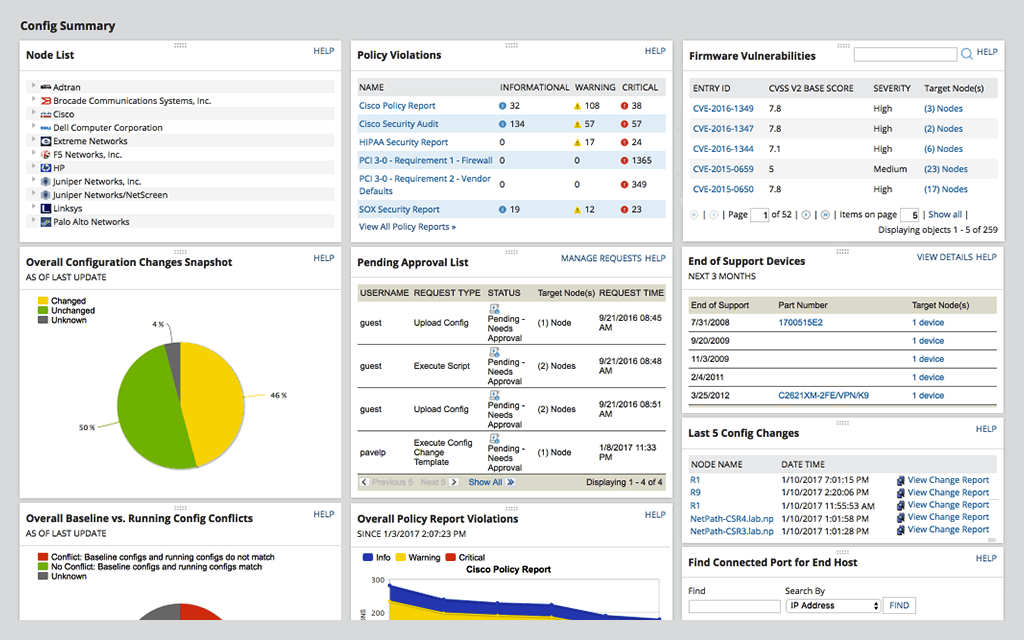
Network Automation -  manage rapid change across complex and multi-vendor networks, reduce time needed to complete repetitive tasks, and maintain standards and service levels for uninterrupted IT
Config Backup - rest easy knowing you can locate the most current configuration and quickly apply it to a replacement spare, or to roll back a blown configuration.
Vulnerability Scanning - Take the hassle out of vulnerability scanning using NCM's integration with the National Vulnerability Database and access to the most current CVE’s to identify vulnerabilities in your Cisco devices.
Inventory Management - Be able to know what devices are connected to your network, their hardware and software configurations, and when they approach end-of-service and end-of-life, with NCM device configuration management tool.
User Management - Use NCM's integrated console to lock down devices from unauthorized access, delegate who can view device details and make configuration changes, and determine when network changes can occur.
Baselines and Diffs - IT professionals can get a more comprehensive view by leveraging baselines across multiple nodes. Diff view in NCM’s network configuration management tool is designed to highlight only those lines that changed.
Reports - Use NCM's 53 included reports to keep stakeholders informed with the current state of your network inventory, configuration changes, policy compliance, security, and planning requirements.

1 / 7

The best tool to manage your network devices while saving time!

Use Cases and Deployment Scope

SolarWinds NCM is principally used to perform configuration backup but also to perform global configuration update like a password change or SNMP community update.

Pros

  • Configuration backup
  • Policy violations
  • Execution script

Cons

  • A more pre-defined script would be welcome.
  • NCM jobs are quite slow to run.
  • Chart designs are old school.

Return on Investment

  • Time saved when configuration restore is needed.
  • EOL inventory
  • Global configuration update.

Other Software Used

Cisco Prime LAN Management Solution

SolarWinds Network Configuration Manger - Software that backs up your Engineer!

Pros

  • Automated Download of every configuration per your schedule
  • Notifies end user when baseline configuration does not match the current running configuration.
  • Easily manage the baseline configurations so that you can keep all information up to date
  • Beautiful dashboard red = bad green=good at a glance you can see if something is not quite right

Cons

  • Odd Hardware that does not have a "startup-config or running-config" per definition; it would be nice to be able to edit the rules to be in compliance for startup-config matches running-config
  • Policy violations are only targeted at Cisco equipment
  • Firmware vulnerabilities only target Cisco equipment

Return on Investment

  • ROI is months! Another valuable asset in my organization.
  • Almost a Full Time Employee! Generally, you only need it when the human employee has made a mistake. The ability to go back in time is phenomenal.
  • Learned a hard lesson when my DR site got severed and I needed a copy of a config. I now replicate the SolarWinds SFTP Directly to the DR site for availability. Sharing a lesson learned with this particular tool. That directory alone can save many hours of unnecessary work if properly maintained.
  • Network Configuration Manager along with the compliment of other SolarWinds Tools has been such a valuable and important investment in our organization. I can provide metrics of UP time. When properly equipped with tools that are properly maintained, you can sleep quite well at night!

Other Software Used

NetApp Active IQ, Trend Micro Apex One, Palo Alto Networks Next-Generation Firewalls - PA Series, Palo Alto Networks WildFire, Palo Alto Networks Cortex XDR (Traps)

SolarWinds Network Configuration Manager is a huge time saver!

Pros

  • Archiving of device configurations. This is the most basic of features for NCM and provides an easy way to maintain startup and running configurations for all network devices.
  • NCM can execute scripts. Any task that is typically done by a technician from the command line is handled by NCM. This includes the ability to schedule script execution jobs against a single device or multiple devices.
  • NCM provides several types of reports out of the box. These include configuration change reports and inventory reports as the best examples.
  • One can easily perform a "stare and compare" of two device configurations so as to quickly and easily determine where changes have occurred.

Cons

  • For those people who may not be proficient at using regular expressions, NCM needs to evolve to provide more direct contextual help in this regard.
  • The job logs that NCM provides are very utilitarian and do not lend themselves to viewing and searching well at all.

Return on Investment

  • The impact of NCM has been huge and quantifiable. I would conservatively estimate that it consistently reduces the man-hours spent on our typical management tasks by more than 50%. The savings in time spent on policy auditing tasks alone are worth the price paid for NCM.

Alternatives Considered

ManageEngine OpManager and Spiceworks

Other Software Used

SolarWinds Network Performance Monitor, SolarWinds IP Address Manager, SolarWinds Server & Application Monitor

SolarWinds Network Configuration Manager (NCM) Review

Use Cases and Deployment Scope

Our organization uses SolarWinds Network Configuration Manager (NCM) to take over configuration management duties and responsibilities for the networking systems, assets, and devices within our IT environment. Besides that, SolarWinds Network Configuration Manager (NCM) is being utilized within our organization for its configuration backup and restore capabilities. Also, NCM has the ability to conduct compliance reporting and vulnerability assessment of network resources.

Pros

  • Network automation
  • Vulnerability assessment
  • Network Backups

Cons

  • Comparable pricing
  • License options
  • 3rd Party Vendors

Return on Investment

  • Network Compliance Auditing
  • Automated IOS Upgrades

SolarWinds Network Configuration Manager review

Use Cases and Deployment Scope

I use it to manage the compliance of our network devices to configuration hardening standards. Our information security program requires that all our network devices, routers/switches/firewalls/etc, have a defined security hardening standard defined and implemented. As a member of the team, I had to come up with an easy way to measure and demonstrate device compliance to defined standards. I tried setting up regex checks against configs stored in ansible but that required all configs to be in ansible, which they weren't, and so I found myself working edge cases and relying on others who had better things to do than help a security guy. I tried a few config managers including the managing engine NCM, which I used for several years at a previous job, but then migrated to the SolarWinds NCM. I like the SolarWinds NCM interface better and since it is part of the Orion suite and our network team was using Orion I was able to add it to their deployment. If I'm being honest I prefer the management engine interface better but found the functionality to be identical between the two. Most valuable thing is having all the device configs available for testing without relying on other teams.

Pros

  • Manage network device configurations
  • allow for customization of network device hardening standards
  • visualize the compliance status of your network device configurations

Cons

  • The user interface could be more intuitive
  • a stable Linux version would be great
  • better and faster performance

Return on Investment

  • Saved many hours of my time and the network team's time with automated remediation to deviations.
  • Saved many hours of time and impressed auditors during security audits

Alternatives Considered

ManageEngine Network Configuration Management (NCM)

Other Software Used

Splunk Enterprise Security (ES), Sumo Logic, CrowdStrike Falcon Endpoint Protection