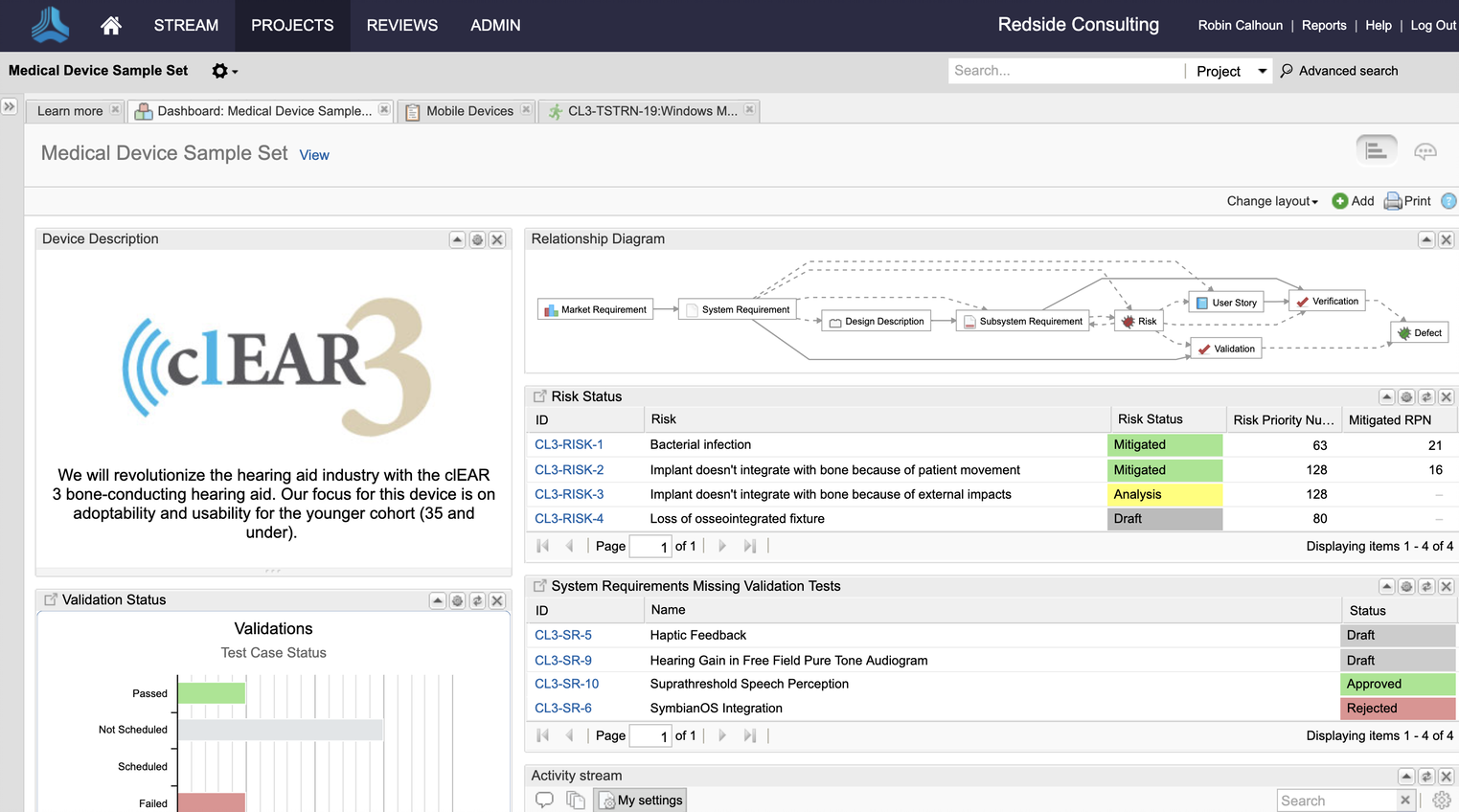
IBM Engineering Lifecycle Management (ELM) is an end-to-end engineering solution used to manage system requirements to design, workflow, and test management, extending the functionality of ALM tools for better complex-systems development.
N/A
Jama Connect
Score 9.4 out of 10
Enterprise companies (1,001+ employees)
Jama Connect® is a Requirements Management software and Requirements Traceability solution. Jama Software enables teams to manage product requirements and enable Live Traceability™ across the development process, in order to reduce cycle times and improve product quality.
Projektspezialist bei Steffen Jäschke EinzUnt Physik, Berechnungen
Chose IBM Engineering Lifecycle Management
The established experience contained in most IBM Rational DOORS installations is only compensated by the high flexibility of Atlassian Jira. The markets state that Jira is less expensive in the setup. There are many manufacturers that support IBM Rational DOORS to have the big …
I would choose IBM Rational DOORS over any other requirements management tool out there. Polarion tries to do too many things and is great for some things but as far as requirements management IBM Rational DOORS is the best tool on the market.
It was easier to do all the change management-related activities, even configurations were handled very effectively. New process definitions and initiatives made it easier for better project deliverables. Effective resource allocations and better reporting and defect …
DOORS is not a suite nor an integrated tool like HP ALM or Rally. It only does one thing and cannot hold defects or accommodate sprint planning. It is older, takes longer to connect and load, and has an inconvenient timeout. It does do a basic job and can be customized to show …
Although Jira is getting popular in DevOps team, it does not work well with ITIL model as RTC does. RTC is still widely used for production management in our company.
CA Service Desk Manager (GSD) is integrated with TPAM which is being used for privilege account management in …
To me, DOORS is like a super version of Excel and Word combined with a relational database. I have not used too many database softwares before, but DOORS does a very specific job well enough. It is so powerful that some of the tools just go unused. Some parts of the software …
Requisite Pro (and Rational Requirements Composer, it's successor) is more simple and focused on requirements. Is like a part of DOORS and can be suitable to smaller projects. IT people on the other hand prefer agile tools like Jira. Of course if the project is big enough, …
It's well integrated with IBM products so it provides better coverage across the lifecycle with first class integration. Other producst are stand alone with limited integration with ALM tools.
An alternative which I have very briefly used is Atlassian's JIRA, which is very similar to IBM RTC, although has a modern UI, feels light-weight and is faster to respond and additionally has seamless integration with bitbucket, which is a Git platform, and other Atlassian …
JIRA is simpler and much more intuitive, especially when bundled with confluence.
TFS is obvious choice if working with Microsoft technologies and has superb API.
It is easy for the organization to identify what kind of problems there are in the project and how many change requests have been resolved and how many are pending. Thereby the employer can pro-actively arrange the meetings and address the issues to the team members.
This product had many of the same features, was easier to use, which would result in less training, and had a lower price tag. Logic and reason do not always figure prominently in a decision. Sometimes there are intangible characteristics that alter the flow. In my observation, …
Microsoft Excel provides only barebone capability when it comes to requirements development, since it is not primarily designed for that purpose. It is therefore not a serious contender to the capabilities of Jama Connect
in terms of features they were similar. The difference was due on the architecture of Jama Connect which apperas more simple and effcient. Polarion was relying to an SVN database.
Jama Connect was the perfect balance between cost, usability and scalability that our company desired. Helix was definitely cheaper but didn't offer the usability or scalability perks. Codebeamer missed the mark on cost and was designed more for a software centric requirement …
Jama Connect is more straightforward than these systems but not quite as versatile or comprehensive. I would choose those other systems if I were at a very large company working on very complex systems (which I am not).
I really liked Cradle as it seemed to be very full-featured. BUT, my liking for it was predicated on my being a daily user of the tool; it took me a while to get familiar with the tool. What was certainly true of Cradle in my experience was that it was VERY challenging to get …
Polarion did not have the outside sales support that Jama Connect has. Polarion seems better suited for an Agile development lifecycle rather than an evergreen repository of requirements, design features, and verifications.
The major sellingpoints of Jama were the review-system for internal and external reviewers and the inclusion of (Use Case) modelling tools, while keeping the core requirements-centric. Ability to synchronise with currently in use test-tooling and the low learning curve were …
JAMA can navigate between them, as far as it generates reports accessible through MS Project, Word, and Excel. Moreover, very likely it can be embedded into Confluence as well however, we have not yet implemented this feature.
From a technical point of view, DOORS is much more customizable than Jama Connect, and this is more useful when talking about SW related requirements; when talking about system related requirements, Jama Connect is well suited with respect to DOORS, in the sense that …
Jama brings requirements engineering to the 21st century and sets up the bar to measure other tools. DOORS and DNG never managed to make this jump and stayed in the past.
We originally looked at Connect (Contour) and Doors as we wanted to move away from Word documents. Contour was much easier to use and had a better collaboration environment. The was many years ago; I haven't done any comparison in the last 5+ years.
While working on a complex project it is important all the needed change requests are handled in an effective manner, this tool helps us do exactly the same, it had great features to manage those change management tickets, making sure to merge the change with existing workflow, prioritize the requests centrally so there are no duplicates. Easy to collaborate across different teams and colleagues across the aisle.
Jama connect has the best UI compared to DOORS, Codebeamer, and PTC Integrity. It’s the clearest to use with the best usability. For example make traces between all requirements is as straightforward as clicking a button. The trace matrix view is highly configurable to get you to show anything you need. It has extensive filtering where every index in your requirement is indexed. Same with their export features, you can use default templates or create custom templates to export to PDF for all your regulatory needs like submitting documentation to FDA. This has helped us a ton without requiring much edits and letting us create up to date reviewed documents.
Speaking of review system, it’s well organized and you can set required approved and optional reviewers. Track your redlines in the tool and also view and resolve comments.
The one issue I’ve experienced is that with a large system the web app can take some time to load everything.
There are a couple of areas where IBM Rational DOORS is quite strong. First, it is part of the IBM CLM solution so the artifacts developed in this module can be easily available for other functions like development and QA. They can link with their stories and test cases and team leads and managers can use traceability matrix to find out where there are gaps in coverage.
Comprehensive configuration management functionality (concept of multiple streams and global configuration) is available, which can be helpful if you need to implement configuration management scenarios for your product or project. For example, a certain version of a requirement can be linked with one story and another version of same requirement can be linked with another story. This is the unique feature which other current tools in the market don't provide.
It's highly customizable so you can configure the project areas based on your need. You can have your own requirement types, and you can define templates to speed up the process. Comprehensive review functionality is there as well.
Focus in the content without loosing the track of the evolution of the items by maintaining the exchange of information between the users inside the Tool.
The possibilities to integrate this tool within our IT-landcape and with our other engineering tools is for us a leverage to success.
Too complex for projects or businesses that don't really need the detail. It is basically overkill.
If you are new to IBM Rational tools, it may be a medium learning curve. You'd also need lots of training from your people, since, as usual, this tool shouldn't be managed alone.
It may seem old fashion compared to Jira and the current control tools used in IT industry.
The 'filtering' capabilities in Jama are not as good as they could be. In particular, the ability to "nest" filters is quite limited. I have certain seen much better capabilities in other tools. ('Cradle' is an example of a tool with excellent "nested filters" capabilities.)
From an administrative point of view, the 'License' admin view is pretty disappointing. The particular thing that I'd like to be able to find out from it is the peak number of 'Float Creator' licenses in concurrent use on each day. If there's a way to get to that information, I haven't found it yet.
One of the downsides for us was the capabilities of the native build tools were lacking. The project management and work item tracking capabilities are great and I would recommend the tool to anyone. There is a definite learning curve with RTC as a source control system, and the streams are a concept unique to the product
Jama is really easy to use and operate compared to other tools. This allows a process owner to get easier buy-in from the organization to see value early. My experience with this tool was very positive and we were able to see value early in its introduction
The UI is terrible and not intuitive. Users need training in order to complete tasks. Much like SAP, it's not the clearest tool. The tracing feature is especially complicated because you must write the scripts yourself. There is a learning curve. Also, even the setup, installation, and logging in each time takes a considerable amount of time.
The requirements and baseline parts are easy to use. The review centre is very useable and understandable, once you understand/set up the moderation. (This last part could use some refinement.) Integration/connectability (the Connect part of Jama) is quite possible, but the useability could use some love as well.
It has always been available, except for preventative maintenance which is announced beforehand. Nonetheless, we experienced one day shortage over a miscommunication about payment.
With performance compared to JIRA, I do recommend Jama in this case. Jama provides very good performance, it loads immediately for any of the items and searches any item immediately. Performance is really good in all of the operations including creating stories, epics, item types or other support operations or report generation.
It does a basic job and has the potential to complete some robust reporting tasks, however, it really is a clunky piece of software with a terrible user interface that makes using it routinely quite unpleasant. Many of our legacy and maintenance projects still use DOORS but our department and company use many alternatives and are looking for better tools.
They typically answer within minutes of posting a ticket, and then you have a clear expectation of what the issue is, how to diagnose it, how long will it take to get resolved, and in which version a given problem is resolved, or if there is a patch for hosted services. They have a number of support people, and all of them are top-notch.
Helpful and exhaustive and tailorable for our needs. Instructor was well versed and engaged. Material was a good reference and was up to date with tool. Overall, in person training was valuable for tool introduction. Trainer was an active user of the tool and worked closely with other clients. So, very knowledgeable.
Easy to reference and understand. Updated routinely to include new topics. Online training evolves to include more advanced topics and how to guides. Online training includes videos and reference guides that make it easy to perform more complex tasks. Online training is free and can be accessed from any computer.
Jama 2015.5 implementation is very smooth and no need for much manual work. Jama 8 has many challenges and we can not install it as smoothly as Jama 2015.5. Initially, Jama didn't provide the Jama 8's installer files or zip files and they were just providing docker files to everyone (which was really strange). It is the worst that they don't provide all the files at a time. Why should they tell us where we should deploy, and why only a dockerfile? I am not very satisfied with Jama implementation.
The established experience contained in most IBM Rational DOORS installations is only compensated by the high flexibility of Atlassian JIRA. The markets state that Jira is less expensive in the setup. There are many manufacturers that support IBM Rational DOORS to have the big tiers as their customers. Jira has problems in that growth. Jira has more features compared to IBM Rational DOORS. For example in cloud support, IBM Rational DOORS relies on improved external services while Jira abstracts in the most modern way. Jira experts have a different professional background compared to that of IBM Rational DOORS. They are indeed from different engineering generations. There is little interchange in personal and ideas.
JCA is an extraordinary tool that is very simple to use and brings efficiency to the creation of requirements. It is particularly good at highlighting improvements to requirements which, when done properly and done up front in the engineering development process, will save significant time and prevent confusion downstream in the development process. It's difficult to quantify how much of a positive impact JCA would have on any individual project, but I would say it could easily save an organization more than its cost in terms of improving efficiencies and the traceability integrity throughout the entire portfolio of projects when applied correctly. This additional product from Jama is highly recommended.
There is no horizontal scalability available in Jama, we have only one choice to scale it vertically. But vertical scalable applications always have limitations to grow. In this case, Jama doesn't support horizontal scalability functions like multi-node architectures with a shared drive for the home directory.
RTC helps automate incident management workflow which improves our work efficiency. With the integration with Geneos and GSD, we can one click create RTC incident tickets from Geneos with most of the information copied from Geneos automatically and then link the details to GSD for privilege account management if needed.
RTC provides a holistic view on ad hoc production activities. We use RTC for production management. Whoever needs to get access to production due to non-planned activities (planned change is managed in GSD) has to raise an incident ticket or service request ticket in RTC so as to get production privilege accounts.
RTC is also being used to review and approve the usage of privilege account which help us to meet audit requirements. For example, if a user made some database change using privilege account under incident number xxx, an entry will be added in RTC and sent to account owner or production support manager to review and approve.
One experience that converted an engineer to using Jama Connect was an electronics engineer that was writing test plans. I showed them about how to write "unit" or very discrete tests and then showed them an automatic export to get the document. Thus the authoring of the document effort was taken away, they could focus on defining the test
Unfortunately I have very much struggled to embed systems engineering, requirements management and Jama Connect as part of the 'ways of working' outside the systems and electronics teams.