Kustomer is a customer service CRM platform built for managing high support volume by optimizing experiences throughout the customer service journey. Kustomer was acquired by Facebook in late 2020, but spun out in 2023 and re-launched as an independent entity, Kustomer, LLC.
$89
per month, per user
Zoho SalesIQ
Score 8.4 out of 10
N/A
Zoho SalesIQ is an AI-powered live chat and analytics platform that promotes proactive customer engagement. It offers sales, marketing, and support teams a tool, with features to communicate with visitors throughout the customer lifecycle. Zoho SalesIQ can be used by businesses of all sizes across all industries. Zoho SalesIQ offers: A detailed list of visitors sorted based on the criteria that matter to businesses A codeless website…
$0
per month per user
Pricing
Kustomer
Zoho SalesIQ
Editions & Modules
Enterprise
$89
per month, per user
Ultimate
$139
per month, per user
Free
$0
per month per user
Basic
$10
per month per user
Professional
$17
per month per user
Enterprise
$25
per month per user
Offerings
Pricing Offerings
Kustomer
Zoho SalesIQ
Free Trial
No
Yes
Free/Freemium Version
No
Yes
Premium Consulting/Integration Services
No
No
Entry-level Setup Fee
No setup fee
Optional
Additional Details
All plans require an annual subscription and 8 users minimum.
—
More Pricing Information
Community Pulse
Kustomer
Zoho SalesIQ
Considered Both Products
Kustomer
Verified User
Anonymous
Chose Kustomer
I think that Kustomer is the most user friendly BUT I think the other platforms are built to do a lot more and can be much more customized

I find it baffling how little data can be stored or associated with a customer in many other systems, and how difficult that can be to set up. It is fine if you already have a robust CDP that you can hook up and use to power your CRM, but it is rare that an organization has the …
It has improved a lot of the training time needed for our new hires to understand the Kustomer interface and how to handle communications fully. The time invested went significantly down, and the learning curve improved a lot as well.
Apps like Intercom, Zendesk, and Gorgios all treat customer inquiries as tickets, just tracking that one issue or interaction with a customer. Kustomer treats each customer as an individual, which allows us to provide top-notch customer service. Customers love that we're able …
Kustomer is a great fit for our organization because we can cut down on multiple contacts from the same customer and see all their information in one place. It's also infinitely customizable, so if we need changes made we can make them while still using the same platform. This …
The UI of Kustomer is a lot cooler than what we are using before. There are a lot of features that Kustomer has that make things easier and more convenient than Desk.com.
I use both in my role with the company. Our social media channels are managed through Khoros, but we use Kustomer to notate and contact customers outside of social media. I'd much rather bring our social media channels into Kustomer, to help with efficiency.
Kustomer is far more intuitive, personal, and holistic than Zendesk. As a company who has a lot of interaction with a single customer, it is such an advantage to take the customer approach rather than a single ticket approach. Zendesk was very limited in a lot of the actions …
All other systems I have used have been internally-made programs that were a lot more basic order-taking systems, no notes or call functions outside of when order was placed. Doesn't really compare here.
Kustomer simply does more than any other platform I've been able to work with. Sure some others will give you a handful of neat tricks built in for managing a channel or two but those rarely offer any external integrative capacity or limit what you can do in connections. …
I was not personally involved in the decision-making process when selecting a new CRM and ultimately settling on Kustomer. That said, I'm happy with the decision to partner with them. Compared to our previous CRMs, it is much easier to work with everything in one place and we …
Moving from Zendesk to Kustomer was driven by the clarity that the customer timeline brings for advocate engagement alongside the custom workflow abilities.
Zendesk did not give a big picture of the customer. It was more of a ticketing platform, and only gave statistics of those conversations. We were unable to track customer sentiment, or other attributes of the customer.
Kustomer is far more scalable and flexible than Zendesk, and it provides a real omni-channel experience far from the "Zendesk for mails, Zendesk chat for chats" we were used to. On the automation and customisation features, it gets even clearer how Kustomer can deal with a lot …
I find the Zoho chat to be easier to implement across our web applications and WordPress site. I find the bot builder to be the simplest of the lot and was able to get it up and running within a few hours. The pricing is great and their integration with other Zoho products is …
The option of the desktop application was a missing feature on both of the previously used tools, including having applications for Windows, Linux, as well as MACOS. Having a separate application for the chat agents from the main CRM application was a key missing feature as it …
Not well. It is a bottom-of-the-barrel tool in all aspects. It does half the features for double the cost it seems. Their pricing models are outdated, their support is awful, onboarding team is useless. Honestly, avoid at all costs if possible. The only reason we used it was …
Zoho SalesIQ provides the control of the webpage in the hands of the subscriber, through supported live chat. Other Zoho products communicate and integrate with Zoho SalesIQ, hence, a third part application is not a demand any more. Lastly, Zoho SalesIQ has a UI which is …
I have compared Zoho SalesIQ with some other popular Live Chat softwares that we have used previously or are using currently on our website. The Live chat softwares are Intercom, LiveChat, and tawk.to. Zoho SalesIQ is better in terms of price, usage, customer support, lead …
Tawk to was nice but it was missing a lot of features that Zoho SalesIQ has. And a massively important advantage that SalesIQ had was that it integrated with other Zoho apps that we already used. The pricing of Zoho SalesIQ was also very attractive, we felt that it offered a …
SalesIQ puts the full control of your website chat into your hands. I don't know that it's better or worse than any other service out there. It really just depends on your needs. If you already have Zoho One, this is a great tool, and you won't need another 3rd party chat …
We like Zoho SalesIQ better than the Hubspot live visitor tracking; it provides more information and is much more cost effective. I find Intercom.io to be a superior product and we use it on another one of our sites and actually have a noticeably higher interaction rate. …
I think that Zoho Salesiq is the missing complement to Google Analtytics. There are very complete and detailed statistics that you receive from Google Analytics but with Zoho Salesiq you have an additional live chat that allows you in any moment to establish contact with your …
It works really well for you to ask a teammate to review a case/email/message and provide some input since you can all review the same conversations and client accounts. They can also cover your inbox using your email handle in case you are out of the office suing some well deserved PTO.
This is being used to make it easier for our sales staff to add leads and follow up with them. Our sales team has found it considerably easier to maintain track of leads generated by this service because of the connectivity with CRM. We wanted to learn more about our customers' habits. This work is made incredibly simple and straightforward to accomplish with SalesIQ. It makes a big difference to chat with and engage with customers at the correct time without being aggressive.
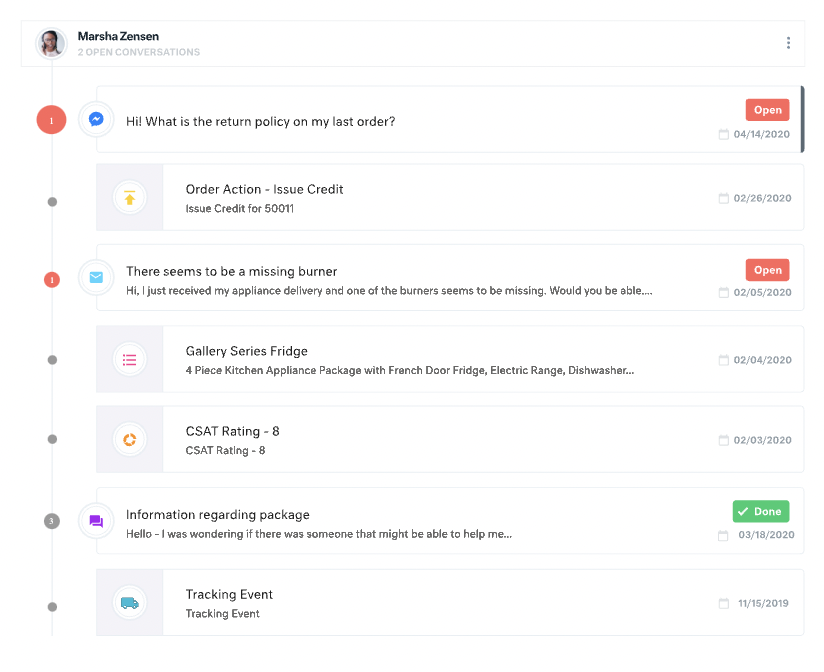
All customer data (past orders, communication with customer service, rewards account data) is in one place. This helps agents avoid confusion and reduces the number of tabs they need to open.
The Knowledge Base (or K Base) is very helpful. Any time we roll out a new policy or have a limited-time promotion, we can add all the relevant information and worksheets there for the convenience of the agents. That way they can stay in a chat while looking up the answer to a question.
We can seamlessly move from chat into email if the customer leaves or the queue times are too long. All the interactions will stay on the customer profile page, so they are kept up to date.
For our team, the feature that defaults all notes to begin in "done" status is difficult. Throughout each day we need to have notes open and assigned back and forth to different teams, and we have to remember to manually "open" each note. There is too much room for human error with this setting, and it is easy for important notes to be missed if a user forgets to open the note.
Similarly, it can be hard to remember to assign emails/notes to a particular team in addition to a user. We almost exclusively work out of team inboxes, and if someone on Care writes an email to a customer, the email will automatically be "done" when it is created, and it will be assigned to the user who wrote it, but not also to the user's team. There are instances where an email needs to be snoozed for several days/hours with further action needed, and unless the user remembers to assign the email to their team it may "awake" from the snooze and not be visible to anyone except the user who created it. Similarly to my first comment, this leaves a lot of room for human error and is not very intuitive.
Personally, I do not love that all tickets/emails/notes are jumbled together in the same inbox. While this gives visibility to everything on the "to do" list at the same time, it can be visually overwhelming. We have created unique folders for certain types of projects or categories of work, but have experienced tech glitches or just the awkwardness of another step to manually read the note, determine what type of category it is, and then manually assign it to another folder. Would love to have things auto-sort and take out this manual lift.
I love the idea of the autopilot setting, but we have not been able to use this for our work because it sorts items based on time, and not based on priority. In our line of work, we may have an urgent situation arise that needs attention before an email that was sent in 60 minutes ago. The autopilot feature would push the email to my associates sooner than it would the urgent situation from 5 minutes ago. Due to this, we manually monitor inboxes and assign work to ourselves and others.
There is a learning curve, but it is more than worth it, especially to have a dedicated resource pointed at Kustomer and any other software it interacts with. The basic implementation is useful, and powerful - certainly a MASSIVE upgrade over taking care of your customers in an email inbox or shuffling between multiple windows and applications! It is also set up really well to grow and reconfigure with your business. I'm a big fan.
It’s a great tool that has helped our company and overall customer service. I believe if we were able to edit certain setting for our specific company that would be hopeful. We have been told before that certain desires of ours would make a change throughout all of Kustomer. Which is not something we would want, we would just want that to change for our business.
I find it baffling how little data can be stored or associated with a customer in many other systems, and how difficult that can be to set up. It is fine if you already have a robust CDP that you can hook up and use to power your CRM, but it is rare that an organization has the resources or the customer-focus to rally behind setting up their customer service/experience team up for success. With a platform like Kustomer, you can actually evolve the relationship over time, or use the past experiences (number of contacts, purchases, previous issues, etc.) to power your next steps with a customer, making for a much more nuanced relationship with a human, not just a ticket.
The option of the desktop application was a missing feature on both of the previously used tools, including having applications for Windows, Linux, as well as MACOS. Having a separate application for the chat agents from the main CRM application was a key missing feature as it was combined with the complete CRMs tools being used earlier. Website visitors' live and history activity on our website was missing on the tools being used earlier by our Customer Success teams.
We’re getting so much positive feedback — which is not something you traditionally associate with a customer care team — because we’re making it effortless for customers to deliver both positive and negative feedback, and we can now resolve the bad feedback really really quickly.
Primarily from our increased efficiency with Kustomer, we’ve seen a significant reduction of $3 to $4 for every cost per contact.
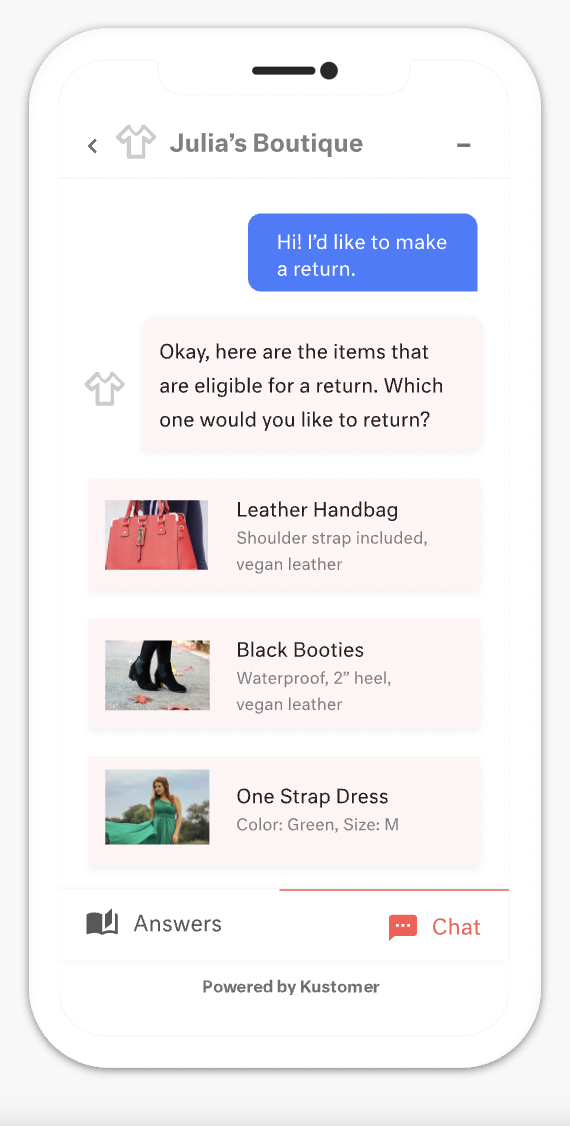
It has significantly reduced the number of phone calls and emails we used to get. Chat is more convenient for our users. It also means we can provide support with fewer agents as a single agent can work on multiple chats (unlike phone support).
Ability to catch and engage with new users that are potential leads has also improved our overall sales program.
Letting admin take over chat seamlessly without a transfer lets us provide a better quality support experience to our more important users.