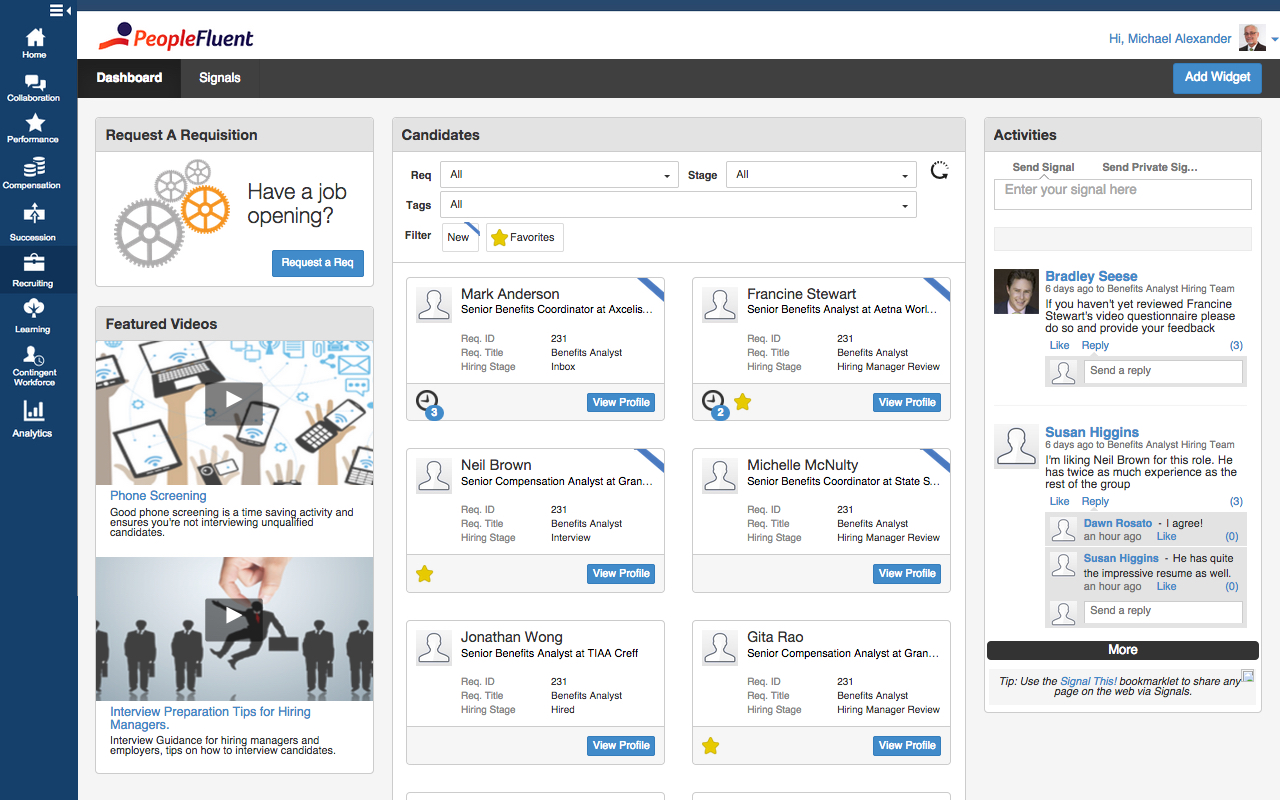
PeopleFluent includes modules for recruiting, performance management, compensation, learning, succession, and vendor management, as well as workforce planning and diversity. These modules can be purchased separately or bundled, and integrate with other HR systems.
N/A
Workday HCM
Score 8.2 out of 10
N/A
Workday Human Capital Management is a cloud-native system offering a globally
consistent user experience. Workday HCM is part of an intelligent, unified system with other
Workday products.
N/A
Pricing
PeopleFluent
Workday Human Capital Management
Editions & Modules
No answers on this topic
No answers on this topic
Offerings
Pricing Offerings
PeopleFluent
Workday HCM
Free Trial
No
No
Free/Freemium Version
No
No
Premium Consulting/Integration Services
No
No
Entry-level Setup Fee
No setup fee
No setup fee
Additional Details
—
—
More Pricing Information
Community Pulse
PeopleFluent
Workday Human Capital Management
Considered Both Products
PeopleFluent
Verified User
Anonymous
Chose PeopleFluent
We already had a relationship with peoplefluent and were offered assistance through implementation and deployment. We couldn't walk away from our current vendor.
I would like Workday the most if we had a greater level of functionality. Would like the company to broaden the package so it benefits the recruiters rather than another administrative tool. Onboarding of Workday needs to be better, we have had terrible experiences with the …
PeopleFluent has eliminated the use of paper reviews. It is also eliminated the use of scanning, emailing or interoffice mail. It is a great tool for communication and I highly recommend it. However, in some ways, the product can be improved. Some processes are tied to each other and could function in tandem. For example, while completing the self-review, the employee has to capture multi-raters. If self-review is submitted without listing multi-rater names then multi-rater review has to be captured separately on paper. In my opinion, these two processes can be different. Multi-raters should be added/removed/modified after submitting self-review.
I would say it's well suited in every environment because I think it does so much. It's like the holy grail of HRIS systems is what I like to call it because thinking about all parts of the employee lifecycle, it lives here in Workday Human Capital Management. So I love the fact that you can do the people data analytics, you can store employee records, the talent acquisition pieces there. I'm thinking I can't think of anything negative right now except for the fact that I can't drill down into the data for the people analytics side. Other than that, I think it's literally, yeah, the holy grail of HRIS systems, I love it and I would highly recommend it.
Since it is cloud based, it does not have version control issues (e.g. get 10 years behind on versions that are no longer supported), or the need for constant upgrades. This is completed behind the scenes.
The flexibility of Workday HCM implementation and then taking it to day to day operations was superior. You can then blow and out and start using other system cababilities when ready.
To enter the system, we must use multi-factor authentication for additional security of employee data. A user downloads their reports and then they are shown in their archive of work transactions and history.
I would advise better filtering options when pulling up candidate profiles, we should have multiple functions when requesting candidates profile.
Sometimes I get huge projects and need to move more than 20 people, it's a headache moving groups in parts.
A faster way to verify if a candidate has been double submitted, maybe with a unique ID or email that identifies said candidate prior to going through the whole submission process.
Stronger cache cookies when session is timed out get kicked out and the process reboots. Sometimes recruiters are pulled in different directions while multitasking.
PeopleFluent continues to develop an already high quality product and works to continually improve the user experience. The different modules integrate well, and the administrative functions are easy to understand and perform resulting in less time spent with KTLO functions. They provide world class customer service and work hard to keep you engaged as a customer.
It is work to make one system the source of truth for our data, but now that it is done, there is less work involved in staying on this path. This means for us that maintaining and/or implementing new modules like performance, finance, talent, etc. is simple. It's a no-brainer
PeopleFluent seems to have all the functionality one would need, but it can be a bit overwhelming. Depending on the client implementation, it can be downright confusing and not intuitive. My 6 rating comes from the fact that it seems like the system can be configured to actually be confusing and not make sense. I think a VMS should be set up not to allow a customer to configure it in such a way as to not really work, or to allow users to circumvent steps. I also really don't like the "organization key" that needs to be entered every time you log in. Why is a login and password good enough for 99% of the systems out there, but PeopleFluent requires an extra field?
Overall this is a highly useable product. It does require continual use to stay current on changes in the User Interface and functionality, but as noted earlier, this is a reasonable trade-off for the rapid rate of improvement. It is very user friendly and the templated business processes prevents the system from becoming overly complicated
In 2014, Workday has changed the update process. There will be two updates a year; the updates will be delivered to customers typically in a 24 hour window during these two weekends a year. They also keep the Community up-to-date about any planned outages, etc. There is weekly scheduled downtime on Friday night.
From my perspective, the system runs like a well oiled machine and I have not had any issues with customers complaining about speed. If a report is taking long to run, the report can run in the background and you can go about your business. For larger enterprises, there is additional space and machines to process the application in what Workday refers to it as Extended Configuration Tenant
In my experience, the support team was very prompt and helpful. They had good subject matter expertise and were able to troubleshoot immediately. At times we wanted some enhancements but it was not possible due to product limitations. But, the support team was helpful in suggesting alternatives for our requirements. The customer support staff was also very polite and friendly.
Support is provided by OneSource, the reseller. They really have no expertise and their level of technical expertise is poor. When we went to our training, the room was filled with OneSource people going through the same training. We finished training in 1 day, they took 4 days. They are hardly experts. Workday has come out with two more releases since then and Onesource have doubled in size in the last year – so it’s hard to see how they can keep up.
There is an online community/portal that is pretty good. There is however no easy answer to “guided completion”
Some training is offered online. Cost is per-person. This also gets quite expensive. Training doesn’t follow a logical path A to B. Starts in middle. When you try to do it afterwards at your desk, difficult. • Training scenarios are not very real
I have done for report writing and mass imports (EIBs). They give materials and you run through examples, i.e. you don’t just watch them do tasks, so that is helpful. Training is expensive – a single reporting writing class is $600 per person for virtual training
We had a small team - 5 of us total. It would have been nice to have a little larger team, but we made it work. Definitely helped that for our first payroll our 3rd party partner OSV was onsight. This minimized issues.
Out of the VMS's listed, I'd say PeopleFluent is solidly in the middle. Fieldglass and IQN are probably easier to navigate and more modern looking, and I definitely don't run into the login problems with them. Beeline and PRO Wand are probably on par with PeopleFluent. They have their plusses and minuses in terms of navigation and ease of use. Covendis is definitely worse than PeopleFluent. Covendis is a mess - very difficult to navigate, not intuitive at all with terrible workflow. Again, I didn't select PeopleFluent; my client did, and I have chosen to work with them, therefore I work with PeopleFluent.
The workday human capital management stacks up against ADP due to the overall different features that we have got in a single platform. With Workday HCM, we do not have to select multiple vendors or tools to manage employees, salary details, career progress, etc. Also, the workday human capital management is very easy to use in all the different use cases that I mentioned above.
Workday has released Financials and is continuing to develop it's Human Capital Management footprint with the addition of Workday Recruiting. I think customers will find that is easy to add on additional functionality in the system. Workday does make it easy for customers to make changes without relying on IT resources. The Business Process framework is a visual tool that allows functional resources to make changes and see the flow of the transaction
I do believe that goal setting and the workflow of following up, going through the process yearly is as good as you make it. If you set good goals, or help your team make good goals then the experience can go well. Otherwise it's just another thing that an employee is doing to make their manager happy.
I am not sure the cost of the product, but if it is really expensive I am not sure that we are getting fully what we should be for what the product offers. Make sure you are using what is offered.
To get the most value out of all possible automation in Workday you really need to use a lot of their modules, otherwise you may not be able to solve for some pretty important and necessary needs.
The system maintenance is way more than what I have seen with some other systems and therefore you need a quite large team dedicated to it.
The ability to automate a lot of administrative tasks and the ability for employee and manager self-service definitely create a lot of opportunity for HR to spent time and effort elsewhere. A lot of the automation that can be leveraged in Workday also allows for eliminating third party vendors as well as the cost of their maintenance and integrations.