Veeam Data Platform vs. VMware Site Recovery Manager

Overview
ProductRatingMost Used ByProduct SummaryStarting Price
Veeam Data Platform
Score 8.6 out of 10
Mid-Size Companies (51-1,000 employees)
Veeam’s® premier product, Veeam Backup & Replication™, delivers availability for all cloud, virtual, Kubernetes and physical workloads. Through a management console, the software provides backup, archival, recovery and replication capabilities.
$428
per year per 5 instances
VMware SRM
Score 9.0 out of 10
N/A
VMware's Site Recovery Manager (VMware SRM) is a disaster recovery option, used to automate orchestration of failover and failback to minimize downtime and improve availability with VMware Site Recovery Manager.N/A
Pricing
Veeam Data PlatformVMware Site Recovery Manager
Editions & Modules
Veeam Data Platform Essentials
$428
per year per 5 instances
Veeam Data Platform
Contact sales team
No answers on this topic
Offerings
Pricing Offerings
Veeam Data PlatformVMware SRM
Free Trial
YesNo
Free/Freemium Version
YesNo
Premium Consulting/Integration Services
NoNo
Entry-level Setup FeeNo setup feeNo setup fee
Additional DetailsVeeam sells through channel partners. Contact a partner for detailed pricing and quotes. Resellers or sales personnel are available for assistance.
More Pricing Information
Community Pulse
Veeam Data PlatformVMware Site Recovery Manager
Features
Veeam Data PlatformVMware Site Recovery Manager
Data Center Backup
Comparison of Data Center Backup features of Product A and Product B
Veeam Data Platform
9.2
Ratings
8% above category average
VMware Site Recovery Manager
-
Ratings
Universal recovery9.20 Ratings00 Ratings
Instant recovery9.40 Ratings00 Ratings
Recovery verification9.30 Ratings00 Ratings
Business application protection9.20 Ratings00 Ratings
Multiple backup destinations9.60 Ratings00 Ratings
Incremental backup identification9.70 Ratings00 Ratings
Backup to the cloud9.10 Ratings00 Ratings
Deduplication and file compression8.90 Ratings00 Ratings
Snapshots9.30 Ratings00 Ratings
Flexible deployment9.20 Ratings00 Ratings
Management dashboard7.50 Ratings00 Ratings
Platform support9.20 Ratings00 Ratings
Retention options8.90 Ratings00 Ratings
Encryption9.70 Ratings00 Ratings
User Ratings
Veeam Data PlatformVMware Site Recovery Manager
Likelihood to Recommend
9.1
(0 ratings)
7.3
(0 ratings)
Likelihood to Renew
7.8
(0 ratings)
10.0
(0 ratings)
Usability
9.9
(0 ratings)
9.0
(0 ratings)
Availability
9.1
(0 ratings)
-
(0 ratings)
Performance
7.4
(0 ratings)
-
(0 ratings)
Support Rating
10.0
(0 ratings)
7.0
(0 ratings)
Implementation Rating
9.9
(0 ratings)
-
(0 ratings)
Configurability
7.4
(0 ratings)
-
(0 ratings)
Ease of integration
8.6
(0 ratings)
-
(0 ratings)
Product Scalability
7.4
(0 ratings)
-
(0 ratings)
Vendor post-sale
9.9
(0 ratings)
-
(0 ratings)
Vendor pre-sale
4.0
(0 ratings)
-
(0 ratings)
User Testimonials
Veeam Data PlatformVMware Site Recovery Manager
Likelihood to Recommend
Veeam Data Platform is best suited in environments that fall under its compatible applications, which it backs up. Any sized business could benefit. The ease of use and metrics are a breeze and the learning curve is low. However, if you're using hypervisors, products that have no support by Veeam Data Platform, then clearly wouldn't be a great fit. Their workaround for this by using OS level backups for baremetal deployments but increases the risk of failure when doing restores.
Read full review
SRM is a must-have tool if your business requires you to failover your VMs to a disaster recovery site and provide valid testing and real-time numbers. Our VP office is always amazed at how easily we are able to satisfy our annual testing and show actual results with time stamps and the sequence of each VM that is up and running. SRM may not be needed in a very small business that does not have the capacity nor the need to have their infrastructure off site in a form of a disaster recovery site.
Read full review
Pros
  • Veeam stands out among backup solutions because of its ability to work with almost any storage type. For example, only a small portion of backup solutions will support catalyst stores, Veeam does.
  • Veeam is extremely flexible when it comes to setting it up. I had a network recently that limited ethernet connectivity between the Veeam VM and the backup repository and Veeam handled it easily.
  • Day-to-day use of Veeam is very simple. It is easy to train our technicians to use it proficiently in a very short amount of time.
  • Our Veeam VMs don't have issues very often, but the one or two times I have called for support, they answered right away, and the technicians assisting us were knowledgeable about their products.
Read full review
  • Easy to build a recovery plan
  • Easy to test recovery plans
  • Works with storage based replication or non storage based replication
Read full review
Cons
  • It should recommend the most secure method of backup methods to ensure immutability.
  • It should maximize SnapMirror technology when using a NetApp as a backup target to replicate backups to CVO targets.
  • It should provide a centralized dashboard for backing up all PaaS services in Azure.
Read full review
  • I am not very pleased with the overall licensing cost. It's pretty expensive. Especially if you have a small number of VMs, you are paying a lot.
  • We had a little struggle getting our support tickets resolved by VMWare support.
Read full review
Likelihood to Renew
The platform has consistently delivered strong performance, reliability, and innovative features that align well with our data protection needs. Its robust capabilities in backup, recovery, and cloud integration have significantly improved our operational efficiency and disaster recovery planning. The only reason for not giving a full 10 would be our ongoing evaluation of emerging technologies and solutions to ensure we are maximizing our IT investments. Overall, Veeam Data Platform has proven to be an invaluable asset to our organization.
Read full review
- easy to set up - easy to protect critical servers in case of disaster
Read full review
Usability
If you are familiar with most Windows software UIs, there should be no issue learning Veeam. Even better if you're already familiar with backup strategies, &c., since all of that is integrated and possible. I doubt my grandmother could use it, but she's not the target audience. If you've been in IT for a bit, this is very usable.
Read full review
VMWare SRM is very easy to use and configure. You don't have to be a virtualization expert to learn SRM configuration and execution.
Read full review
Reliability and Availability
The Veeam Backup & Replication solution is up and running every time you need it as it was planned. In more than 3 years that we have been using the product every night, it might have failed or presented an error once or twice, so the availability percentage is almost at 100%.
Read full review
No answers on this topic
Performance
Veeam does a good job with backing up our servers in a timely manner. We are still at the beginning of our Veeam use and are pleased with the speed at which we can access the system as well as the backups and restore points. Veeam is definitely superior to our previous backup system in terms of speed and accessibility
Read full review
No answers on this topic
Support Rating
The support team has never asked me to jump through silly hoops or waste time on pointless exercises. They seem to truly have a handle on what may be wrong. In fact, when we were having trouble getting our license renewal setup (because of yet another license migration at Veeam) a support incident got us connected to the right people to get our renewal done in time.
Read full review
Sometimes we have to struggle explaining the problem and getting it resolved on priority. The overall quality of support team is not as good as it used to be in past.
Read full review
In-Person Training
I rated the in-person training an 8 because it was generally effective and provided a solid foundation for understanding the Veeam Data Platform. The instructors were knowledgeable and engaged, making the sessions interactive. However, I felt that some topics could have been covered in more depth, and additional hands-on exercises would have further reinforced the learning experience. Overall, it was a positive training session that adequately prepared attendees for using the product, but there's room for improvement.
Read full review
No answers on this topic
Online Training
I gave it a rating of 7 because, although the online training offered valuable content and covered the essential aspects of the Veeam Data Platform, it lacked interactivity and opportunities for direct engagement with instructors. This made it challenging to ask questions or delve deeper into specific topics. Additionally, some sections felt a bit rushed, which could hinder a comprehensive understanding of more complex features. Overall, while the training was useful, improvements in interactivity and pacing could elevate the experience significantly.
Read full review
No answers on this topic
Implementation Rating
When deploying Veeam, be sure you have your environment right-sized. While it is not a big deal to increase capacity later, it will make a difference if you are trying to run Veeam on instances/VMs that are not appropriately sized on CPU and Memory requirements.
Read full review
No answers on this topic
Alternatives Considered
Commvault is a standard backup platform for Enterprise backups, but we have no need for its extensive client abilities or the staff for the vast infrastructure that is required to use it. Cohesity is a truly fantastic system, but it is too far for larger companies than the one that I work for. Its cost also makes it prohibitive for SME's like us. Norton Backup was so long ago, I don't know if it even exists. It was difficult to use, had very slow recovery times, and I don't miss it at all.
Read full review
Veeam Backup & Replication is slower than VMWare SRM and doesn't suits our RTO (Recovery Time Objective).
Read full review
Scalability
In terms of scalability for our company, Veeam was able to cover our backup needs with ease. They have options for even more individualized backup if we were to need them; i.e. if a specific workstation needs its own independent backup. We have not used these resources yet, but I am confident they will be beneficial to our company in the near future.
Read full review
No answers on this topic
Return on Investment
  • When Veeam is running well, I don't need to babysit it at all; I just read the email reports and am done.
  • When it doesn't work, Veeam consumes entire days getting everything working again.
  • Veeam has significantly improved how we test new software by enabling easy duplication of existing resources to different platforms.
Read full review
  • The biggest positive is that we have a data recovery solution that we can test and verify in a live condition. Prior to this we were only hoping we could recover from a disaster.
  • We've been only running for 4 months and haven't had to use SRM.
Read full review
ScreenShots

Veeam Data Platform Screenshots

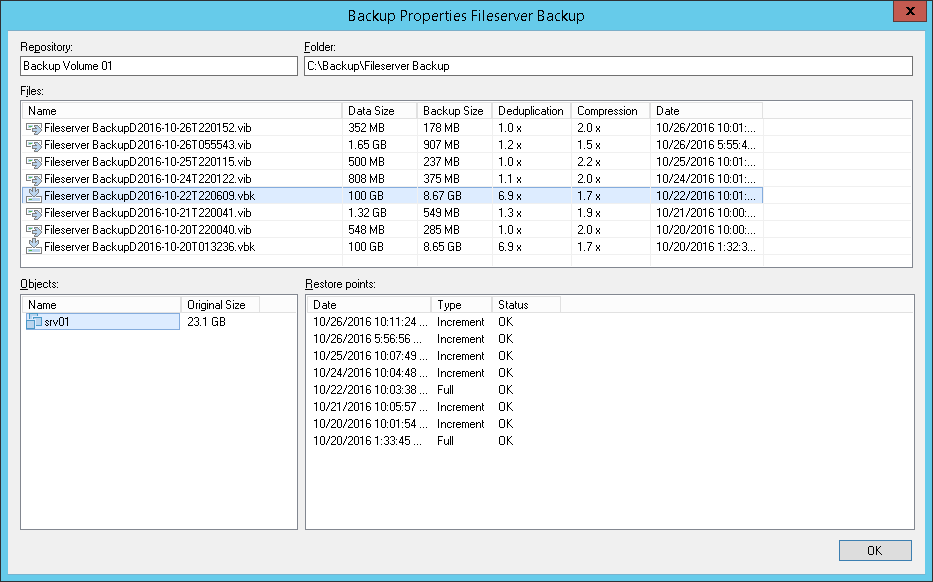
Screenshot of the Veeam Data Platform dashboard, that puts the spotlight on malware. It will also highlight threats, identify risks, and measure the security score of the environment in the Veeam Threat Center.Screenshot of backup properties. Veeam Backup & Replication does not back up "dirty blocks" on VM guest OS.Screenshot of backup properties. Veeam Backup & Replication does not back up "dirty blocks" on VM guest OS.