TrustRadius: an HG Insights company

Tricentis qTest

Score8.8 out of 10

54 Reviews and Ratings

What is Tricentis qTest?

Tricentis qTest (formerly QASymphony) provides enterprise-level agile testing tools giving businesses visibility and control needed to ensure application quality in fast-paced development environments. Tricentis and QASymphony merged in summer 2018.

Media

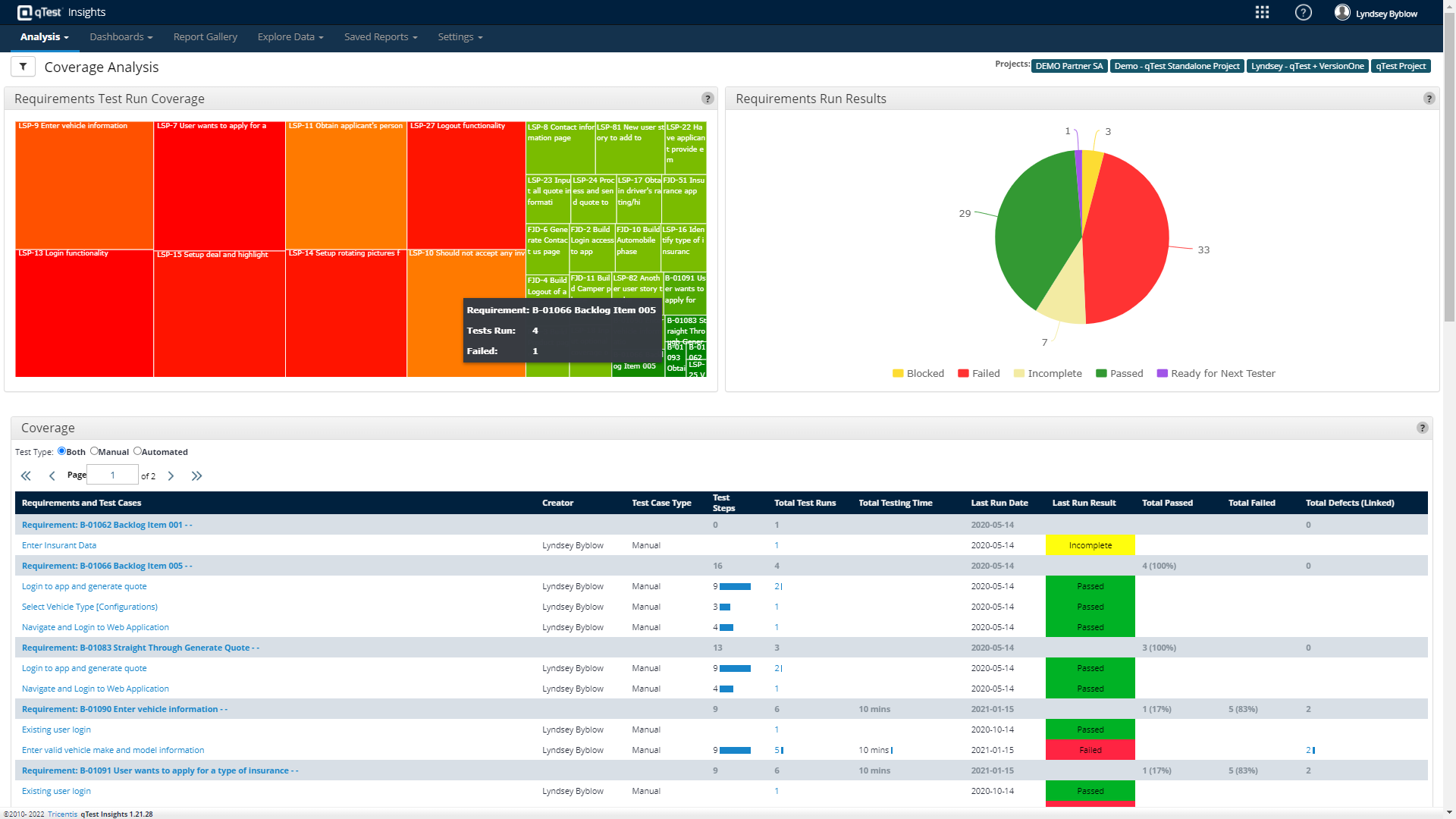
Customizable analytics and reports can be shared across the organization - additional read license required
Centrally manage automated testing and environments, as well as schedule and or kickoff automated testing with any open source or proprietary tool
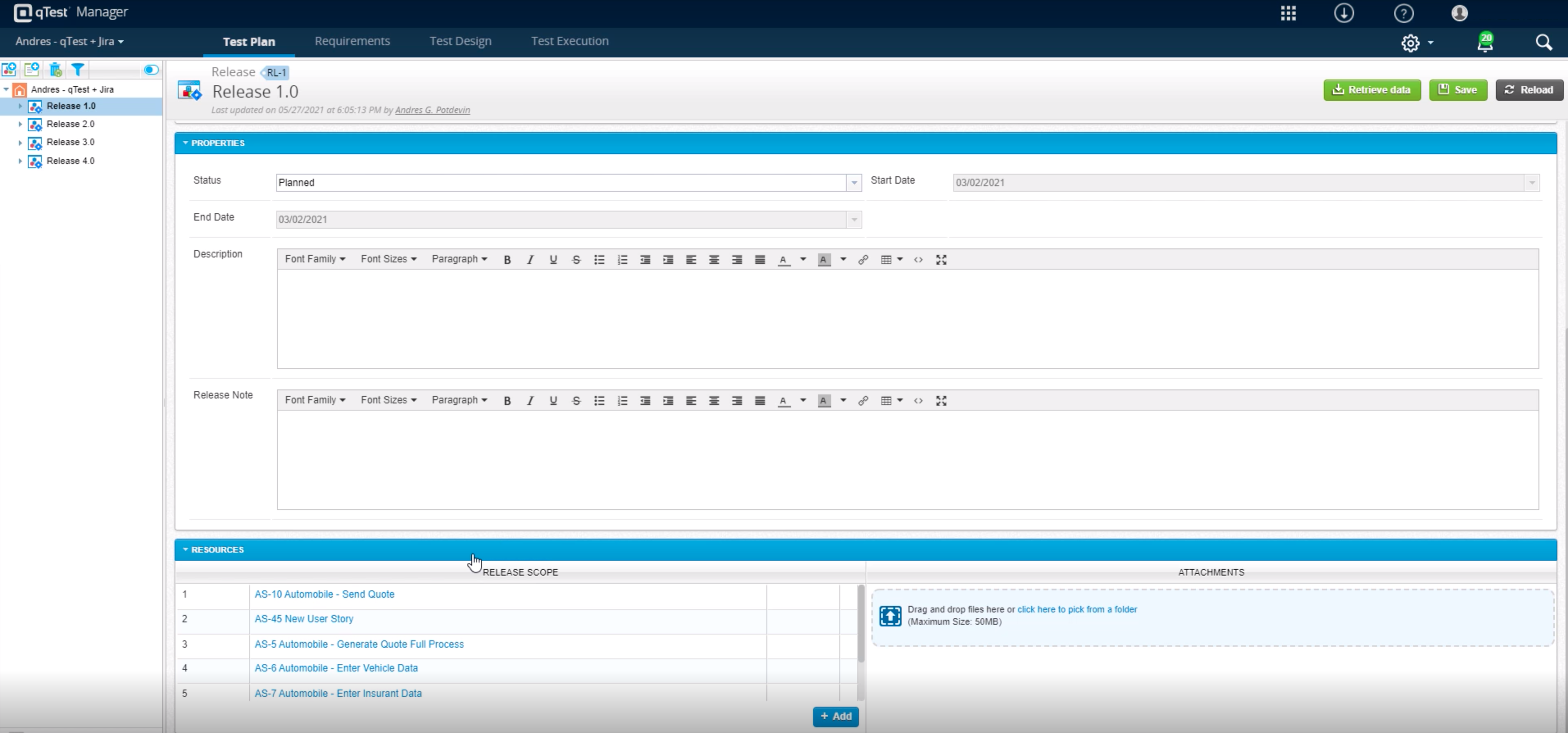
qTest allows for true test case sharing across teams and projects to help standardize and scale knowledge and best practices
qTest integrates in real-time with Jira for full traceability to requirements during Agile test and development
Build custom, event-driven workflows with any third-party solution, including ChatOps tools like Slack and Microsoft Teams, to streamline testing and drive collaboration
Tricentis qTest comes with over 60 out-of-the-box metrics, with drag-and-drop capabilities to build custom dashboards
Tricentis qTest includes present dashboards on defects, status, coverage, and velocity, filterable by fields like project and date
Scale and orchestrate automated testing with any tool - Tricentis qTest helps users manage automation hosts, test schedules, and results in one place

1 / 8

Top Performing Features

  • Defect management

    Ability to automatically log defects and link them to failed tests, and report defect resolution progress

    Category average: 8

  • Map tests to user stories

    Provide visibility into user story test coverage

    Category average: 8

  • Centralized test management

    Ability to manages both manual and automated tests from a centralized location

    Category average: 8.6

Areas for Improvement

  • Test execution reporting

    Comprehensive reporting on which tests have been run and pass/fail

    Category average: 8.1

  • Manage test hosts and schedules

    Ease of setup of automated tests and test schedules

    Category average: 7.6

qTest is for making QA life easy by bringing all STLC entities under one roof

Use Cases and Deployment Scope

Earlier our test case for execution were scattered across many g-docs & the purpose of Tricentis qTest was to bring all STLC i.e. Test authoring, Test management, test execution & reporting under 1 tool. Tricentis qTest helped us to get all this together & track effectively. Especially when we were not using qTest we were losing our past data of "proof of testing" now it has become easy for us to focus on just execution & authoring rest toll will handle for us & drive us thru needy numbers

Pros

  • Proof of testing maintenance thru "web explorer option"
  • Execution report is easily derivable
  • Authoring & Execution tracking
  • Ease of maintainance

Cons

  • At times server errror cost us half a day of work
  • "Web explorer" sometimes goes for toss & collection of test proof becomes hard
  • when there are bulk actions are performed we see glitch (rare-case)

Return on Investment

  • Faster test deliver
  • effective execution
  • defect mapping to test case

Alternatives Considered

TestRail

Other Software Used

TestRail, Zephyr Scale, X-Ray.contact

Tricentis qTest Review

Use Cases and Deployment Scope

We use qTest to manage test cases, link them to user stories, and track defects across manual and automated tests. It helps us improve traceability, streamline test execution, and ensure faster feedback during sprints. Our use spans across QA teams for functional, regression, and integration testing.

Pros

  • Organizes test cases in a clear, hierarchical structure by release, module, or feature
  • Seamlessly integrates with Jira, allowing automatic linking of test cases to stories, bugs, and requirements
  • Allows batch execution of tests across environments and releases
  • Offers real-time status dashboards, so QA leads and PMs can monitor progress and defects

Cons

  • The UI can feel outdated at times, requiring too many clicks to perform simple actions like cloning test cases or switching between modules.
  • Large projects with thousands of test cases can cause sluggish load times, especially in the Test Design and Execution tabs.
  • Built-in reports are helpful, but customizing dashboards often requires external BI tools or API scripting.

Return on Investment

  • Tricentis qTest significantly improved our testing process by increasing visibility, traceability, and collaboration across teams.
  • It reduced test execution time by centralizing manual and automated test results, helped us catch defects earlier through better test coverage, and standardized testing practices across multiple squads.
  • we saw fewer escaped defects, faster sprint turnarounds, and more consistent QA reporting, which directly supported our delivery and quality goals."

Other Software Used

Tricentis Tosca, Appium, WebdriverIO

How as a fresher qTest helped in testing phase of a software.

Use Cases and Deployment Scope

qTest is the primary testing tool in our Org. We primarily use this for salesforce and related business applications. It helps us to follow QA's agile process and helps us in delivering high quality testing. It also helps Business Analysts and many other teams to collaborate and look into what our team (QA) is actually working on and what all test cases we are drafting and how are we testing them.

Business Problems addressed: It mainly address the huge problem each company faces which is - 'centralized test management'. Currently we are not facing this issue as we integrated qTest in our daily workflow and it helps us a lot in our QA work routine.

The other problem is other teams (outside QA) if they want to know the type of quality we are providing they need not to explicitly ask us as qTest contains all the Test cases that we run as part of a JIRA and they can refer them if they want to address or replicate any scenario they we as a QA team tested.

Pros

  • As a fresher, when I started using qTest it was very handy and easy to understand.
  • It helps us trace the test cases that are used to test the quality in a single location
  • The main thing is its integration with JIRA as soon as we create a ticket we would be getting all the requirements in the qTest so it became easy for me

Cons

  • Better integration with JIRA as sometimes I faced the requirements not getting filled automatically in qTest
  • I also noticed some times when I pause the session also it records where ever I press the mouse so little improvement on that side
  • Some glitches while starting a session for testing

Return on Investment

  • Integrating qTest in our workflow helped us in 52% reduction in test authoring effort
  • Overall project management and the time calculation for the quality checking of each project can be managed good in qTest
  • It provides full tracability of a single project from the requirements to the defects raised it helps our team a lot

Other Software Used

Atlassian Jira, Copado

Tricentis qTest is a Great Tool for Large QA Organizations

Use Cases and Deployment Scope

At my former company, we used Tricentis qTest as a repository for our manual test cases. That is because we preferred to hand-code our automation test cases using Ruby and Cucumber. When it was time for Regression, we divided up the manual test cases among the entire Engineering organization because there were so many.

Pros

  • Tricentis qTest is very good at organizing the test cases with a parent/child relationship using a tree menu.
  • The product utilizes modules and folders well to help users find their test cases.
  • The product makes it easy to find statistics related to pass/fail.

Cons

  • Make it easier to delete old users from the licensing list.
  • It is difficult to trace the history of a test when going between projects.
  • Allow an admin to easily group tests according to their pass/fail/incomplete status so that they can be followed up on.

Return on Investment

  • In comparison to other Testing tools, Tricentis qTest was the most expensive.
  • We were able to quickly bring international users up to speed on how to use the tool.
  • The ability to clone a project rather than create a new one from scratch was a valuable time saver.

Alternatives Considered

TestRail

Other Software Used

Atlassian Jira, Atlassian Confluence, Trello

qTest for Test Management

Use Cases and Deployment Scope

We use Tricentis qTest to help clients standardize and optimize test planning and repositories. We also use it with clients for manual and exploratory testing since not everything can be automated. As with anything, there's a learning curve. But leveraging qTest to store test scenarios in a clean way, also linking everything back to requirements provides traceability from start to finish. It also doesn't depend what automation platform we're using, qTest integrates well through qTest Pulse via API and webhooks. This is one of the elite commercial/enterprise grade test management platforms to exist.

Pros

  • Cleanly organized repository structure for team to standardize to
  • Gives me real time, historical, and future visibility as to the state of testing (results, in progress, planned - then all linked to requirements)
  • Deep integration with a variety of automation tools and requirements management tooling

Cons

  • Modular features create a feeling of overload and unnecessary complexity for newer users
  • Reporting directly in qTest is lacking compared to BI tools (but it integrates directly to circumvent this)
  • Not a strong defect manager

Return on Investment

  • Less tool sprawl, faster back and forth between teams - less duplication
  • Faster release cycles
  • Faster test creation with reusability
  • Slow onboarding without expert help
  • Without defined process and full adoption, qTest partial-use can occur, leading to rework and slow releases

Alternatives Considered

Panaya Test Dynamix, OpenText ALM/Quality Center, OpenText ALM Octane, TestRail and SpiraPlan