TrustRadius: an HG Insights company

Tricentis Tosca

Score8.2 out of 10

64 Reviews and Ratings

What is Tricentis Tosca?

Tricentis Tosca provides an approach to test automation that is AI-powered, codeless, and end-to-end so it can test everything in a complex IT landscape, to ensure business processes work flawlessly no matter where changes occurs.

Its 160+ technology support helps users test everything at the UI, API and data layer, including virtually any enterprise, custom, homegrown and mobile application.

With its model-based approach, Tosca enables business, QA and IT teams to create and maintain reusable test assets at speed and scale, while boosting test automation rates to from release to release. Tosca is designed to help users test faster, catch more defects and cut overall testing costs .

Tosca also features risk optimization, service virtualization, test data management, and smart test case design, to make it a comprehensive continuous testing tool.


Media

Screenshot of where no-code, model-based test automation separates the technical information of an application into reusable, no-code modules that can be updated as applications change, which auto-updates test cases.
Screenshot of a test case design for risk optimization - this displays a flexible testing model that enables fast, easy test case creation and maintenance and reduces risk in app releases.
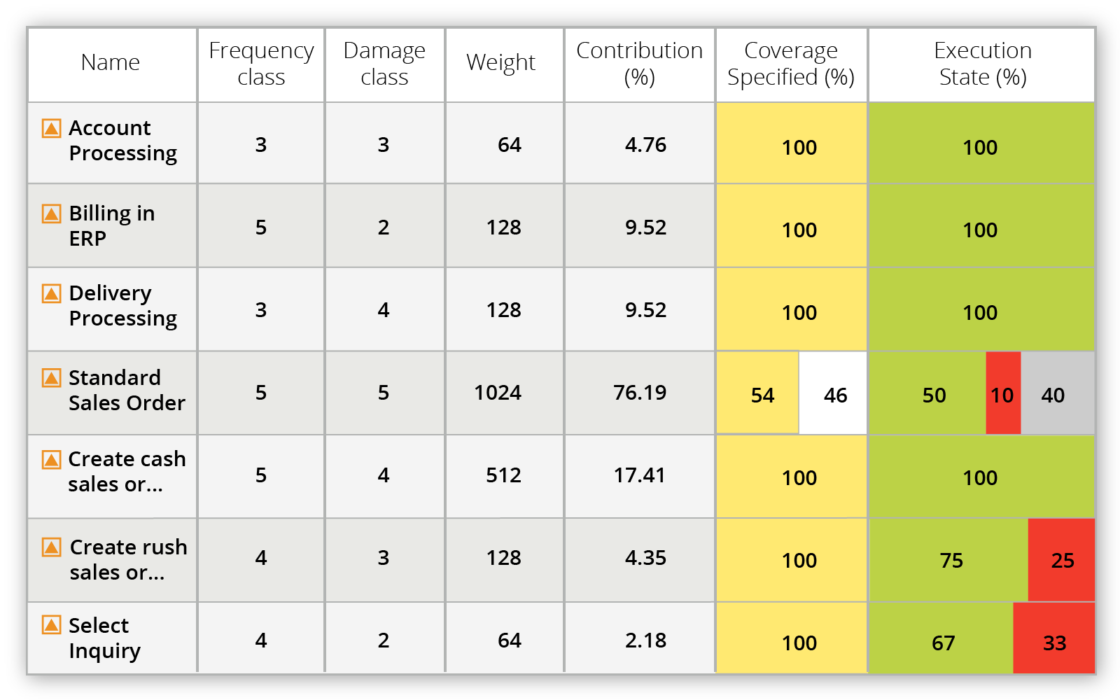
Screenshot of requirements coverage for risk optimization - this enables users to prioritize requirements by business risk/ impact, understand what is needed to test, and gain business insight on defects to ensure smarter and faster release decisions.
Screenshot of Vision AI - AI powered test automation using patented neural network technology to deliver resilient UI automation. Includes self-healing AI capabilities.
Screenshot of service virtualization, which enables users to build realistic, simulated services in minutes to remove bottlenecks and run end-to-end tests faster in the software development lifecycle.
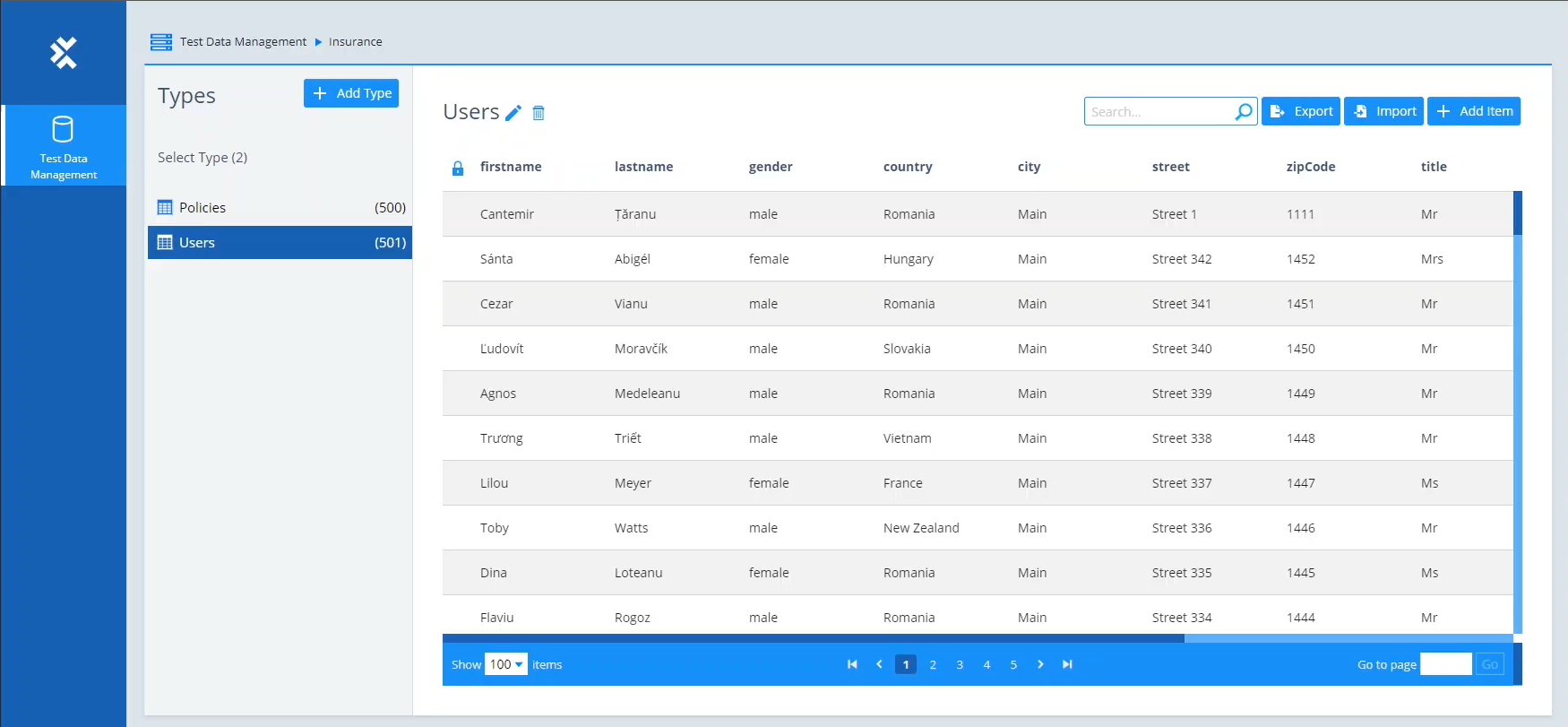
Screenshot of test data management. This offers test data when it is needed and helps keep track of the data as it gets consumed across end-to-end business processes.
Screenshot of an API Scan. This enables users to create codeless API tests without having to wait for the full application to be built.
Screenshot of the Automation Recording Assistant (ARA) that enables business users to record and capture their workflows during normal SAP routines and contribute to test automation.
Screenshot of Mobile testing - Codeless automated testing for any mobile application. Tests native, hybrid, and web applications on iOS and Android devices — including mobile cross-browser testing.
Screenshot of distributed execution, which enables faster testing at scale by running multiple tests in parallel across distributed infrastructures and virtual machines.
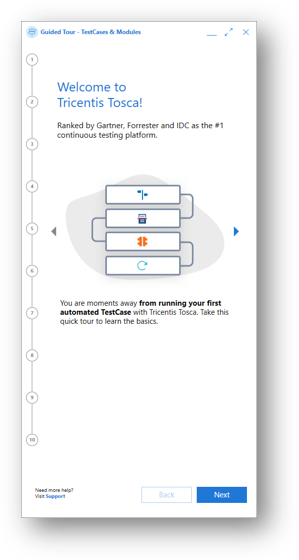
Screenshot of the step-by-step journey on how to navigate the Guided Tour, in 10 steps.
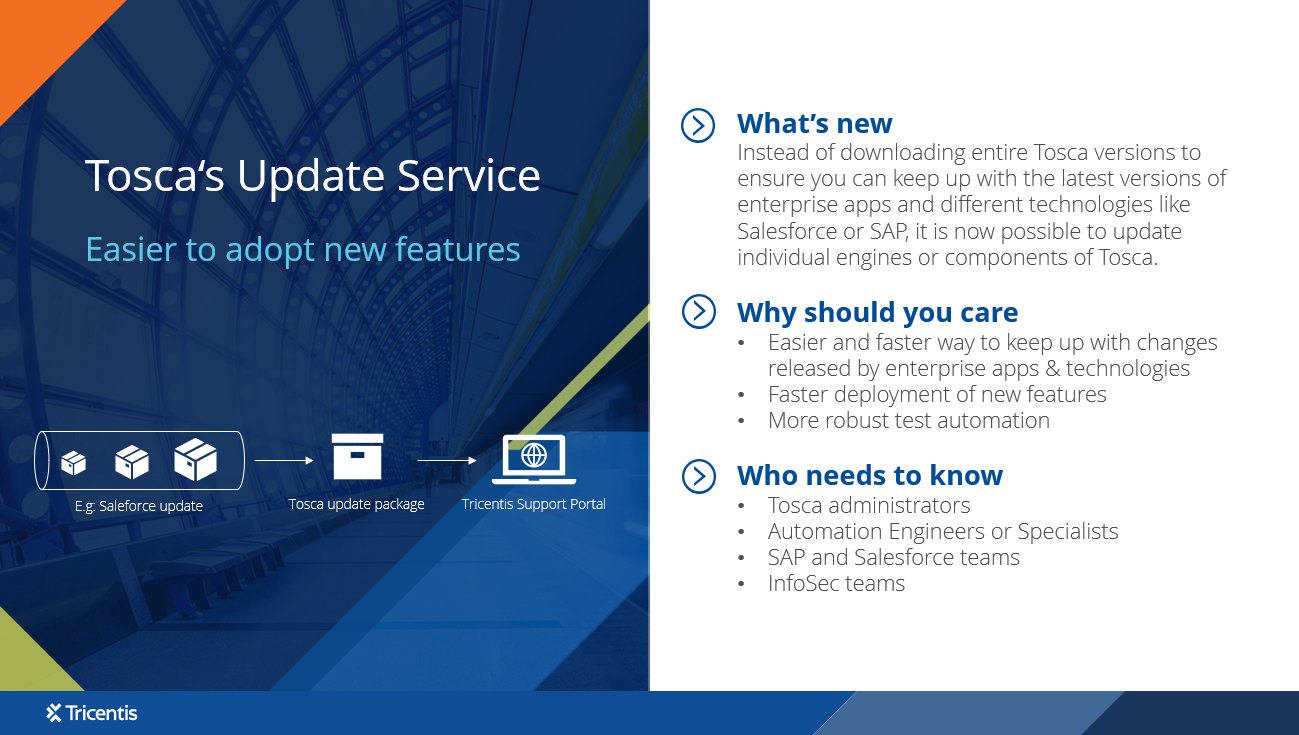
Screenshot of the update service, which enables users to update single technologies of Tosca removing the need to update entire Tosca versions.
Screenshot of Tricentis Tosca's codeless, end-to-end testing.

1 / 13

Screenshot of where no-code, model-based test automation separates the technical information of an application into reusable, no-code modules that can be updated as applications change, which auto-updates test cases.

Top Performing Features

  • Object Recognition

    The product is able to find and interact with user interface elements on a web page or application, to suggest fixes and/or make it easier to keep test elements in sync with the actual web page or application.

    Category average: 8.5

  • Data-Driven Testing

    Users can run the same test script with different inputs to test out multiple different scenarios.

    Category average: 8.5

  • Multi-Browser Testing

    Users can ensure that web applications work seamlessly across different browsers.

    Category average: 7.9

Areas for Improvement

  • Real Device Testing

    The product provides access to real hardware devices for testing on different platforms. Tests are run using your own devices or using provided simulated devices.

    Category average: 7.1

  • Record and Automate

    Users can record manual test cases and can automate test scripts for reuse.

    Category average: 7.9

  • Mobile Testing

    Allows users to automate testing on mobile devices for iOS and Android platforms.

    Category average: 7.8

Easy to use Tricentis Tosca

Use Cases and Deployment Scope

We are using Tricentis Tosca to test API and UI with low code and no code. This helps us to automate very fast. We are using Tricentis Tosca for our regression suite and sanity testing. we are also scheduling out automation and running it nightly every day. It help in. finding code quality and reduce bugs.

Pros

  • Test automation
  • Statergy
  • regression suite

Cons

  • Providing a cloud version
  • Support
  • better documentation

Return on Investment

  • Usability
  • Reliability
  • Reuse

Usability

Alternatives Considered

Playwright

Other Software Used

Postman, Selenium, Playwright

The Easiest Path to GUI Test Automation

Use Cases and Deployment Scope

We use Tricentis Tosca to automate end to end testing and our regression suite. Our regression suite usually takes 1 day to execute with help of 6 QAs, but with Tricentis Tosca, we get the job done in half day.The tool is super easy to learn, has good learning material, quite powerful for test data creation.

Pros

  • easy to learn
  • good learning material
  • powerful for test data creation

Cons

  • slightly expensive (as all commercial solutions)
  • heavier on infrastructure
  • ci/cd integration could have been easier

Return on Investment

  • Our regression suite used to take 1 day with 6 QAs manually, now with Tosca it takes roughly over 3 hours
  • Test case creation time is reduced
  • Automation coverage is increased by 20%

Usability

Alternatives Considered

Eggplant, from Keysight, UiPath Automation Platform, Testsigma and ACCELQ

Other Software Used

Watermelon, Testsigma, ACCELQ

Amazing software for automation testing

Use Cases and Deployment Scope

We are using the Tricentis Tosca to automate multiple software, this is very easy to use and automate it easily

Pros

  • Automation Testing
  • Continue testing
  • Exceution

Cons

  • Plan and Prices can be improved
  • Reporting structure can be improved
  • Support document with video tutorial to understand more

Return on Investment

  • Testing cost is reduce
  • Reporting structure is changed
  • Maintaining the reports

Usability

Alternatives Considered

BrowserStack and Opkey (now with pCloudy)

Tricentis Tosca a winwin to automate your QA process

Use Cases and Deployment Scope

We're using Tricentis Tosca to automate all e2e tests. In a cloud solution and CI/CD instead run locally. Tricentis Tosca help us to build a full solution with a little effort and a very user friendly interface. In addition, is easy to work with daily results and create reports each days to control the current situation of project.

Pros

  • Scan and discover almost of elements and attributtes of them
  • User friendly UI

Cons

  • Dashboard to check results from ppl outside of team (managers for example)

Return on Investment

  • Return on Investment
  • Easy and fast executions
  • very complete suite and integrates well with existing tools

Usability

Alternatives Considered

Tricentis qTest

A Users Take on Tricentis Tosca Strengths and Limitations

Use Cases and Deployment Scope

For about two years, my team used Tricentis Tosca primarily for automating both API and front-end tests for our B2B and B2C web shop applications. While it was central to our testing efforts on these platforms, we occasionally faced challenges finding clear solutions in the documentation or getting timely support solely through the community forums.

Pros

  • Easier to use in comparison with coded Automation (e.g. Java + Selenium)
  • Easy to reuse components
  • Handles API tests pretty fast

Cons

  • Documentation - struggled multiple times with features not explained very well, or not explained at all
  • The only support is on Tricentis Forums, where, sometimes, based on 'luck' - you will open a support case, and wait few days until you get the chance to speak with someone from Tricentis and show case your issue

Return on Investment

  • Reduced testing costs
  • Increased automation rates
  • Reduced regression times
  • Faster testing cycles

Usability

Other Software Used

Microsoft Teams, Google Chrome, Mailinator, Screenpresso, Postman