TrustRadius: an HG Insights company

Zendesk Chat

Score8.7 out of 10

155 Reviews and Ratings

What is Zendesk Chat?

Zendesk Chat (formerly Zopim) is a live chat tool developed by the Singaporean company also called Zopim, acquired by Zendesk in April 2014.

Categories & Use Cases

Media

How Zopim Chat Widget looks on the website.
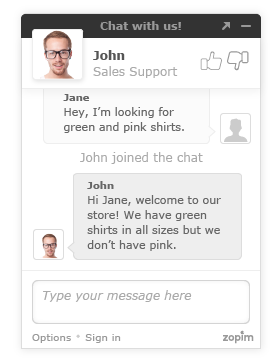
This is how the chat window looks like to your visitors
This is a screenshot of the visitor list.

1 / 4

A must have for dealing with real-time customer support

Use Cases and Deployment Scope

We use Zendesk Chat so that our customers can contact us with their problems easily and so that we can solve them as fast as possible, ensuring that we keep a log of all calls.

Zendesk also allows us to address various concerns, from onboarding to reporting, reconciliation of audits, as well as troubleshooting of its features to ensure that their operations don't get disrupted. If the issue continues to persist and it cannot be addressed whilst chatting, it gets converted into a ticket which will be responded via email.

Pros

  • Client connectivity is so easy
  • Easy ticketing for staff to be allocated issues
  • Managing the jobs that have been received
  • Remote viewing and access

Cons

  • Would love reminders of outstanding tickets
  • Ease of features
  • The 'ring' of new chats coming in is annoying and distracting.

Return on Investment

  • Improved client communication and reputation
  • Excellent way to ensure work is streamlined for staff
  • Increased efficiency within the team

Usability

Alternatives Considered

LiveChat

Other Software Used

LiveAgent, AceThinker Screen Grabber Pro, Nordcloud Managed Services

Love Zendesk Chat

Use Cases and Deployment Scope

We use Zendesk Chat to communicate directly with our users who are business owners who have signed up for our payment systems for their businesses. We address various concerns, from onboarding to reporting, reconciliation of audits, as well as troubleshooting of its features to ensure that their operations don't get disrupted. If the issue continues to persist and it cannot be addressed whilst chatting, it gets converted into a ticket which will be responded via email.

Pros

  • Client connectivity
  • Remote viewing and access
  • Easy ticketing

Cons

  • Integrate voice features (Zendesk Voice)
  • Ticketing history

Return on Investment

  • Reduces the number of applications that need to be used
  • Easy management

Usability

Alternatives Considered

Zoho Desk

Zendesk Chat works well for teams.

Use Cases and Deployment Scope

We use it as a live chat for our customers who reach out with questions and issues. It's our primary point of contact for our customers and the area where we staff our Support Team the most. We have roughly 25 CSRs who use it daily. We answer simple questions and complex questions in it, and move things to an email if needed.

Pros

  • Pulling up customer information.
  • Shows the incoming chats with wait time.
  • Helpful dashboard.

Cons

  • Linking images is not clean.
  • Would love it if there could be a wait time added before a CSR receives a new chat instead of having to set themselves away.
  • Being able to adjust what messages take up the capacity.

Return on Investment

  • We are able to respond to customers quickly and in real time.
  • We often get great customer reviews through our chats.

Usability

Alternatives Considered

Fin by Intercom

Other Software Used

Zendesk Talk, Klaus, Postmark, HiBob, Slack, Assembled, Google Sheets, Stripe Billing, Calendly

Zendesk Chat the MasterBlaster

Use Cases and Deployment Scope

As a e-commerce company we use Zendesk Chat to handle multiple client queries related to the delivery of their items, not receiving product on time etc etc.. Zendesk Chat is good and easu UI which everyone can understand

Pros

  • Quick
  • Easy to use
  • Get help articles easily

Cons

  • Can be made more user friendly

Return on Investment

  • It was all about positive
  • We handled too many queries quickly
  • Everyone was easily trained on thai platform

Usability

Alternatives Considered

HubSpot CRM

Other Software Used

HubSpot CRM

Zendesk helps with efficiency

Use Cases and Deployment Scope

It was becoming overwhelming managing a shared Team mailbox with everyone receiving the same communications and not knowing who was responding to what. Zendesk completely changed this issue but allowing us to create tickets and have different individuals manage and close out the tickets. This has been a huge help in our workflow with making the team more efficient without being overwhelmed.

Pros

  • Efficiency
  • Creating Tickets
  • Creating workflows

Cons

  • The plan I am on lacks features and customizability
  • Would love reminders when tickets are not answered
  • Would love to have external users have licenses for free so we can effectively communicate with internal users in the org who don't particularly use Zendesk

Return on Investment

  • More efficient workflows

Usability

Other Software Used

Bullhorn ATS & CRM