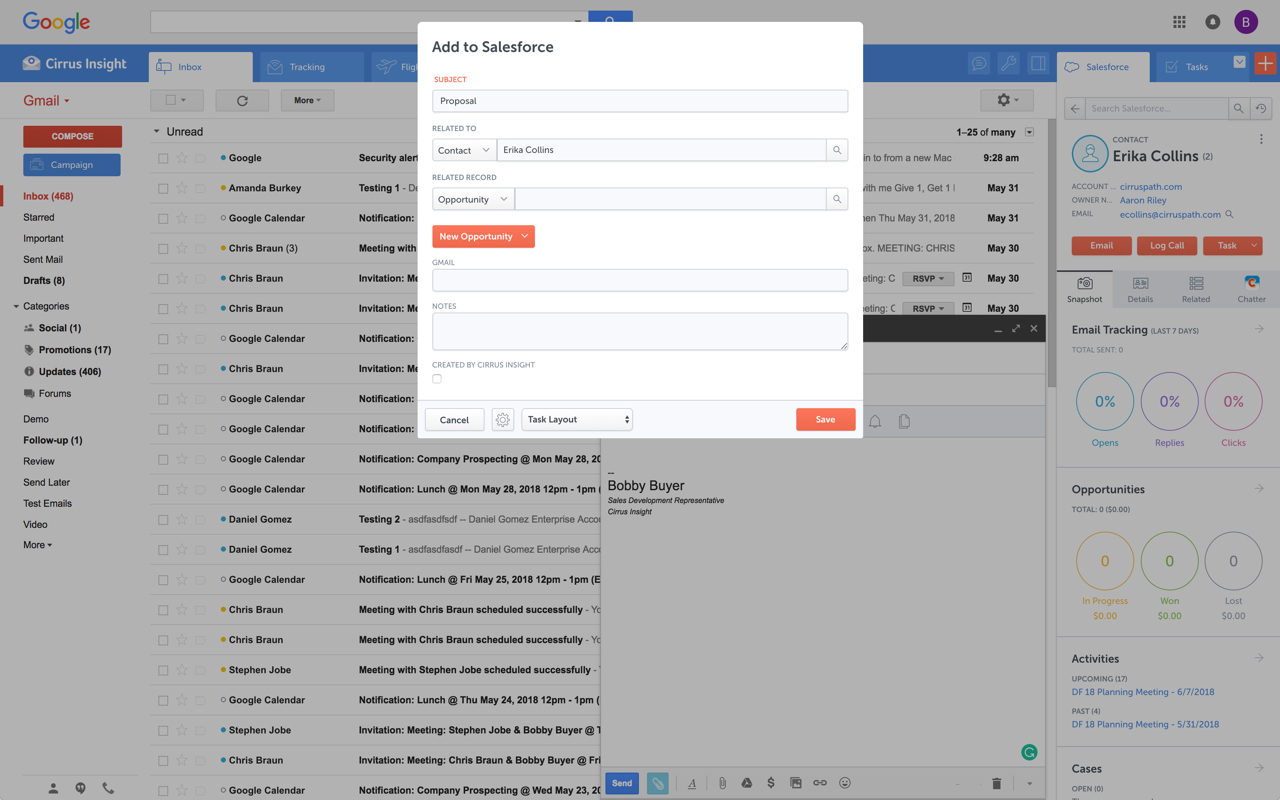
Cirrus Insight integrates Salesforce with Gmail, Google Calendar, and Google Contacts. Instantly View Contextual Salesforce Information in Your Inbox. Save Emails & Attachments to Salesforce with a Click. Sync Your Google & Salesforce Calendars. Create & Edit Salesforce Records on the Fly. Customize Your Salesforce Workflow in Gmail. Add Google Contacts to Salesforce. Salesforce Tasks Integration. Salesforce Templates Integrated with Gmail.
$27
per user/month
Salesflare
Score 6.0 out of 10
Small Businesses (1-50 employees)
Salesflare headquartered in Antwerp offers their small business intelligent CRM, providing automated event tracking and related features designed to aid the operations of SMBs.
We used Cirrus Insights for a period of time and then switched to Salesforce Inbox because Salesforce Inbox was included in our Salesforce license which made the change easier to do since there was no financial impact of making the switch. We didn't spend very much time …
We use Outreach to drive campaigns now. We've been successful with it for several reasons: 1- Our business operations team knows it and is able to coach us on how to use it 2- We use it across several departments (Marketing, SDE team, AE team, Customer Success - though we may be …
Yesware regularly sent me alerts that my emails had been opened by someone who I hadn't sent them to, from locations they couldn't possibly have been. I also don't recall its Salesforce activity logging working as smoothly, though I last used Yesware more than 12 months ago so …
We were just using the free email to Salesforce option, which sends your email to an inbox within Salesforce. Then you are required to address it to the correct location. It's a two step process, so that was cumbersome. Or, some of my coworkers would drag the email onto their …
Cirrus Insight is a light-weight affordable tool that offers reasonable bang for your buck. However it does not have the reliability of other more enterprise-like platforms nor does it have the advanced features that are becoming of an email support tool - such as more advanced …
The decision was made at my current role before I was hired, but I made the decision in a previous role to personally pay for Cirrus Insight, as I found it that valuable. This was after my entire sales team did a trial of Yesware, which I found to be a bit clunky and not as …
While I really liked Toutapp's social integration, it left a lot to be desired with the SFDC integration, which was a higher priority for me. It does what both Boomerang and Yesware do IMO for my purposes in one, easy to use app that doesn't dominate my screen.
Salesflare has BOTH the dedicated web platform and the integrated side-bar in my google inbox that acts intuitively to mine for contacts in my emails and linkedIN. Monday.com requires all manual input and though well laid out and has some fun pizzaz, is less helpful. Salesflare …
The learning curve and ease of use are virtually non-existent, and the interface is straightforward. Other products we've tried or evaluated have been too complicated and customizable. It's easy to start using Salesflare right away. Salesflare can be thought of as a better …
You can think of Salesflare as a smarter Pipedrive. It rocks the same kind of intuitive user experience that is very low-barrier to get going with, but turns it up a notch when it comes handling, enriching and automating data. I've also find it more flexible to integrate with …
Other products we've tried or evaluated have been too complex and/or been "too customizable" in that they do not offer an easy and intuitive path to enabling your sales team right out of the box.
Salesflare does its own thing compared to the others I've tried. It's unique even though it shares many of the main features a CRM should have. Salesforce Lightning is amazing and feature-packed but can often get overwhelming depending on your use case. I never experience any …
Pipedrive was another option but I chose Salesflare for the seamless integration into my regular everyday workflow as well as its ability to integrate with just about any app you can think of. It plays nice with all of my other apps and makes using a CRM actually fun. I love …
For someone who uses both Gmail and Salesforce as part of their main role, this software is an invaluable connector for them both. Some of the features are also not Salesforce specific - such as the Meeting Scheduler, which has proved invaluable to me, and I would recommend to any Gmail user who frequently set up meetings (either internally or externally).
Salesflare is recommendable for any business that runs a lean sales setup with a website for lead generation, empowered with maybe cold outreach and/or lead nurturing. Mostly so for small-to-medium sized businesses: they can save a ton of time/money generating more revenue with their human sales efforts, while Salesflare does the rest of the job.
Log email to Salesforce. You click one button and it logs for you. This is easier than adding the BCC email address that Salesforce provides as a way to log email.
Track views and engagement on these emails. It's nice to know if the email was opened and if links were clicked.
Update quick fields in Salesforce directly from their inbox using Cirrus. This prevented reps from needing to click into Salesforce, wait for it to load, then update fields like the phone number or name.
If the rep did need to open Salesforce, Cirrus provides a quick button to navigate to the Lead/Contact/Opportunity page quickly.
Workflows are easy to create and very effective for bulk messaging.
I like the email templates that I can set up and re-use - very convenient!
The phone app is good - I can access a contact right from my phone and call them. When I make a call, it automatically opens a note for me to create a time-stamped record of the call.
I also like that fact that I can add customized contact and account fields. This is a big help in allowing me to do pretty precise "sorts".
Salesflare automatically captures and organises data about leads so it can effectively surface the ones that require your attention. It also provides you with the tools to do just that. What it doesn't cover as much right now is feeding top of the funnel: I would for example happily pay extra to have a website visitor identification functionality into the mix.
It is the best google to salesforce integration on the market. support is incredibly responsive and very helpful. They are constantly adding new features, and the current feature set is well beyond anything else that is currently offered in the market
Very easy to use. Everything opens in a familiar interface right inside the google apps sidebar. It brings in salesforce records, so as long as you know google apps / gmail and salesforce you'll be all set. It's point and click.
The pipeline, which is the core of the platform, is very clear and full of features. On top of that Salesflare added automations, integrations, plugins and emails. You can easily get your leads there from any platform and nurture your leads until you get the deal done. I think any business can benefit from using this sales CRM.
Hit them on Chat support, and you are gonna get a response within a few minutes (if not in a few hours, during weekends) But they are gonna keep following with you till they make sure that your query has been resolved. Keep it up!
The plugin is installed inside your internet browser as an extension/add-on. It can be found in most add on stores and is easy to install. Usually just a few clicks. It handles authorization for you once you sign in, and then takes care of all the rest. It couldn't be easier to get working right out of the box. You're up in running in less than 5 minutes.
Yesware regularly sent me alerts that my emails had been opened by someone who I hadn't sent them to, from locations they couldn't possibly have been. I also don't recall its Salesforce activity logging working as smoothly, though I last used Yesware more than 12 months ago so my memory isn't as fresh as it could be
The learning curve and ease of use are virtually non-existent, and the interface is straightforward. Other products we've tried or evaluated have been too complicated and customizable. It's easy to start using Salesflare right away. Salesflare can be thought of as a better Pipedrive. With the same easy-to-use, low-barrier approach to getting started, it ups the ante when dealing with data, enriching and automating it.
I save dozens of hours each month managing new clients and leads, Salesflare easily pays for itself each month
Between the great mobile app and integration with Gsuite, Salesflare is the perfect CRM for the mobile user. I no longer feel chained to a desktop to manage my leads.
I used to have a Love-Hate relationship with CRMs but now actually enjoy using a CRM since using Salesflare and feel like I actually realize the value of using a CRM.