TrustRadius: an HG Insights company

Absorb LMS

Score9.2 out of 10

150 Reviews and Ratings

Learn More

Contact about Absorb LMS

Please fill out the form below to get in touch.

Absorb Software Inc.

Connect with Absorb Software Inc.

What are you interested in?

Already have an account?

You hereby consent to have TrustRadius share the information supplied on this form with Absorb Software Inc. so that Absorb Software Inc. and TrustRadius may contact you in regard to the information requested.

What is Absorb LMS?

Absorb LMS aims to empower organizations to train employees with the skills needed to stay modern and relevant in today's fast-paced world. The LMS software focuses on aligning learning needs with business demands.

Read more details.

Media

Screenshot of a company's unique identity with a training interface that is custom-designed for the brand.
Screenshot of a company's image and values with a training interface that is tailored to the brand's specific needs.
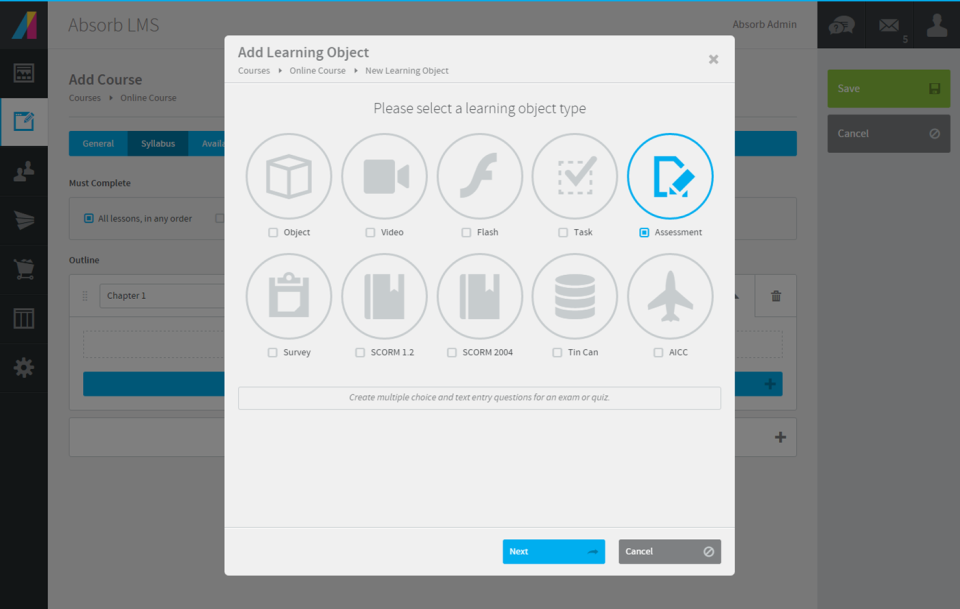
Screenshot of the course creation workflow, that offer a diverse set of formats, including instructional videos, quizzes, and assessments.
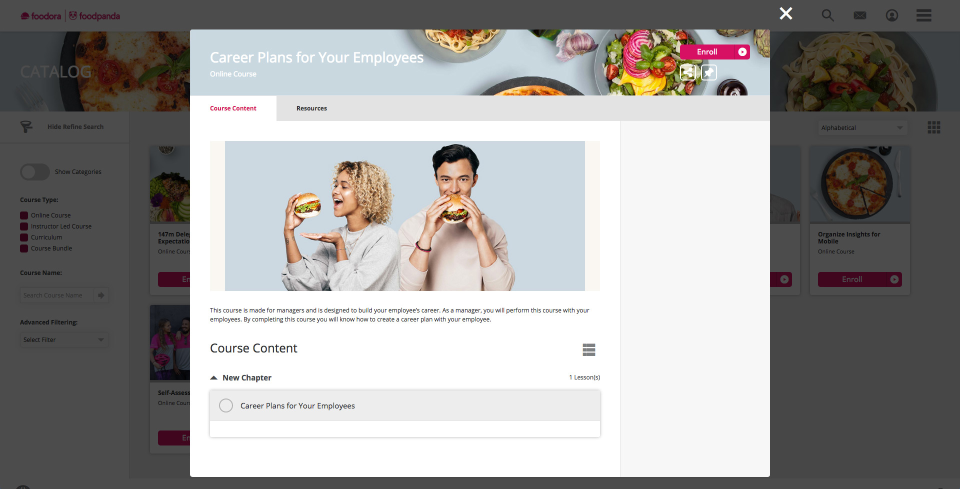
Screenshot of Absorb's course details page, accessible from the course catalog dashboard, used to give learners an understanding of the course material.
Screenshot of learners' progress insights, used to make data-driven decisions with the reporting capabilities of Absorb LMS.
Screenshot of course creation with Create AI Beta.

1 / 6

Screenshot of a company's unique identity with a training interface that is custom-designed for the brand.

Top Performing Features

  • Progress tracking & certifications

    The system tracks individuals’ progress on courses, scores, transcripts, certificates, etc.

    Category average: 8.4

  • Assignments

    Users can assign courses/curricula to individuals or groups, with due dates.

    Category average: 7.6

  • Compliance management

    Users can identify potential risks and ensure that requirements are met and that certifications are up to date.

    Category average: 8.4

Areas for Improvement

  • Social learning

    Includes features for collaboration and knowledge sharing among peers.

    Category average: 6.9

  • Mobile friendly

    Students or employees can access content from mobile devices. Course authors can develop responsive learning content.

    Category average: 7.5

  • Gamification

    Presents course material in a game-like format to increase engagement and enjoyment.

    Category average: 7.2

Who Buys & Uses Absorb LMS

Pros

  • Intuitive and modern user interface for learners, requiring minimal training
  • Streamlined administrative functions with automated enrollment and learning paths
  • Robust and reliable reporting capabilities for compliance and audit logs

Cons

  • Limited flexibility in generating customized, ad-hoc reports and filtering options
  • Cluttered administrative interface requiring excessive clicks for common tasks
  • Steep learning curve for administrators due to interface complexity

Balanced Practical Reliable LMS for Corporate Compliance Though Admin Setup Takes Time

Use Cases and Deployment Scope

We use Absorb LMS as our centralized platform to manage employee onboarding, annual compliance certifications, and role-specific technical training across our global team. Before adopting Absorb, our primary challenge was tracking decentralized training records across multiple departments and ensuring audit readiness. The platform allows us to automate course enrollments based on department tags, track completion rates through intuitive reporting dashboards, and deliver interactive SCORM modules. Today, its scope covers approximately 450 internal employees across five regional offices.

Pros

  • Intuitive and modern user interface: The learner portal is clean, simple to navigate, and requires virtually no end-user training. Learners can easily see their assigned courses, upcoming deadlines, and certificates directly from the dashboard.
  • Automated enrollment and user management: The platform handles automated course assignments smoothly using smart rules based on department, job role, and location. This significantly cuts down manual administrative overhead during new-hire onboarding.

Cons

  • TrustRadius requires reviews to be your own authentic thoughts rather than AI-generated text. Use these common pain points as reference points and adapt them into your own words.
  • Administrative backend complexity: While the learner interface is clean, the administrative side has a noticeable learning curve. Setting up advanced rules, nested curricula, or custom user permissions often requires navigating through multiple menus and sub-tabs that feel less than intuitive.
  • Custom report builder limitations: Standard reports work well, but building deep custom reports or cross-referencing multi-course completion metrics can be cumbersome. More flexible visualization tools and easier data-filtering options would make executive reporting much smoother.

Balanced Comprehensive Reliable and scalable LMS for workforce training with minor admin overhead

Use Cases and Deployment Scope

We use Absorb LMS across our entire organization to centralize employee onboarding and mandatory annual compliance training. Prior to adopting Absorb, tracking certifications and module completion across distributed teams was handled via spreadsheets, leading to audit gaps and lost administrative time. Absorb LMS solves this by automating enrollment workflows, setting recurring certification deadlines, and integrating with our HRIS for automatic user provisioning. Its reporting dashboards allow team leads and HR administrators to easily track department-level progress and ensure our workforce remains compliant.

Pros

  • Intuitive Learner Experience & Clean UI: The user dashboard is modern, straightforward, and easy for new employees to navigate without prior training. Finding assigned courses, tracking completion status, and accessing multimedia resources requires minimal friction.
  • Automated Enrollment & Learning Paths: Creating custom rules to automatically enroll users based on department, role, or hiring date significantly cuts down administrative overhead. Structured curricula and prerequisite rules keep learning sequences logical and organized.
  • Robust Reporting & Compliance Tracking: Generating scheduled reports and audit logs for compliance requirements is fast and reliable. Custom filters make it easy for administrators and managers to monitor department progress and export completion data for audits.

Cons

  • Admin Interface Learning Curve & Nested Menus: While the learner portal is modern, the backend administration interface can feel cluttered and unintuitive. Several everyday configuration settings, such as enrollment rules and certificate updates, are buried under multiple layers of menus, requiring more clicks than necessary.
  • Custom Reporting Flexibility: Standard reports cover basics well, but creating ad-hoc, highly customized cross-department reports can be cumbersome. Filtering options sometimes feel restrictive, often requiring administrators to export raw data into Excel for deeper analysis.
  • Custom Reporting Flexibility: Standard reports cover basics well, but creating ad-hoc, highly customized cross-department reports can be cumbersome. Filtering options sometimes feel restrictive, often requiring administrators to export raw data into Excel for deeper analysis.

Great Experience Implementing Absorb LMS

Use Cases and Deployment Scope

Absorb LMS is our business to business eLearning solution for external sales of eLearning modules, as well as management of learners piloting training through grants and projects. Pre-existing SCORM content is managed as courses and curriculums and made available for purchase through the fully branded, self-service checkout. The platform is extremely customisable, and very accessible - which was a key factor in determine which platform we would provide our content through.

Pros

  • Thorough training and support throughout the build.
  • User friendly and intuitive for both admins and learners.
  • Customisable look and feel - right down to language used within the site structure.

Cons

  • Greater flexibility with Zoom set up for instructor lead courses
  • Alt text added to all image uploads

Return on Investment

  • Improved learner engagement
  • Improved accessibility
  • Empowered admins who can manage more elements than they could in the previous platform

Usability

Alternatives Considered

Go1, Litmos and TalentLMS

Other Software Used

monday.com

Excellent product support and user experience

Use Cases and Deployment Scope

The previous LMS platforms we used were clunky, difficult to navigate, and we had to purchase content to put in the LMS (no authoring tool). Absorb LMS, while pricier than our previous options, contains so much added value. We love Absorb Create and have use it to author over 75 courses since our implementation 6 months ago! It has cut down the time to create learning resources significantly, while still maintaining a high quality. We needed to be able to track learning (which wasn't really possible in our previous LMS's) so the admin experience solved pretty much every problem we had in that regard - we love the ease of use of the reporting feature. I can't say enough good thinks about Absorb LMS and how it's benefited our organization.

Pros

  • Customizing the user interface was fairly simple and our learners WANT to use the platform because it looks so nice.
  • Admins have so many tools at their fingertips to pull reports, create new users, author new courses, and more!
  • Absorb LMS has been the solution to so many problems we had experienced in our previous LMS: ease of use, course library, course authoring, tracking, reporting, etc.

Cons

  • Building out competencies is a long and arduous process we have not tackled because of what's needed to be done beforehand.
  • Career pathing should be way easier to build out.
  • Some reports are hard to find.

Return on Investment

  • We used Absorb LMS to track Annual Safety Training to ensure compliance with inspectors and ensure our teammates understand the risks and how to mitigate them safely. We were never able to track this before and thus, we simply didn't have mandatory annual training.
  • A huge drawback prior to implementation of Absorb LMS was our inability to offer more than our 40 purchased e-courses to our employees. These were mostly safety and equipment based courses, so we didn't have any soft skill development happening. Now we have hundreds of courses available from the Absorb library that cover the safety aspects, but we also have dozens of leadership courses, communication and influence courses, etc. It has been a huge gamechanger for our employees and their development opportunities! When I look at our course library, there are 400 courses, which over 300 being available through Absorb library (the other 80+ were made using Absorb Create).

Usability

Alternatives Considered

Cornerstone OnDemand and Trakstar Learn

Other Software Used

Microsoft 365

Lauren Hayat Training Review

Use Cases and Deployment Scope

I'm an administrator of the LMS and use it to create curricula and courses (ILCs and online courses). It solves problems of our Learning & Development team having courses scattered across different systems. It also helps us automate our work by being able to send automated enrollment/completion messages and certificates. We serve 4,500 customers and provide courses for different subsets within that group.

Pros

  • User-friendly with icons for course creation
  • Checks before we publish courses to ensure we don't make mistakes
  • Track completion metrics for courses
  • Ease at which we can upload various types of files into courses, and the ease at which we can create curricula combining multiple courses

Cons

  • The "And" and "Or" rules for self + automatic enrollment could be spelled out more to clarify who we're enrolling into courses
  • The thumbnail and poster "Upload photo" section is confusing. There should be a "Favorites" folder where we can easily find most commonly used posters and thumbnails
  • more education around Absorb analyze essentials
  • How the Featured courses section ranks courses is confusing on the back-end. I need to switch the primary one to second place to feature the new one first. But if the previous one now becomes second place, what happens to the old course that was in second place? I've noticed the order you select on the back-end for this isn't always reflected on user side
  • Same comment as Featured Courses but for appearance of billboards. Hard to position each in the right order

Return on Investment

  • Positive impact in terms of metrics reporting
  • positive by spreading our courses to a wider audience easily
  • improved engagement!

Usability
