TrustRadius: an HG Insights company

Zoho Sign

Score9.2 out of 10

29 Reviews and Ratings

What is Zoho Sign?

Zoho Sign is a digital signing service that lets you execute contracts quickly without the hassles of transporting paper documents while ensuring security and legality. It works completely on cloud and integrates readily with your everyday apps.

According to the vendor, Zoho Sign is perfect for anyone who needs to sign business documents but widely used for HR, legal, finance, HR, and sales functions.

Documents that can be signed include: NDAs, Invoices, Sales contracts, Business proposals, Purchase orders, Lease agreements, Partnership agreements, Employment offers and more.

Features include:

  • Simplified signing process
  • Extensive document support
  • Multiple signing orders
  • G-Suite integrations
  • Import from Cloud services
  • Automatic Notifications and Reminders
  • Bulk import recipients
  • Templates
  • Rebranding
Zoho Sign is a highly secure digital signature software that is compliant with industry standard digital signature laws such as ESIGN, UETA and eIDAS.

Categories & Use Cases

Media

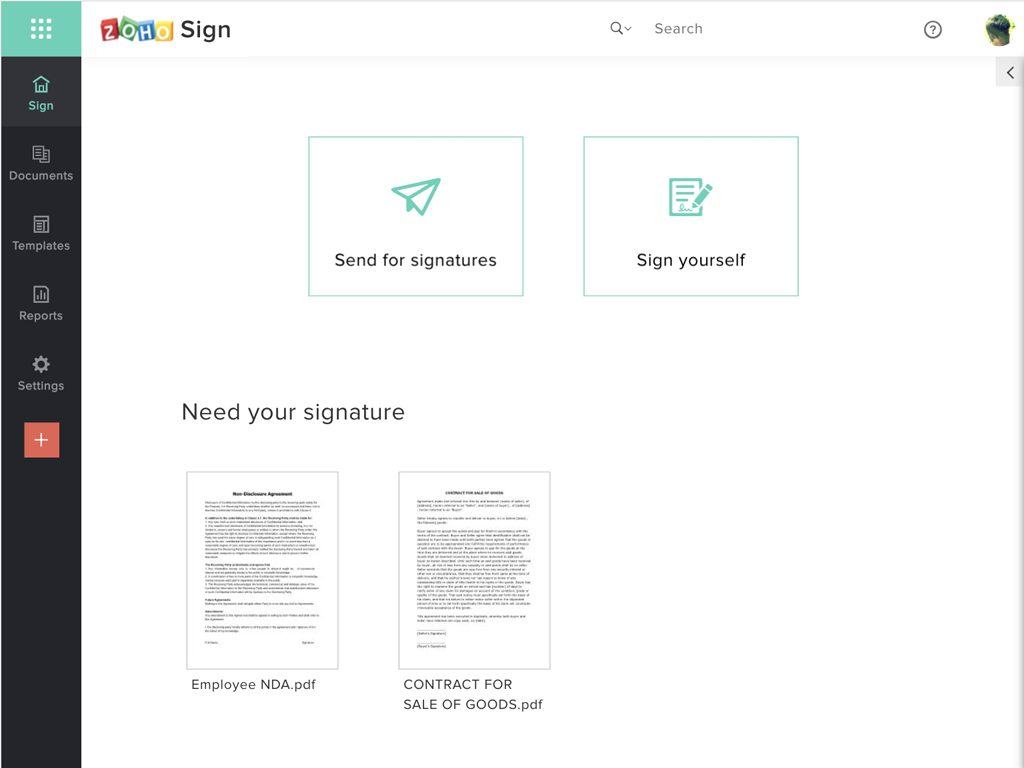
Zoho Sign Dashboard
Sending documents for signatures using templates
All document sent using Zoho Sign
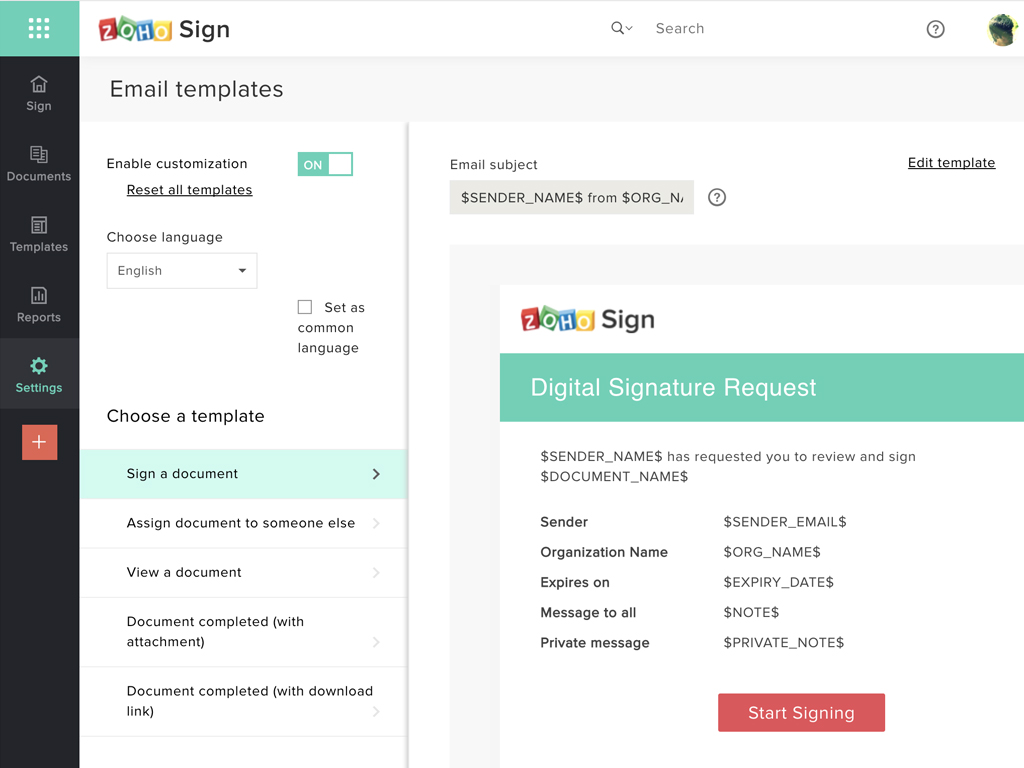
Rebranding email templates sent from Zoho Sign

1 / 4

My Experience With Zoho Sign.

Use Cases and Deployment Scope

For all our electronic document signing needs, we use Zoho Sign, and it has been awesome. It is fast, reliable, and available on all devices, therefore ensuring we can get documents signed anytime/anywhere. In addition, it is secure and also houses great document management features.

Pros

  • Signing is easy and fast.
  • It ensures documents are signed securely.
  • It comes with amazing document management features.
  • It is an affordable solution.
  • Makes electronic document signing seamless.

Cons

  • No flaws to list. I find it resourceful and it works as it should.

Return on Investment

  • Saves time - documents are signed fast and anytime/anywhere.
  • It is secure, and this ensures no data breaches.
  • Document management capabilities come as a plus.

Usability

Other Software Used

Splashtop

Best use of Signing with Zoho Sign

Use Cases and Deployment Scope

Using Zoho Sign helps to keep all our important documents in one place and allows us to maintain important files that we need to be signed by our clients. Using a digital signature that can be added to our documents makes them official. We use them for keeping payment details and it has helped us to prove that clients have authorized payments and agreed to our payment plans when they have disputed unrecognized charges to their card. When presented with an authorized form with the client's signature we have found the payments are returned to us promptly

Pros

  • Contracts
  • Payment options
  • terms of work
  • service agreements
  • options to choose products or services

Cons

  • Better ways to edit templates
  • add a credit card form input
  • create documents that then can be changes instead of uploading a document from word or pdf

Return on Investment

  • Saves time when you are preformed forms that need to be signed as you can use the templates to send to various people
  • Reminders are a time saver as if a client has not sighed, reminders can be sent out at specific intervals.
  • having documents secure makes our documents legally binding is important and once signed they are locked so you can not copy or edit their contents.

Alternatives Considered

Adobe Acrobat Sign and DocuSign

Other Software Used

Adobe Acrobat, Zoho Books, Zapier

High Value Easy to Use Digital Signature Workflow

Pros

  • Shared organizational templates encourage corporate uniformity and standards.
  • Centralized retention of the executed agreements.
  • Orchestrated signing workflow with internal and external users.

Cons

  • Page and element spacing can sometimes be different than expected.
  • There should be more standardized fields for inserting into documents.

Return on Investment

  • Because we are Zoho One users, it is bundled, therefore we don't have to spend money on another signing solution.

Alternatives Considered

Adobe Sign, DocuSign and PandaDoc

Other Software Used

Zoho CRM, QuickBooks Online, Slack

Zoho Sign is a Game Changer!

Use Cases and Deployment Scope

We use Zoho Sign in the administration department of our non-profit. We send out contracts on a daily basis, and Zoho Sign allows us to send them out and have them signed easily. We also use it as an information form to gather details about potential clients prior to working with them.

Pros

  • Easy use.
  • Drag and drop for text-boxes.
  • Quick upload of documents.

Cons

  • It should give an option that the recipient see's the email as coming from our organization, not from "Zoho Sign."
  • It should allow a document to be sent to two people and allow both of them to sign it.
  • There should be an easier way to create documents instead of having to upload a document every-time (or using a pre-set template).

Most Important Features

  • Ease of use.
  • Drag and drop textboxes.
  • Numerous types of "textboxes."

Return on Investment

  • Allowed us to appear more more professional by sending out a fillable document instead of emailing a PDF.
  • Saved us time by sending automated reminders to recipients reminding them to sign the document.

Other Software Used

Canva, Google Calendar, Calendly, Zoom

Simple and affordable

Pros

  • Ease of importing documents for e-sign.
  • Ease of tracking signatures and document flow.

Cons

  • It integrates from sign to the CRM (in that order) poorly. To have the doc associated with the contact it can ONLY come from the CRM.

Return on Investment

  • Zoho Sign was far more affordable for the simple uses we need. It simplified our processes at a very affordable price.

Alternatives Considered

DocuSign